TRENDNET TEG-S380 Review: Your Network Feels Faster. But You Haven’t Hit the Real Wall Yet.
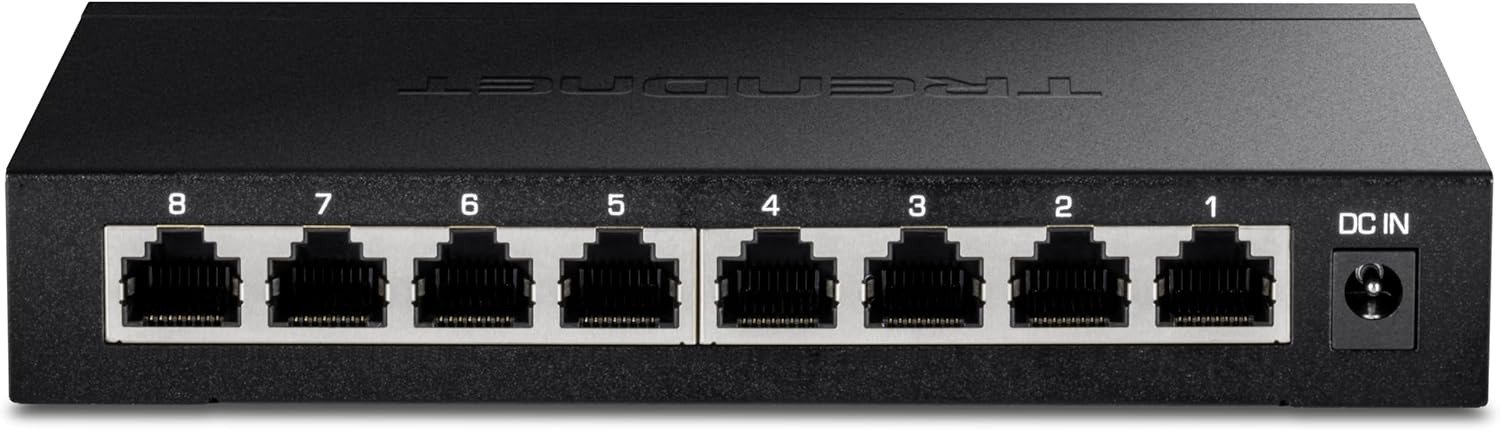
TRENDNET TEG-S380
You upgraded your NAS. You bought the 2.5G adapter. You plugged everything into your old gigabit switch — and transfers feel about the same. Something is wrong, but the specs look fine on paper, the cables are Cat5e or better, and every device reports a healthy connection. The bottleneck isn’t where you think it is. And buying a new switch won’t fix it unless you understand the threshold where the actual problem lives.
The Result Looks Fine. The Problem Isn’t.
A gigabit switch running at full speed delivers roughly 125 MB/s per port. That sounds sufficient until you have a NAS, a workstation, a gaming PC, and a streaming server all competing for the same pipe. The ceiling isn’t one slow transfer — it’s four slightly acceptable transfers that all quietly degrade each other. You don’t see a failure. You see a vague, ambient sluggishness you’ve learned to tolerate.
This is the traffic pattern that makes a 2.5G switch relevant. Not because 2.5G is dramatically fast in isolation. But because each of the eight ports handles speeds of 100Mbps, 1Gbps, or 2.5Gbps, allowing older devices to connect without any fuss while newer hardware gets the full bandwidth boost — and with a 40Gbps switching capacity, all eight ports can push heavy traffic simultaneously without anyone waiting in line.
That last part is the real number. Not 2.5G per port. But 40G total non-blocking fabric across all eight ports at once.
What You’re Actually Feeling but Not Naming
There’s a specific kind of network friction that never triggers a visible error. Files transfer. Backups run. Streams play. But everything takes just slightly longer than it should. A 15GB video backup that should finish before you make coffee is still running when you sit back down. A local 4K stream stutters once every twelve minutes. A file sync between two machines feels slower than it did six months ago, though nothing changed.
Home lab users who run a NAS alongside multiple workstations notice the difference immediately — large file transfers that used to drag out over minutes complete substantially faster after moving to multi-gig. But this is conditional. The improvement is real only when two things are true simultaneously: your devices actually have 2.5G NICs, and your existing cabling is Cat5e or better at the actual run length involved.
If either of those conditions is false, the switch performs at 1G — silently, without complaint, and without telling you why.
The Hidden Mechanism Behind the Miss
Most buyers assume the switch is the only upgrade needed. It isn’t. The TEG-S380 is non-manageable and not configurable — and if Windows shows a connection at 1.0Gbps instead of 2.5Gbps, the cause is almost always the network adapter specification or the cable category, not the switch itself.
This matters because it means the switch is a downstream solution to an upstream condition. You cannot extract 2.5G performance from a device with a 1G NIC, regardless of what switch it’s plugged into. The switch negotiates downward automatically, silently, and without warning.
The mechanism of failure isn’t a defect. It’s an auto-negotiation protocol working exactly as designed. Your device announces what it supports. The switch matches it. The result is a 1G link that looks connected, reports healthy, and delivers the same throughput you always had.
| Scenario | Expected Outcome | Actual Outcome |
|---|---|---|
| 2.5G NIC + Cat5e (≤100m) | 2.5Gbps link | 2.5Gbps ✅ |
| 2.5G NIC + Cat5e (degraded/long run) | 2.5Gbps link | Falls to 1Gbps ⚠️ |
| 1G NIC + Cat5e | 2.5Gbps link | 1Gbps — switch negotiates down ❌ |
| 1G NIC + Cat6 | 2.5Gbps link | 1Gbps — NIC is the ceiling, not cable ❌ |
| Mixed devices (2.5G + 1G) | Full 2.5G across board | Each device gets its own max — 1G stays 1G ✅ |
The Threshold Where the Outcome Quietly Breaks
The TEG-S380 performs correctly within its design envelope. The threshold at which performance quietly degrades is not the switch’s fault — but it is the buyer’s responsibility to understand before purchase.
Threshold 1 — The NIC Ceiling. If the device connecting to the switch doesn’t support 2.5GBASE-T, the port negotiates at 1G. No error, no warning, no indication.
Threshold 2 — The Cable Distance Threshold. Older or longer Cat5e runs may fall back to 1Gbps rather than reliably hitting the full 2.5Gbps speed. The standard supports 2.5G up to 100 meters on Cat5e, but real-world wiring that is aged, poorly terminated, or routed through conduit with interference introduces loss that forces auto-negotiation downward.
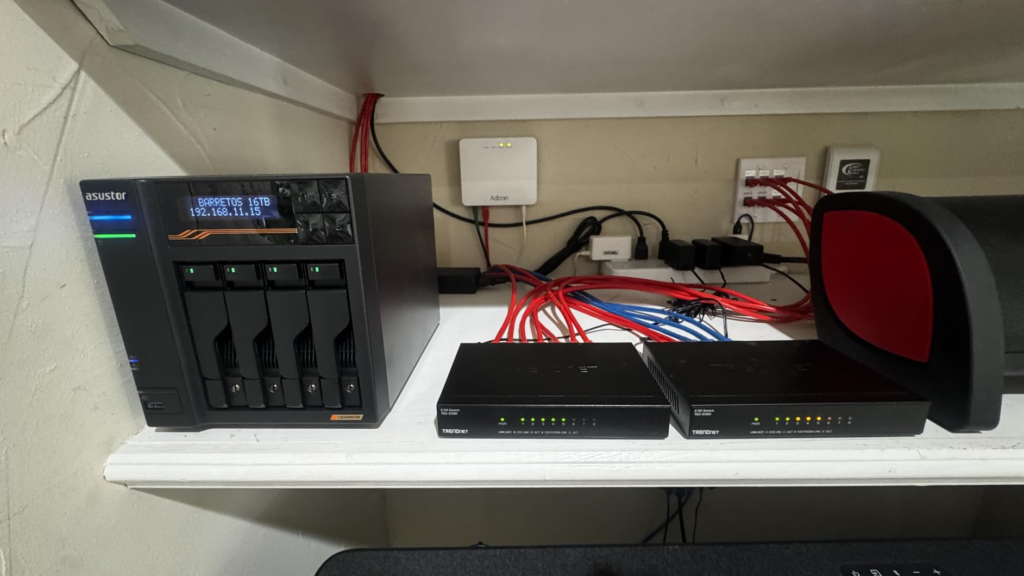
Threshold 3 — The Heat Envelope. The chassis runs noticeably warm under sustained heavy load — enclosed or poorly ventilated spaces should be avoided. The switch is rated to 40°C operating temperature, but in a cabinet or shelf with poor airflow, sustained all-port saturation will push the metal enclosure to temperatures that feel uncomfortable to touch. This is not a failure condition, but it is a longevity consideration worth taking seriously.
| Performance Variable | Condition for Full 2.5G | Risk If Unmet |
|---|---|---|
| NIC speed | 2.5GBASE-T required | Link drops to 1G silently |
| Cable category | Cat5e or higher | Negotiates down at long/degraded runs |
| Cable run length | Under 100m, clean termination | Same as above |
| Ambient ventilation | Open airflow around chassis | Sustained warmth, possible longevity risk |
| Switch capacity | 40Gbps fabric | No bottleneck until all 8 ports saturate simultaneously |
Why Most Buyers Misread This Too Early
The most common misread is buying this switch as a replacement for a managed switch. The flip side of zero configuration is zero control. There are no VLANs, no QoS rules, no traffic monitoring, no port isolation, no trunk configuration. If you need to segment your IoT devices from your workstations, this switch cannot help you. If you need to prioritize VoIP packets over backup traffic, this switch does not have that capability.
Something that the TEG-S380 notably lacks — especially at its price point — is per-port LED indicators that show connection speed. You cannot look at the switch and confirm whether a device connected at 1G or 2.5G. This is a meaningful diagnostic gap for anyone troubleshooting whether their NICs and cabling are actually delivering the speed they expect. You will need to check the network adapter properties on the connected device itself.
The second misread is expecting this to serve as a backbone in a tiered network. There is no 10G uplink port, which means the TEG-S380 cannot function as a high-speed backbone in a tiered network setup. If you plan to connect this switch uplink to a 10G core switch, you are limited to a 2.5G inter-switch link — which becomes a new bottleneck at a different layer.
Who Is Actually Inside This Problem
| User Profile | Does the TEG-S380 Solve Their Problem? |
|---|---|
| Home user with NAS + 2–3 workstations all on 2.5G NICs | ✅ Yes — direct, immediate improvement |
| Small office with 6–8 desktops that already have 2.5G | ✅ Yes — plug-and-play, silent, no IT overhead |
| Home lab with Synology/QNAP NAS + 2.5G-equipped machines | ✅ Yes — the intended deployment |
| User wanting to segment IoT / guest / work traffic | ❌ No — needs a managed switch |
| User with all 1G NICs and no plans to upgrade | ❌ No — will run at 1G on every port |
| User wanting speed indicators per port | ❌ No — zero per-port LEDs (V1); V2.0R has front-panel LEDs |
| User needing a 10G uplink to a core switch | ❌ No — max inter-switch speed is 2.5G |
| Government/education buyer requiring NDAA/TAA compliance | ✅ Yes — certified |
Where Wrong-Fit Begins
Wrong-fit starts at exactly one question: do your devices support 2.5G? If fewer than three of the eight connected devices have 2.5GBASE-T NICs, the cost-to-benefit ratio of this switch is weak. You would be paying for a capability that most of your network cannot use.
Wrong-fit also begins at installation location. No rack-mount or wall-mount hardware is included in the box, making clean permanent installation more difficult. If you intend to mount this in a rack or fix it to a wall neatly, you will need to source hardware separately or purchase a different model that ships with mounting accessories.
And wrong-fit begins firmly at eight ports. Eight ports fills up quickly in growing home labs or small offices with more than a handful of wired devices. If you already have six wired devices and plan to add more, you will hit the port ceiling faster than expected. The TEG-S380 is not expandable — you would need to add a second switch or replace it entirely.
Finally: lifetime warranty coverage applies only to US and Canada, excluding international buyers entirely. If you are purchasing outside those regions, the primary protection argument for this switch’s value proposition disappears.
The One Situation Where This Product Becomes Logical
The TEG-S380 sits in the sweet spot for home users and small offices that have hit the ceiling on standard gigabit networking. The specific condition where it becomes the logical choice is this: you have four or more devices with 2.5G NICs already, you run a NAS or local media server that generates sustained high-bandwidth traffic between nodes, your cabling is Cat5e or newer and properly terminated, and you want zero management overhead.
At its price point, it is the cheapest brand-name 2.5G switch available from reputable retailers — and when compared to TP-Link’s equivalent, the savings are meaningful without any compromise in performance.
Power consumption sits around 5W at idle and reaches a maximum of approximately 12–13W under full load — making it one of the most efficient 8-port multi-gig switches in its class. That is not a marketing footnote. Over three years of continuous operation, the difference in electricity cost between this and a poorly-optimized competitor is real money.
| Spec | Value |
|---|---|
| Ports | 8 × 2.5GBASE-T RJ45 |
| Switching Capacity | 40 Gbps |
| Forwarding Rate | 29.76 Mpps |
| Compatible Cable | Cat5e or higher |
| Speed Negotiation | Auto: 100M / 1G / 2.5G |
| Jumbo Frame Support | Up to 12KB |
| Power at Idle | ~5W |
| Power at Full Load | ~12–13W |
| Operating Temperature | 0°C to 40°C (32°F to 104°F) |
| Management | None (unmanaged) |
| Compliance | NDAA + TAA (US & Canada) |
| Warranty | Lifetime (US & Canada only) |
| Dimensions | 159mm × 110mm × 25mm |
| Form Factor | Desktop / Wall-mountable |
What It Solves, What It Reduces, and What It Still Leaves to You
What it solves: The per-port bandwidth ceiling of a gigabit switch in a multi-device household or small office where several machines have 2.5G NICs. It eliminates the invisible queuing delay that builds up when multiple devices compete for a single 1G uplink to a NAS or server.
What it reduces: Energy consumption versus fan-cooled alternatives, cable replacement costs by working on existing Cat5e infrastructure, and complexity by requiring zero configuration. It also reduces the price barrier to entering multi-gig networking — it is the cheapest brand-name option at this port count from a reputable vendor.
What it still leaves to you: Verifying your NICs support 2.5G before purchase. Managing cable run quality and termination. Providing adequate ventilation around the chassis during sustained load. Accepting the absence of per-port speed visibility. And planning your port count ceiling before the network grows past eight devices.
| Category | Verdict |
|---|---|
| Plug-and-play simplicity | Excellent |
| Per-port 2.5G throughput | Delivers as rated, condition-dependent |
| Silent operation | Confirmed fanless |
| Build quality | Solid metal chassis |
| Heat management | Warm under load — needs open air |
| Port count sufficiency | Tight for growing environments |
| Management features | None — by design |
| Value at price point | Strong for the category |
| Warranty (US/Canada) | Lifetime |
| International warranty | Not covered |
Final Compression
The TEG-S380 is not a universal upgrade. It is a precise solution to a specific bottleneck: multiple 2.5G-capable devices sharing a single gigabit switch and bleeding bandwidth into each other without a visible failure state.
If that is the exact condition you are dealing with — at least four 2.5G-equipped devices, clean Cat5e cabling, and no need for VLANs or traffic control — then the decision is structurally simple. The switch will do exactly what it is designed to do, silently and indefinitely, at the lowest price point in its category.
If you have any doubt about your NIC specifications before purchasing, check your network adapter properties first. The switch cannot upgrade a device that doesn’t support 2.5G. Buying the switch before confirming device compatibility is how the majority of disappointed buyers land in the wrong place.
If the device list and the cabling check out, there is no better-priced 8-port 2.5G unmanaged option in the market at this writing.
Frequently Asked Questions
| Question | Answer |
|---|---|
| Does the TEG-S380 work with my existing Cat5e cables? | Yes — it delivers full 2.5Gbps over Cat5e at runs up to 100 meters with proper termination. Degraded, aged, or very long runs may cause auto-negotiation to fall back to 1Gbps. Cat6 or Cat6a eliminates this risk. |
| Will it improve speeds for my devices that only have 1G network cards? | No. The switch auto-negotiates downward to match the device. A 1G NIC will connect at 1G regardless of the switch. The TEG-S380 only delivers 2.5G to devices that support 2.5GBASE-T. |
| Can I use it with my Synology or QNAP NAS? | Yes, provided your NAS model has a 2.5G port — which many current Synology and QNAP units do. The improvement in NAS-to-workstation transfer speed is one of the most commonly reported benefits. |
| Does it need any software or configuration? | None. The TEG-S380 is non-manageable and not configurable. Plug in power, plug in cables, and it operates automatically. |
| Why does my PC show 1Gbps connection speed even after connecting to the TEG-S380? | Check your network adapter’s specification to confirm it supports 2.5Gbps, and verify the cable is Cat5e or higher. If the NIC is a 1G card, it will always report a 1G connection — the switch is not the limiting factor. |
| Does it run hot? | The chassis runs noticeably warm under sustained heavy load. This is normal for a fanless design. Avoid deploying it inside a closed cabinet or stacking equipment directly on top of it. |
| Is the warranty valid outside the US and Canada? | Lifetime warranty coverage is limited to the US and Canada. International buyers should verify return and warranty terms with their local retailer. |
| Does it support VLANs or QoS? | No. It is fully unmanaged. There are no configuration options of any kind — no web interface, no app, no CLI access. |
Transparency Note:
This analysis is built on aggregated real-world experience.
It extracts what repeatedly holds, what breaks, and what users uncover only after living with the system—then shapes it into a clear model you can use immediately.
Think of it as structured experience, refined and presented so you don’t have to learn it the hard way.
“A quick note: Don’t believe the star ratings, but trust personal experience. This article is a compilation of collected experiences”