ARRIS SURFboard MAX W21: THE SIGNAL LOOKS STRONG. THE DECISION ISN’T.
You can have full bars in the corner of the house and still hate your network.
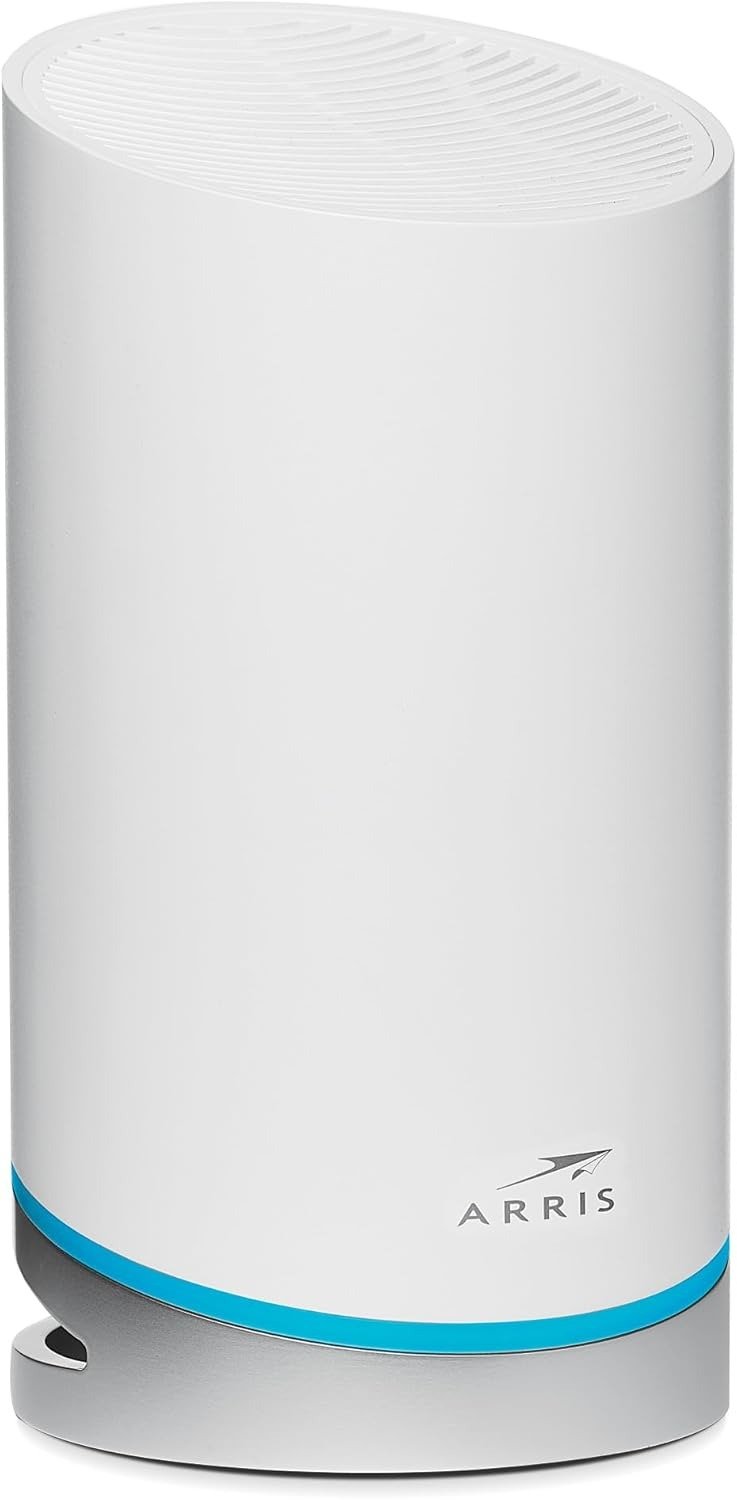
That is the trick this category plays on people. The icon in the top-right of your phone says everything is fine. The stream starts. The camera comes online. The game boots. So you assume the router is doing its job. Then the smaller frictions begin to stack up: the app takes too long, the settings feel thin, the ports run out faster than you expected, and the whole thing starts to feel like a locked box that happens to throw a decent signal. The ARRIS SURFboard mAX W21 sits exactly in that tension. On paper, it is a tri-band Wi-Fi 6 router with AX6600 branding, eight streams, two Gigabit Ethernet ports, app-based setup, support for internet plans up to 1 Gbps, and coverage rated up to 2,750 square feet. In practice, the question is narrower and sharper: is your problem weak coverage, or is your problem that you need a network you can actually shape?
The Result Looks Fine. The Problem Isn’t.
The first thing I noticed about the W21 is why people get seduced by it so quickly. It answers the most visible pain first. Dead zone in the bedroom. Weak signal near the patio. Camera losing connection at the edge of the house. That kind of pain is loud, obvious, embarrassing. And this router is built to look like the fix for exactly that. Even the owner feedback tends to split along those lines: people praise the stronger signal, easier whole-home reach, and visible improvement over older ISP gear, while others hit a wall with the app and the lack of control. Amazon shows the W21 at 3.8/5 from 100 ratings, and Best Buy shows 3.7/5 from 6 reviews; the positive comments lean on speed and coverage, while the negative ones repeatedly circle back to the app experience and reliability worries.
That split matters. A lot.
Because a router can impress you on day three and annoy you on day ninety. Those are not the same test.
What You’re Actually Feeling but Not Naming
Most buyers do not walk into this decision saying, “I need richer local administration, better port flexibility, and a cleaner management layer.” They say something simpler: my Wi-Fi is annoying me. That annoyance usually arrives in three forms:
| What you feel | What you call it | What it often really is |
|---|---|---|
| Random friction | “Bad internet” | Weak signal in part of the home |
| Repeated interruptions | “Unstable router” | Setup or software control burden |
| Purchase regret | “It should do more” | Feature threshold crossed too early |
The W21 is strongest when your pain lives in the first row. It gets shakier when your pain is actually living in the second or third. That is the real emotional trap here. You think you are buying relief from weak Wi-Fi. You may actually be buying a negotiation with limited management.
The Hidden Mechanism Behind the Miss
The hidden mechanism is not speed. It is control compression.
ARRIS built the W21 around a tri-band Wi-Fi 6 design and routes management through the SURFboard Central app. Officially, the product promises setup, customization, guest access, QoS, parental controls, device monitoring, and mesh expandability. That sounds complete until you look at the shape of the control layer more closely. Independent testing found no web user interface, no bridge mode, no AP mode, no USB, no multi-gig port, and only one Gigabit WAN plus one Gigabit LAN port on the unit. That means the hardware story and the management story are not moving at the same level. The radio sounds premium. The administrative surface feels narrow.
That mismatch is what creates the strange feeling many people struggle to name. The network seems modern, but your options feel old. The shell says “high-end Wi-Fi 6.” The ownership experience says “stay in the lane we built for you.”
The Threshold Where the Outcome Quietly Breaks
Here is the threshold that matters:
The W21 stops feeling premium the moment your needs move beyond coverage and into control.
Not theoretical control. Practical control.
The kind that shows up when you want more ports without adding another box. When you prefer a local web interface over a phone app. When you need multi-gig headroom for a faster plan later. When you want more than a shallow version of parental control. When you expect the router to adapt to your house instead of asking your house to adapt to the app.
And that threshold comes sooner than many buyers expect, because the W21 is officially positioned for plans up to 1 Gbps and includes only two 1 Gigabit Ethernet ports. The product page itself is almost accidentally honest about this: it is a strong coverage-first router for a Gigabit-class home, not a future-facing control hub.
Why Most Buyers Misread This Too Early
Because AX6600 is a loud number.
It lands like a promise. It sounds bigger than the actual decision. And most people read router numbers the way people read horsepower on a brochure: faster, therefore better. But the W21’s own detailed band layout tells a subtler story. Independent testing describes it as tri-band Wi-Fi 6 with a 2×2 2.4 GHz band up to 600 Mbps, a 2×2 5 GHz band up to 1200 Mbps, and a 4×4 5 GHz band up to 4800 Mbps at up to 160 MHz channel width. In standalone testing, close-range sustained throughput averaged around 860 Mbps with noticeable fluctuation, while farther out it dropped toward 500 Mbps for a 2×2 Wi-Fi 6 client. Those are not bad numbers. They are simply not magical numbers. They tell you this router can move, but not without variance.
That is the misread. People compare the marketing number. They should be comparing the friction profile.
A fast router with thin control can still become a tiring router.
Who Is Actually Inside This Problem
The right buyer for the W21 is easier to identify than the marketing suggests.
You are inside this product’s real use case if three things are true:
- Your internet plan is Gigabit-class or lower, not multi-gig.
- Your first pain is coverage or weak signal reach, not network tinkering.
- You want one clean, compact router now, with the option to expand into mesh later.
That last point matters more than it looks. ARRIS officially supports adding up to two mAX satellites, and current support documentation says wired backhaul is supported after the satellite is first onboarded over Wi-Fi. So the W21 is not a dead-end single box. It can grow. It just grows inside ARRIS’s ecosystem and on ARRIS’s terms.
If that sounds acceptable to you, the W21 starts to make sense.
Where Wrong-Fit Begins
Wrong fit starts quietly.
Not with a dramatic failure. With a sigh.
You begin outside the W21’s fit zone if you are the kind of buyer who immediately cares about any of the following:
| If this matters to you early | Why the W21 starts to feel wrong |
|---|---|
| Web-based local management | It does not offer a web UI in independent testing, and official setup revolves around the app |
| Rich customization | Review testing found very limited settings and features |
| More wired flexibility | The unit has only two Gigabit Ethernet ports total |
| Multi-gig planning | There is no multi-gig port |
| Advanced network modes | Review testing reported no bridge mode and no AP mode |
That is the boundary. Not “good router” versus “bad router.” That is lazy. The real line is simpler: coverage-led buyer versus control-led buyer. If you are in the second camp, the W21 can feel cramped before the honeymoon period is over. That pattern shows up in both professional review criticism and owner comments that praise the signal but complain about the app, missing options, or the general feeling of being boxed in.
The One Situation Where This Product Becomes Logical
There is one moment where the W21 stops being a maybe and becomes a clean, rational answer.
It is when you are not trying to build a network hobby. You are trying to stop a household irritation.
A medium-to-large home. A Gigabit-class plan. Too many weak spots for an aging ISP router. No appetite for deep tuning. No need for enterprise-style knobs. Just a demand for better reach, stronger whole-home stability, and the option to extend later without tearing up the house. In that exact situation, the W21 becomes logical because its strongest trait is real: coverage. Independent testing called the range excellent, found very little signal loss in mesh thanks to the dedicated wireless backhaul, and reported that the system passed a three-day stress test without issue. Owner feedback also repeatedly points to whole-home signal improvement as the reason people kept it.
That is the cleanest way to understand this product.
It is not the router for people who want to drive the network. It is the router for people who mostly want the network to stop interrupting their day.
What It Solves, What It Reduces, and What It Still Leaves to You
What it solves is straightforward: it pushes stronger Wi-Fi into spaces where weaker routers start to thin out. It reduces the daily nuisance of dead spots, edge-of-home instability, and the constant little ritual of moving closer to the router without admitting that is what you are doing.
What it still leaves to you is equally important.
You still have to accept the app-centric management model. You still have to live inside limited customization. You still have to manage around only two Gigabit ports. And you still have to be honest about your ceiling: this is officially for plans up to 1 Gbps, not a long runway into multi-gig ambitions. Even the product’s better owner reactions tend to sound like relief, not admiration. That tells you something. The W21 is a problem-solver, not a playground.
Final Compression
Here is the shortest honest version.
If your house is bleeding signal, the ARRIS SURFboard mAX W21 can feel like a quiet correction. If your house is not bleeding signal but you are the kind of buyer who notices thin software, missing knobs, limited ports, and future ceiling, it will feel smaller the longer you own it.
So the decision is not “Is the W21 fast?” It is this:
Has your Wi-Fi problem crossed the control threshold, or is it still just a coverage problem?
If it is still a coverage problem, this is the logical next step.
Transparency Note:
This analysis is built on aggregated real-world experience.
It extracts what repeatedly holds, what breaks, and what users uncover only after living with the system—then shapes it into a clear model you can use immediately.
Think of it as structured experience, refined and presented so you don’t have to learn it the hard way.
“A quick note: Don’t believe the star ratings, but trust personal experience. This article is a compilation of collected experiences”