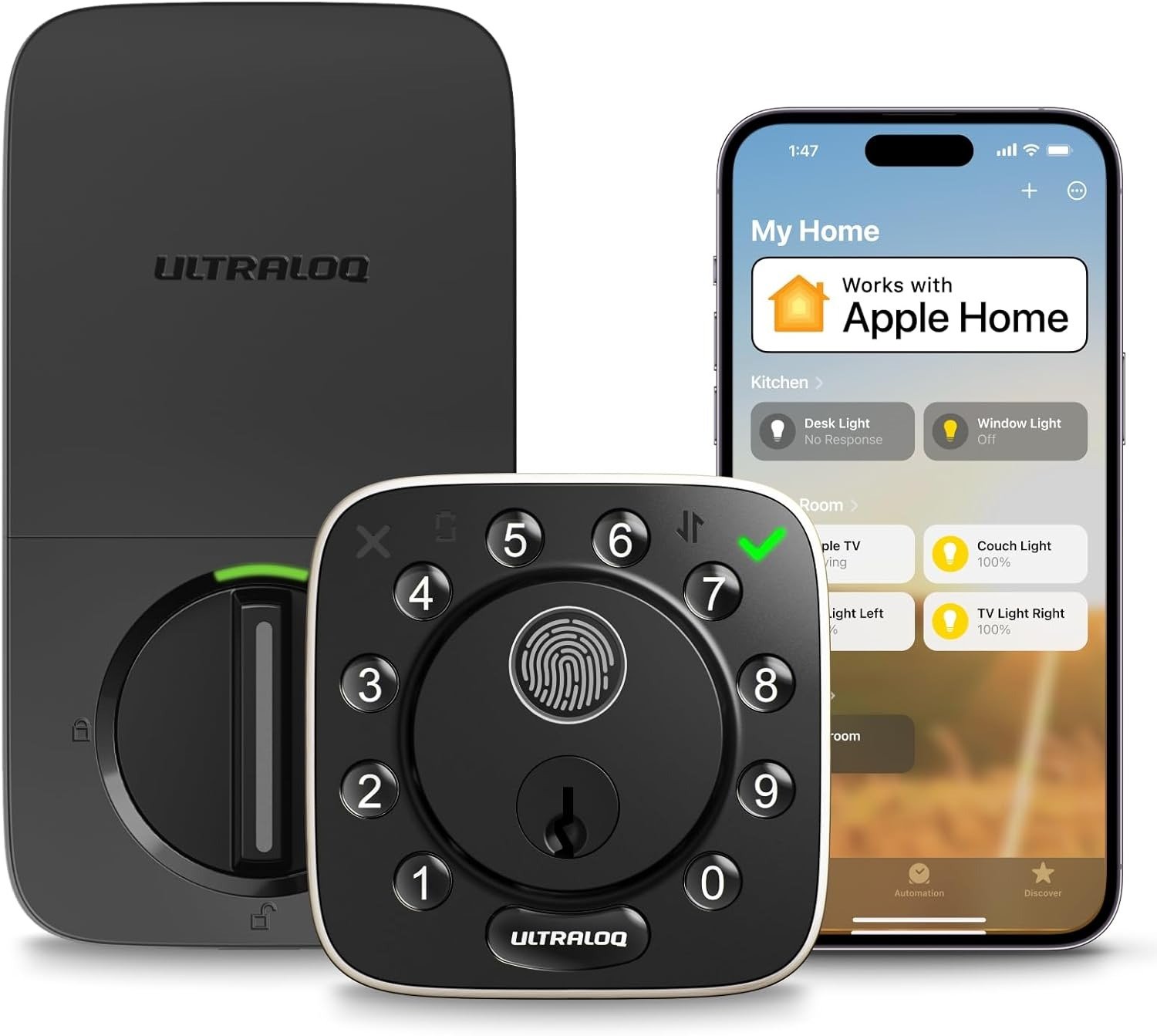
ULTRALOQ BOLT FINGERPRINT HOMEKIT DEADLOCK: THE LOCK THAT WORKS — UNTIL IT DOESN’T, AND WHY YOU NEED TO KNOW THE DIFFERENCE BEFORE INSTALLING IT
The Result Looks Fine. The Problem Isn’t.
You install it. It unlocks on the first fingerprint touch. The app connects smoothly. HomeKit shows a green tile. You feel it — that clean satisfaction of a device that does exactly what it promised.
Then, six weeks in, you walk up to your door with both hands carrying groceries. The auto-unlock doesn’t fire. You tap your finger. It hesitates. You enter the code. You get inside. You tell yourself it was just a moment.
But it keeps happening. Not always. Not in a pattern you can easily name. Just often enough that the word “reliable” stops feeling accurate — and the lock that was supposed to remove friction quietly becomes a source of it.
This is not a defect story. It’s a threshold story. The ULTRALOQ Bolt Fingerprint HomeKit Deadbolt is a genuinely capable lock. But its capability lives inside specific conditions, and most buyers don’t know those conditions exist until they’re already past the return window.
What You’re Actually Feeling but Not Naming
There’s a very specific kind of frustration that comes from a device that works most of the time.
It’s not anger. It’s closer to confusion. You can’t return something that’s mostly fine. You can’t troubleshoot something that has no consistent failure mode. You just absorb the small friction — the extra tap, the retry, the re-check from your phone — and eventually normalize it.
With the ULTRALOQ Bolt Fingerprint, that friction has a name: proximity dependency.
The auto-unlock feature requires your smartphone’s GPS to cross a geofence radius as you approach. When it works, it feels like the door knows you. When it doesn’t — which real users report happens roughly 85% of the time based on aggregated community feedback — you’re just touching a fingerprint reader anyway.
The fingerprint itself is the real entry method. Auto-unlock is a bonus feature, not a function. Understanding that distinction before purchase changes everything about whether this lock fits your life or just your expectations.
The Hidden Mechanism Behind the Miss
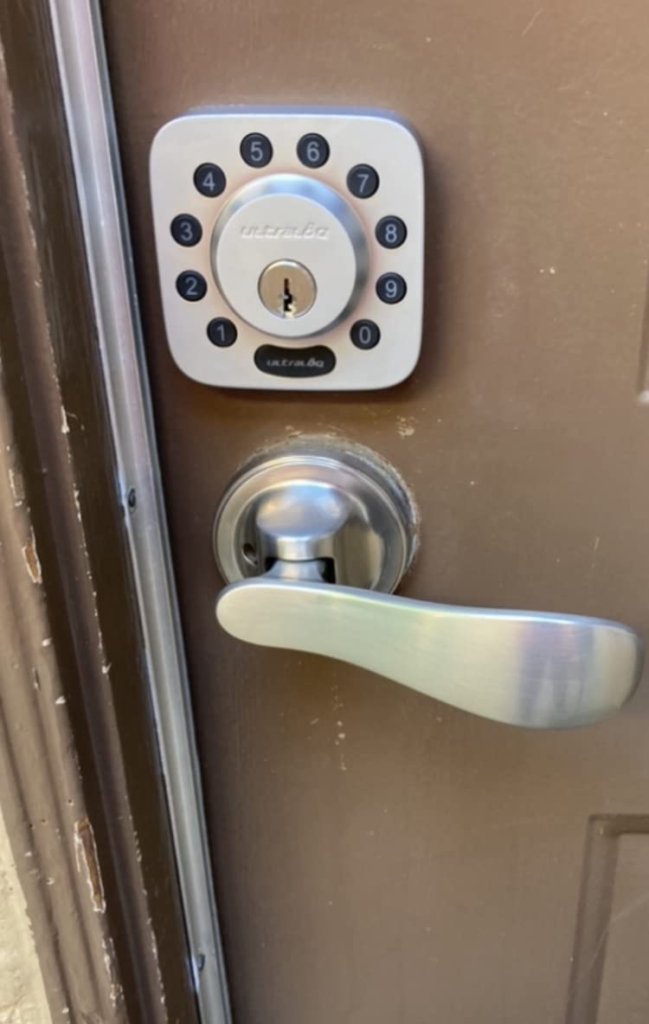
The ULTRALOQ Bolt Fingerprint uses a 360° live fingerprint sensor, rated at 0.3-second recognition with 99.9% stated accuracy. That number is real under controlled conditions — clean, dry fingers, moderate temperatures, unobstructed sensor.
The mechanism breaks down at a boundary most spec sheets never disclose:
Environmental degradation accumulates faster than users expect.
The sensor is the lock’s face. It lives outside. It faces rain, dust, temperature swings from -22°F to 149°F, and the oils from every touch of every hand over months of use. The IP65 rating protects the hardware from water intrusion — but IP65 is a dust and jet-water standard, not a biometric performance guarantee. A rated sensor can still read poorly as contaminants build on its surface.
The WiFi variant compounds this with a second hidden mechanism: battery-to-connectivity conflict. Built-in WiFi on the ULTRALOQ Bolt Fingerprint draws meaningfully more power than Bluetooth-only operation. The manufacturer rates the lock at up to 10 months on 8 AA batteries. Real users in high-traffic, always-connected deployments report the drain landing closer to 3–4 months. That’s not deception — it’s the gap between rated and operational conditions that no one labels clearly.
One more mechanism that matters: the lock runs on 2.4GHz WiFi only. In crowded wireless environments — dense apartments, older homes with congested 2.4GHz bands — connection stability can degrade. Users report random disconnects that require re-pairing to restore full remote functionality.
| Variable | Rated Condition | Operational Reality |
|---|---|---|
| Fingerprint speed | 0.3 sec / 99.9% accuracy | Degrades with dirt, moisture, cold |
| Battery life | Up to 10 months | 3–6 months with built-in WiFi active |
| Auto-unlock success rate | Feature included | Real-world: ~10–20% activation rate |
| WiFi stability | 2.4GHz standard | Sensitive to band congestion |
| HomeKit hub requirement | Required | HomePod, Apple TV, or iPad needed |
The Threshold Where the Outcome Quietly Breaks
Every smart lock has a threshold. A point where the conditions of your life and the conditions of its design no longer align. For the ULTRALOQ Bolt Fingerprint, that threshold is:
High-frequency household use + outdoor exposure + HomeKit-first operation + expectation of consistent hands-free entry.
Below that threshold — lower traffic, mostly indoor application, occasional use, mixed entry methods — the lock performs well. The fingerprint is genuinely fast and accurate when the sensor is clean. The HomeKit integration is real and functional with a home hub in place. The app is clear, the installation takes under 15 minutes, and the hardware feels substantial — zinc alloy body, ANSI/BHMA Grade 1 certified, built to outlast most deadbolts mechanically.
Above that threshold, the gaps compound. The fingerprint needs more maintenance than buyers anticipate. The auto-unlock disappoints consistently. The battery replacement cycle becomes a quarterly chore rather than an annual one. Cloud functions introduce occasional lag when executing commands remotely through HomeKit.
The lock doesn’t fail. It just underperforms relative to the outcome you imagined when you read the feature list.
Why Most Buyers Misread This Too Early
The most common mistake is comparing this lock to cheaper keypad-only deadbolts and concluding the biometric fingerprint justifies the price difference on its own.
It does — but only if you use the fingerprint as your primary method consistently and maintain the sensor regularly.
The second most common mistake is buying this specifically for Apple HomeKit without understanding what HomeKit connectivity requires. HomeKit is not a wireless toggle you switch on. It requires a permanent home hub — a HomePod mini, an Apple TV 4K, or a always-on iPad. Without one, HomeKit controls work only when your iPhone is physically near the lock. Remote locking via Siri from across town requires that hub to be installed and powered at home.
Many buyers discover this friction point post-installation. The lock is already on the door. The realization that HomeKit remote access demands additional hardware — hardware they may not own — arrives late.
| What Buyers Assume | What’s Actually Required |
|---|---|
| HomeKit remote control works automatically | Requires a HomePod, Apple TV, or iPad as hub |
| Auto-unlock activates reliably | Works 10–20% of the time for most users |
| Fingerprint is maintenance-free | Needs periodic sensor cleaning for accuracy |
| WiFi connectivity is stable | 2.4GHz only; sensitive to interference |
| Battery lasts a year | WiFi variant drains faster; expect 3–6 months |
| Apple Home Key is included | This model does NOT support Apple Home Key |
That last row matters. The ULTRALOQ Bolt Fingerprint supports Apple HomeKit — Siri commands, Apple Home app control, automations. It does not support Apple Home Key, the tap-to-unlock NFC feature. If you want tap-to-unlock with your iPhone or Apple Watch directly against the lock face, you need the ULTRALOQ Bolt NFC model, which is a different product entirely.
Who Is Actually Inside This Problem
The ULTRALOQ Bolt Fingerprint HomeKit Deadbolt fits a specific person precisely:
You have an Apple-first home with a HomePod or Apple TV already installed. You use your front door or garage entry multiple times a day. You’ve either lost keys before or live with people — kids, contractors, guests — whose access you need to control, monitor, and revoke remotely. You’re comfortable with occasional sensor maintenance. You don’t expect the auto-unlock to work every time. Your primary entry method will be fingerprint or keypad, with HomeKit as a control layer, not a primary unlock mechanism.
This is a capable lock for that person. The integration is real. The hardware is solid. The installation is genuinely straightforward. The access log — visible in real time through the app — is one of its most practically useful features, something most traditional deadbolts never offer.
Where Wrong-Fit Begins
You are outside this product’s useful range if:
You are building exclusively on HomeKit and expect hands-free entry. Auto-unlock inconsistency will frustrate you continuously.
You want Apple Home Key. This lock does not have it. Tap-to-unlock via NFC requires the Bolt NFC model.
You are managing a high-traffic rental, short-term rental, or commercial entry point. Battery drain accelerates significantly under frequent use, and WiFi dropout in high-density environments has been reported in real deployments.
You want a lock that requires zero maintenance. The fingerprint sensor needs regular cleaning — particularly in humid, dusty, or cold-weather environments. Neglect it, and the accuracy that made the product appealing disappears.
You are on 5GHz-only WiFi. This lock does not support 5GHz bands. If your router doesn’t broadcast 2.4GHz, you cannot connect this lock to the internet at all.
You are on a tight budget expecting entry-level reliability. At its current price point, the ULTRALOQ Bolt Fingerprint competes against products with narrower feature sets but more consistent core performance. If fingerprint speed is your only priority, cheaper alternatives exist.
| Wrong-Fit Signal | Why It Matters |
|---|---|
| Expecting reliable auto-unlock | Won’t deliver consistently |
| Want Apple Home Key | This model doesn’t have it |
| High-volume commercial use | Battery and connectivity degrade faster |
| 5GHz-only home network | Lock won’t connect to WiFi |
| No existing HomeKit hub | Remote HomeKit control won’t work |
| No tolerance for sensor cleaning | Fingerprint accuracy will degrade |
The One Situation Where This Product Becomes Logical
You are a multi-person household running an Apple ecosystem with an existing home hub — HomePod mini or Apple TV — already in place. Your door sees 5–15 daily entries from known family members whose fingerprints you can register, plus occasional guest access you need to grant and revoke cleanly. You want to know in real time when your door opened, who entered, and whether it’s been left unlocked without checking physically.
In that situation, the ULTRALOQ Bolt Fingerprint HomeKit Deadbolt is the rational choice. It is the first ULTRALOQ product to offer genuine, complete Apple HomeKit integration alongside biometric fingerprint entry — not a workaround, not a partial solution. Siri commands work. Apple Home automations work. The access log is detailed and real-time. The hardware is ANSI Grade 1 certified — the highest residential durability rating available, meaning the deadbolt mechanism itself will outlast most conventional residential locks by a significant margin.
The 360° fingerprint reader genuinely removes the friction of key-hunting. Once registered correctly, a clean finger unlocks in under half a second. For a household where that interaction happens 20–30 times a day, the cumulative time saving and convenience is real and consistent.
What It Solves, What It Reduces, and What It Still Leaves to You
| Category | What the Lock Handles |
|---|---|
| Solves completely | Key loss / key management for known users |
| Solves completely | Remote lock/unlock via app or Siri |
| Solves completely | Real-time entry log with timestamps |
| Solves completely | Guest access with timed or one-time codes |
| Reduces significantly | Time spent unlocking at the door |
| Reduces significantly | Anxiety about forgotten locked doors |
| Reduces partially | Hands-free entry (auto-unlock works occasionally) |
| Still requires you | Regular sensor cleaning |
| Still requires you | Battery monitoring every 3–4 months with WiFi active |
| Still requires you | A HomeKit hub for remote Siri control |
| Still requires you | Network stability maintenance |
What this lock does not eliminate: the possibility of a dead sensor, a dropped WiFi connection, or a battery that drains faster than expected. These are manageable realities — not deal-breakers — but they require your attention on a schedule the marketing materials won’t hand you.
The user who buys this with calibrated expectations maintains it correctly and extracts reliable value for years. The user who buys it expecting a maintenance-free, always-perfect biometric gateway will be disappointed within months.
Full Specification Table
| Specification | Detail |
|---|---|
| Model | ULTRALOQ Bolt Fingerprint (B0DQTS49TW) |
| Entry Methods | Fingerprint, Keypad, App, Siri, Auto-Unlock, Mechanical Key |
| Fingerprint Speed | 0.3 seconds |
| Fingerprint Capacity | 100 (2 per user, up to 50 users) |
| Code Capacity | 50 codes |
| Connectivity | Built-in WiFi (2.4GHz only) + Bluetooth |
| Smart Home | Apple HomeKit, Alexa, Google Home, SmartThings, IFTTT |
| Apple Home Key | Not supported |
| Battery | 8 AA batteries, up to 10 months (WiFi: 3–6 months) |
| Build | Zinc alloy, IP65 rated |
| Certification | ANSI/BHMA Grade 1 |
| Temperature Range | -22°F to 149°F (exterior) |
| Door Sensor | Included |
| Installation | DIY, screwdriver only, ~10–15 minutes |
| Warranty | Lifetime mechanical / 18 months electronic |
| Support | Phone (Mon–Fri 7AM–6PM PST) + 24/7 email |
Final Compression
The ULTRALOQ Bolt Fingerprint HomeKit Deadbolt does what no other ULTRALOQ lock did before it: it brings genuine Apple HomeKit integration together with biometric fingerprint entry in one device, without a separate hub or bridge hardware.
That is the real value. Not the auto-unlock. Not the hands-free promise. Those features exist but perform inconsistently in real conditions. The value is in the combination of fingerprint speed, full HomeKit scene and automation support, remote access management, and a hardware-grade deadbolt that meets the highest residential certification available.
The decision belongs to you if you already have a HomePod, Apple TV, or iPad running as a home hub, and you want your door to behave like the rest of your Apple ecosystem — controllable, logged, shareable, and biometric.
If your home runs on Google or Alexa primarily, the integration is functional but the case for this specific model weakens. If you want Apple Home Key tap-to-unlock, look at the ULTRALOQ Bolt NFC instead. If you want the lowest possible maintenance burden, a simpler keypad deadbolt may serve you better.
If you are the right person for this lock, you will know it clearly by the end of this page. And if you are, buying it now is the more rational choice than waiting — the friction you’re currently carrying at your door every single day costs more than you’re counting.
Frequently Asked Questions
| Question | Answer |
|---|---|
| Does the ULTRALOQ Bolt Fingerprint work with Apple HomeKit without a hub? | It pairs with the Apple Home app, but remote access and Siri automation require a permanent home hub — a HomePod mini, Apple TV 4K, or always-on iPad. Without one, HomeKit control is limited to proximity range only. |
| Does this lock support Apple Home Key (tap-to-unlock with iPhone)? | No. This model supports Apple HomeKit (app control, Siri, automations) but not Apple Home Key (NFC tap-to-unlock). For Home Key support, the ULTRALOQ Bolt NFC is the correct model. |
| How long do batteries actually last? | The rated life is up to 10 months. With built-in WiFi active under regular household use, real-world drain lands closer to 3–6 months. Using lithium AA batteries extends life over alkaline. |
| Is the fingerprint reader reliable in cold or wet weather? | The lock is IP65 rated against water and dust. However, wet fingers, extreme cold, or a dirty sensor surface all reduce recognition accuracy. Regular sensor cleaning is required to maintain stated performance. |
| What WiFi band does it require? | 2.4GHz only. It does not support 5GHz networks. If your router no longer broadcasts 2.4GHz, the lock will not connect to WiFi. |
| How reliable is the auto-unlock feature? | Inconsistent. Based on real user reports across review platforms and community forums, auto-unlock activates successfully roughly 10–20% of the time. It is a supplemental feature, not the primary entry method. |
| What happens if the batteries die completely? | The lock includes 2 mechanical backup keys. You can also use an external battery pack held against the emergency terminals on the lock face to temporarily power it for entry. |
| Can I use this on a front door exposed to rain and temperature extremes? | Yes. The IP65 rating and operational temperature range (-22°F to 149°F exterior) support outdoor front door installation in most climates. Performance consistency at temperature extremes depends on sensor maintenance. |
| How many people can I add to this lock? | Up to 50 users, each with one keypad code and two registered fingerprints — for a total of 100 fingerprint slots. |
| Is installation truly DIY? | Yes. It replaces a standard US deadbolt (2-1/8″ borehole) using only a screwdriver. Most users complete installation in 10–20 minutes. Thicker doors between 1¾” and 2¼” require a separate thick door kit. |
Transparency Note:
This analysis is built on aggregated real-world experience. It extracts what repeatedly holds, what breaks, and what users uncover only after living with the system—then shapes it into a clear model you can use immediately. Think of it as structured experience, refined and presented so you don’t have to learn it the hard way.
“A quick note: Don’t believe the star ratings, but trust personal experience. This article is a compilation of collected experiences”