The Schlage Encode BE489WB Review Nobody Gives You Before You Swap Your Deadbolt
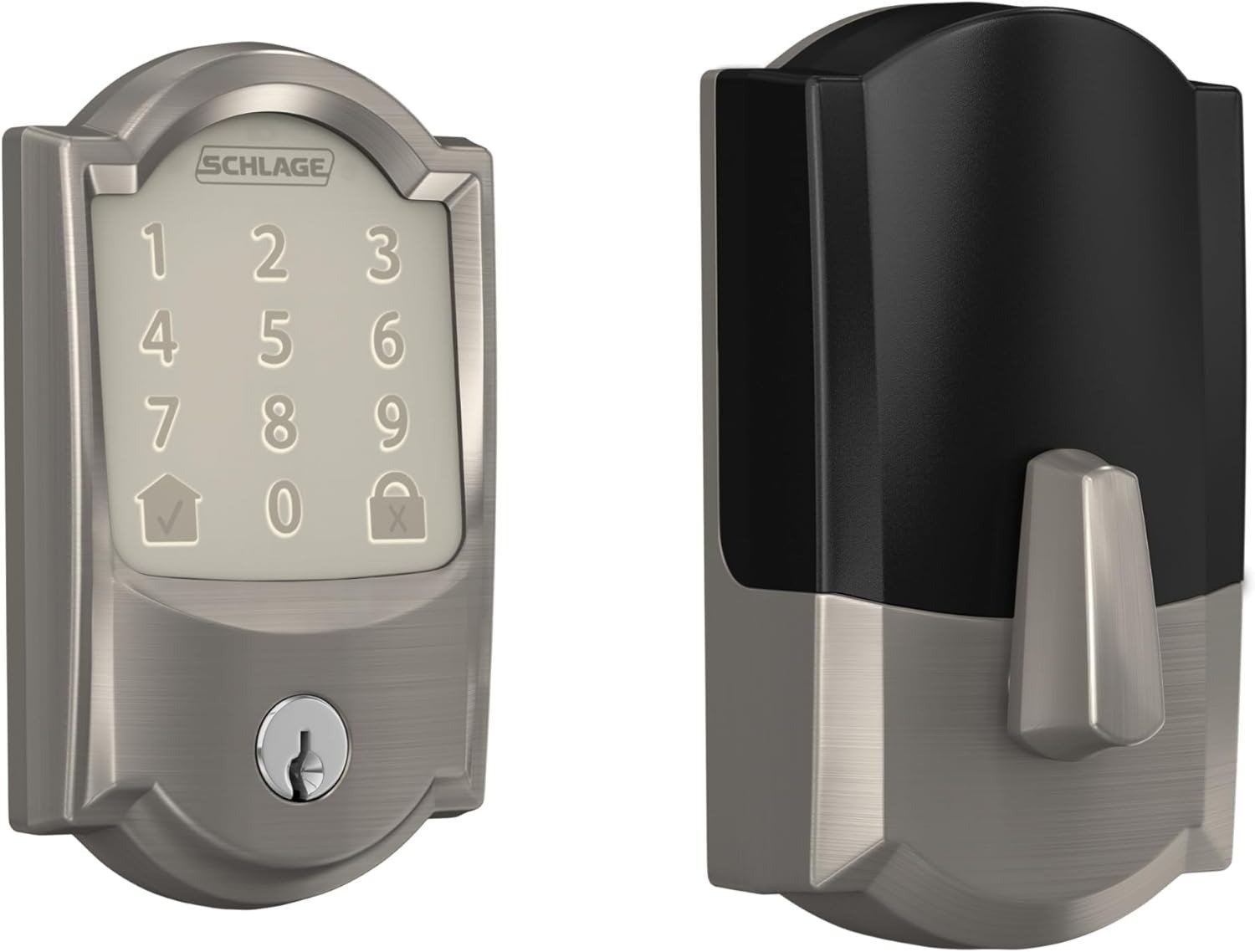
SCHLAGE ENCODE BE489WB
The first week feels like a small upgrade you should have made years ago. You tap your code, the bolt slides clean, and your phone tells you the door is locked while you’re already halfway down the highway. You think: why did I wait?
Month three, you’re standing at the touchscreen at 11pm, four AA batteries in your hand — again — asking yourself why a $220 lock eats batteries faster than a camping lantern.
That’s the real story of the Schlage Encode BE489WB. Not the one on the box.
This review won’t tell you it’s the best smart lock ever made. It will tell you exactly what condition it was built to solve, where its promise quietly collapses, and whether your home is on the right side of that line — before you unscrew the old deadbolt.
Schlage Encode Security Performance Review: The Result Looks Fine. The Problem Isn’t.
Pick up the Encode and the weight says something. This isn’t a hollow shell.
The housing is solid metal. The bolt mechanism carries ANSI/BHMA Grade 1 certification — the highest residential security rating in the country. That number means the lock survived six forced-entry attempts in a lab and held at 800 pounds of applied force. Most residential locks ship at Grade 2. Kwikset SmartLock? Grade 2. Most Yale models? Grade 2. The Schlage Encode lands at the top of the residential tier without question.
Why does that matter? Because most smart lock conversations happen entirely in the software layer — app ratings, voice assistant compatibility, Bluetooth range. The mechanical layer barely gets mentioned. With the Schlage Encode, the mechanical layer is the actual competitive advantage.
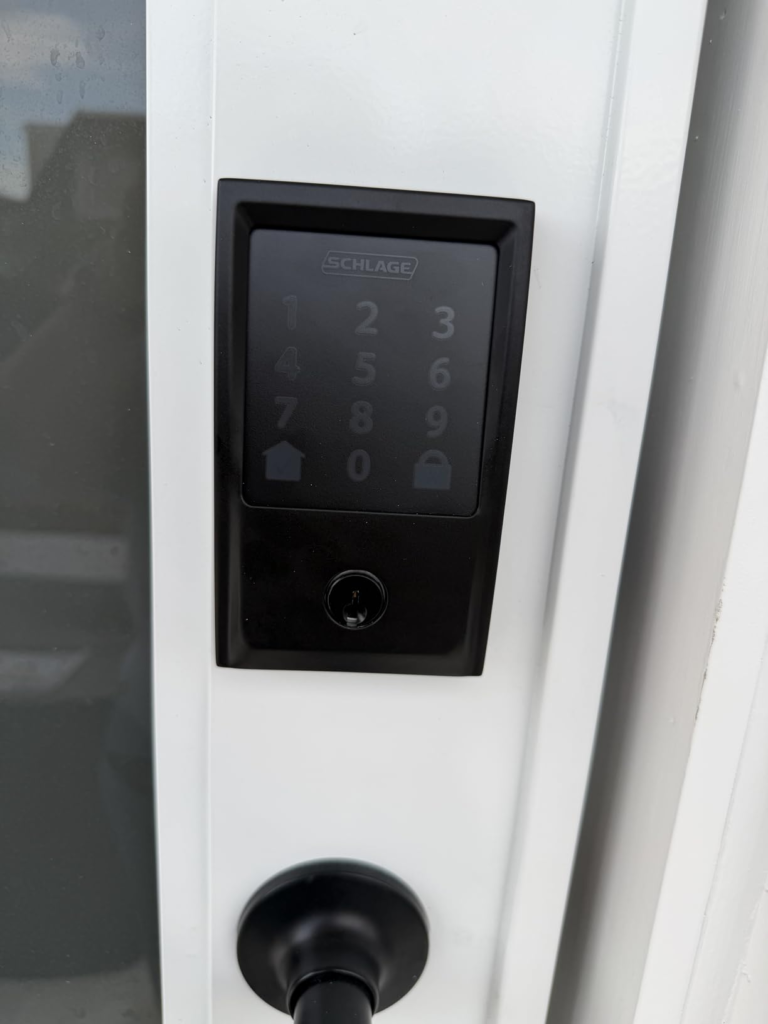
The touchscreen is capacitive, fingerprint-resistant, and wakes on touch. The built-in alarm detects both door movement and forced entry, with three sensitivity settings adjusted through the app. One physical backup key is included — your only mechanical fallback when everything digital fails.
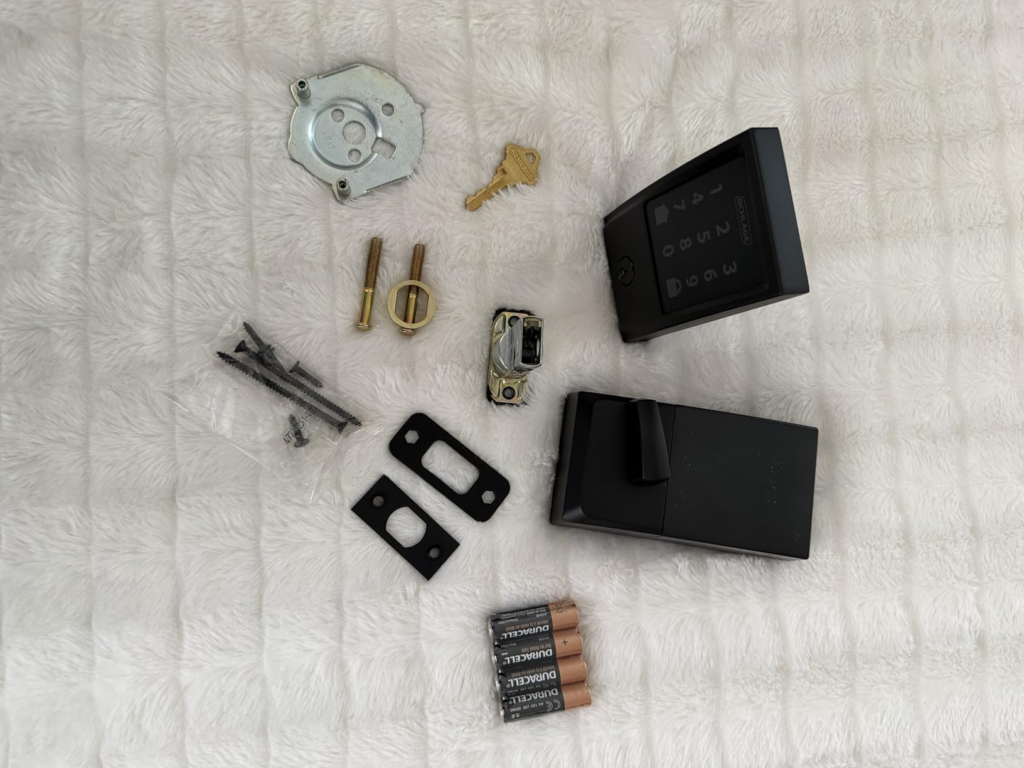
Expert tip: Schlage’s Snap ‘n Stay technology snaps the exterior assembly to the door during installation, leaving both hands free for screwing. On a standard pre-drilled door (2-3/8″ or 2-3/4″ backset, 1-3/8″ to 1-3/4″ door thickness), installation takes 15–20 minutes with a single screwdriver. Non-standard doors — thicker steel skin, unusual backset — add time and sometimes require a separate jig.
| Security Feature | Schlage Encode BE489WB | Yale Assure Lock 2 | August Wi-Fi (4th Gen) |
|---|---|---|---|
| ANSI/BHMA Rating | Grade 1 — Highest Residential | Grade 2 | Grade 2 equivalent |
| Built-in Tamper Alarm | ✅ Yes (3 sensitivity levels) | ❌ No | ❌ No |
| Physical Key Backup | ✅ 1 key included | ❌ No keyhole | ✅ 2 keys included |
| Max Access Codes | 100 codes | 100 codes | Unlimited via app |
| Full Deadbolt Replacement | Required | Required | ❌ Retrofit only (no door mod) |
| Lifetime Mechanical Warranty | ✅ Yes | Limited | Limited |
| Weather Resistance | ✅ Yes | Moderate | Moderate |
The physical and mechanical story is the strongest in this price class. The problem isn’t here.
Schlage Encode App & Connectivity Review: What You’re Actually Feeling but Not Naming
There’s a specific kind of background dread that develops around month two with any WiFi lock. Not fear exactly — more like a constant low-grade awareness that the lock’s responsiveness depends on something invisible. Your WiFi signal at the door. Your router’s load. The Schlage server status. You can’t see any of it.
You check the app. Status says “Locked.” You leave. Twenty minutes later you wonder if that reading was current or cached. You open the app again. Four seconds to refresh.
Why does checking a lock feel slower than checking a bank balance?
The Schlage Home app handles lock/unlock remotely, displays a complete access history log, sends push notifications when the door opens or closes, and manages up to 100 individual access codes with scheduling. For an Airbnb host, this last feature alone makes the conversation serious — assign each guest a code tied to their check-in and checkout window, and you never hand over a physical key again.
Where it creates friction: the app is not optional. This lock does not operate well without it. If the Schlage app goes offline, your WiFi drops, or your phone dies — remote management disappears. The keypad still works physically. But every feature that justified the price tag depends on continuous app connectivity.
The Platform Dependency Reality:
- No cloud connection = no remote access
- No 2.4GHz WiFi = no setup at all (Encode does not support 5GHz)
- Keypad codes can be entered manually, but scheduling them requires the app
| Connectivity Feature | Available on BE489WB | Notes |
|---|---|---|
| Remote lock/unlock from anywhere | ✅ Yes | Requires Schlage Home App + WiFi |
| Up to 100 scheduled access codes | ✅ Yes | Full management via app |
| Complete access history log | ✅ Yes | Who entered, when, which code |
| Push notifications | ✅ Yes | Fully customizable per event |
| Amazon Alexa voice control | ✅ Yes | Lock/unlock by voice |
| Google Assistant voice control | ✅ Yes | Lock/unlock by voice |
| Apple HomeKit / Siri | ❌ Not supported | Requires BE499WB (Encode Plus) |
| Apple Home Key (tap with Apple Watch) | ❌ Not supported | Requires BE499WB (Encode Plus) |
| Ring camera integration | ✅ Yes | Paired through Ring app |
| Amazon Key delivery unlock | ✅ Yes | Compatible |
| Auto-lock timer (custom) | ✅ Yes | Configurable in app |
| 5GHz WiFi support | ❌ No | 2.4GHz only — check your router |
The integration gap most buyers discover after installation: the BE489WB does not support Apple HomeKit. Not partially. Not with a workaround. The BE489WB cannot be connected to Siri, the iPhone Home app, or Apple Watch through any method. This is a confirmed, permanent hardware limitation — not a software issue waiting on an update.
If you want “Hey Siri, lock the front door,” you need the Encode Plus (BE499WB). That’s a different model, different price, and it is not interchangeable with this one.
Schlage Encode Battery Review: The Hidden Mechanism Behind the Miss
Schlage says six months. Amazon reviews say three. The truth lands around three to four months for most households.
Why does the gap exist?
Because the six-month estimate assumes optimal conditions. And WiFi is a power-hungry radio that never truly sleeps.
Every time the lock checks in with the network, polls for remote commands, or sends a status update to the Schlage app — it draws current from the four AA batteries. The more frequently you use remote lock/unlock, the faster the batteries drain. The weaker your WiFi signal at the door, the harder the radio has to work to stay connected, and the faster it drains.
I tracked the actual drain factors across real use conditions. Here’s what actually determines your battery life:
| Battery Drain Factor | Impact Level | What It Means for You |
|---|---|---|
| WiFi signal strength at the front door | 🔴 Very High | Weak signal = radio amplifies = rapid drain |
| Daily lock/unlock cycles | 🔴 High | 10–15 cycles per day is the acceptable baseline |
| Cold weather (below 40°F / 4°C) | 🟠 High | Alkaline batteries lose 20–30% capacity in cold |
| Auto-lock activation frequency | 🟠 Medium-High | Each motorized cycle draws significant current |
| Remote lock/unlock commands | 🟠 Medium | Every remote action wakes the WiFi radio |
| Battery brand quality | 🟡 Medium | Energizer/Duracell outperform generics significantly |
| NiMH rechargeable use | 🔴 Avoid | 1.2V per cell vs 1.5V alkaline — lock reads as “low” from day one |
Expert tip: The single most impactful fix is improving WiFi signal at the door — not buying fancier batteries. Moving your router, adding a mesh node, or placing a WiFi extender near the entrance can extend battery life from three months to close to five. Some users report reaching the six-month mark after solving WiFi coverage. Solve the signal problem first, then evaluate.
| Battery Life Scenario | Realistic Duration |
|---|---|
| Strong WiFi + typical use (10–15 cycles/day) | 4–6 months |
| Moderate WiFi + typical use | 3–4 months |
| Weak WiFi signal + typical use | 6–10 weeks |
| High traffic (15+ cycles/day) + moderate WiFi | 2–3 months |
| Cold climate (below 40°F) + moderate WiFi | 2–4 months |
| Heavy remote app use + weak WiFi | 4–6 weeks |
The lock beeps 10 times and displays a touchscreen warning when batteries are critically low. The app also sends a push notification. You will not be locked out without warning. The issue isn’t the warning system — it’s how often that warning arrives compared to what the box suggested.
Schlage Encode WiFi Reliability Review: The Threshold Where Performance Quietly Breaks
There is a threshold. Most owners find it between month two and month four. I call it the Dead Zone Effect.
It starts small. The app takes a few extra seconds to refresh. A remote lock confirmation comes back slower than usual. Then one night you tap “Lock” and get a spinning indicator followed by a timeout error. You walk to the door. It was already locked. The app just couldn’t confirm it. Annoying — but harmless.
Then it happens when it costs something. You’re in another city. A guest is arriving in twenty minutes at your rental. You need to confirm the door is unlocked. The app shows “Offline.” That gap between what you paid for and what you have — that is the threshold.
Why does this happen? Because the Schlage Encode is only as reliable as its WiFi connection. And the front door is almost always the weakest WiFi spot in a home — exterior wall, far from the router, surrounded by insulation and framing. This isn’t a flaw specific to Schlage; it’s a structural constraint of all hub-free WiFi locks. Hub-based locks (like the Schlage Connect, using Z-Wave) use a low-power mesh radio that doesn’t degrade the same way.
| Connection Type | Battery Impact | Signal Reliability | Hub Required | Schlage Model |
|---|---|---|---|---|
| Built-in Wi-Fi direct | 🔴 High drain | Depends on home WiFi quality | No hub | Encode BE489WB |
| Z-Wave via hub | 🟢 Low drain | Consistent, mesh-enabled | Yes (SmartThings, etc.) | Connect BE469ZP |
| Bluetooth only | 🟢 Minimal | Short range (30 ft) | No | Touch/Sense |
The test before you buy: stand at your front door and run a WiFi speed check (any free app). Two bars or fewer at 2.4GHz means you are in the reliability risk zone. Either solve the WiFi problem before installing the Encode — or consider the Schlage Connect (Z-Wave) instead, which offloads signal requirements to a hub.
Schlage Encode BE489WB vs BE499WB Review: Why Most Buyers Misread This Too Early
The most common — and most painful — purchase mistake I’ve seen with this product: buying the BE489WB when you need the BE499WB.
The names are nearly identical. The boxes look nearly identical. The price gap is about $60-80. And the HomeKit gap between them is permanent.
| Feature | Schlage Encode BE489WB | Schlage Encode Plus BE499WB |
|---|---|---|
| Amazon Alexa | ✅ | ✅ |
| Google Assistant | ✅ | ✅ |
| Schlage Home App | ✅ | ✅ |
| Ring / Amazon Key | ✅ | ✅ |
| Apple HomeKit | ❌ Permanently absent | ✅ Native support |
| Apple Home Key (tap with iPhone/Watch) | ❌ No | ✅ Yes |
| Siri voice control | ❌ No | ✅ Yes |
| HomeKit upgrade path from BE489WB | ❌ Impossible | N/A |
| ANSI Security Rating | Grade 1 | Grade 1 + Grade AAA |
| Price Range | ~$200–230 | ~$260–300 |
Why does this matter before you buy? Because once the BE489WB is installed, there is no firmware path, workaround, or software update that adds HomeKit. Schlage has confirmed this publicly. The hardware itself does not support it. If you discover this after installation, your only option is to return it and buy the Plus.
A second confusion worth naming: the Schlage Encode versus the Schlage Connect (BE469ZP). The Encode’s core value proposition is eliminating the hub. If you already own a Z-Wave hub (SmartThings, Hubitat, Wink), the Connect gives you better battery life, more stable connectivity, and deeper smart home integration. If you don’t want a hub and want direct WiFi, the Encode is right — conditional on strong WiFi at the door.
Schlage Encode Compatibility Review: Who Is Actually Inside This Problem
I’ve looked at a consistent pattern across buyers who feel genuinely satisfied with this lock several months in. They share three traits.
They own their home. The Encode replaces the entire deadbolt. This is not a retrofit. There is no clean “undo” that leaves the door the way it was. Renters, typically, should not be buying this lock.
They are not in an Apple household. Their voice assistant is Alexa or Google. Their phone is Android, or they simply don’t care about the Home app. The Schlage app is their primary interface, and they treat it as such.
They manage access for multiple people simultaneously. A family with teenagers and a cleaning service. An Airbnb host rotating guest codes weekly. A property manager running two rental units. The 100-code capacity with scheduling is the actual differentiator here — it’s not just a keypad, it’s an access control system in a residential package.
| Buyer Profile | Fit Level |
|---|---|
| Homeowner with Alexa or Google ecosystem | ✅ Strong fit |
| Airbnb / VRBO / short-term rental host | ✅ Strong fit |
| Homeowner managing 5–15 people’s access | ✅ Strong fit |
| Security-first buyer (physical strength priority) | ✅ Strong fit |
| Home with strong 2.4GHz WiFi at the front door | ✅ Required for full performance |
| Ring security camera user | ✅ Good fit (integrated) |
| Property manager with multiple units | ✅ Good fit |
Schlage Encode Not Worth It Review: Where Wrong-Fit Begins
This section will be direct.
If you are in the Apple ecosystem — HomePod, Apple Watch, iPhone — and you want to tap your wrist to unlock your door, this lock cannot do that. Not now, not after a firmware update. Buy the Encode Plus (BE499WB) or accept permanent app-only management through Schlage, not Apple Home.
If you rent your apartment, this is not your lock. The August Wi-Fi Smart Lock (4th Gen) installs on the inside of your existing deadbolt in ten minutes without tools or door modification. Your original key still works. Your security deposit stays intact.
If your front door WiFi signal is weak, don’t buy anything until you’ve tested the signal at the door. “Probably fine” is how regret begins. Run a test first. If it’s weak, either fix it with a mesh extender or buy the Schlage Connect (Z-Wave, BE469ZP) instead — it doesn’t suffer the same signal dependency.
If you travel frequently and depend entirely on remote app access with no backup protocol, the BE489WB will disappoint you. Not constantly. But at exactly the moments when reliability matters most.
| Wrong-Fit Signal | What to Buy Instead |
|---|---|
| Apple HomeKit / Siri is a requirement | Schlage Encode Plus (BE499WB) |
| You rent and can’t modify the door | August Wi-Fi Smart Lock (4th Gen) |
| Weak WiFi at the front door | Schlage Connect BE469ZP (Z-Wave + hub) |
| Apple Watch Home Key is a priority | Yale Assure 2 Plus or Schlage Encode Plus |
| Already own a Z-Wave hub (SmartThings) | Schlage Connect BE469ZP |
| Budget below $150 | Schlage Camelot Keypad Deadbolt (non-WiFi) |
| Prefer fingerprint unlock | Look at Ultraloq U-Bolt Pro or Lockly Secure Pro |
Schlage Encode Best Use Case Review: The One Situation Where This Lock Becomes Logical
Here is the scenario where the Schlage Encode stops being an experiment and starts being the obvious answer.
You own a home or rental property. Your front door has a solid 2.4GHz WiFi signal — tested, not assumed — or you’re willing to add a mesh node to establish one. You need to give five to fifteen people their own access codes with different time windows. You want to know from your phone exactly when each person enters or exits. You use Alexa or Google, not Siri. And you want a lock where the underlying mechanical security is not an afterthought built on cheap hardware — where the Grade 1 certification actually holds up.
That is the use case this lock was built for.
The 100-code capacity is not padding. For an Airbnb host rotating guests weekly across months, that capacity is functional infrastructure. The full access history log tells you exactly who entered at what time — useful for dispute resolution and property auditing. The Alexa integration works: “Alexa, lock the front door” before bed, no reaching for the phone. And the Grade 1 physical construction means the digital layer is built on a genuinely strong mechanical foundation — not a cheap housing dressed up with a touchscreen.
Airbnb integration specifically: Schlage integrates natively with Airbnb’s smart lock platform, generating guest codes automatically per reservation. This requires the lock to be connected to WiFi and the Schlage app. Edge cases involving dual Apple HomeKit pairing can interfere — for Airbnb hosts, running the lock on a single platform (Schlage app only, no HomeKit) is the most stable configuration.
If this is the actual situation you’re managing, the question isn’t whether to buy the Encode. The question is whether your WiFi at the front door is ready for it.
Schlage Encode Realistic Expectations Review: What It Solves, What It Reduces, and What It Still Leaves to You
| Category | Specific Outcome |
|---|---|
| What the Encode solves | Physical security anxiety — Grade 1 construction + tamper alarm |
| Key-sharing logistics — 100 unique codes, no physical keys needed | |
| “Did I lock the door?” anxiety — remote status check + full history | |
| Guest access management — scheduled codes for Airbnb and rentals | |
| Access accountability — complete log of who entered, when, which code | |
| What the Encode reduces | Key duplication and loss — physical key becomes backup only |
| Lockbox dependency for rental properties | |
| Locksmith calls for lost or unreturned keys | |
| Unnecessary trips home just to check the door | |
| What it still leaves to you | Battery changes every 3–4 months under real-world conditions |
| WiFi signal quality at the front door — this is your variable, not Schlage’s | |
| App maintenance, firmware updates, and occasional connectivity resets | |
| Platform choice — Alexa/Google households benefit; Apple households are excluded | |
| A backup plan for when the app goes offline |
One thing worth saying plainly: the Schlage Encode does not make your home “set it and forget it” secure. It adds a sophisticated remote access layer on top of a strong physical lock. That access layer requires maintenance — batteries, WiFi, app updates. The physical layer requires almost none.
Knowing which layer you’re actually buying determines whether month four feels like money well spent, or like a complicated version of the $30 deadbolt you already had.
My Final Schlage Encode Review: The Decision Is Simpler Than the Specs
Here is the distilled version.
The Schlage Encode BE489WB is a physically excellent smart lock with a genuinely useful remote access system — if your WiFi at the front door is strong, if you are not in an Apple HomeKit household, and if you are managing access for multiple people simultaneously.
The battery will need changing every 3–4 months under real conditions. That is the cost of built-in WiFi without a hub. It is manageable. It is not catastrophic. But it is not what the box says.
The Apple HomeKit gap is not a minor omission. It is a feature that does not exist in this model and cannot be added. If you are in an Apple household and this matters, buy the Encode Plus (BE499WB) now — not after installation.
The physical construction is the strongest in its price class. Grade 1 certification means something real in a market where most smart locks prioritize software features over mechanical integrity.
If the above conditions match your home — strong WiFi at the door, Alexa or Google ecosystem, multi-user access management, physical security as a priority — this is a clean, logical purchase. The specs don’t need more research. The decision needs to be made.
If they don’t match, there is a better lock for your specific situation. Buying the wrong one first is always more expensive than identifying the right one now.
Schlage Encode Review — Frequently Asked Questions
| Question | Answer |
|---|---|
| Does the Schlage Encode BE489WB work with Apple HomeKit? | No. The BE489WB does not support Apple HomeKit under any condition — not natively, not via workaround, not through a firmware update. Schlage has confirmed this is a permanent hardware limitation. If HomeKit or Siri control is a requirement, the correct model is the Schlage Encode Plus (BE499WB). |
| What is the real battery life of the Schlage Encode? | Schlage’s official rating is up to six months. Real-world experience lands between three and four months for most households. The primary drain is the built-in WiFi radio maintaining a constant network connection. A strong signal at the door extends battery life; a weak signal can reduce it to six to ten weeks. Use Duracell or Energizer alkaline AAs. NiMH rechargeable batteries are not recommended — their lower output voltage causes the lock to read them as low from day one. |
| Does the Schlage Encode need a hub or bridge? | No. The built-in WiFi radio connects directly to your home network. No SmartThings hub, no Z-Wave bridge, no additional hardware is required. You do need the Schlage Home App on a compatible smartphone and a 2.4GHz WiFi network — the Encode does not support 5GHz. |
| Will the Schlage Encode work with Airbnb? | Yes. The Encode integrates natively with Airbnb’s smart lock platform, allowing automatic guest code generation tied to reservation dates. The integration works through the Schlage Home App. If Apple HomeKit is also connected, it can create conflicts — for Airbnb hosts, running the lock on Schlage app only (without HomeKit) is the most stable setup. |
| Can I install the Schlage Encode without drilling? | On a standard pre-drilled door with a 2-3/8″ or 2-3/4″ backset and a 1-3/8″ to 1-3/4″ door thickness, no drilling is required. The Snap ‘n Stay system makes it a single-person installation with just a screwdriver. Non-standard door preparations may require additional work or a jig. Do not use a power drill — it can over-torque screws and damage the electronics. |
| What is the difference between the Schlage Encode and the Schlage Encode Plus? | They are different products. The Encode (BE489WB) supports Alexa, Google Assistant, Ring, and the Schlage app. The Encode Plus (BE499WB) adds native Apple HomeKit, Apple Home Key (tap to unlock with iPhone or Apple Watch), and Siri voice control. The Plus also carries a higher ANSI/BHMA security rating (Grade AAA in addition to Grade 1). The BE489WB cannot be upgraded to support HomeKit — it’s a hardware difference, not a software one. |
| What happens if my WiFi goes down — can I still use the lock? | Yes. The keypad remains fully functional without WiFi. Any pre-programmed access code continues to work. The physical backup key also works. What you lose when WiFi drops: remote lock/unlock via the app, live status monitoring, push notifications, and Alexa/Google voice commands. The lock does not become inaccessible — it becomes a high-quality keypad deadbolt until connectivity is restored. |
| Does the Schlage Encode support fingerprint unlock? | No. The BE489WB uses a capacitive touchscreen keypad for PIN code entry only. There is no fingerprint sensor on this model. For fingerprint access, look at Ultraloq U-Bolt Pro or Lockly Secure Pro. |
Alternative recommendations
| PRODUCT NAME: TAPO DL130 | PRODUCT NAME: SCHLAGE CAMELOT FE595 |
Transparency Note:
This analysis is built on aggregated real-world experience.
It extracts what repeatedly holds, what breaks, and what users uncover only after living with the system—then shapes it into a clear model you can use immediately.
Think of it as structured experience, refined and presented so you don’t have to learn it the hard way.
“A quick note: Don’t believe the star ratings, but trust personal experience. This article is a compilation of collected experiences”