TP-Link ER707-M2 Review: I Tested the Three Points Where the Multi-Gigabit Promise Quietly Breaks
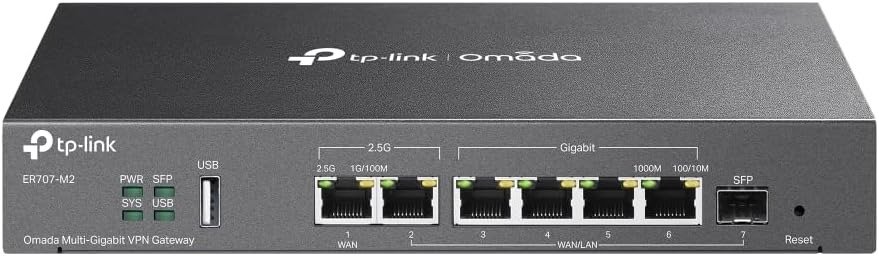
TP-LINK ER707-M2
The Result Looks Fine. The Problem Isn’t.
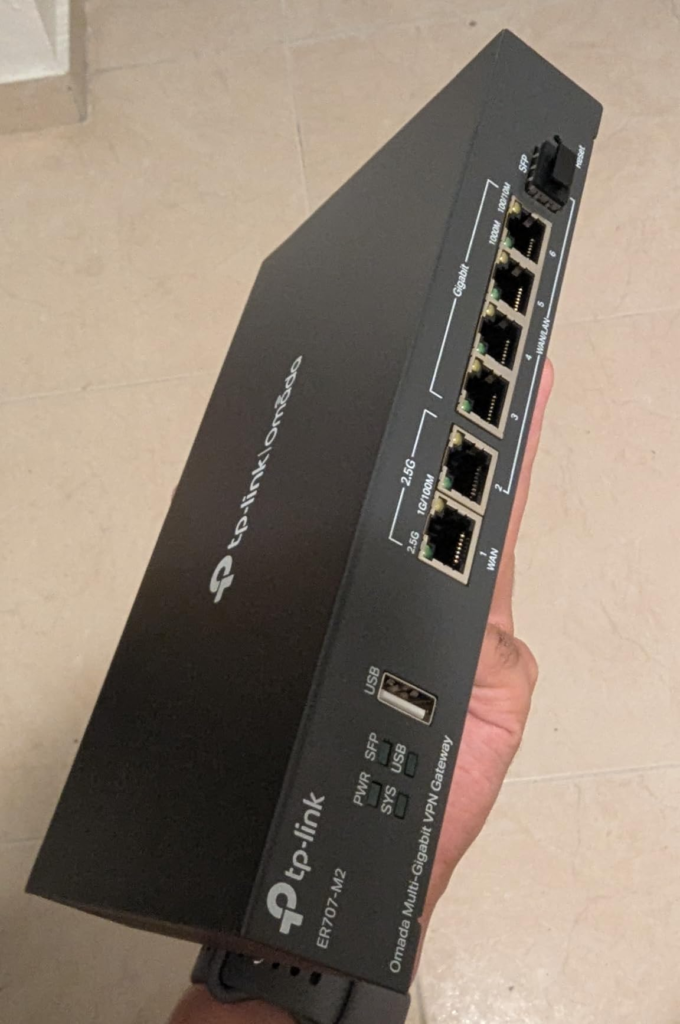
The ER707-M2 ships looking like exactly what it claims to be. Dual 2.5G ports. 500,000 concurrent sessions. A dedicated dual-core ARMv8 processor, 1GB of DDR4 RAM, six configurable WAN ports, and an IPSec throughput figure that clears 650 Mbps in TP-Link’s own benchmarks. At around $99–$130 on Amazon, the comparison to enterprise-adjacent alternatives feels uncomfortable — in a good way.
And in a real deployment running clean NAT at static IP? It holds. NAT throughput reaches approximately 2,365 Mbps in TP-Link’s documented tests, and under typical PPPoE conditions, the router sustains above 2,347 Mbps — numbers that will never be saturated by any single gigabit WAN connection.
The disconnect arrives when you start activating the features listed on the spec sheet. Not all of them behave at the throughput ceiling you just measured. Some of them collapse it. Quietly. Without any alert in the interface.
That is not a defect. It is a structural characteristic of how this hardware is engineered — and any honest buying decision should be built on that understanding, not around a port count or a feature list read at face value.
What You’re Actually Feeling but Not Naming
If you’ve been researching this router for more than a few hours, you’ve likely noticed a specific friction pattern in the reviews. Some buyers are completely satisfied. Others feel let down by something they cannot precisely articulate. The dissatisfaction is not about the hardware failing — it is about the experience not matching the expectation formed during purchase.
There are three distinct forms this takes.
A network administrator enables the IDS/IPS feature on a multi-gigabit line and watches throughput collapse from a stable 920 Mbps to something inconsistent between 140 and 300 Mbps. The CPU shows 25% utilization. Nothing in the interface explains why. The feature is on; the speed is gone. The confusion sits precisely in that gap.
A second user configures OpenVPN as their primary remote access protocol, expecting performance that roughly tracks IPSec. They reach 135 Mbps on a good run — and spend considerable time testing configurations, swapping servers, and waiting for firmware releases that never close the gap.
A third person sets up the router in standalone mode, opens the Omada app expecting full management access, and discovers that routers in this product line are only app-accessible in controller mode. Separate controller software — free to download, but a real setup commitment — is required before the device operates the way TP-Link designed it to.
None of these users received misleading marketing. The specifications mention all of this, technically. But the gap between a spec sheet entry and what happens at the boundary of that spec — that is where the real friction lives, and it is invisible until you reach it.
The Hidden Mechanism Behind the Miss
The ER707-M2 uses a dedicated dual-core ARMv8 processor with 1GB DDR4 memory. It handles up to 500,000 concurrent sessions, sustains 6,000 new sessions per second, and produces NAT throughput above 2,300 Mbps — all of which is real, consistent, and verified against TP-Link’s published datasheet.
The mechanism that creates the performance ceiling is not processor weakness. It is architectural. The hardware offloading that makes multi-gigabit NAT possible operates at a system layer that bypasses software inspection. This is the standard design for affordable multi-gigabit routers: hardware acceleration handles pass-through traffic with minimal CPU involvement, which is how the 2.5G ports operate at rated throughput without generating excessive heat or CPU stress.
The problem is that deep packet inspection, IDS/IPS, and certain VPN protocols sit entirely outside that hardware-accelerated path. They require the CPU to examine every packet individually before forwarding it. At 900 Mbps and above, this is a significant load for a dual-core chip — regardless of what the utilization percentage shows at idle.
OpenVPN tops out at approximately 135 Mbps on the ER707-M2. IPSec with AES-256-SHA256 encryption delivers around 650 Mbps. L2TP with encryption reaches approximately 561 Mbps. These are not configuration failures — they are the honest performance envelope of software-executed encryption on this processor.
When IDS/IPS is enabled — even on its lowest “Detect Only” setting — users have documented throughput drops from 900–950 Mbps to as low as 140 Mbps. The reason is structural: all inbound packets must be scanned by the CPU before forwarding, introducing latency that directly reduces effective throughput independent of raw CPU utilization percentage. Hardware-offloaded IDS/IPS begins at a meaningfully different price tier.
The Threshold Where the Outcome Quietly Breaks
There are three precise thresholds in this router. Each one is exact. Each one is invisible if you are reading marketing copy rather than architecture.
| Threshold | What You Expect | What Actually Happens | Impact Severity |
|---|---|---|---|
| IDS/IPS Enabled | Full security + full speed | Throughput collapses to ~140–300 Mbps on 1G+ WAN | High |
| OpenVPN as primary VPN | Multi-gig encrypted tunnels | Hard ceiling at ~135 Mbps, unfixable by config | High |
| Standalone mode without controller | Full feature set | Advanced features locked; app management unavailable for routers | Medium–High |
| L2TP Client VPN | Comparable to IPSec | Noticeably lower throughput; ~561 Mbps encrypted | Medium |
| WireGuard (pre-firmware 1.2.0) | Available protocol | Not supported on earlier firmware versions | Low (firmware updatable) |
The IDS/IPS Threshold is the most operationally significant. The feature exists, it is listed, and it genuinely detects intrusions. But it runs entirely in software on the CPU with no hardware acceleration. For any connection at or above 500 Mbps, enabling it creates a throughput degradation that defeats the commercial purpose of the 2.5G port it arrived with.
The VPN Protocol Threshold separates buyers into two entirely different products. If your VPN architecture runs on IPSec or WireGuard, the ER707-M2 is a highly capable device — IPSec delivers 650+ Mbps at AES-256, and WireGuard (added from firmware 1.2.0) provides a modern, low-overhead alternative. If your architecture depends on OpenVPN — whether migrating from pfSense, connecting to commercial providers, or supporting legacy configurations — you will hit 135 Mbps and find it structurally unmovable.
The Controller Threshold defines the shape of what you are actually purchasing. Standalone mode gives you a functional router. Omada mode — reached through the free Software Controller, cloud-based controller, or hardware controller OC200/OC300 — gives you the router TP-Link actually designed. The gap between those two experiences is not cosmetic.
Why Most Buyers Misread This Too Early
The most common comparison made against this router is the ER605. It costs less. It has fewer ports. It has lower NAT throughput and a lower concurrent session count. On those dimensions, the ER707-M2 wins by a wide enough margin to justify the price difference across most real deployments.
But the comparison that costs buyers money is the one made against the router’s own spec sheet, in isolation — treating a feature’s presence on the list as confirmation that it operates at the device’s full performance tier. That is not how the ER707-M2 is built. And it is not how any router at this price is built. Dedicated threat-inspection hardware at wire speed begins at a category above.
| Specification | ER605 | ER707-M2 | Practical Meaning |
|---|---|---|---|
| Max NAT Throughput | ~940 Mbps | ~2,365 Mbps | WAN no longer a bottleneck on multi-gig ISP |
| IPSec VPN Throughput | ~200–300 Mbps | ~650–673 Mbps | Meaningful site-to-site VPN upgrade |
| OpenVPN Throughput | ~100 Mbps | ~135 Mbps | Marginal improvement, both are ceiling-limited |
| L2TP Encrypted | ~918 Mbps | ~561 Mbps | ER605 actually higher here |
| Concurrent Sessions | 150,000 | 500,000 | Matters at 100+ active devices |
| RAM | 128MB | 1GB DDR4 | Session stability under load |
| 2.5G WAN Ports | 0 | 2 | Essential for multi-gig ISP connections |
| IDS/IPS | No | Yes (software only) | Present, with documented throughput cost |
| WireGuard Support | Limited/No | Yes (firmware 1.2.0+) | Modern VPN protocol option |
| Max IPSec Tunnels | 50 | 100 | Room for multi-site growth |
The jump from the ER605 is real across every metric that defines a growing SMB network. But the jump to hardware with dedicated packet-inspection acceleration is a different purchase at a different price tier. That distinction is where almost every premature comparison breaks down.
The Omada SDN management layer is also not an optional convenience add-on. It is the operating environment for which this router was designed. Users who treat it as a standalone device and decline to set up the controller will consistently encounter a reduced version of the product they purchased.
Who Is Actually Inside This Problem
The ER707-M2 was designed for a specific type of network operator. Getting this right before purchasing saves a significant amount of time.
You manage a network with 20 to 300+ connected devices. Your ISP has upgraded to multi-gigabit tiers — 1G, 2G, or higher — and your current gateway is becoming the bandwidth ceiling. You need VPN capability without a separate appliance. You either already operate within the Omada ecosystem (access points, managed switches) or you are willing to enter it. You have the networking background to configure VLANs, set up IPSec or WireGuard tunnels, and interpret what the Omada interface requires of you.
| Use Case | Fit Level | Honest Notes |
|---|---|---|
| Multi-gig ISP, clean routing | ★★★★★ | NAT throughput well above any current WAN tier |
| IPSec site-to-site VPN | ★★★★★ | 650+ Mbps at AES-256, up to 100 tunnels |
| WireGuard remote access | ★★★★☆ | Supported from firmware 1.2.0+; stable after config |
| Omada SDN ecosystem (AP + Switch + Gateway) | ★★★★★ | Designed natively for this configuration |
| Multiple ISP lines (load balance + failover) | ★★★★★ | Up to 6 WAN ports, LTE USB backup |
| VLAN segmentation (IoT / guest / staff) | ★★★★☆ | Full ACL management requires controller |
| Retail or hotel captive portal | ★★★★☆ | Available with controller; voucher system functional |
| OpenVPN as primary VPN | ★★☆☆☆ | 135 Mbps ceiling; not configurable out |
| IDS/IPS at full wire speed on 1G+ WAN | ★☆☆☆☆ | Structurally incompatible at this hardware tier |
| pfSense-equivalent DNS customization | ★★☆☆☆ | DHCP DNS reservation aliases not supported |
| Plug-and-play setup, no IT knowledge | ★★☆☆☆ | Steep learning curve; Omada required for full function |
Where Wrong-Fit Begins
The purchase-regret cases share a common structure. Someone isolates one or two specs as the deciding variable — “multi-gig ports,” “VPN support,” “IDS/IPS” — completes the purchase, receives functional hardware, and then encounters a specific workflow that produces results that do not match the surface reading of those specs.
The exclusion boundaries are specific.
Your VPN architecture runs on OpenVPN and your required throughput exceeds 150 Mbps. The 135 Mbps ceiling is not a firmware bug. It is a consequence of single-threaded OpenVPN encryption on this CPU. Firmware versions through 1.3.0 have not materially moved this number. If remote access at 300+ Mbps is a hard requirement, this router solves your problem only if you migrate the VPN protocol.
You need active IDS/IPS simultaneously with full multi-gigabit throughput. These two requirements are architecturally incompatible on this hardware. There is no configuration, no firmware setting, and no Omada controller mode that changes this — because the constraint is the absence of a dedicated hardware packet inspection engine, not a software optimization.
You are replacing a pfSense or OPNsense installation and expect comparable DNS and DHCP granularity. The Omada interface is capable but deliberately simplified. Specific features — including the ability to define custom DNS aliases for DHCP reservations, a standard pfSense capability — are absent and have been raised in community forums without confirmed resolution timelines.
You want the full management experience without engaging the controller setup. Standalone mode works. But the Omada app does not manage routers in standalone mode, the cloud dashboard is unavailable, and the full ACL management layer is inaccessible. The experience is significantly reduced relative to what TP-Link built this device to deliver.
Your network never exceeds 500 Mbps on a single WAN connection, requires no multi-site VPN, and has no need for VLAN segmentation or centralized management. In that configuration, the ER605 delivers everything necessary for considerably less money. The ER707-M2 offers capabilities that would go entirely unused.
The One Situation Where This Product Becomes Logical
For a specific type of network — multi-gigabit ISP, Omada ecosystem already in place or willingness to build into it, IPSec or WireGuard as the primary VPN protocol, multiple locations or meaningful device segmentation requirements — the ER707-M2 resolves a real operational problem at a price that is genuinely difficult to match.
A dedicated dual-core ARMv8 CPU with 1GB DDR4 RAM, dual 2.5G ports, a six-port WAN configuration, IPSec at 650+ Mbps, WireGuard support, multi-WAN load balancing, LTE failover via USB, 4kV lightning protection on all ports, and a 5-year warranty — under $130 — represents a capability density that does not exist at this price in most competing products.
The Omada SDN layer adds centralized management across sites, automatic device discovery, traffic monitoring, VLAN automation, scheduled reboots, and zero-touch provisioning under the cloud controller. These are not consumer features. A small business network that can terminate a multi-gigabit ISP feed, segment traffic across isolated VLANs, maintain encrypted tunnels to remote locations, and provide LTE redundancy — all managed from a single remote interface — costs meaningfully more when assembled from traditional enterprise hardware.
The ER707-M2 is the correct decision when: VPN runs on IPSec or WireGuard, the Omada ecosystem is the operating environment (or will be), and the performance expectation is calibrated to what the hardware actually delivers rather than to what the feature list implies.
When those three conditions are present, the decision stops being a comparative exercise. It becomes a question of timing.
What It Solves, What It Reduces, and What It Still Leaves to You
| Category | What Changes After Deployment | What Stays Your Responsibility |
|---|---|---|
| NAT Routing | Multi-gigabit throughput; gateway is no longer the bottleneck | Nothing at this WAN tier |
| IPSec Site-to-Site VPN | 650+ Mbps encrypted tunnels; up to 100 simultaneous | Remote client scale beyond 100 tunnels |
| WireGuard VPN | Modern protocol; competitive speed | Config must be recreated after some firmware upgrades |
| Multi-WAN / Failover | Load balancing across 6 WAN ports; LTE USB backup | LTE dongle compatibility varies by model |
| VLAN Segmentation | IoT / guest / staff isolation with ACL | Full ACL management requires controller setup |
| IDS/IPS | Threat detection available | Cannot run at full throughput simultaneously |
| OpenVPN | Protocol available and documented | 135 Mbps ceiling; not resolvable by configuration |
| Omada Management | Centralized multi-site control; remote monitoring | Requires controller investment to unlock |
| DNS / DHCP Customization | Standard DHCP, static routing, address reservation | No DNS alias support for DHCP reservations |
| Lightning Protection | 4kV hardware protection on all ports | External surge protection still advisable in exposed environments |
| Firmware / Support | Active development; regular releases; 5-year warranty | Occasional VPN config resets after specific updates |
This is a router that has earned its market position without structural dishonesty. The throughput figures are real. The VPN capability is real. The Omada management ecosystem is genuinely useful once deployed. What it delivers, it delivers with consistency — and the 5-year warranty is not a common offer in this product tier.
The gaps are equally real. OpenVPN throughput, IDS/IPS at wire speed, and deep DNS customization are not solved by this hardware. That is a design decision reflecting where $130 of networking equipment sits in the market, not a manufacturing flaw. If you go in understanding both sides of that ledger with precision, the regret risk approaches zero.

Final Compression
The ER707-M2 is not the right router for everyone who searches “multi-gigabit VPN router.” It is precisely right for the operator who needs clean, fast routing at multi-gig speeds, IPSec or WireGuard between locations, and centralized management through Omada SDN — without entering enterprise pricing.
If OpenVPN is your VPN backbone at speeds above 150 Mbps, this hardware cannot deliver that. If active IDS/IPS at full throughput is a hard requirement, this price tier cannot accommodate it. If your connection is below 1 Gbps and your network is small, the ER605 handles it for less.
But if your internet has crossed into multi-gig territory, your VPN architecture runs on IPSec or WireGuard, and the Omada ecosystem is either already in place or a logical next step — the question is not whether this is the right hardware. The question is how long your current gateway can still hold the load.
Frequently Asked Questions
| Question | Answer |
|---|---|
| Does the TP-Link ER707-M2 require an Omada Controller to function? | No. The ER707-M2 operates in standalone mode and can be fully configured through its local web management interface without any controller. However, most advanced features — including full Omada app access for routers, cloud management, multi-site visibility, VLAN ACL automation, guest portal advanced options, and zero-touch provisioning — require either the free Omada Software Controller, the cloud-based controller, or a hardware controller such as the OC200 or OC300. Standalone mode is functional; Omada mode is the product TP-Link designed. |
| Does the ER707-M2 support WireGuard VPN? | Yes, from firmware version 1.2.0 onward. Units shipping today include this firmware, but if your device is older, update before configuring WireGuard. There are documented reports of WireGuard peer configurations being reset after the 1.2.3 firmware upgrade — affected users had to recreate WireGuard server and peer settings from scratch. The configuration itself is not complex, but the reset is disruptive if you do not expect it. |
| What is the actual OpenVPN throughput on the ER707-M2? | Approximately 135 Mbps under optimal conditions. This is a structural ceiling imposed by software-based OpenVPN processing on the dual-core CPU — it is not a configuration error, and no firmware version through 1.3.0 has meaningfully raised it. If OpenVPN is your primary remote access protocol at throughputs above 150 Mbps, this limitation should be the primary variable in your evaluation. |
| Does enabling IDS/IPS significantly reduce speed? | Yes, substantially. Users have documented and reproduced throughput drops from 900–950 Mbps to as low as 140 Mbps with IDS/IPS enabled at its lowest “Detect Only” setting. This occurs because all packet inspection runs in software on the dual-core CPU with no hardware acceleration path. The detection capability itself functions correctly — the incompatibility is between simultaneous full-throughput routing and software-based deep inspection at this price tier. |
| Is the ER707-M2 a meaningful upgrade over the ER605 for VPN use? | For IPSec: yes, significantly. The ER707-M2 delivers approximately 650–673 Mbps IPSec throughput versus the ER605’s approximately 200–300 Mbps. For WireGuard: yes, the ER707-M2 supports it more fully. For OpenVPN: the practical difference is narrow — approximately 135 Mbps versus 100 Mbps. The upgrade justification is strongest when your VPN protocol is IPSec or WireGuard, your connection exceeds 1 Gbps, and your device count is growing. |
| How many VPN tunnels does the ER707-M2 support simultaneously? | 100 IPSec tunnels, 66 OpenVPN tunnels, and 60 PPTP/L2TP tunnels from a shared pool. For outbound VPN client connections, it supports up to 12 PPTP/L2TP server connections and up to 6 OpenVPN server connections simultaneously. |
| Can the ER707-M2 handle a 2.5 Gbps internet connection? | Yes, for clean NAT routing without active deep-packet inspection. Documented NAT throughput at static IP exceeds 2,365 Mbps — well above any single 2.5G WAN feed. The 2.5G WAN ports are the correct hardware choice for ISP tiers at 1G, 1.5G, and 2G. If IDS/IPS is active simultaneously, the effective throughput drops substantially regardless of WAN tier. |
| Does the ER707-M2 support IPv6? | Yes. Supported IPv6 modes include PPP, DHCPv6, Static IP, 6in4 tunnel, and Pass-Through. |
Transparency Note:
This analysis is built on aggregated real-world experience.
It extracts what repeatedly holds, what breaks, and what users uncover only after living with the system—then shapes it into a clear model you can use immediately.
Think of it as structured experience, refined and presented so you don’t have to learn it the hard way.
“A quick note: Don’t believe the star ratings, but trust personal experience. This article is a compilation of collected experiences”