Your Office Has Wi-Fi 6. It Also Has Zero Visibility Into What’s Attacking It Right Now.
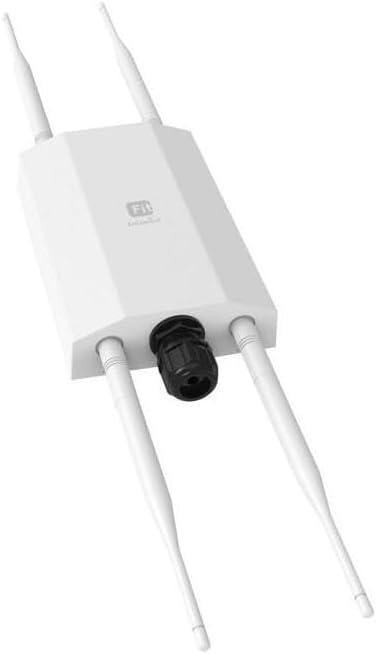
PRODUCT NAME: ENGENIUS ECW230S
Business networks fail in two distinct ways. The first failure is obvious: slow speeds, dropped connections, dead zones. You feel it immediately. You fix it.
The second failure is invisible. Your access point is broadcasting cleanly. Devices are connecting. Throughput looks fine on the dashboard. Meanwhile, a rogue AP is broadcasting your SSID two floors below, collecting credentials from employees who can’t tell the difference. A man-in-the-middle attack is running quietly between your conference room and your router. A neighboring device is jamming your DFS channel. None of this shows up on a speed test. None of it triggers an alert from a standard Wi-Fi 6 AP. It just happens.
Most businesses that get hit don’t realize it until the damage is already done.
That gap — between a working network and a monitored network — is the exact problem the EnGenius ECW230S was built to close.
The Result Looks Fine. The Problem Isn’t.
Here is what a standard Wi-Fi 6 access point does: it transmits, it receives, it manages client connections. It handles OFDMA scheduling, MU-MIMO streams, band steering. If you measure throughput, it will look solid. If you check client counts, everything appears normal.
What it cannot do is watch.
A standard access point like the ECW230 uses its radios for client data — OFDMA to handle denser network environments more efficiently, MU-MIMO to serve multiple clients simultaneously. These are performance features, not security features.
The radios are busy transmitting. They have no spare capacity to sit silently and listen to the spectrum around them.
This is the structural gap that most buyers miss. They read “WPA3,” “enterprise security,” “RADIUS support,” and assume the access point is doing the monitoring. It isn’t. It’s encrypting your traffic. That’s different from watching who else is on the channel, who’s cloning your SSID, and what devices are broadcasting around your perimeter.
A locked door and a security camera serve different functions. Most Wi-Fi 6 APs give you the lock. The ECW230S gives you both.
What You’re Actually Feeling but Not Naming
If you manage a business network — a clinic, a financial office, a distributed retail chain, a hotel — you’ve probably experienced one of these without a precise name for it:
A client device connects to what it thinks is your network, then behaves strangely. An employee reports occasional slowdowns that no log explains. A competitor seems to know things they shouldn’t. A vendor flags unusual traffic patterns that your AP dashboard never caught.
None of these events show up as “rogue AP detected” because your AP doesn’t have the hardware to detect one. What you’re experiencing is the cost of running a network with no ambient intelligence — a system that handles connections but cannot observe its environment.
The core problem for modern business networks is that remote access, BYOD adoption, and growing numbers of IoT and Bluetooth devices create more attack surfaces than ever before, making networks increasingly vulnerable to data breaches and cyber-attacks without any real-time visibility into what’s happening in the radio spectrum.
The annoyance you can’t name precisely is this: you’re responsible for a network you cannot see.
The Hidden Mechanism Behind the Miss
Standard access point security operates at the authentication layer. WPA3, 802.1X, RADIUS — these protocols govern who is allowed to connect to your network. They are necessary. They are not sufficient.
What they cannot do is detect threats that don’t attempt to connect at all.
An evil twin attack doesn’t knock on your door. It broadcasts a duplicate SSID alongside yours and waits for your clients to connect to it instead. A standard AP will never see this, because it’s not looking at the airspace — only at its own association table.
The ECW230S uses dedicated WIPS/WIDS scanning radios — separate from the data radios — to continuously monitor the RF environment for evil twins, rogue APs, flood detection, man-in-the-middle attacks, and RF jammers, without degrading network performance at all. The critical word is dedicated. These radios do nothing else. They are not sharing bandwidth with client traffic. They are listening full-time.
The ECW230S also provides a live animated Spectrum graph that shows in real time whether the AP is impacted by interference, the channels where it occurs, and the attenuation in dBm — a diagnostic tool that allows detection of active jamming attempts.
This is the mechanism that standard specs don’t surface. You can read “WPA3 Enterprise” on five different access points and never know that none of them are watching the channel at all.
The Threshold Where the Outcome Quietly Breaks
There is a point in every network environment where the difference between monitoring and not monitoring becomes catastrophic rather than theoretical. Call it the visibility threshold.
Below this threshold, your network is transmitting clean data through encrypted channels. You look protected. No alarm has fired. No speed test has degraded.
Above this threshold — a medical practice handling patient records, a financial office processing wire transfers, a distributed retail chain where guest networks live alongside POS systems — the consequences of a missed intrusion are not just operational. They are regulatory. They are financial. They are reputational.
The ECW230S is explicitly positioned for information-sensitive financial, medical, and distributed enterprise networks where 24/7 threat elimination is a business requirement, not a luxury feature.
At this threshold, you are no longer choosing between access points based on throughput figures. You are choosing between operating blind and operating with full RF visibility. That is a different category of decision entirely.
The threshold is not defined by your budget. It is defined by what it costs you — legally, operationally, financially — if a breach occurs that a dedicated scanning radio would have caught.
Why Most Buyers Misread This Too Early
The comparison that kills this decision is the throughput comparison. Buyers look at the ECW230S at $399 and put it next to the TP-Link EAP670 or Ubiquiti U6-Pro at $130–$200 and conclude: same Wi-Fi 6, same OFDMA, same MU-MIMO — why pay double?
The comparison is measuring the wrong thing.
The ECW230S is limited to 80MHz channel width, capping real-world client speeds at 1,200 Mbps rather than the advertised 2,400 Mbps. On raw throughput benchmarks, it performs similarly to other 4×4 Wi-Fi 6 APs. If throughput is your only metric, the comparison is accurate. The ECW230S loses on price efficiency.
But the ECW230S is not competing on throughput. It is competing on something no other access point at its price point delivers: a dedicated radio that never stops scanning.
Fortinet offers access points with dedicated security scanning radios, but at roughly twice the price of the ECW230S. Ubiquiti has produced security-dedicated APs at the Wi-Fi 5 generation but had not released a Wi-Fi 6 equivalent.
The buyer who compares the ECW230S to the EAP670 on iPerf scores is making the same mistake as comparing a delivery van to a security vehicle on fuel economy. They are different tools for different jobs. The feature set that matters — dedicated WIPS, AirGuard, live RF spectrum analysis, Zero-Wait DFS, evil twin detection — is simply absent from everything priced below it.
Who Is Actually Inside This Problem
You are inside this problem if you manage a network where a security event has defined consequences beyond inconvenience.
This means: a multi-site business where a rogue AP at one location could compromise the entire organization. A healthcare practice where patient data compliance is not optional. A financial services office where detecting a man-in-the-middle attack is an audit requirement, not a preference. A hotel or hospitality environment where guest and staff networks share the same physical space and an evil twin could go undetected for days.
The ECW230S is also relevant for dense environments where multiple clients need to be served simultaneously with reliable throughput — its 4×4 MU-MIMO and OFDMA handling make it capable of managing a high client count without the security features creating any radio performance penalty.
You are also inside this problem if you already have a PoE+ switch and an EnGenius Cloud account — or are building toward a multi-AP deployment where centralized cloud management across sites is operationally necessary.
Where Wrong-Fit Begins
The ECW230S is not the right device for every deployment. This matters as much as who it does fit.
If you are setting up a home office or a small team of fewer than ten people, the security monitoring capability will never activate in a meaningful way. The price premium is real and the return is zero. A standard Wi-Fi 6 AP at a third of the cost handles your actual problem.
If you are a network administrator who wants full local control without any cloud dependency, this is not your device. The ECW230S cannot be configured without an internet connection. The local web interface allows only status viewing and firmware updates — there is no way to set up or operate it as a wireless access point without the EnGenius Cloud platform. If your policy or infrastructure prohibits mandatory cloud management, this constraint eliminates the product before the security features become relevant.
The full feature set — particularly the AirGuard security tools and extended Diagnostics — requires a Pro license. A 1-year Pro license is included with purchase, but ongoing use of the advanced security features beyond the first year requires paid renewal. This is not a hidden cost, but it is a recurring one. If your operation has no budget for per-device annual software licensing, factor that into the total cost of ownership before the first device ships.
If your Wi-Fi 5 client devices represent the majority of your connected endpoints, the 2.4GHz performance will also disappoint. Wi-Fi 5 client devices drop off noticeably past 45 feet on the 2.4GHz band, with throughput falling to barely usable levels after 70 feet — the OFDMA efficiency gains are primarily realized with Wi-Fi 6 clients.
The One Situation Where This Product Becomes Logical
You are at a business network threshold. Your data has regulatory or financial sensitivity. You are running cloud-managed infrastructure or planning to. You have PoE+ switching in place. You cannot afford to discover a security event after it has occurred.
In that specific situation, the EnGenius ECW230S is the only Wi-Fi 6 access point in its price class that solves the actual problem.
The hardware is identical to the ECW230 in physical form — both measuring 8.27 × 8.27 × 1.31 inches, with the same slim ceiling-mount design and white matte finish that disappears on a ceiling tile. The difference is internal: two additional dedicated radios that do nothing except monitor the spectrum around your network, permanently, without degrading the performance of the data radios at all.
The table below captures the structural difference across the relevant comparison set:
| Feature | ECW230S | ECW230 | Ubiquiti U6-Pro | TP-Link EAP670 |
|---|---|---|---|---|
| Wi-Fi Standard | Wi-Fi 6 (AX3600) | Wi-Fi 6 (AX3600) | Wi-Fi 6 (AX5400) | Wi-Fi 6 (AX5400) |
| Radio Chains | 4×4:4 | 4×4:4 | 4×4:4 | 4×4:4 |
| Uplink Port | 2.5GbE PoE+ | 2.5GbE PoE+ | 1GbE PoE | 2.5GbE PoE |
| Dedicated WIPS Radio | ✅ Yes | ❌ No | ❌ No | ❌ No |
| AirGuard (Evil Twin / Rogue AP / Jamming Detection) | ✅ Yes | ❌ No | ❌ No | ❌ No |
| Zero-Wait DFS | ✅ Yes | ❌ No | ❌ No | ❌ No |
| Live RF Spectrum Analysis | ✅ Yes | Limited | Limited | ❌ No |
| Cloud Management | Mandatory | Mandatory | Optional (Local available) | Optional (Local available) |
| Approximate Street Price | $399 | $299 | $179–$199 | $149–$179 |
| Pro License Required for Full Features | ✅ After Year 1 | ✅ After Year 1 | ❌ | ❌ |
The $100–$250 gap between the ECW230S and its closest performance-equivalent alternatives exists entirely in that dedicated WIPS radio column. If you don’t need it, the gap is unjustifiable. If you do need it, nothing cheaper provides it.
What It Solves, What It Reduces, and What It Still Leaves to You
The ECW230S closes the visibility gap. It will detect rogue SSIDs in your environment, identify evil twin broadcasts, flag RF jamming attempts in real time, and notify your administrator before a client connects to the wrong network. The RF jamming detection feature is particularly rare for any networking device at this price range — it actively identifies malicious interference attempts that would be completely invisible on any standard access point.
It also eliminates DFS disruption. Zero-Wait DFS means that when radar is detected on a DFS channel, the access point switches immediately without the 60-second blackout period that interrupts client connections on standard APs.
Real-world iPerf throughput at close range exceeds 900 Mbps on 5GHz with Wi-Fi 6 clients, and drops to around 629 Mbps one floor below — performance that holds up well against the full 4×4 competitor field at 80MHz channel width.
What it does not solve: perimeter security at the firewall level. The ECW230S monitors the wireless layer. It does not replace a next-generation firewall, endpoint protection, or network segmentation strategy. It tells you when something is wrong in the air. What you do with that information is still yours.
The cloud dependency also remains a structural constraint. Administrators who need to change settings during a cloud outage or who manage air-gapped networks will hit a hard wall. The device continues broadcasting configured SSIDs when the cloud connection drops, but reconfiguration requires cloud access to restore.
Final Compression
The EnGenius ECW230S is not a better-performing Wi-Fi 6 access point. It is a Wi-Fi 6 access point that watches — permanently, separately, without touching the data radios — the RF environment your network lives inside.
If you are operating a business network where a security event carries consequences you cannot afford to discover after the fact, the invisible cost of running a standard AP is not zero. It is deferred.
The decision is not whether to spend more on wireless hardware. The decision is whether your network environment has crossed the threshold where full RF visibility is a business requirement. If it has — a medical practice, a financial office, a distributed multi-site operation, a hospitality environment where guest and internal traffic share physical space — then every other Wi-Fi 6 AP at this price point is solving the wrong problem.
The ECW230S is available directly from the EnGenius Store at $399, with a 1-year Pro license included and a 30-day return window. If your network environment is inside the threshold described above, this is where the decision stops being ambiguous.
Transparency Note:
This analysis is built on aggregated real-world experience.
It extracts what repeatedly holds, what breaks, and what users uncover only after living with the system—then shapes it into a clear model you can use immediately.
Think of it as structured experience, refined and presented so you don’t have to learn it the hard way.
“A quick note: Don’t believe the star ratings, but trust personal experience. This article is a compilation of collected experiences”