MikroTik RB5009UPr+S+IN Review: The Router Looks Overbuilt Until Your Network Finally Stops Falling Apart
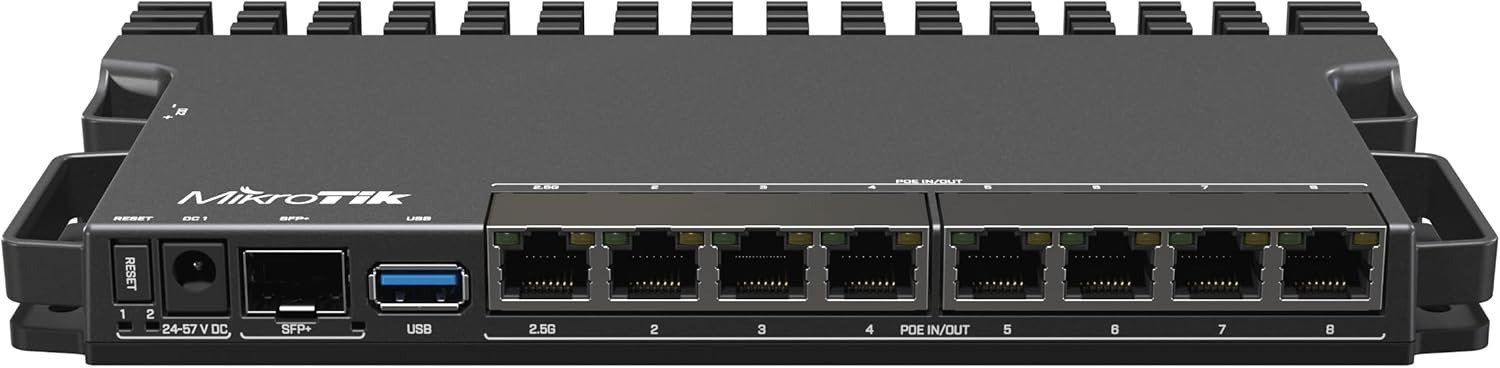
MIKROTIK RB5009UPR+S+IN
A weak router rarely fails with drama. It fails with little humiliations. A camera that drops at midnight. An access point that reboots when the room fills up. A cabinet that slowly turns into a nest of injectors, adapters, heat, dust, and excuses. The result still looks “fine” from a distance. The network is the thing that keeps blinking. I am not writing this from a glossy first impression. I am writing from the point where the spec sheet, MikroTik’s own test data, lab review notes, and buyer feedback start telling the same story: the RB5009UPr+S+IN is not a beauty purchase. It is a threshold purchase. It becomes logical when power disorder, port sprawl, and uptime anxiety start living in the same box.
The Result Looks Fine. The Problem Isn’t.
Most people do not shop for a router because routing failed. They shop because the room around the router got ugly first. One injector for an access point. Another for a camera. A separate switch because ports ran out. Another power brick because the first one could not feed everything. Then the shelf starts looking like a compromise you keep postponing instead of a system you chose.
That is the first reason this MikroTik pulls attention. It compresses roles that are usually scattered across too many boxes: 7x 1GbE ports, 1x 2.5GbE port, 1x 10G SFP+ cage, PoE-out on Ether1 through Ether8, three DC input paths, and a metal body that doubles as a passive heatsink. ServeTheHome also notes the chassis is fanless and silent, which matters more than people admit when the router sits in a study, a wall panel, or a small rack near where humans actually live.
What you see What is usually happening underneath
“The internet mostly works.” The topology is already messy and one device failure ripples wider than expected.
“I only need a router.” You actually need routing, power distribution, cleaner cabling, and fewer failure points.
“I’ll add one more box later.” Later becomes the permanent design language of the network.
That is why this product attracts homelab owners, small offices, and demanding smart-home builders. Not because it looks luxurious, but because it removes hardware clutter that was silently becoming operational debt. That pattern shows up both in professional review coverage and in buyer comments that praise the compact metal body, passive cooling, and the ability to eliminate separate injectors.
What You’re Actually Feeling but Not Naming
The irritation here has a shape. It is not “slow internet.” It is intervention burden.
You are tired of touching the network.
You are tired of tracing power.
You are tired of needing one more device to make another device behave.
That is what owners keep circling around in their reviews, even when they do not use that language. One buyer described it as a compact wall-panel-friendly solution that removed the need for PoE injectors; another praised it for keeping VoIP, APs, and core connectivity alive while a larger switch could shut down to preserve UPS runtime. On the other side, experienced buyers also warn that this is not casual hardware: the interface and planning requirements punish people who buy first and think later.
I would name the friction this way:
Hidden friction What it feels like in real life
Maintenance dread You postpone network changes because every change touches too many parts.
Power ambiguity You know devices are “supported,” but you do not trust the power path.
Cabinet creep The installation keeps growing sideways instead of becoming cleaner.
The RB5009UPr+S+IN is attractive because it attacks all three at once. That is also why it is easy to misbuy.
The Hidden Mechanism Behind the Miss
The hidden variable is not throughput first. It is power architecture.
MikroTik built this model around unusually flexible powering: PoE-in support, PoE-out on all eight Ethernet ports, a 2-pin connector, a DC jack, and a wide 24–57V input range. The board selects the highest-voltage available source, reserves power for itself, and lets you prioritize PoE-out ports when total power becomes constrained. Each PoE-out port can supply up to 25W, but the combined PoE-out budget is capped at 130W, and the unit’s total max consumption is listed at 150W. MikroTik’s brochure also states the board reserves 20W for itself before shedding lower-priority PoE loads if power is insufficient.
That sounds simple until you notice the trap: PoE-out is only as good as the power you feed the box. The official spec says PoE-out is “same voltage as supplied,” and 802.3af/at PoE-out requires 44–57V input. In plain English: this router is not a magic power generator. It is a disciplined distributor. Feed it weakly, and the fantasy collapses.
That exact misunderstanding appears in the field. One forum thread shows an installer expecting the advertised budget to carry several APs, then discovering the bundled 48V 2A supply changed the usable reality; once they moved the AP load elsewhere, stability returned. Another thread discusses overload and reboot behavior when PoE demand or firmware behavior becomes part of the equation.
This is the part many buyers miss because product pages train them to count ports, not electrical consequences.
The Threshold Where the Outcome Quietly Breaks
Here is the threshold I would use for this device:
The RB5009UPr+S+IN stops being a clever all-in-one idea the moment your network depends on it behaving like a full PoE switch and a high-end encrypted edge box at the same time.
That is the break point.
Not because the unit is weak. Because it is specific.
MikroTik’s own routing tests show excellent numbers in fast-path conditions and large packets, but performance drops sharply once you add heavy policy overhead or small-packet work. Routing with no fast-path overhead reaches around 9.85 Gbps with 1518-byte packets, while routing with 25 IP filter rules drops to roughly 3.1 Gbps at 512-byte packets and 414 Mbps at 64-byte packets. ServeTheHome makes the same broader point: for most users, 2.5GbE workloads are fine, but this is not the box you buy expecting elite 10GbE encrypted routing behavior.
Threshold zone What happens
Clean routing, sensible filtering, sane PoE loads The router feels compact, quiet, and almost smugly efficient.
Heavy filtering, tiny packets, crypto-heavy expectations The CPU starts mattering in a way the port count hides.
Multi-device PoE with underplanned input power Reboots, brownouts, or unstable edge behavior become far more likely.
There is a second threshold too: PoE-in expectations. The official brochure and user manual state 802.3af/at PoE-in is only on Ether1; the other Ethernet ports support reverse PoE/passive scenarios, not a free-for-all standards buffet. That distinction matters if you imagined any random injector or power method would behave identically across all ports.
Why Most Buyers Misread This Too Early
Because they read the front panel like consumers and the backend behaves like infrastructure.
Seven gigabit ports. One 2.5GbE. One 10G SFP+. Eight PoE-capable Ethernet ports. Silent chassis. Compact body. On paper, that looks like a tiny monster. And it is. But only if you read the sentence all the way to the end.
The real sentence is this: tiny monster for people who plan power, topology, and RouterOS behavior on purpose.
Amazon feedback captures both halves of the truth at once. The overall sentiment is strong—4.8/5 from 114 global ratings, with 89% of reviews at five stars—but the most useful positive reviews are not naïve praise. They praise stability, flexibility, clean cabinet installs, VLAN/QoS/firewall handling, and the way the box rewards people who know what they are building. The sharpest caution is equally consistent: the interface is not for everyone, there is no wireless built in, and planning the PoE setup matters before you buy, not after.
A lazy comparison asks, “How many ports do I get?”
A smarter one asks, “What kind of labor does this remove, and what kind of competence does it demand back?”
That is the real split.
Who Is Actually Inside This Problem
You are inside this problem if your network is no longer a single-router story.
You have access points. Cameras. A VoIP base. Maybe a smart-home relay. Maybe a fiber handoff you do not want to babysit. Maybe a rack is too much, but a cheap plastic home router has already become an insult.
This is where the RB5009UPr+S+IN starts making emotional sense without needing emotional language. The product is compact enough for a low-current wall panel or a narrow cabinet, and several users explicitly mention that the metal enclosure and small footprint make it easier to place beside an ONT, modem, and power gear without the usual pileup. With the optional K-79 accessory, MikroTik says you can mount four units in a single 1U space.
If I were placing it in a real room, I would not treat it like décor. I would treat it like a quiet piece of industrial order. In a structured cabinet, it cleans the visual field because the cables stop multiplying through extra injectors. In a built-in wall panel, it changes the feel of the installation from improvised to deliberate. The gain is not only network performance. It is spatial dignity.
Best-fit environment Why it fits
Smart home with multiple APs/cameras PoE-out reduces injectors and simplifies power distribution.
Small office edge VLANs, QoS, firewalling, and mixed uplinks make sense here.
Quiet homelab Fanless operation, SFP+, 2.5GbE, and RouterOS flexibility land well.
Where Wrong-Fit Begins
Wrong-fit starts where convenience buyers walk in.
If you want plug-and-play Wi-Fi, this is the wrong box. If you want an app-first consumer experience, wrong box. If your plan requires the router to moonlight as a full-fat PoE switch for a hungrier deployment, wrong box. If your decision hinges on maximum IPsec horsepower, there are cleaner answers. MikroTik’s own IPsec test tables show performance is respectable in their benchmark setup, but experienced forum users still warn there is no hardware IPsec acceleration here and real-world crypto-heavy use can push you toward stronger MikroTik lines such as CCR models.
The wrong-fit signs are easy to name:
You want the router to think for you.
You need broad multigig client switching, not mostly gigabit edge work.
You expect every PoE story to work out because the headline number looked generous.
You are buying RouterOS hardware but resent RouterOS learning.
One of the best Amazon summaries called it “the mighty mini router that rewards nerds and punishes the unprepared.” That is blunt. It is also fair.
The One Situation Where This Product Becomes Logical
It becomes logical when your network’s real problem is not “I need a faster router,” but:
“I need one compact, silent, wired core that can route cleanly, feed several low-to-moderate PoE devices, survive messy power scenarios better than consumer gear, and stop the cabinet from turning into a power strip sculpture.”
That is the situation.
In that situation, the RB5009UPr+S+IN is not merely attractive. It is unusually coherent.
Here is the practical shape of that coherence:
Core spec Why it matters in the real world
7x 1GbE + 1x 2.5GbE + 1x 10G SFP+ You get flexible WAN/LAN roles and a credible uplink path without buying a bulky chassis.
PoE-out on Ether1–Ether8 APs, phones, cameras, and low-draw edge gear can be powered directly.
24–57V input range, DC jack + 2-pin + PoE options Redundancy planning gets easier and cleaner.
1GB RAM, quad-core 1.4GHz ARM64, Marvell switch chip Enough brains for serious edge work, not endless fantasy workloads.
Fanless metal case Quiet deployment and passive heat handling matter more than spec-sheet glamour.
These specifications come directly from MikroTik’s product sheet and brochure, while the silence and low idle draw are reinforced by ServeTheHome’s review.
And this is the part I like most: the box does not beg for attention. It just removes junk. Fewer injectors. Fewer adapters. Fewer weak links. In infrastructure, that kind of elegance ages well.
What It Solves, What It Reduces, and What It Still Leaves to You
What it solves:
It gives you a dense wired edge with useful uplink flexibility.
It cuts cable and injector clutter in PoE-aware installs.
It offers a far more serious control surface than ordinary home routers.
It can stay quiet, cool, and compact while doing grown-up work.
What it reduces:
Cabinet sprawl.
Power-path confusion.
The need to bolt on extra boxes just to make the network feel complete.
What it still leaves to you:
You still have to size power correctly.
You still have to respect PoE standards and voltage realities.
You still have to understand RouterOS well enough to avoid blaming the hardware for your own design shortcuts.
You still may need a separate switch if your world is truly multigig-heavy or your PoE appetite grows beyond what this form factor should be asked to carry.
That is why I would not call it universally “worth it.” I would call it cleanly justified for a narrow but very real kind of buyer.
Final Compression
If your break point is raw simplicity, do not buy this.
If your break point is Wi-Fi-in-one-box, do not buy this.
If your break point is extreme encrypted throughput, do not buy this.
But if your network has reached that irritating stage where power, ports, uptime, and physical clutter are all rubbing against each other at once, the MikroTik RB5009UPr+S+IN stops looking expensive and starts looking honest. It is a compact wired core for people who want fewer boxes, fewer excuses, and a topology they can finally respect. The hardware is strong. The owner sentiment is strong. The limits are also real. That combination is exactly why I trust it.
Transparency Note:
This analysis is built on aggregated real-world experience.
It extracts what repeatedly holds, what breaks, and what users uncover only after living with the system—then shapes it into a clear model you can use immediately.
Think of it as structured experience, refined and presented so you don’t have to learn it the hard way.
“A quick note: Don’t believe the star ratings, but trust personal experience. This article is a compilation of collected experiences”