My Lutron Caseta P-PKG1WB-WH Review: The Dimmer Works — But It Doesn’t Work for Every Situation You Think It Does
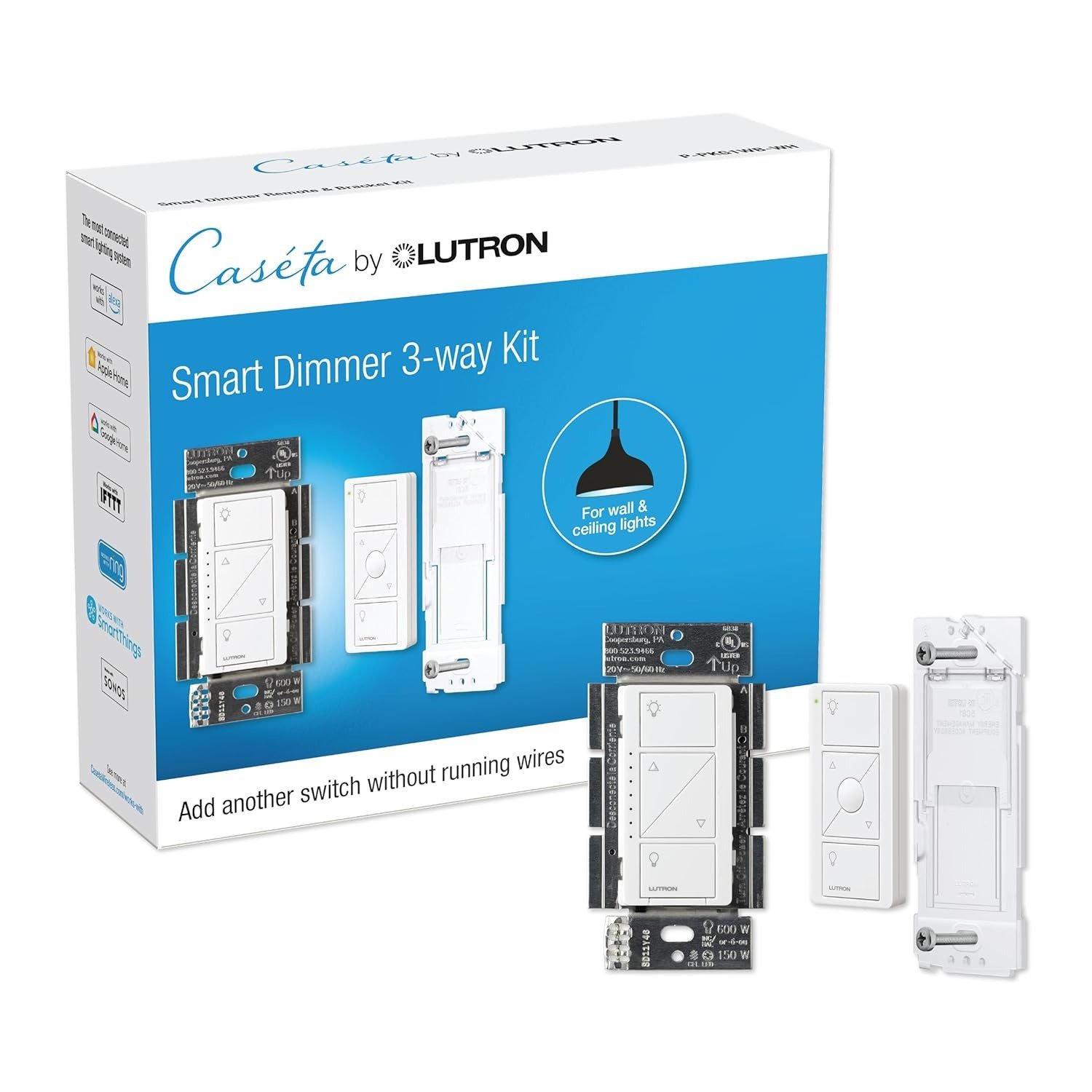
LUTRON CASETA P-PKG1WB-WH
The Light Dims. The Problem You’re Solving May Not Be What You’re Calling It.
You installed a smart dimmer before. Or you watched someone do it. Or you’ve been reading for two weeks and the specs seem clear enough — 150W, no neutral required, works with Alexa, Pico remote included.
The decision feels close. The product seems obvious.
That’s usually when the wrong purchase gets made.
Not because the Lutron Caseta P-PKG1WB-WH is a bad product. It isn’t. But “it works” and “it solves your problem” are not the same sentence, and most reviews — including the enthusiastic five-star ones — don’t separate them clearly enough.
The real issue isn’t whether this dimmer functions. It’s whether the system you’re imagining in your head matches the system you’re actually about to buy. There’s a gap there that costs people money, time, and a second Amazon order.
This review maps that gap.
What You’re Actually Feeling But Not Naming
The friction that leads people to this product usually sounds like one of these:
“My 3-way switch setup is annoying — I have to walk to the other end of the hallway to turn off the light I already dimmed.”
“I want voice control without rewiring my 1987 house.”
“I need a second control point for a light without cutting drywall.”
“I want scheduling and geofencing but I don’t want a complete smart home overhaul.”
None of these are product problems. They’re wiring architecture problems — and what makes this kit unusual is that it approaches them without touching your wiring architecture at all.
The Pico remote inside this box is not a bonus accessory. It is the core mechanism. It communicates via Lutron’s proprietary Clear Connect RF protocol — not Wi-Fi, not Bluetooth — and it mounts to any wall surface with a bracket, no gang box required, no holes, no wire pulls. That’s the actual value proposition most people misread when they see “includes remote.”
The question isn’t whether the remote is convenient. The question is whether your problem is a second-control-point problem or something else entirely.
The Hidden Mechanism Behind the Miss
Here is what the spec sheet doesn’t explain clearly:
This kit — the P-PKG1WB-WH — does not include the Caseta Smart Hub.
The dimmer switch and Pico remote will work together locally, without the hub, as a manually controlled dimmer with wireless secondary control. That works. You press the Pico, the light responds. Reliable, fast, no latency.
But the entire ecosystem layer — app control, scheduling, geofencing, Alexa, Google Assistant, Apple HomeKit, Smart Away, Sunset Tracker — none of that activates without the L-BDG2-WH Smart Hub, sold separately at approximately $80–90.
This creates a decision fork that the packaging does not make obvious:
| What You Assume | What You’re Actually Getting |
|---|---|
| App control from anywhere | Only if you add the hub |
| Voice commands via Alexa | Only if you add the hub |
| Scheduling & scenes | Only if you add the hub |
| Apple HomeKit | Only if you add the hub |
| Local dimmer + Pico remote | ✅ Included in this kit |
| No neutral wire required | ✅ Works in any home age |
| 3-way setup without extra wiring | ✅ Via Pico wall mount |
If you already own the hub from a previous Caseta purchase, this kit is exactly right — an expansion unit at the correct price.
If you don’t own the hub and you want the full ecosystem, the actual entry cost is this kit ($50–60) plus the hub ($80–90), totaling roughly $130–140 for one dimmer location with full smart control.
That number changes the purchase decision for some people. Not because it’s unreasonable — for what Lutron delivers, it isn’t — but because the mental model going in was different.
The Threshold Where the Outcome Quietly Breaks
Lutron Caseta runs on Clear Connect, its own 434 MHz RF protocol. This is not Wi-Fi. This is not Z-Wave. This is not Zigbee. It is Lutron’s proprietary band, chosen specifically because it does not compete with the 2.4 GHz spectrum your router, your neighbors’ routers, your microwave, and your baby monitor all share.
The practical consequence: in dense Wi-Fi environments — apartment buildings, urban townhomes, older homes with thick plaster walls — Caseta switches maintain response where Wi-Fi-native competitors like TP-Link Kasa or Leviton Decora Smart frequently don’t.
This is the threshold that matters:
| Condition | Caseta Behavior | Wi-Fi Native Dimmer Behavior |
|---|---|---|
| Dense neighbor Wi-Fi | Unaffected | Intermittent dropout |
| Wi-Fi router restart | Functions locally | May lose pairing temporarily |
| Peak bandwidth hours | No degradation | Possible lag |
| Power outage + restore | Returns to last state | Varies by brand |
| Walls, distance | Clear Connect range ~30ft through walls | 2.4 GHz degrades faster |
The reliability gap is real and it shows up not at installation — where everything works — but three months in, at 11pm, when the light doesn’t respond and you’re not sure if it’s the switch, the app, or your ISP.
That specific failure mode is what Lutron’s architecture was built to prevent. It does prevent it. This is not marketing language — it’s the reason HVAC engineers, professional integrators, and people who’ve been burned by Insteon or Wink shutting down have landed on Caseta as their stable platform of record.
Why Most Buyers Misread This Too Early
The most common misread happens at the comparison stage.
Someone prices this kit at $55 and sees a TP-Link Kasa dimmer at $19, or a Leviton at $29, and reads: “Why would I pay three times as much for a dimmer switch?”
The answer is that you are not buying a dimmer switch. You are buying a position in a protocol ecosystem that does not depend on your Wi-Fi router’s health, your ISP’s uptime, or a cloud service’s continued operation.
The second misread: “It says no neutral wire required — that means I can install it anywhere.”
Partially true. No neutral is required for the switch itself. But:
- Your bulbs must be dimmable LED, incandescent, or halogen — not non-dimmable LED drivers, not magnetic low-voltage transformers, not certain commercial-grade LED fixtures.
- A minimum load exists (roughly 10W) — very low wattage circuits with a single small LED may exhibit ghost glow or flicker at the off position, caused by the leakage current the switch needs to power its own control circuitry without a neutral wire.
- Lutron publishes a compatibility list; non-listed bulbs are not guaranteed to dim cleanly.
The third misread: “The Pico remote is a nice-to-have.”
As noted above — in this kit, the Pico remote is the 3-way solution. If you only want a single control point and you’re not expanding to a second switch location, the Pico wallmount bracket included in this box is irrelevant to you. The P-PKG1WB-WH without hub, for a person who only wants one switch location and already has a single-pole setup, is the wrong configuration to buy.
Who Is Actually Inside This Problem
The P-PKG1WB-WH without hub is the correct product for:
- Someone who already owns a Caseta Smart Hub and is adding a second or third switch location.
- Someone who needs a 3-way lighting setup — two control points for one light — without rewiring.
- A homeowner in a pre-2000 house with no neutral wire in the switch box.
- Someone in a building where Wi-Fi instability is a known, recurring issue.
- Anyone who prioritizes long-term platform reliability over lowest upfront cost.
- People expanding an existing Caseta ecosystem room by room.
The P-PKG1WB-WH with the hub added separately (or the P-BDG-PKG1W starter kit instead) is the correct product for:
- Someone building Caseta from scratch who wants full app + voice control.
- Homeowners who want scheduling, geofencing, Smart Away, and Sunset Tracker active.
Where Wrong-Fit Begins
This product is the wrong choice if:
You need to control non-dimmable LED fixtures. Drivers built into certain recessed lights, strip lights, or commercial-spec fixtures don’t respond to forward-phase dimming — the method Caseta uses. The result ranges from flicker to complete incompatibility. Check Lutron’s online compatibility tool before purchasing.
You want the full smart ecosystem but aren’t planning to buy the hub. Without it, this becomes an expensive wireless dimmer with a wall-mount remote — functional, but not the smart home device you’re imagining.
You’re running a very low-wattage circuit. A single 4W LED bulb on a no-neutral dimmer creates ghost glow — a faint but visible light at the “off” state. This is physics, not a defect, but it is annoying in dark rooms.
You want a fan speed controller. Caseta makes a separate fan control product. This dimmer controls lights only. Using a light dimmer on a fan motor damages the motor.
You want a switch aesthetic that matches Decora-style rocker plates throughout your home. The Caseta original dimmer has its own paddle aesthetic. Lutron offers the Diva smart dimmer (DVRF-6L) in the Caseta ecosystem for those who want a Decora-matching form factor, at a higher price.
You’re buying this as a budget smart switch. It isn’t one. The platform investment is real. If your primary filter is lowest cost per switch, this is not your product.
The One Situation Where This Product Becomes Logical
You have a light controlled from two locations. The wiring predates 2000. Your switch box has no neutral wire. You’ve already — or are planning to — anchor your lighting control in the Caseta ecosystem for reliability in a Wi-Fi-dense or multi-wall environment. And you want the second control point to mount cleanly without a contractor visit.
In that situation, the P-PKG1WB-WH is not just a reasonable choice. It is the structurally correct one.
The Pico remote in this kit has a 10-year battery life. The Clear Connect protocol has no router dependency. The dimmer itself handles up to 150W of dimmable LED load — up to 17 bulbs on one circuit. The system expands: each dimmer can be paired to up to 10 Pico remotes, and the hub (when added) connects to every major smart ecosystem simultaneously — Alexa, Google Assistant, Apple HomeKit, Ring, and Sonos, all at once, without choosing sides.
That last point matters more than people realize. The platform doesn’t force you out of any ecosystem. It bridges them.
| Feature | Specification |
|---|---|
| Model | P-PKG1WB-WH |
| Max Load (Dimmable LED) | 150W |
| Max Load (Incandescent/Halogen) | 600W |
| Neutral Wire Required | No |
| Protocol | Clear Connect RF (434 MHz) |
| Hub Required for Full Smart Function | Yes (sold separately: L-BDG2-WH) |
| Pico Remote Battery Life | ~10 years |
| Compatible Ecosystems (with hub) | Alexa, Google, Apple HomeKit, Ring, Sonos |
| Pico Remote Range | ~30 ft through walls |
| Devices per Hub | Up to 75 |
| Picos per Dimmer | Up to 10 |
What It Solves, What It Reduces, and What It Still Leaves to You
What it solves:
The 3-way control problem without rewiring. The no-neutral-wire installation barrier. The RF reliability gap in Wi-Fi-congested environments. The single-ecosystem lock-in problem.
What it reduces:
Ghost glow risk (manageable, not eliminated — use Lutron’s compatible bulb list). The complexity of 3-way smart switching versus other brands that require replacing both physical switches.
What it still leaves to you:
The hub purchase if you want app and voice control. The bulb compatibility check before you install. The faceplate decision — the Pico remote wallplate bracket is included, but the decorative wallplate itself is sold separately. The decision about whether to expand the ecosystem further, or stop at one switch.
Where the regret starts:
Buyers who purchase this kit expecting full voice control without the hub, or who install it on non-compatible LED drivers, or who choose it as a budget entry point when their actual use case is a single-pole switch in a modern wired home. In each of those cases, a different product at a lower price would have served them better.
Final Compression
The Lutron Caseta P-PKG1WB-WH is not a general-purpose smart dimmer for the lowest-cost-seeking buyer. It is a precision fit for a specific structural problem: wireless 3-way lighting control in homes without neutral wires, inside a protocol ecosystem built for long-term reliability over cheap Wi-Fi dependency.
If you already own the Caseta hub and need to add a second dimmer location with a second control point, buy this.
If you’re starting from scratch and want full app and voice control, add the hub — either separately or by purchasing the P-BDG-PKG1W starter kit, which bundles the hub with the dimmer.
If your problem is different — single-pole modern wiring, budget priority, non-dimmable LEDs, fan control — your product is different.
The decision stops being vague the moment you know which of those situations you’re actually in.
Frequently Asked Questions
| Question | Answer |
|---|---|
| Does the P-PKG1WB-WH include the Caseta Smart Hub? | No. This kit includes one dimmer switch, one Pico remote, and one wall mount bracket. The Smart Hub (L-BDG2-WH) is sold separately. Without it, the switch and Pico work together locally, but app control, voice assistants, scheduling, and geofencing are not available. |
| I don’t have a neutral wire in my switch box. Will this install? | Yes. Caseta is specifically engineered to work without a neutral wire, making it compatible with virtually any home wiring age. However, very low-wattage LED circuits (under ~10W) may exhibit ghost glow at the off position due to the leakage current mechanism the switch uses to power itself. |
| Will my LED bulbs work with this dimmer? | Only dimmable LEDs are compatible. Non-dimmable LED drivers — common in certain recessed retrofit fixtures, strip lights, and commercial-grade fixtures — are not compatible and may flicker or sustain damage. Check Lutron’s online compatibility tool with your specific bulb model before purchasing. |
| Why does Caseta use its own protocol instead of Wi-Fi? | Lutron’s Clear Connect operates at 434 MHz, outside the congested 2.4 GHz Wi-Fi band. This eliminates interference from neighboring networks, routers, and household devices, producing more consistent response times and eliminating the dropout pattern common in Wi-Fi-native smart switches in dense residential environments. |
| Can I use this dimmer to control a ceiling fan? | No. This is a light dimmer only. Using a dimmer on a fan motor damages the motor’s windings over time. Lutron makes a separate Caseta fan speed controller (PD-FSQN) for that application. |
| What happens to my lights if my Wi-Fi goes down? | The Pico remote and wall switch continue to function normally — the Clear Connect RF link between them is independent of your router and internet connection. Only app-based remote control and voice assistant commands (which route through the hub’s cloud connection) become temporarily unavailable. |
| How many switches can I add to one Caseta hub? | The L-BDG2-WH hub supports up to 75 devices. Each individual dimmer switch can be paired with up to 10 Pico remotes simultaneously. |
| Is the Pico remote faceplate included? | The wall mount bracket is included in this kit. The decorative wallplate that covers the bracket is sold separately. This is a frequent oversight buyers discover after installation. |
Transparency Note:
This analysis is built on aggregated real-world experience.
It extracts what repeatedly holds, what breaks, and what users uncover only after living with the system—then shapes it into a clear model you can use immediately.
Think of it as structured experience, refined and presented so you don’t have to learn it the hard way.
“A quick note: Don’t believe the star ratings, but trust personal experience. This article is a compilation of collected experiences”