WYZE LOCK BOLT REVIEW: THE DOOR LOCKS FINE. GETTING BACK IN IS THE TEST.
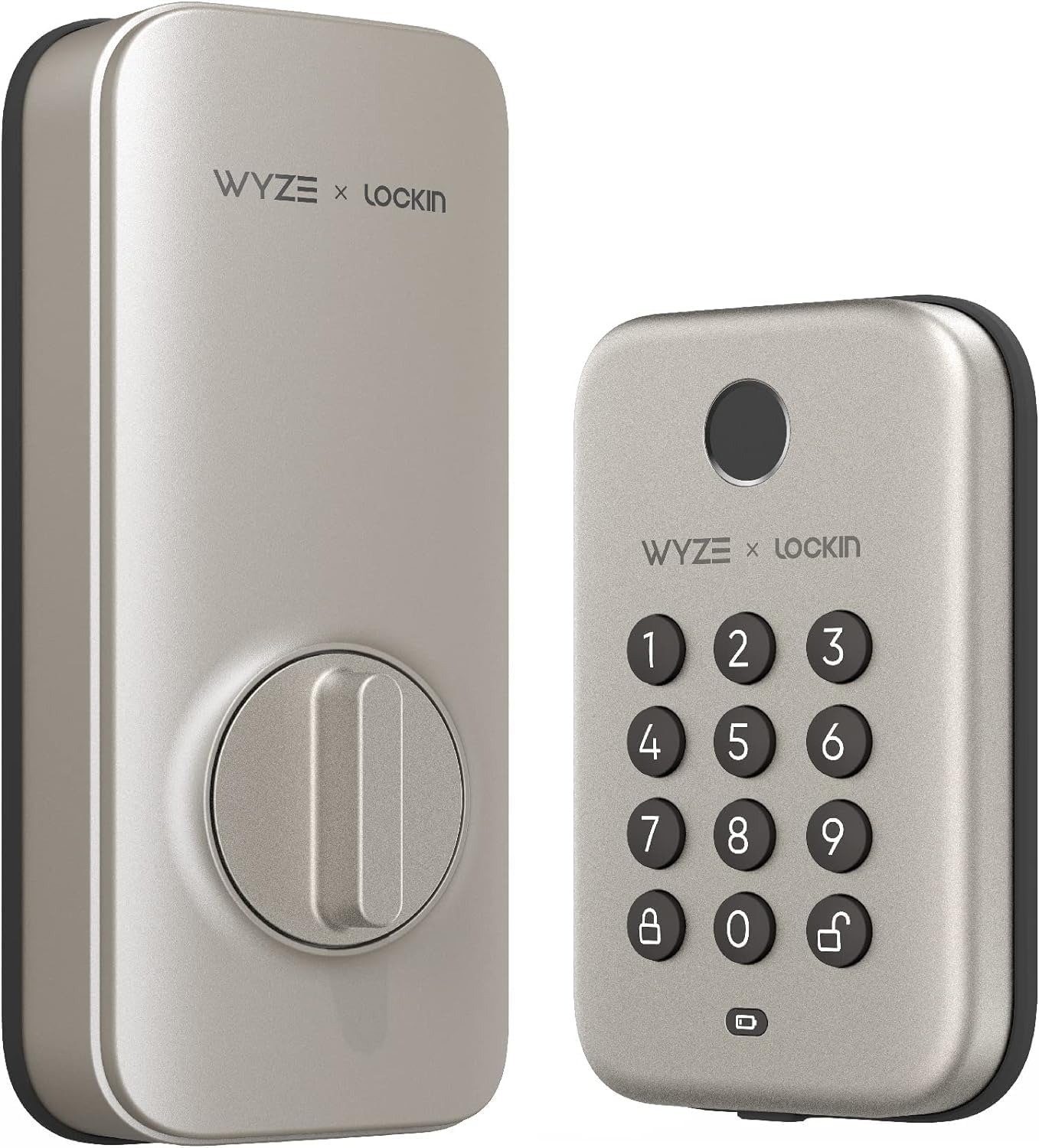
WYZE LOCK BOLT
It’s 11 p.m., your hands are cold, and the little light under your finger just blinked red for the third time. There’s no keyhole to dig a spare key into, because there isn’t one. That’s the exact moment most buyers find out what they actually installed on their front door.
I went through everything Wyze has published on the Lock Bolt, plus the professional teardown reviews, the support documentation, the owner forums, and the retailer reviews left by verified buyers months after the honeymoon period ended — not the unboxing version, the version that shows up in January, or after the fortieth guest code, or the day the batteries finally die at the worst possible time.
Here’s what that actually shows.
Wyze Lock Bolt Problems: The Result Looks Fine, The Issue Isn’t
On day one, this lock is hard to dislike. Installation runs about 20 to 30 minutes on a standard deadbolt prep, the app finds the lock in under ten seconds, and setting your first code and fingerprint takes another couple of minutes. It’s carrying roughly a 4.4-out-of-5 average across more than 1,200 ratings on Wyze’s own site as of this writing, and reviewers who’ve tested dozens of smart locks keep landing on the same note: for a fingerprint deadbolt under $80, the hardware feels more solid than it has any right to.
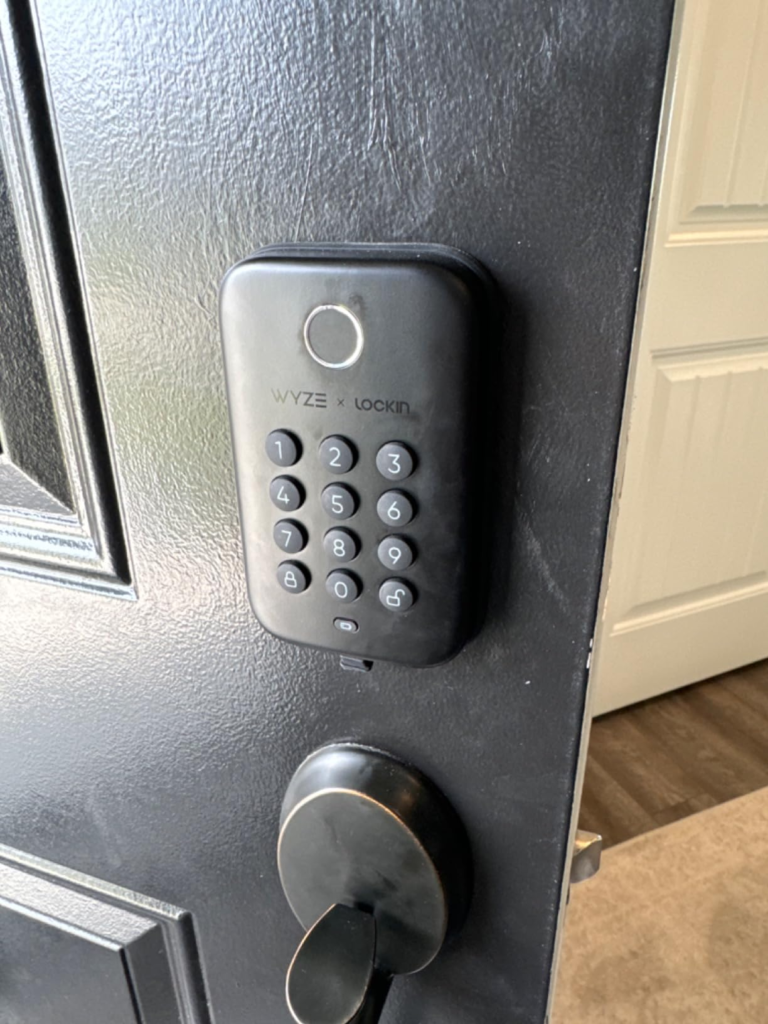
That’s not the part I’d worry about. Here’s the quick picture before we go further:
| Spec | Detail |
|---|---|
| Finish (this listing) | Satin Nickel |
| Unlock methods | Fingerprint, keypad code, Bluetooth app, one-time code |
| Fingerprint storage | Up to 50 fingerprints |
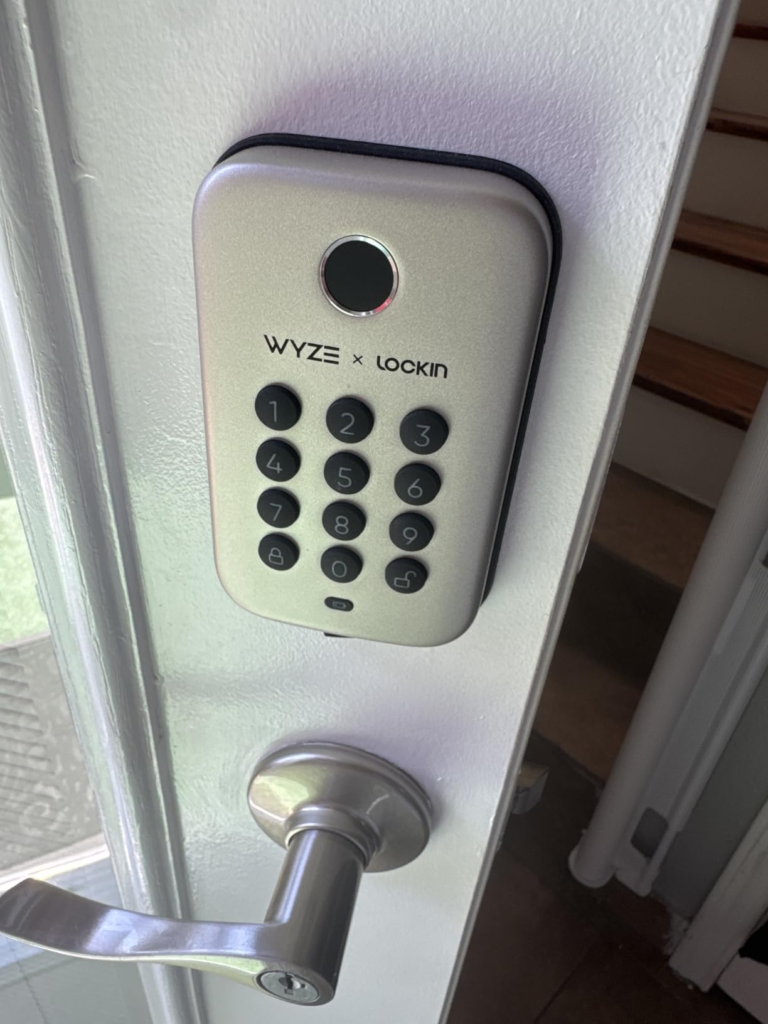
| Connectivity | Bluetooth 5.0 only, about 16 ft of range — no built-in Wi-Fi |
| Remote access | Only through a paired Wyze Video Doorbell, and unlock-only |
| Voice assistants | Not supported (Bluetooth-only devices can’t pair with Alexa or Google) |
| Battery | 4x AA, roughly 10–12 months, plus a USB-C emergency power port |
| Weatherproofing | IPX5 (rain and spray resistant, not submersible); keypad rated -13°F to 122°F |
| Physical key backup | None |
| Typical price | Roughly $70–85 depending on retailer and sales |
Every line in that table is accurate on its own. Nothing here is a lie, an omission, or a marketing trick. But two of those rows — connectivity and physical key backup — quietly decide whether you’re happy with this lock in six months or writing a one-star review. The rest of this piece is really just an explanation of those two rows.
Wyze Lock Bolt Auto-Lock: What You’re Actually Feeling but Never Named
Why does your brain always ask the same dumb question halfway down the driveway — did I actually lock that? Nobody names this as a “problem” when they go shopping for a lock. It just feels like low-grade background static that follows you out the door.
Wyze’s answer is Auto-Lock — set a delay anywhere from 15 seconds to 15 minutes, and the deadbolt throws itself. It works. It also has a blind spot worth knowing about before it surprises you: the lock can’t sense whether the door is actually closed. Prop it open to carry in groceries or move furniture, and Auto-Lock doesn’t know that. It’ll still try to fire on schedule, throwing the bolt into open air instead of the frame. Minor thing, until the one day it isn’t.
My advice: treat Auto-Lock as a safety net, not a replacement for glancing back at the door.
Wyze Lock Bolt Fingerprint Sensor: The Hidden Mechanism Behind the Missed Scan
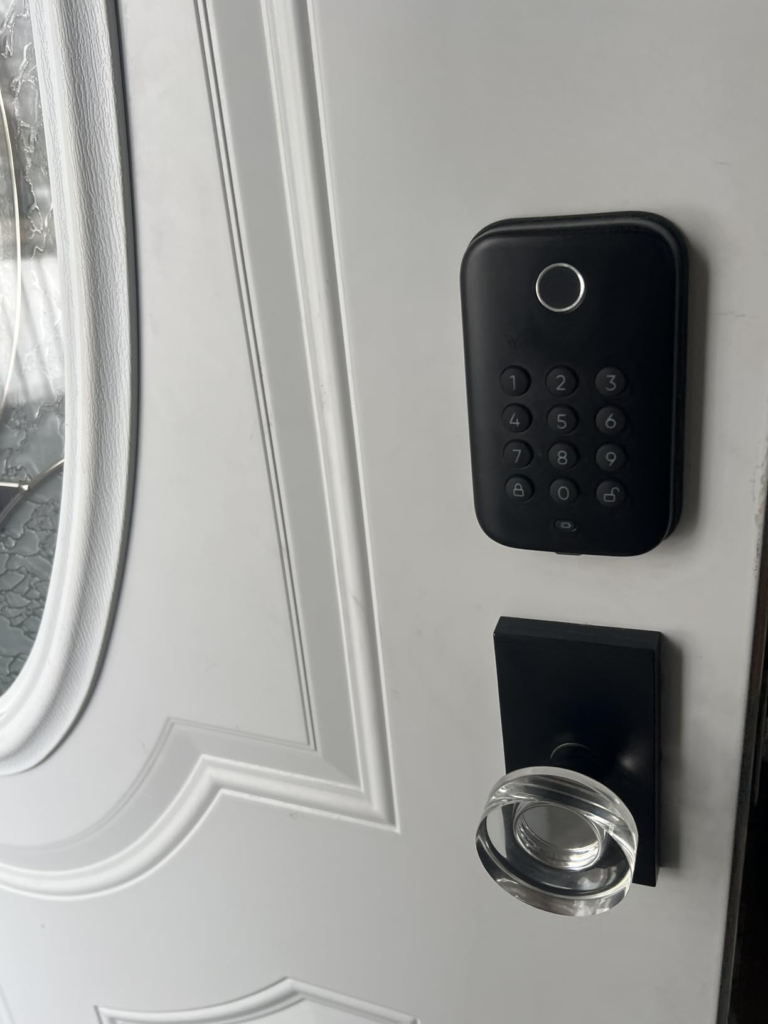
Why does a sensor that read your thumb perfectly yesterday suddenly hesitate today? Here’s the part almost nobody explains properly. A capacitive fingerprint sensor — the same tech in your phone — isn’t reading a picture of your finger. It’s reading the tiny electrical map created by your skin’s ridges touching the plate. Change the moisture, the temperature, or the ridges themselves, and you change that map.
That’s why Wyze’s own troubleshooting guidance doesn’t say “the sensor is broken.” It says check for oil, water, or debris on your finger, moisturize dry hands before scanning, wipe the sensor with a soft cloth, and enroll the same finger more than once for extra reference points. That’s not a workaround for a defect — it’s just how the physics behaves. Independent hands-on testing backs it up: reviewers who lived with the lock day-to-day clocked it around a 95 percent first-try success rate, with the occasional retry showing up mostly in cold or wet conditions.
| Condition | Why It Struggles | What Actually Fixes It |
|---|---|---|
| Cold, dry skin in winter | Ridges lose definition, weaker electrical read | Warm your hands or moisturize before scanning |
| Wet or greasy fingers | Sensor can’t map the ridge pattern clearly | Dry your hand fully first |
| Kids or small fingertips | Fewer usable data points on the plate | Enroll a thumb, or register the same finger twice |
| Smudged or dusty sensor | Physical debris sits between skin and plate | Wipe the glass with a soft, dry cloth |
None of this makes the lock unreliable. It makes it a biometric device behaving like every other biometric device on the market.
Wyze Lock Bolt No Key: The Threshold Where “Keyless” Quietly Becomes “No Way Back In”
This is the one I’d want to know before I bought it, not after.
The Wyze Lock Bolt has no keyway. Not a hidden one behind a panel, not a decorative one that doesn’t work — none, anywhere on the unit. Wyze states this plainly in its own support documentation, and goes further: if your home has only one entry point — a condo, an apartment, a townhouse with no back door — Wyze itself recommends against installing this lock, pointing you toward its other model that still takes a physical key.
That’s rare. Most brands write around a limitation like that. Wyze just says it outright.
Why remove the one thing every lock has carried for two centuries? Because a keyway is also the one thing every lock pick was ever designed to exploit. No keyway, nothing to pick — a genuine security upgrade over a traditional pin-tumbler deadbolt. But every “what if” you’d normally solve with a spare key now runs through the battery, the Bluetooth radio, and the motor instead. Tellingly, Wyze’s own owner forum has threads asking, plainly, what the plan is if the motor seizes completely, since there’s no mechanical override to fall back on.
Call it the Single-Door Threshold: if this lock is the only thing standing between you and your house, its failure mode isn’t inconvenient. It’s exclusion. If a second entry point exists, that same failure mode is just a Tuesday — you go in through the garage and deal with it later.
Wyze Lock Bolt vs Wyze Lock: Why Most Buyers Compare the Wrong Two Models
Two traps catch people here, and both are worth killing before you scroll further.
The first is name confusion. Wyze sells the “Lock Bolt” (this one — Bluetooth, no key, fingerprint), the older “Lock” (Wi-Fi, keeps a physical key, works with Alexa and Google), and a newer “Lock Bolt v2” (adds built-in Wi-Fi, a smarter self-learning fingerprint reader, and brings the key back). Reviews for all three get blended together online. If what you actually want is voice control or true remote access from a hotel room, you’re describing the Lock or the v2 — not this model, no matter how similar the name looks in a search result.
The second trap is price-shaming. Why does a $75 lock keep showing up next to a $230 one in the same search results? It’s tempting to assume the cheaper option must be cutting corners somewhere structural. Mostly, it isn’t. That price gap buys Wi-Fi radios, app-based remote access, and smart-home ecosystem tie-ins — not meaningfully better resistance to physical force. What you give up by choosing the Lock Bolt isn’t security. It’s convenience you may not have needed in the first place.
Wyze Lock Bolt Pros and Cons: Who This Lock Actually Fits
| You’re a Good Fit If… | Skip This Lock If… |
|---|---|
| Your home has a second entry point (garage, back door, side gate) | This is your only door, with no other way in |
| You want fingerprint entry without paying $200+ | You need to lock or unlock remotely from work or vacation |
| You already use Wyze cameras or a Wyze doorbell | You depend on Alexa or Google Assistant for your smart home |
| You don’t mind training the sensor for the first week | You want zero chance of ever re-scanning a finger |
| You’d rather have no keyway than a pickable one | You want a spare key cut “just in case” |
If you read that table and landed cleanly on one side, you already know more than most people do before they check out.
Wyze Lock Bolt Single-Entry Door: Where This Lock Becomes The Wrong Choice
Let me walk through the actual regret scenario, because it’s specific and it’s avoidable.
Someone rents a one-door apartment. The Lock Bolt looks sleek, costs a third of the competition, and goes on the door. Nine months later, on moving day: boxes everywhere, the phone charger is already packed onto the truck, and the one enrolled finger is coated in packing-tape residue the sensor won’t read through. There’s no keyhole to fall back on, because Wyze never built one into this model.
To be fair to Wyze, they engineered real outs for exactly this: the USB-C port under the rubber flap can give the lock enough emergency power to accept a code, and the app can generate one-time codes in advance that don’t need Bluetooth or Wi-Fi to work at the door. Both only help if you set them up before the bad day, not during it. No second door, and no pre-loaded backup code or power bank on hand — that’s the exact combination that turns a chaotic afternoon into a locksmith bill.
Wyze Lock Bolt Price: The One Situation Where It Becomes the Logical Choice
Strip away the edge cases, and one situation makes this an easy, rational purchase: you have another way into your home, you don’t need to control your door from three states away, and you want biometric entry without spending three times as much.
| Lock | Typical Price | Remote (Away From Home) | Fingerprint Entry |
|---|---|---|---|
| Wyze Lock Bolt | ~$70–85 | No (doorbell workaround only) | Yes |
| August Smart Lock | ~$200 | Yes | No |
| Yale Assure Lock 2 | ~$239 | Yes (with module) | Depends on module |
| Schlage Encode | ~$236 | Yes | No |
Fingerprint entry at this price is genuinely uncommon — most locks in the $70–100 range still make you type a code or tap an app every single time. That’s the real value here, not a sales pitch dressed up as one.
Wyze Lock Bolt Reliability: What It Solves, What It Reduces, and What Still Depends on You
| It Solves | It Reduces | It Still Depends on You |
|---|---|---|
| Fumbling for keys in the dark or with full hands | Forgetting to lock up (Auto-Lock) | Using fresh alkaline batteries, not rechargeables |
| Cutting spare keys for guests or dog-walkers | Someone reading your code over your shoulder (anti-peep) | Making sure the door is fully shut before Auto-Lock fires |
| The risk of your deadbolt being picked | Guessing who came and went (activity log) | Having a second entry point, or a pre-set backup code |
That’s the honest ceiling and floor of what this lock does. It doesn’t make your door invincible, and it doesn’t need to. It removes a specific, everyday annoyance and replaces it with a narrower, more manageable one — as long as you’re the household this piece has already described.
Wyze Lock Bolt FAQ: The Questions Worth Asking Before You Buy
Does the Wyze Lock Bolt work with Alexa or Google Assistant?
No. It’s a Bluetooth-only device, and Wyze confirms directly that it isn’t compatible with either voice platform. That capability exists on the newer Lock Bolt v2 and on the original Wyze Lock, not on this model.
Can I lock or unlock it remotely when I’m away from home?
Only in a limited way. Pair it with a compatible Wyze Video Doorbell, and you can unlock — not lock — from the doorbell’s live view. Without that doorbell, you need to be within roughly 16 feet for the app to reach it at all.
What happens when the batteries die?
A red indicator warns you in advance. If you miss it, a USB-C port under a rubber flap lets you plug in a power bank for a brief charge — just enough to punch in your code and get inside.
Is there a physical key backup?
No. This model has no keyway anywhere on the unit. That’s a deliberate trade for pick-resistance, not an oversight — but it means every backup plan has to be electronic: a charged phone, a pre-set one-time code, or a power bank.
How accurate is the fingerprint reader in real use?
Hands-on testing puts it around 95 percent on the first try, climbing higher once you’ve enrolled a finger more than once. Cold, wet, or dry skin is the most common reason for a second scan.
Will it fit my door?
It’s built for a standard single-cylinder deadbolt: a 2-3/8″ or 2-3/4″ backset and 1-3/8″ to 1-3/4″ door thickness. It won’t work on glass doors, sliding doors, or mortise locks — measure your door before you order.
Wyze Lock Bolt Verdict: Should You Actually Buy It
Here’s the whole decision compressed into one line: if your home has a second way in and remote access was never the point, the Wyze Lock Bolt gives you real fingerprint security for less than half of what the big Wi-Fi names charge. If this is your only door, or you already picture yourself unlocking it from an airport, you’re better served by the Lock Bolt v2 or the original Wyze Lock instead.
Transparency Note:
This analysis is built on aggregated real-world experience.
It extracts what repeatedly holds, what breaks, and what users uncover only after living with the system—then shapes it into a clear model you can use immediately.
Think of it as structured experience, refined and presented so you don’t have to learn it the hard way.
“A quick note: Don’t believe the star ratings, but trust personal experience. This article is a compilation of collected experiences.”