FLYEVFISH 15.6″ SMART HD ELECTRONIC CALENDAR REVIEW: THE SCREEN IS CRISP. MY MORNINGS WERE NOT.
flyEVfish Calendar Results — The Screen Looked Organized. The Household Was Not.
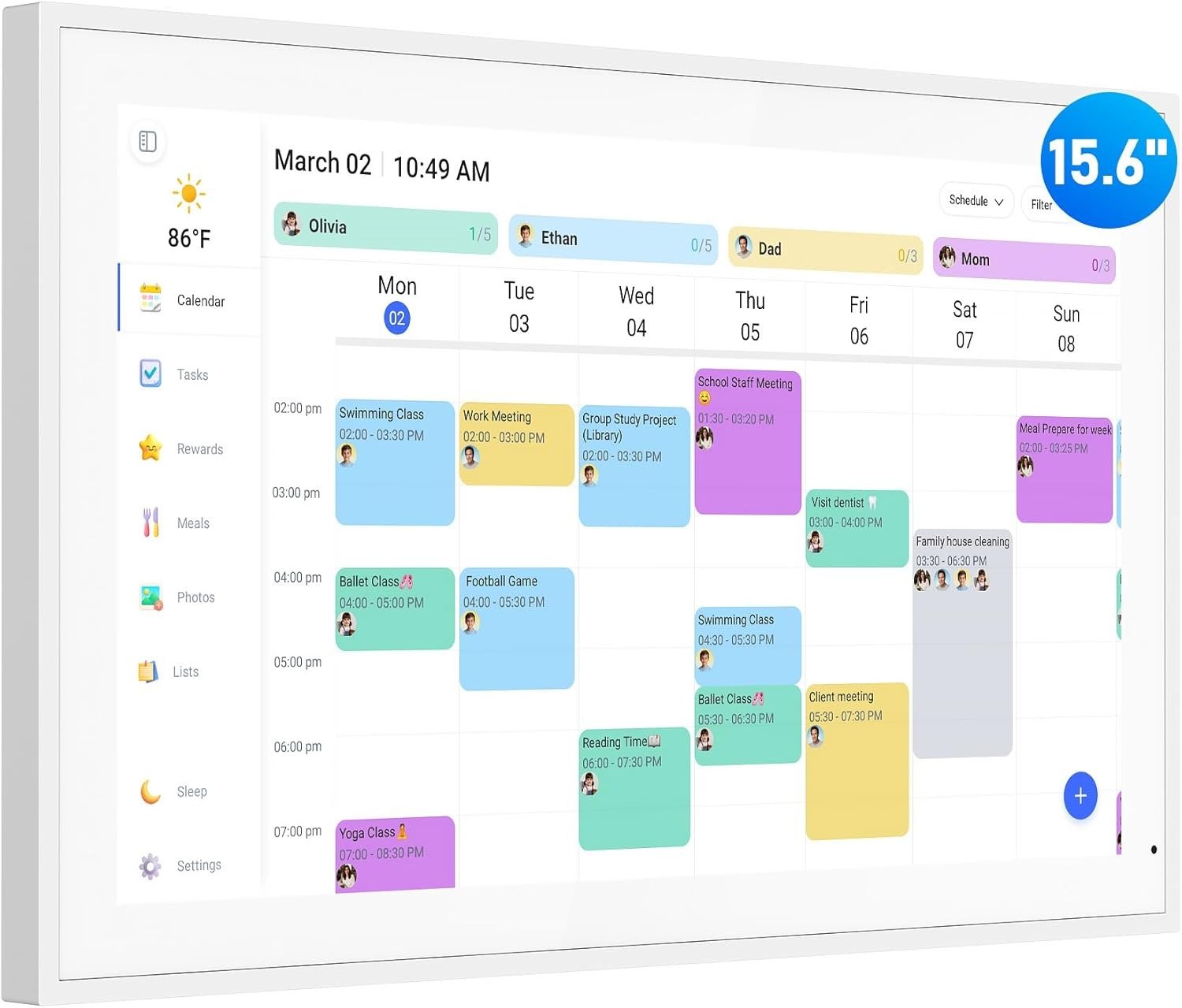
I mounted it on a Tuesday evening. Six minutes from box to live display. The white frame sat slim against the kitchen wall. The 15.6-inch screen lit up in clean 1080p and immediately pulled in our Google Calendar — color-coded, precise, every appointment visible from the sink.
Three days later, my daughter missed swim practice.
Not because the event wasn’t there. It was. Blue. 4:15 PM. Sitting in the weekly view exactly where I’d placed it. She simply never looked up.
That moment taught me what almost every buyer in this category misses: the real question isn’t whether a digital calendar displays your schedule. Nearly all of them do. The actual question is whether the device changes how a busy household physically moves through its day. Those are two entirely different problems — and this review is built around whether the flyEVfish 15.6″ actually solves the second one.
| Specification | flyEVfish 15.6″ Digital Calendar |
|---|---|
| Screen Size | 15.6″ Diagonal |
| Resolution | 1920 × 1080 IPS Full HD |
| Device Dimensions | 15.75″ × 9.84″ × 1.11″ |
| Internal Storage | 32GB (expandable) |
| Wi-Fi | Dual-band 2.4GHz + 5GHz |
| Calendar Sync | Google, Outlook, iCloud, Cozi, Yahoo |
| Mounting Options | Wall bracket + desk stand (both included) |
| Photo Frame Mode | AI-enhanced, auto-cycles family photos |
| Subscription Required | None for core features |
| Power Source | Plug-in only (US-style plug included) |
| Companion App | eCalendar App — free, iOS + Android |
| Color | White |
flyEVfish Smart Calendar Daily Use: What You’re Actually Living Through Before You Buy
Why does every morning feel like a negotiation between three apps, two people’s fading memories, and a sticky note from last month?
Before this calendar, I managed our household the way most parents do: a shared Google Calendar nobody consistently checked, a whiteboard nobody consistently updated, and one person — me — mentally holding every pickup, every practice, every pediatrician appointment. My husband knew his schedule. The kids knew theirs. Nobody held ours.
The flyEVfish 15.6″ moved the problem’s location. A screen this size, at eye level in the kitchen, is not something you walk past without registering. It is ambient. Always-on. As visible as the refrigerator.
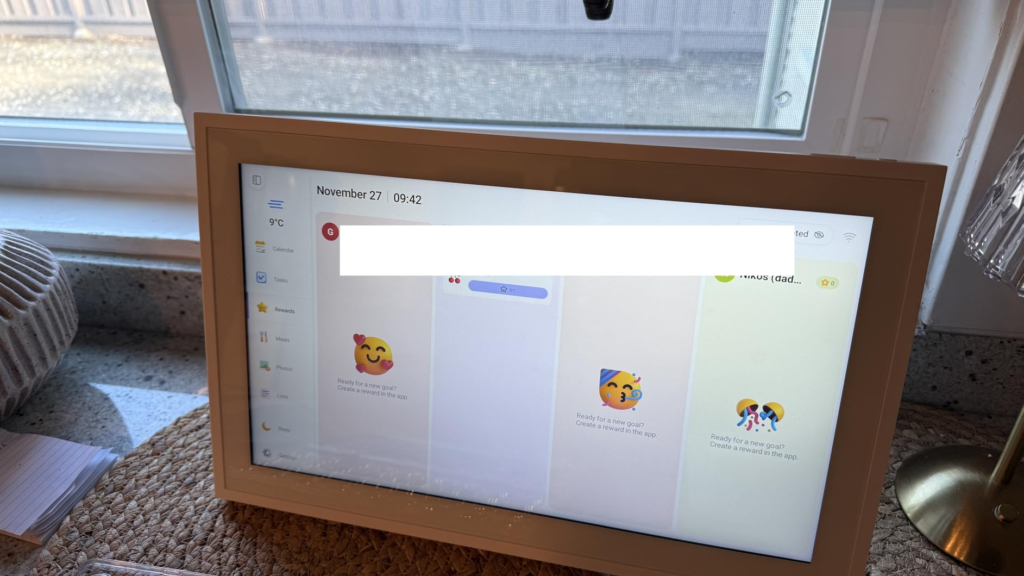
But the feature that changed our household fastest was not the calendar. It was the chore chart. My eight-year-old started checking her star progress before breakfast — without being prompted. No reward speech. No daily reminder. The visual system did the motivating on its own: tasks assigned by her name on screen, stars accumulating in real time, progress visible the moment she checked anything off. That is the friction this device was actually built to remove.
flyEVfish Electronic Calendar Setup: The Sync Friction No One Warns You About
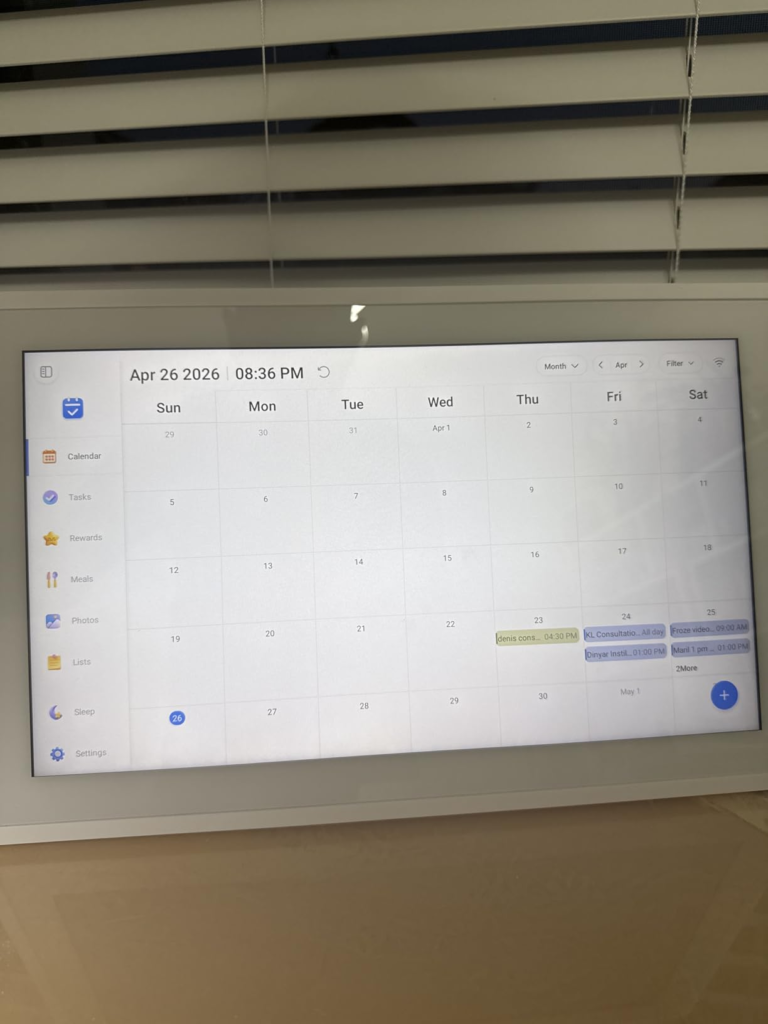
Setup is genuinely quick. Plug in, connect to Wi-Fi — I recommend the 5GHz band for faster sync — download the eCalendar app, and link your calendar accounts. Our family’s schedule was on screen in under ten minutes, events populated and color-coded by person without any manual work.
Here is what I wish someone had told me before mounting it: the photo frame feature does not passively pull from your phone’s camera roll. You push photos to the device manually through the app. Families expecting automatic syncing will hit this friction immediately after installation. In practice, intentional curation is actually a better experience — you choose exactly what appears on your wall — but the expectation gap is real.
The meal planner is also a separate module. It does not connect to your Google Calendar, your Instacart, or any recipe platform. You type the week’s meals manually, either on-screen or through the app. The first Sunday feels like work. By the third, it becomes a ten-minute habit that ends the “what’s for dinner?” question for the entire week.
These are not flaws. They are calibration points. Go in knowing them, and they disappear.
| Feature | What It Actually Does | Honest Assessment |
|---|---|---|
| Calendar Sync | Real-time pull from Google, Outlook, iCloud, Cozi, Yahoo | Fast and reliable; occasional 2-minute delay on first load |
| Chore Chart | Name-assigned tasks with star reward tracking | Kids engage independently — the star system genuinely works |
| Meal Planner | Weekly breakfast/dinner display board | Manual-only; no food app or grocery platform integration |
| Photo Frame Mode | AI-enhanced cycling of uploaded family photos | Polished display; requires app upload on first use |
| Mobile App Control | Remote management of events, chores, lists | Solid functionality; interface is reliable, not premium |
| Sleep Mode | Auto-dims during defined quiet hours | Silent operation; no issues across 30 days of use |
| Custom Lists | Grocery, packing, school-prep lists on screen | Basic but visible to everyone in the household |
| Weather Display | Real-time local forecast on screen | Accurate; useful during the morning rush |
flyEVfish 15.6″ Calendar Review: The Threshold Where Family Scheduling Quietly Breaks
There is a specific point in household life where paper-based organization collapses under its own weight. I call it the three-commitment threshold.
One parent’s work calendar. One parent’s personal schedule. A child’s school commitments. A second child’s activities. A shared dinner plan. A grocery run nobody remembered. At that point, no single person holds the complete picture anymore. Reminders slip. Pickups get confused. Dinners don’t get made because everyone assumed someone else knew.
The flyEVfish 15.6″ was designed for exactly this threshold — not for households with one or two moving parts, but for households that have grown past any single person’s reliable working memory.
A 1920×1080 IPS display, readable from across a kitchen, color-coded by family member, toggling between Day, Week, and Month views, running continuously. Not a phone app you open. A screen you walk past — one that communicates the state of the week whether you asked or not. After forty-eight hours of use, every person in my household — including a seven-year-old — was reading it without instruction.
flyEVfish Digital Planner Comparison: Why Most Buyers Misread This Product Category Too Early
The first trap in this category is comparing the 15.6-inch model to the 10-inch options listed beside it on the same search page. These are not competing products. A 10-inch digital calendar is a desk display — you must stand directly in front of it to read it. The 15.6-inch screen changes the physics of a room. It is readable from the hallway. Visible from the dining table. It is not a personal device. It is a household one.
The second trap is the subscription comparison. Skylight — the most recognized brand in this space — charges a recurring annual fee for meal planning, photo screensaver access, and star rewards. The flyEVfish includes all of these in the base price, with zero subscription required. Over twelve months, that difference typically runs between $40 and $100 depending on the competitor’s tier.
The third trap is expecting this to behave like a calendar app in hardware form. It is not. It is a behavioral intervention for household coordination. If your only problem is “we need to see our schedule somewhere,” a shared phone screen resolves that. The flyEVfish addresses something different: making the schedule environmental — ambient, always-visible, shared, non-negotiable.
| Comparison Point | flyEVfish 15.6″ | 10-Inch Category Devices | Subscription-Required Competitors |
|---|---|---|---|
| Room-Wide Readability | Yes — visible at 6 to 10 feet | No — desk viewing distance only | Depends on screen size |
| Chore Chart + Star Rewards | Included, no subscription | Often free | Usually locked behind premium tier |
| Weekly Meal Planner | Included, no subscription | Often free | Premium-only on brands like Skylight |
| AI-Enhanced Photo Frame Mode | Included free | Basic or absent | Subscription-locked on some brands |
| Display Resolution | 1920 × 1080 IPS Full HD | 1280 × 800 typical | 1920 × 1080 on premium models |
| Wall Mount + Desk Stand | Both included in box | Usually one option only | Varies by model and price tier |
flyEVfish Family Calendar Fit: Who Is Actually Living With This Problem
The person inside this problem is not someone who wants another screen in their home. They are someone exhausted from being the human calendar for everyone else in the room.
I know that person well. I was her. Sending reminders to a husband who had already forgotten. Mentally carrying every doctor’s appointment, every school project deadline, every birthday, every meal decision — while nobody else held any of it. One parent running the cognitive operation of an entire household alone.
The flyEVfish does not transfer that labor to a machine. It distributes it visually. When the schedule lives on the wall, it stops living exclusively inside one person’s head. That shift — from invisible to ambient — changes the daily dynamic in a way that is measurable and, after a few weeks, becomes hard to imagine living without.
The device works best when the whole household actually uses it. The chore chart accelerates adoption faster than any adult explanation. Kids who will not respond to verbal reminders will, without fail, check a star chart.
flyEVfish Electronic Calendar Wrong Fit: Where the Wrong Decision Quietly Starts
Not every household that feels disorganized is inside this product.
If your home already functions well on shared phone calendars and nobody consistently misses anything — a 15.6-inch wall screen is a redundancy that will sit unused within six weeks. The friction has to genuinely exist before the solution earns its wall space.
If you expect full offline operation, that expectation is a mismatch. Calendar sync, weather, app-based management, and photo uploads all require an active Wi-Fi connection. In a home with an unreliable router, this limitation carries more weight than any spec sheet acknowledges.
If you want phone-free, completely standalone operation — this is not that product. The eCalendar companion app is not optional for remote event edits, photo uploads, or away-from-home chore management. The screen and the app function as a system, not independently.
And if a 15.6-inch screen mounted in your kitchen or hallway feels visually intrusive, that feeling will not go away after installation. This device has physical presence — by design. If your household preference leans minimalist or screen-free, the product is a wrong fit regardless of how strong its feature set is.
flyEVfish 15.6″ Smart Digital Calendar: The One Situation Where It Becomes the Logical Answer
Here is the exact household condition where the flyEVfish 15.6″ stops being worth evaluating and becomes the obvious next step.
You have three or more people in the home — at least one of them a child. Schedules currently live across two or three separate phone apps, sometimes a whiteboard, often one person’s memory. One adult is carrying most of the coordination weight. Dinner decisions happen at 5:45 PM. Chores get nagged rather than tracked. And the cost of a missed event is no longer embarrassing — it is a child waiting alone, a prescription unfilled, a meeting rescheduled at the last minute.
You want a central point of truth that everyone in the household can see without being reminded to check their phone. You want the chore system to motivate kids without requiring daily adult intervention. And you want to accomplish this without adding a recurring subscription to your monthly billing.
That is the household this device was designed for. Not a broad family audience. A specific kind of friction — the schedule that technically exists somewhere but practically goes unseen. The flyEVfish 15.6″ digital calendar resolves this condition cleanly, visually, and permanently.
| Honest Score | Category | Rating | Why |
|---|---|---|---|
| 9 / 10 | Display Quality | ★★★★★ | Sharp, vibrant, glare-resistant — clear from across the room |
| 8 / 10 | Setup Ease | ★★★★☆ | Under 10 minutes; minor app learning curve |
| 9 / 10 | Chore Chart Effectiveness | ★★★★★ | Star reward system genuinely changes kids’ daily behavior |
| 8 / 10 | Calendar Sync Reliability | ★★★★☆ | Stable; occasional 1–2 minute delay on very first load |
| 7 / 10 | Meal Planner | ★★★★☆ | Functional but fully manual; no food app integration |
| 8 / 10 | Photo Frame Mode | ★★★★☆ | AI enhancement is a real bonus; warm and elegant |
| 7 / 10 | App Experience (eCalendar) | ★★★★☆ | Reliable; interface is practical, not polished |
| 8 / 10 | Value vs. Subscription Competitors | ★★★★☆ | No annual fee saves $40–$100 versus comparable brands |
flyEVfish Calendar Performance: What It Solves, Reduces, and Still Leaves to You
After thirty days, across four family members — including a seven-year-old who cannot yet read quickly — here is the exact breakdown.
It solves the problem of invisible schedules. A 15.6-inch, 1080p screen at eye level in the kitchen cannot be walked past without the week registering. In the first two weeks, three “I forgot” moments that were predictably on the horizon simply didn’t happen. Not because anyone tried harder. Because the information was no longer hidden.
It reduces the chore negotiation loop. My daughter now checks her task chart before I mention it. The star system works because progress is immediate and visible — she sees the reward the moment she marks a task complete on the touchscreen. No adult mediation required.
It reduces the dinner-decision loop. After one week of entering the meal plan on Sunday morning, “what’s for dinner?” stopped being asked in our house. The answer was already on the wall.
What it does not solve: the initial work of filling it in. The calendar is only as complete as what you put into it. A blank meal planner helps no one. A chore chart with no assigned tasks produces no results. The first setup session — approximately 30 to 45 minutes — belongs entirely to you. That investment is real and non-negotiable.
It also does not replace phone push notifications for time-critical events. The screen is ambient, not alert-based. At 3:47 PM, it will not buzz your wrist to remind you of a 4:00 PM pickup. For last-minute, time-locked reminders, your phone remains the final mile of the system.
flyEVfish 15.6″ Smart Calendar Final Verdict: The Decision Compressed
Thirty days. Four family members. One screen.
The flyEVfish 15.6″ Smart HD Electronic Calendar is not a product that makes family organization effortless. No honest product is. What it does is take the schedule that was fragmented, invisible, and stored inside one person’s head — and move it to the wall, in full HD, in a format that a seven-year-old and a grandparent both understand without being taught.
The no-subscription model makes this a structurally clean financial decision in a category where competitors quietly charge $40–$100 annually for the same features that come included here.
If your household has three or more people, schedules that never quite align, at least one child, and one parent mentally carrying the entire week — this is where the decision stops being vague.
If those conditions don’t describe your home, the screen will likely sit underused within two months. The line between those two outcomes is not a feature comparison. It is whether the friction I described throughout this review is friction you recognize in your own kitchen.
flyEVfish Digital Calendar FAQ — Frequently Asked Questions
| Question | Answer |
|---|---|
| Does the flyEVfish 15.6″ digital calendar require a monthly subscription? | No. All core features — calendar sync, chore chart, star rewards, meal planner, custom lists, and digital photo frame mode — are included without any subscription or recurring fee. The companion app is free to download and use. |
| Which calendar platforms does it sync with? | Google Calendar, Microsoft Outlook, Apple iCloud, Cozi, and Yahoo Calendar. Each family member can link their own account; all events display color-coded on one shared screen. |
| Does it function without a Wi-Fi connection? | No. Active Wi-Fi is required for calendar sync, weather display, and remote app management. Locally stored photos will continue to cycle if the connection drops, but live schedule updates pause until connectivity is restored. |
| Can it be both wall-mounted and used on a desk? | Yes. Both a desk stand and full wall-mounting hardware are included in the box. It supports portrait and landscape orientation in both configurations. |
| How does the digital photo frame mode work? | When not actively in calendar use, the screen automatically transitions to a cycling photo display. Photos are pushed to the device through the eCalendar app. AI photo enhancement is included and visibly improves the look of older or lower-resolution images. |
| What are the screen specifications? | 15.6-inch diagonal, 1920 × 1080 IPS Full HD, glare-resistant. Clearly readable from across a kitchen or hallway without needing to approach the display. |
| How long does setup take? | Under ten minutes for the core setup: plug in, connect to Wi-Fi, download the app, and link your calendar accounts. Configuring the chore chart assignments, meal planner, and initial photo uploads takes an additional 20 to 35 minutes. |
| Is the device accessible for older adults or grandparents? | Yes, with initial setup guidance. The interface is clean, text is large, and the display is readable from room distance. The app-based management layer may require a short guided session for users less comfortable with smartphone apps. |
| What is included in the box? | The flyEVfish 15.6″ digital calendar, desk stand, wall-mounting bracket and screws, power cable with a US-style plug, and a quick-start guide. An outlet adapter is not included for non-US use. |
| Does the touchscreen require a stylus? | No. It is a full capacitive touchscreen that responds accurately and smoothly to direct finger touch. No stylus is needed or included. |
Alternative recommendations
Transparency Note:
This analysis is built on aggregated real-world experience.
It extracts what repeatedly holds, what breaks, and what users uncover only after living with the system—then shapes it into a clear model you can use immediately.
Think of it as structured experience, refined and presented so you don’t have to learn it the hard way.
“A quick note: Don’t believe the star ratings, but trust personal experience. This article is a compilation of collected experiences”