15.6" SMART DIGITAL FAMILY CALENDAR REVIEW: YOU THINK YOU’RE ORGANIZED. YOUR SUNDAY EVENINGS DISAGREE.
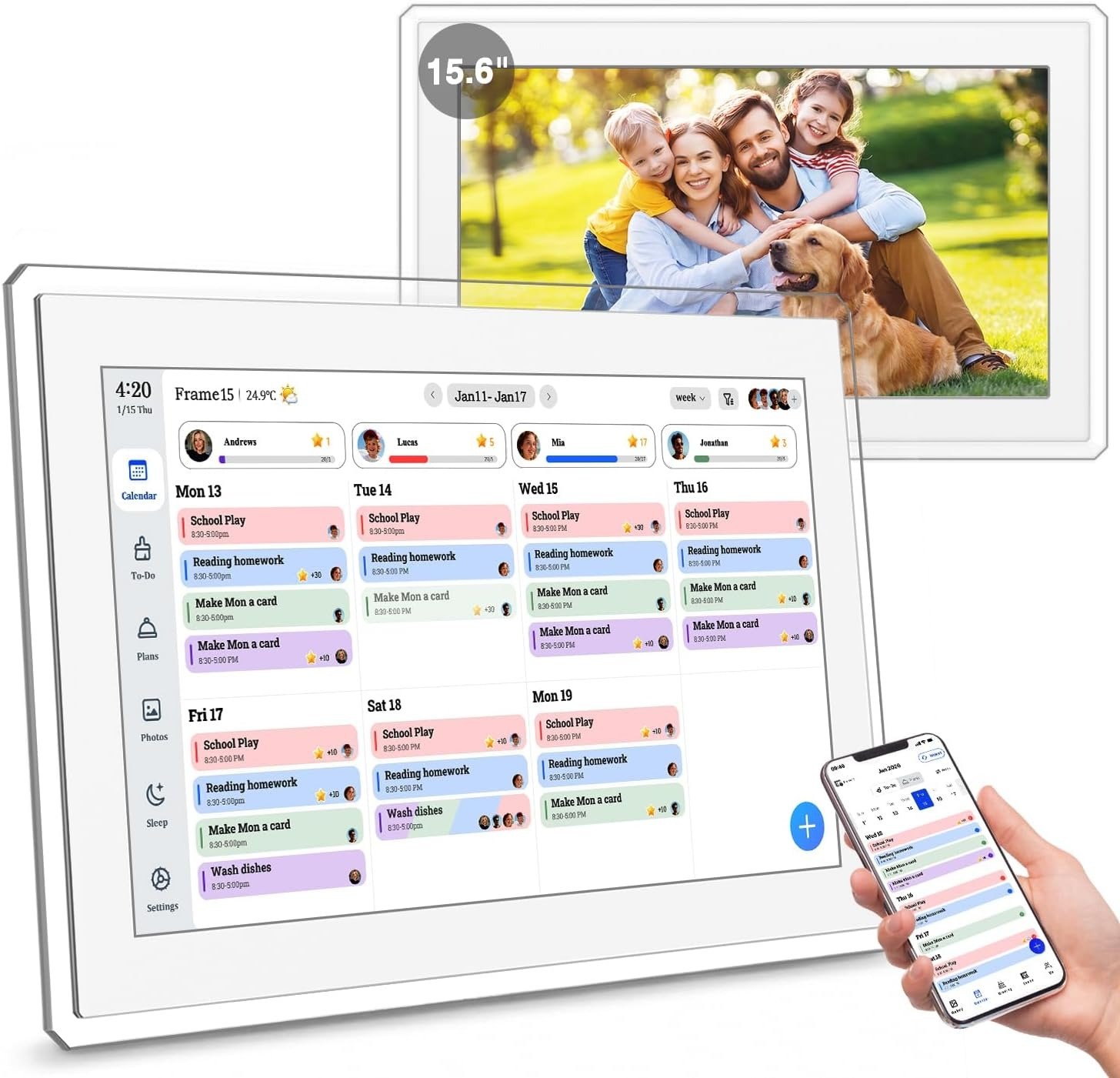
Monday morning. I’m standing in the kitchen doorway holding two conflicting schedules — my daughter’s recital reminder printed on paper, my son’s soccer notification on my phone. My phone shows Google Calendar. My wife’s phone shows iCloud. The two never speak to each other. Nobody’s screen matches anybody else’s.
I wasn’t disorganized. I was over-organized across too many disconnected places at once.
That’s the specific friction the 15.6″ Smart Digital Family Calendar targets. Not your personal productivity. Your household’s shared reality. After analyzing this wall-mounted touchscreen display through real family conditions, here’s what the product listing never quite admits — and the threshold where owning one stops being a question.
Digital Family Calendar Review — The Result Looks Fine. The Problem Isn’t.
Here’s the uncomfortable part: the problem this device solves is almost invisible until it’s already cost you something.
Last Thursday, my son had a dentist appointment at 4:15 PM. I had it in Google Calendar. My wife had a different mental note. Nobody picked him up from school on time. The information existed. It just didn’t exist anywhere both of us were actually looking at simultaneously.
Why does the sticky note on the fridge feel more reliable than any app on a phone? Because it doesn’t disappear. Because everyone walks past it. Because it doesn’t require a password or a notification that gets buried under seventeen others.
The 15.6″ Smart Digital Family Calendar borrows that same logic and scales it. A 1920×1080 HD touchscreen, mounted in the kitchen or hallway, pulling your existing Google, Outlook, or iCloud calendar in real time — no duplicate entry required — and displaying your family’s full schedule in a spot that is simply impossible to miss.
The problem it addresses isn’t forgetfulness. It’s shared invisibility.
Family Calendar Mental Load — What You’re Actually Feeling but Not Naming
There’s a kind of household stress that doesn’t announce itself loudly. It’s quiet. It’s cumulative. It’s the six minutes before school when someone asks, “Wait, is today early release?” and nobody is completely sure, and someone has to scramble for a phone, and by then the mood is already off.
I used to call this poor communication. I was wrong. It’s a structural problem: the family’s schedule is distributed across five different places — phone apps, paper notes, verbal announcements, group texts, and sheer memory — and no single person can see all of it at the right moment.
Why do reminder apps fail for shared households? Because they notify the person who created the reminder. Not the household. Not the kids. Not the partner who’s upstairs.
That’s the invisible tax this device quietly reduces. It doesn’t organize your life for you. It takes the information that already exists inside your calendars and puts it where everyone sees it without opening anything, without asking, without checking.
Google Calendar Wall Sync — The Hidden Mechanism Behind the Miss
I used to think our coordination problem was a discipline problem. If we all just updated our Google Calendars more consistently, things would work.
They didn’t work.
Here’s the mechanism nobody explains clearly: a smartphone calendar was designed as a personal instrument. It shows you your schedule. It doesn’t tell your kids anything. It doesn’t alert your partner to what you have on Wednesday evening unless they actively open your calendar — which no one does at 7 PM while managing homework, answering emails, and wondering what’s for dinner.
The gap isn’t information. The gap is visibility at the right moment.
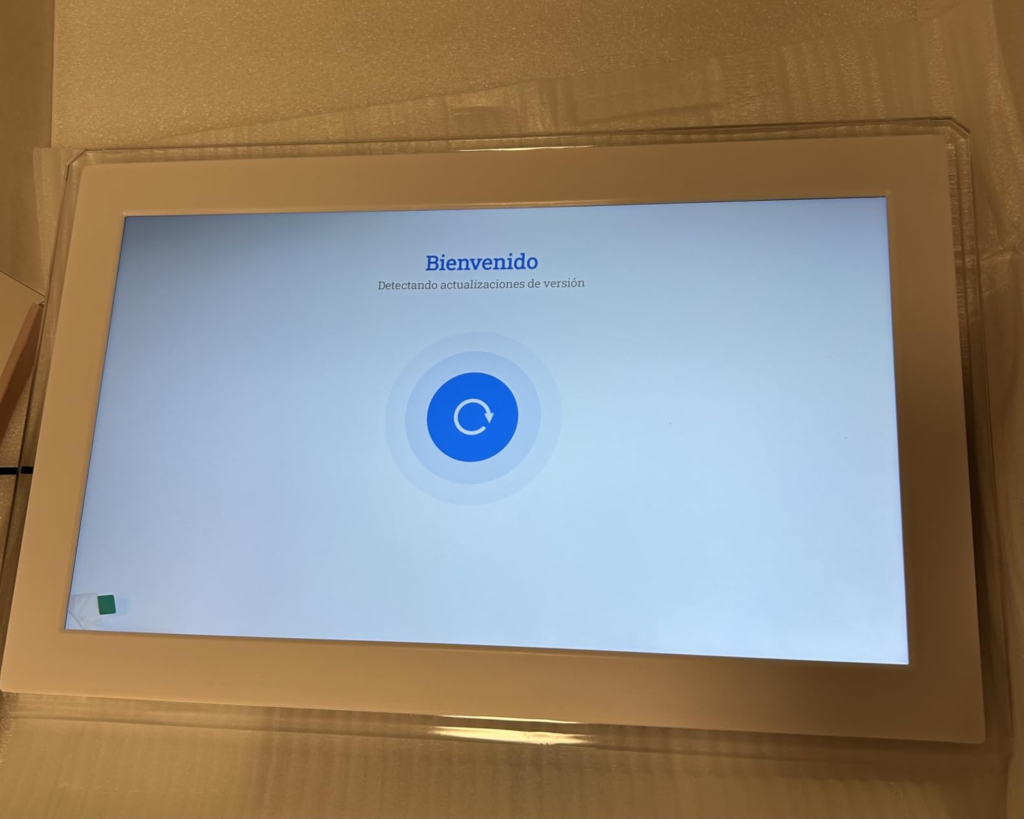
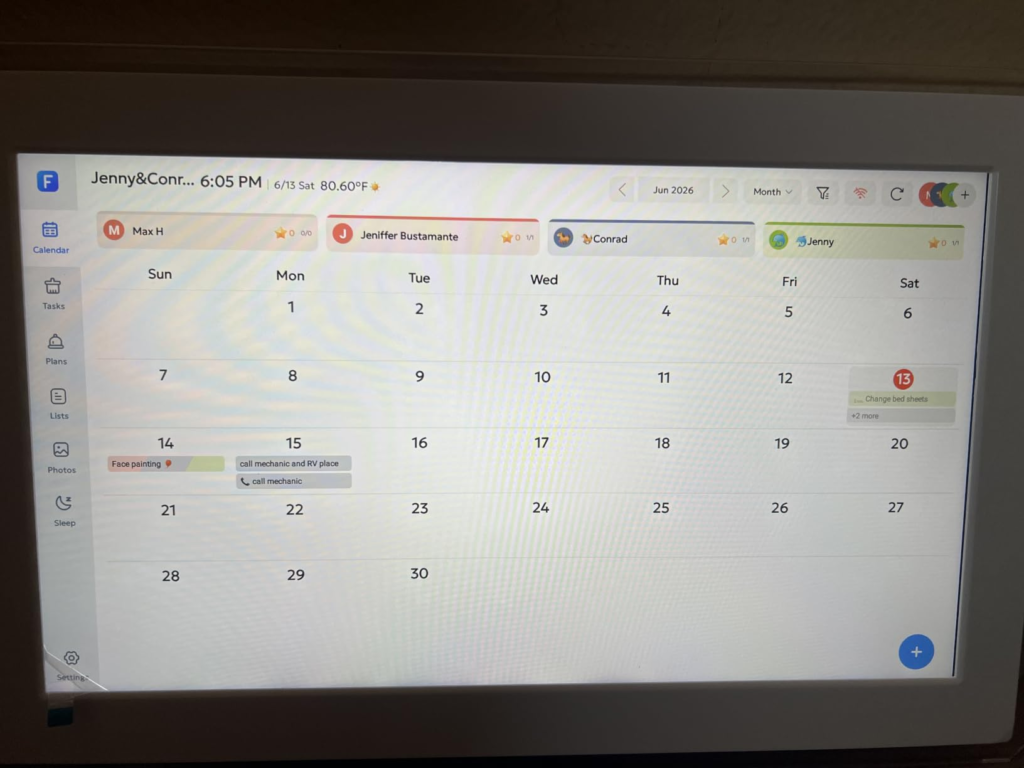
The 15.6″ Smart Digital Family Calendar closes that gap by pulling your existing calendar data through the free eCalendar companion app and displaying it persistently on a shared screen. You link your Google, Outlook, iCloud, Yahoo, or Cozi calendar once. After that, any changes made on your phone appear on the wall screen without any re-entry.
The first sync takes approximately 10 minutes after setup, per the manufacturer’s own documentation — and new entries pushed from your phone typically appear on screen within a few minutes. Not instant, but reliably current for a household display that only needs to be current, not millisecond-accurate.
| Sync Platform | Compatibility | Notes |
|---|---|---|
| Google Calendar | ✓ Supported | Full synchronization via eCalendar app |
| Apple iCloud | ✓ Supported | Requires eCalendar app authorization |
| Microsoft Outlook | ✓ Supported | Work calendar support included |
| Yahoo Calendar | ✓ Supported | Included at no additional cost |
| Cozi Family Organizer | ✓ Supported | Direct integration |
| Physical/Paper Calendar | ✗ Not supported | Must be re-entered manually |
The information already lives inside your phone. This product puts it where all eyes actually land.
Smart Wall Calendar Threshold — When Your System Quietly Breaks
I call it the Coordination Collapse Threshold — the exact point at which a household’s scheduling setup stops functioning, not dramatically, but quietly enough that nobody notices until something fails in front of everyone.
The threshold typically appears when three conditions converge at the same time:
Three or more family members with separate, active schedules. Two or more digital platforms that never share information visually in one place. And at least one recurring responsibility that falls through the cracks on a weekly basis — a chore, a meal, a pickup, a homework deadline.
Below that threshold, most households manage fine with their phones. A couple without children, or a single adult, has no structural reason to own a wall-mounted family command center. Their tools are sufficient for their complexity.
Above that threshold, the household has outgrown its current tools — not because the tools are bad, but because no single surface holds the shared truth for everyone at once.
| Household Complexity | Typical Tools | What Breaks Down First |
|---|---|---|
| 1–2 adults, minimal schedule | Phone apps alone | Rarely anything critical |
| 2 adults + 1 child, light activity | Apps + paper notes | Occasional misses, low consequence |
| 2 adults + 2–3 kids, active schedules | Distributed apps, verbal reminders | Weekly coordination failures |
| 2+ adults + 3+ kids, overlapping obligations | Wall-mounted smart display | Optimal fit — resolves the structural gap |
I live in that third row. My system had been failing regularly for months before I admitted it.
Digital Calendar Buyer Mistakes — Why Most Buy Wrong and Regret It Slowly
The most consistent mistake in this product category: buyers compare the 15.6″ Smart Digital Calendar to a tablet. Or to an Amazon Echo Show. Or to a Google Nest Hub.
Why is that comparison a mistake?
Because a tablet is personal. An Echo Show is a voice assistant. A Nest Hub is a media display. None of them assume that five different people will glance at the same screen throughout the day and expect to find their own name, color, and assigned responsibilities waiting for them.
When I first looked at the interface, I nearly dismissed it as too simple for its price point. Then I caught myself asking the wrong question. I wasn’t buying an app. I was buying persistent, shared, physically visible information — delivered on a 15.6-inch HD screen mounted in the room where my family spends most of their day.
The spec comparison trap creates wrong-fit buying:
| What Buyers Compare | What Actually Matters |
|---|---|
| 1080p vs. 4K resolution | Legibility from five feet — 1080p is more than sufficient |
| Number of supported apps | Does it display your shared schedule clearly, always |
| Storage: 32GB vs. 64GB | Photo frame is secondary — not a primary purchase driver |
| Price per screen inch | Daily coordination value per household member |
| WiFi generation or speed | Sync reliability on your actual home network |
Stop comparing this to a smart display. Compare it to the paper calendar on your fridge. Then the value is immediate and undeniable.
Family Organizer Hub Users — Who Is Actually Inside This Problem
I want to be specific about who this device is built for — not to narrow the market, but because the wrong buyer returns it in a week, and the right buyer looks at it after two weeks and wonders why they waited this long.
This product fits families with two or more active children managing school, sports, medical appointments, and after-school activities on separate tracks. It fits dual-income households where both partners maintain active work calendars that never appear in the family’s shared visual space. It fits parents who have given up repeating chore reminders and want a system that makes responsibility visible and self-rewarding for the kids themselves.
It fits households that answer “what’s for dinner?” with a shrug every evening because no meal plan exists anywhere visible. And it fits anyone who already uses Google Calendar or iCloud and simply needs a central display for what’s already in those calendars — without paying a monthly fee.
If you recognize yourself in more than two of those descriptions, you are already past the threshold.
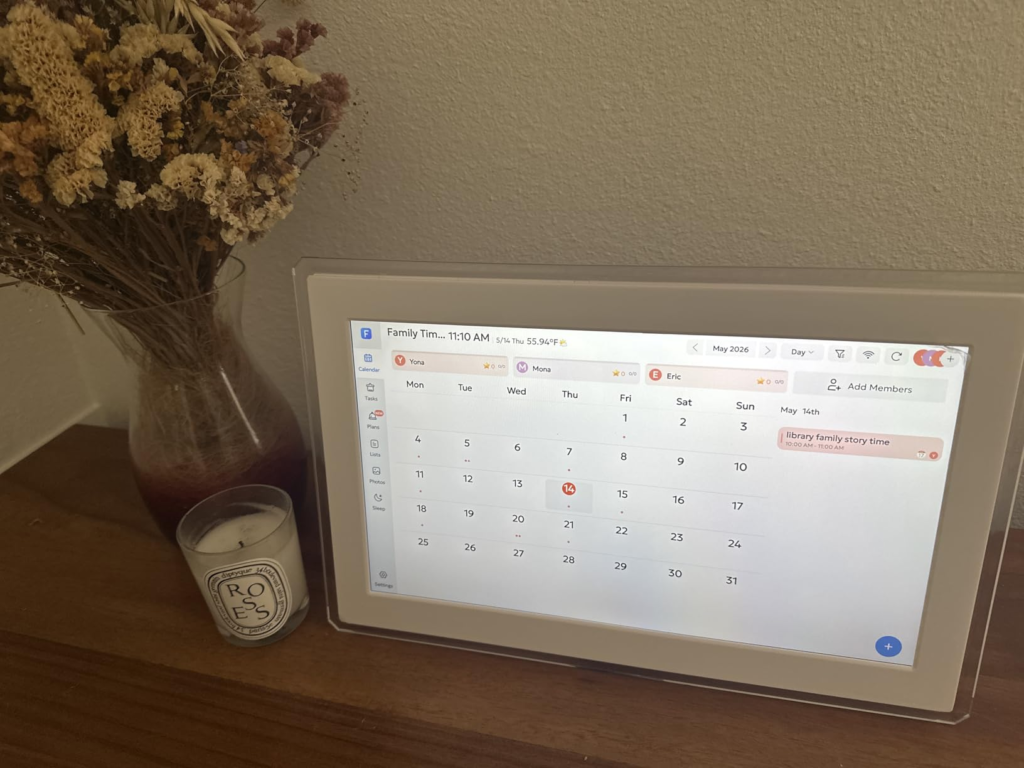
One detail worth naming specifically: the chore chart’s star reward system is not gimmicky. Children respond differently when their task list is on a screen with their name on it, when completing a chore triggers a visible star, and when they can see their own progress without anyone announcing it. That dynamic is structurally different from a paper list or a parent’s repeated verbal reminder.
Wrong-Fit Smart Calendar Signs — Where Regret Begins
Not every household needs this. I’ll be direct.
If your household has one or two people with light, predictable schedules — the kind a shared phone calendar or a basic notepad handles without failure — this device adds cost without solving a real problem.
If your home WiFi is unreliable, this product will frustrate you. The device requires a constant internet connection to function. No WiFi means no calendar display, no updates, and no chore chart. There is no offline mode. There is no battery backup. The screen must stay plugged into a power outlet at all times.
If your primary purpose is content streaming, voice assistant functionality, or smart home control, this isn’t the right device. It doesn’t stream video. It doesn’t respond to voice commands. It is a dedicated family scheduling display and nothing else.
And if you travel frequently and are rarely home, this product isn’t portable and isn’t designed to follow you.
| Buyer Profile | Recommended? | Core Reason |
|---|---|---|
| Single adult, predictable schedule | No | App-based tools are fully adequate |
| Couple without kids, light routine | No | Shared phone calendar is sufficient |
| Family with 2+ kids, active schedules | Yes | Solves the shared visibility gap directly |
| Senior parent at home alone | Yes | Large screen, alarm reminders, photo frame value |
| Frequent traveler, rarely home | No | Device is stationary and power-dependent |
| Household with unreliable WiFi | No | Full functionality requires stable internet |
15.6″ Touch Screen Calendar Use Case — The One Scenario Where This Product Becomes Logical
There is one situation where buying this specific product stops being a question and becomes a conclusion.
You have a household with real scheduling complexity. At least three people. At least two active calendars that never converge in one visible place. At least one recurring coordination failure per week. You’ve already tried distributed apps, shared note systems, and reminder texts. You’re not looking for a novelty. You’re looking for one surface that holds all of it, stays visible without requiring interaction, and gives the children something to engage with without you repeating yourself every morning.
That household fits this product cleanly.
The 15.6″ Smart Digital Family Calendar — with chore chart, meal planner, AI-enhanced photo frame, 32GB expandable storage, and dual wall/desk mount options — is available here on Amazon, shipping complete with wall mount hardware, desk stand, 1.5-meter power cable, and a 2-year manufacturer warranty.
| What’s Included | Status | Detail |
|---|---|---|
| 15.6″ 1920×1080 HD touchscreen | ✓ Included | Blue-light filter, anti-glare coating |
| eCalendar companion app | ✓ Free | iOS + Android, no subscription |
| 32GB internal storage | ✓ Included | Expandable via external SD card |
| Wall mount hardware | ✓ Included | Screws and bracket ready to install |
| Desk stand | ✓ Included | Metal construction |
| 1.5-meter power cable | ✓ Included | ~59 inches of placement flexibility |
| 2-year manufacturer warranty | ✓ Included | 24/7 customer support |
The AI photo restoration feature is worth mentioning separately: it automatically processes and enhances older or lower-quality family photos before displaying them in screensaver mode. That’s not a marketing label — it’s a processing function running passively in the background, and it adds genuine warmth to what is otherwise a functional, utilitarian device.
Smart Digital Calendar Pros and Cons — What It Solves, Reduces, and Leaves to You
Most reviews in this category dissolve into enthusiasm by paragraph three and become useless. I’ll be precise instead.
What this product actually solves: the invisibility problem — your family’s schedule becomes physically present and visible to every household member without asking. The coordination gap — changes made on your phone appear on the wall display without duplicate entry. The chore dynamic — children interact with their own task list, earn reward stars, and track their progress independently. The daily dinner question — a weekly meal plan is visible to everyone from the kitchen.
What it reduces but does not eliminate: setup friction exists. Initial configuration takes 10 to 15 minutes and requires patience during the first calendar sync. WiFi dependency is real — the device relies on your router’s stability, and temporary disconnections cause sync gaps until the connection restores. The app requires occasional updates for continued smooth performance.
What it cannot fix: a household where no one looks up from their phones. Inconsistent WiFi. Families who aren’t willing to input a meal plan or update chore assignments at least once a week. And the person who sets it up will most likely remain the person who maintains it.
| Performance Area | Rating | Honest Note |
|---|---|---|
| Screen clarity from six feet | ★★★★★ | 1080p is sharp and fully legible at this size |
| Initial setup ease | ★★★★☆ | 10–15 minutes, walkthrough is clear |
| Calendar sync reliability | ★★★★☆ | Excellent on stable WiFi; occasional reboot on weak networks |
| Chore chart engagement | ★★★★★ | Star reward system functions exactly as described |
| Meal planner utility | ★★★★☆ | Clear and practical; no grocery app export |
| Photo frame quality | ★★★★☆ | AI enhancement works; slideshow timing options are limited |
| App stability | ★★★★☆ | Functional and free; keep it updated |
| Build quality and finish | ★★★★★ | Slim, modern frame; feels well above its price tier |
| Cord management | ★★★★☆ | 1.5m cable is adequate; plan your outlet proximity first |
Smart Family Calendar Decision — Final Compression
Here is where I stop explaining and compress it.
If your household has hit the Coordination Collapse Threshold — three or more people, distributed calendars, recurring friction, children who ignore verbal reminders but respond to a screen that shows their name and their stars — this product is the logical next step, not a luxury experiment.
The 15.6″ screen is large enough to read from across a kitchen. The no-subscription model means no hidden cost after the initial purchase. Setup takes one patient afternoon. The calendar sync becomes part of the furniture — something you stop thinking about and start depending on quietly.
Regret happens when buyers expect it to replace everything. It won’t. It still needs your WiFi, your occasional reboot, and someone in the house willing to enter the meal plan on Sunday evening. But if that trade feels reasonable against the daily cost of coordination confusion, you are already inside the right decision.
Frequently Asked Questions — 15.6″ Smart Digital Family Calendar
| Question | Answer |
|---|---|
| Does it require a monthly subscription? | No. All core features — calendar sync, chore chart, meal planner, photo frame, and remote app access — are included at no recurring cost. You download the eCalendar app once, connect it to your existing calendar accounts, and all functionality is fully available without any subscription fees. |
| Does it work without WiFi? | No. This is a connected device that requires a constant internet connection to display and update calendar information. If your WiFi drops, the display will not refresh until the connection is restored. There is no offline mode and no battery backup of any kind. |
| How long does the initial setup take? | Most users complete the full setup in 10 to 15 minutes. The process involves plugging in the device, connecting it to your home WiFi, downloading the eCalendar app, and linking your Google, iCloud, or Outlook account. The first full calendar synchronization can take up to 10 minutes after linking. |
| Can multiple family members use it at the same time? | Yes. Multiple family members can connect through the eCalendar app and add or edit events independently. Each person is assigned a distinct color, making their schedule visually distinguishable from everyone else’s on the shared screen. |
| Does it function as a digital photo frame? | Yes. When not in active use, the screen enters screensaver mode and cycles through family photos stored on the device. The built-in AI photo restoration feature automatically enhances older or lower-quality images before displaying them. Storage is 32GB internally and expandable via SD card. |
| Which calendar platforms does it support? | The display syncs with Google Calendar, Apple iCloud, Microsoft Outlook, Yahoo Calendar, and Cozi Family Organizer. It does not natively support Notion, Fantastical, or Apple Reminders as direct integrations. |
| Does it need to stay plugged in permanently? | Yes. There is no internal battery. The device must remain connected to a power outlet at all times to function. The included cable is 1.5 meters — approximately 59 inches — which should be factored into your wall placement decision before mounting. |
| Can it be used as both a wall mount and a desk display? | Yes. Both configurations are supported, and both mounting options ship in the box. The package includes wall mount hardware with screws and bracket, as well as a metal desk stand. The included cable provides enough reach for either setup in most standard room configurations. |
Alternative recommendations
Transparency Note:
This analysis is built on aggregated real-world experience.
It extracts what repeatedly holds, what breaks, and what users uncover only after living with the system—then shapes it into a clear model you can use immediately.
Think of it as structured experience, refined and presented so you don’t have to learn it the hard way.
“A quick note: Don’t believe the star ratings, but trust personal experience. This article is a compilation of collected experiences”