Tenda ME3 Pro BE3600: Your Wi-Fi Says Full Bars. Your House Says Otherwise.
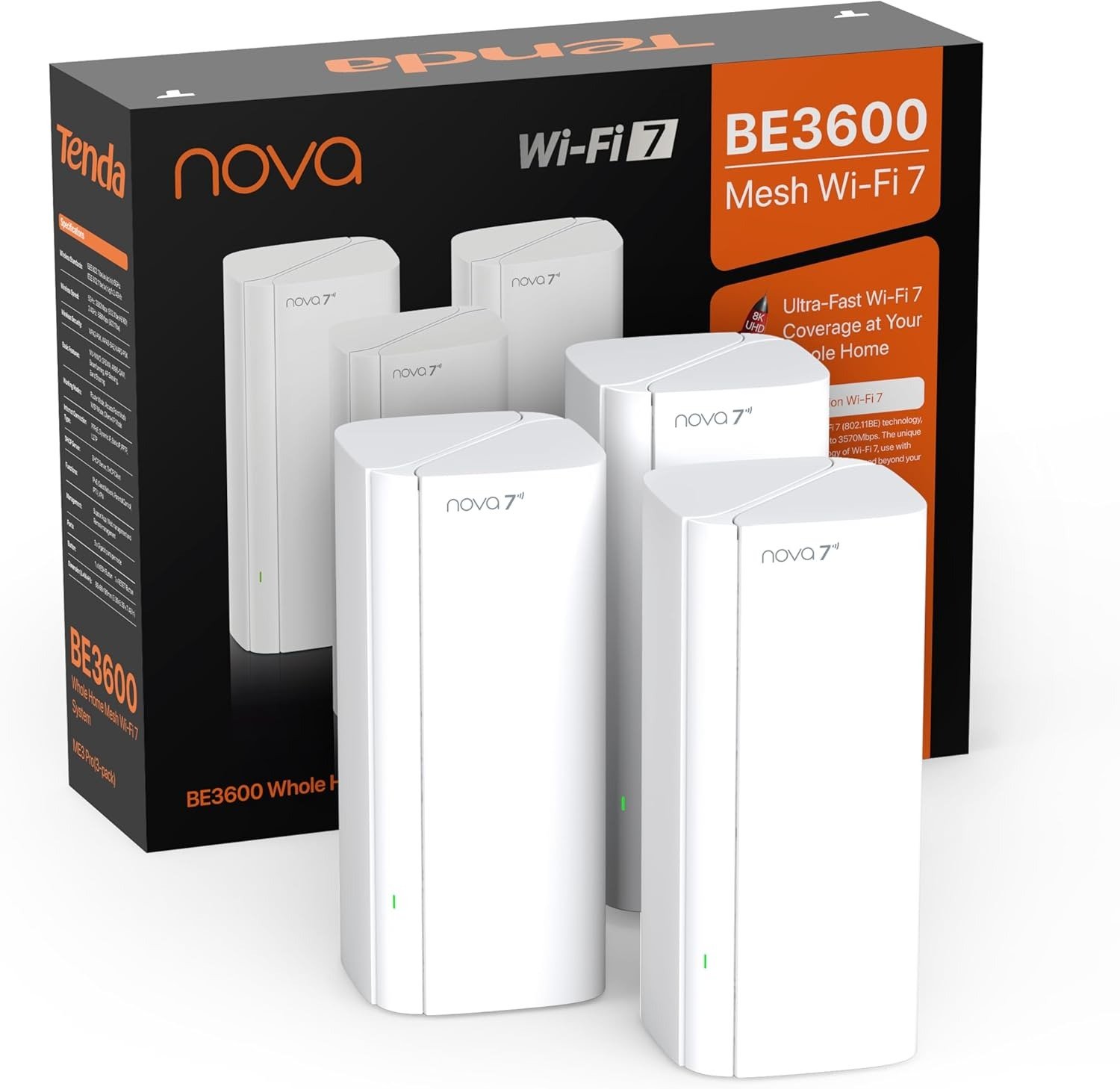
Tenda ME3 PRO BE3600
You are not imagining it. The router is online. The connection is active. The app shows green. But the video call breaks up the moment you walk into the back bedroom. The game lags when your teenager starts streaming in the other room. The smart TV in the garage buffers for three seconds before every scene. And yet — your router’s dashboard shows no problem.
That gap between what the router reports and what you actually live through is not a signal problem. It is a coverage architecture problem. And most people spend years fighting it with the wrong tools — adding extenders, rebooting routers, repositioning antennas — without naming the actual failure correctly.
This article is about that failure. And about one system that addresses it structurally, without pretending the problem is simpler than it is.
The Result Looks Fine. The Problem Isn’t.
A traditional router broadcasts one signal from one point. That signal degrades with distance, through walls, around corners, across floors. The speed you measure at the router is not the speed you receive in the kitchen. It never was.
The numbers your ISP sold you — 500 Mbps, 1 Gbps — are speeds measured at the modem. By the time that bandwidth travels through two walls and a ceiling, the effective speed at your device may be a fraction of what you paid for. Most people discover this only when something breaks: a work call stutters, a game session freezes, a stream drops to 480p at the worst moment.
What makes this painful is that the problem is invisible until it isn’t. The signal icon on your phone still shows three or four bars. The issue is not signal absence — it is signal degradation at distance. And a single router, regardless of how expensive or powerful, cannot solve a geometry problem with radio waves alone.
What You’re Actually Feeling but Not Naming
There is a specific kind of Wi-Fi frustration that is hard to describe because it is inconsistent. Not a full outage. Not a constant failure. Just: sometimes the call quality drops. Sometimes the video buffers. Sometimes the connection feels sluggish at certain times of day when multiple devices are active.
This inconsistency is the actual symptom. It has a name: multi-device contention under load at distance.
When several devices compete for bandwidth from a single node that is already managing the distance penalty, the system degrades under load in ways that are unpredictable. The router is doing its best — it simply cannot be everywhere at once with full strength. It prioritizes some requests, delays others, and the result is the stuttering, inconsistency, and frustration that people blame on their ISP, or their device, or their walls.
The walls are not helping. But they are not the root cause. The root cause is asking one radio source to cover a problem that requires multiple coordinated radio sources.
The Hidden Mechanism Behind the Miss
Wi-Fi 7 is not just a marketing generation label. It introduces two specific technologies that change the structural behavior of a wireless network in ways that matter for everyday use.
The first is MLO — Multi-Link Operation. In previous generations, a device could only transmit on one band at a time. MLO allows simultaneous use of both the 2.4 GHz and 5 GHz bands at once, splitting traffic across them to reduce latency and increase throughput. This matters especially under load, when multiple devices are active. Instead of waiting in line, traffic moves across two lanes simultaneously.
The second is 4K-QAM — a higher-density encoding method that packs more data into each wireless transmission. Where Wi-Fi 6 uses 1024-QAM, Wi-Fi 7’s 4K-QAM encodes roughly 20% more data per transmission cycle at the same power. The practical result is higher sustained throughput in real-world conditions, not just in lab tests.
The Tenda ME3 Pro BE3600 uses both. Combined dual-band throughput reaches up to 3.6 Gbps — 2,882 Mbps on the 5 GHz band, 688 Mbps on the 2.4 GHz band — which Tenda’s own lab tests position as approximately 48% faster than comparable Wi-Fi 6 AX3000 systems under similar conditions. Real-world results will vary, but the architecture is genuinely different, not just incrementally upgraded.
Each node also uses a 6nm processor chip — a design choice that reduces heat generation and power consumption, which translates to more stable signal behavior over long periods of use. A chip that runs cooler sustains its performance longer without the thermal throttling that causes routers to slow down during extended heavy sessions.
The Threshold Where the Outcome Quietly Breaks
Every coverage solution has a threshold — a point at which the approach stops working, even though everything looks fine on paper.
For single routers: the threshold is roughly 1,500–2,000 square feet in a typical home with standard walls. Beyond that, dead zones are mathematically inevitable regardless of the router’s spec sheet.
For extenders: the threshold appears earlier than most people expect. A wireless extender doesn’t extend your network — it creates a new, separate network that your devices must manually switch to, and it cuts available bandwidth in half because it is both receiving and retransmitting on the same radio channel. The setup is convenient. The architecture is structurally degraded.
For Wi-Fi 6 mesh systems: the threshold appears under sustained multi-device load. The lack of MLO means each device connects on one band at a time. When ten devices are active simultaneously — phones, laptops, TVs, smart speakers, security cameras — the queue builds. Latency rises. The system handles it, but not gracefully.
The ME3 Pro’s threshold is meaningfully higher. Three nodes cover up to 6,600 square feet. Each node carries five high-gain antennas plus five independent external FEM modules — components that boost signal strength and improve reception reliability at the edges of coverage. The mesh backhaul is configurable as wired Ethernet, which eliminates the bandwidth penalty entirely when Ethernet cable is available between nodes.
Why Most Buyers Misread This Too Early
The most common mistake when shopping for a mesh system is comparing spec sheets and choosing the cheaper option because “my house isn’t that big.”
Two issues with that logic.
First, square footage is not the only variable. A 1,800 square foot house with thick plaster walls, multiple floors, and steel reinforcement behaves like a much larger house for radio signals. A 1,200 square foot open-plan apartment may need far less. Square footage is a proxy. Wall material, floor count, and device density are the real variables.
Second, most buyers underestimate their device count. A modern household with two adults working from home, two children with devices, smart TVs, game consoles, security cameras, smart speakers, and smart home sensors can easily reach 40–60 connected devices. A Wi-Fi 6 AX3000 router can theoretically handle that. Under simultaneous load at distance, it handles it poorly.
The ME3 Pro is rated for 160+ simultaneous devices. That is not a number that matters in a 900 square foot studio. It matters in a four-bedroom house where eight devices are actively streaming or communicating at the same time.
The wrong comparison is: “Do I need Wi-Fi 7 for basic browsing?” The right question is: “Do I need consistent performance across my entire home under realistic simultaneous load?”
Who Is Actually Inside This Problem
| Situation | Does This Problem Apply? |
|---|---|
| Home over 2,000 sq ft with multiple floors | Yes — dead zones are nearly certain |
| 10+ simultaneous connected devices | Yes — load contention will appear |
| Remote work requiring reliable video calls | Yes — inconsistency has real cost |
| Gaming with competitive latency requirements | Yes — single-band load causes lag spikes |
| Household with children streaming independently | Yes — multi-device peak load is daily |
| Smart home with 20+ IoT devices | Yes — background device density matters |
| Small apartment, 1–2 people, casual use | Probably not — this system is unnecessary |
The ME3 Pro is not for everyone. If your home is under 1,500 square feet, you live alone or with one other person, and your usage pattern is light browsing and occasional streaming from a single device — this system solves a problem you do not have. A simpler, cheaper router is the correct answer for that situation.
Where Wrong-Fit Begins
Wrong-fit buyers fall into predictable categories.
The Spec Maximizer. Someone who needs the absolute highest throughput available — multi-gigabit symmetric, 6 GHz band, enterprise-grade backhaul — will find the ME3 Pro’s dual-band design a limitation. The ME3 Pro does not support the 6 GHz band (that requires BE9300 or higher specification). For multi-gig internet plans above 2.5 Gbps, this system’s Gigabit LAN ports become the bottleneck. The 3-pack does include one 2.5G WAN port per node, but wired throughput beyond that ceiling requires a different product category entirely.
The Power User. Anyone who wants deep manual configuration — VLAN segmentation, custom QoS rules, OpenWRT support, CLI access — will find the ME3 Pro’s app-driven interface limiting. The Tenda Wi-Fi app is clean, functional, and sufficient for household use. It is not a tool for network engineers who want full control.
The Single-Room Buyer. If your problem is specifically one corner of your house — a garage, a basement corner, one bedroom — a single extender or a powerline adapter may solve that specific problem more cheaply. The ME3 Pro is a whole-home architecture solution, not a targeted coverage patch.
Knowing you are outside these categories is the first step toward a decision that holds.
The One Situation Where This Product Becomes Logical
You have a home that is meaningfully large — over 2,000 square feet, multi-floor, or built with materials that absorb signal. Your device count is real: laptops, phones, game consoles, smart TVs, cameras, tablets, smart speakers. Multiple people in the house use the internet simultaneously, not in sequence. And the problem you are experiencing is not a complete outage — it is inconsistency, degradation at distance, and frustration that appears at the worst moments.
In that situation, the Tenda ME3 Pro BE3600 3-pack is structurally the logical answer at its price point.
The 3-pack covers 6,600 square feet with Wi-Fi 7 technology, MLO, 4K-QAM, and hardware built to sustain that coverage under load. Setup is through the Tenda app and takes most users under 15 minutes. The NFC-enabled pairing (on EU variants) makes node addition even simpler. Firmware updates are delivered automatically. The system self-optimizes node assignment through AI-assisted roaming algorithms that switch devices to the strongest node in milliseconds without disrupting active connections.
At its current price point on Amazon, no comparable Wi-Fi 7 mesh system at this coverage level offers a meaningfully better value proposition for the household profile described above.
Tenda ME3 Pro BE3600 — Full Specifications Table
| Specification | Detail |
|---|---|
| Wi-Fi Standard | Wi-Fi 7 (802.11be) |
| Frequency Bands | Dual-Band: 2.4 GHz + 5 GHz |
| Max Combined Speed | 3,570–3,600 Mbps |
| 5 GHz Speed | 2,882 Mbps |
| 2.4 GHz Speed | 688 Mbps |
| Coverage (3-Pack) | Up to 6,600 sq ft |
| Coverage (2-Pack) | Up to 4,600 sq ft |
| Coverage (1-Pack) | Up to 2,500 sq ft |
| Device Support | 160+ simultaneous |
| Antennas per Node | 5 high-gain internal + 5 FEM modules |
| Processor | Dual-core 1 GHz, 6nm process |
| Memory | 512 MB RAM |
| Ports per Node | 3× Gigabit LAN (1 auto-sensing WAN); 3-Pack primary node: 1× 2.5G + 2× 1G |
| Key Technologies | MLO, 4K-QAM, MU-MIMO, OFDMA |
| Security | WPA3, WPA2/WPA3 mixed |
| Management | Tenda Wi-Fi App (iOS/Android) |
| VPN Support | Yes |
| Parental Controls | Yes |
| Internet Backhaul | Wireless or wired Ethernet |
| 6 GHz Band | No |
| OpenWRT Support | No |
| NFC Pairing | Yes (select variants) |
| Chip Architecture | 6nm advanced process |
Performance at a Glance: ME3 Pro vs. Common Alternatives
| Feature | Tenda ME3 Pro BE3600 | Wi-Fi 6 AX3000 Single Router | TP-Link Deco BE3600 | Typical Extender Setup |
|---|---|---|---|---|
| Wi-Fi Generation | Wi-Fi 7 | Wi-Fi 6 | Wi-Fi 7 | Extends existing gen |
| MLO Support | Yes | No | Yes | No |
| 6 GHz Band | No | No | No | Varies |
| Coverage (3-Pack) | 6,600 sq ft | ~1,500 sq ft | ~6,500 sq ft | Adds ~1,000 sq ft |
| Simultaneous Devices | 160+ | 60–80 | 150+ | Cuts bandwidth by 50% |
| Wired Backhaul Option | Yes | N/A | Yes (2.5G ports) | No |
| App Management | Yes | Varies | Yes (HomeShield) | Varies |
| 2.5G Ports (primary) | Yes | Rarely | Yes | No |
| Price Point (3-Pack) | ~$200 | ~$80–$150 | ~$180–$220 | ~$80–$150 + router |
| Wrong-fit for | Multi-gig plans, power users | Multi-room homes, 10+ devices | Same profile as ME3 Pro | Anyone needing reliability |
What It Solves, What It Reduces, and What It Still Leaves to You
What it solves completely: Dead zones in large homes. Video call drops caused by device roaming between signal areas. Simultaneous multi-device load contention. The gap between router-reported performance and real-world experience.
What it meaningfully reduces: Latency spikes under load (MLO handles this at the architecture level). Buffer time on 4K streams across multiple devices. Setup friction — the app-driven installation is genuinely simple compared to router configuration pages.
What it does not eliminate: The quality of your ISP connection. If you are on a 50 Mbps plan, no mesh system delivers more than 50 Mbps to your devices. Thick reinforced concrete walls will still attenuate signal — the system handles them better than a single router, but not perfectly. And if you have an internet plan above 2.5 Gbps, the Gigabit ports on non-primary nodes become the ceiling.
Where regret begins: Buyers who purchase this system expecting it to increase their ISP speed will be disappointed. Buyers who purchase it to solve a home coverage and consistency problem will find it does that very well.
Final Compression
The problem that most large households experience with Wi-Fi is not speed. It is architecture. One radio source cannot maintain consistent, high-quality signal across a 3,000 square foot house under simultaneous multi-device load. The physics do not allow it, regardless of how high the router’s spec sheet numbers are.
The Tenda ME3 Pro BE3600 addresses that architecture problem with current-generation Wi-Fi 7 technology — MLO, 4K-QAM, a 6nm chip, five antennas per node — at a price point that makes it accessible without requiring a compromise on core capability.
It is not the right product for a small apartment. It is not the right product for a network engineer who needs full manual control. It is not the right product for someone on a multi-gig internet plan requiring multi-gigabit wired throughput throughout the house.
It is the right product for a household that lives with inconsistency, frustration, and dead zones in a large home with real device density — and wants that solved cleanly, without complexity, at a price that makes structural sense.
If that is the condition you are actually in, the decision does not need to be complicated.
Frequently Asked Questions — Tenda ME3 Pro BE3600
| Question | Answer |
|---|---|
| Does the Tenda ME3 Pro support the 6 GHz band? | No. The ME3 Pro BE3600 is a dual-band system (2.4 GHz + 5 GHz). The 6 GHz band requires a BE9300 specification or higher. If 6 GHz coverage is a requirement for your use case, this system is outside that scope. |
| Can I use wired Ethernet backhaul between nodes? | Yes. The ME3 Pro supports wired Ethernet backhaul, which eliminates the bandwidth overhead of wireless inter-node communication. When wired backhaul is available, it is the recommended configuration for maximum performance. |
| How many devices can the ME3 Pro handle simultaneously? | The system supports 160+ simultaneous connected devices across the mesh network. This is a meaningful figure for households with high IoT device counts alongside phones, laptops, TVs, and gaming consoles. |
| Does it work with my existing ISP modem? | Yes. The ME3 Pro is compatible with all major ISPs. It requires a modem (or modem-router from your ISP) as the upstream connection point. It replaces your router, not your modem. |
| Can I expand the system by adding more nodes later? | Yes. The ME3 Pro is plug-and-play expandable. Additional nodes can be added via the Tenda Wi-Fi App without reconfiguring the existing network. |
| Does the ME3 Pro support VPN? | Yes. VPN server and client functionality is supported through the app, allowing devices on your home network to route through a VPN without installing VPN software on every device individually. |
| What is MLO and does it require special devices to work? | MLO (Multi-Link Operation) allows simultaneous transmission on multiple frequency bands, reducing latency and increasing throughput. Full MLO benefits require a Wi-Fi 7 client device. Wi-Fi 6 and older devices connect normally but do not use MLO — they receive standard mesh connectivity without the multi-link advantage. |
| Is the setup difficult? | No. Setup is app-driven through the Tenda Wi-Fi App and takes most users under 15 minutes. No web interface configuration is required for standard installation. |
| Does the Tenda ME3 Pro support parental controls? | Yes. Parental controls including device-level scheduling and content filtering are available through the app at no additional subscription cost. |
| What is the difference between the 1-pack, 2-pack, and 3-pack? | Coverage area scales with pack size: 1-pack covers approximately 2,500 sq ft, 2-pack covers approximately 4,600 sq ft, and 3-pack covers up to 6,600 sq ft. The 3-pack primary node also includes a 2.5G WAN port for higher-speed internet plan compatibility. |
Transparency Note:
This analysis is built on aggregated real-world experience.
It extracts what repeatedly holds, what breaks, and what users uncover only after living with the system—then shapes it into a clear model you can use immediately.
Think of it as structured experience, refined and presented so you don’t have to learn it the hard way.
“A quick note: Don’t believe the star ratings, but trust personal experience. This article is a compilation of collected experiences”