NETGEAR Orbi RBE972 Review: The Wi-Fi 7 Mesh That Proves Your Network Problem Was Never About Speed
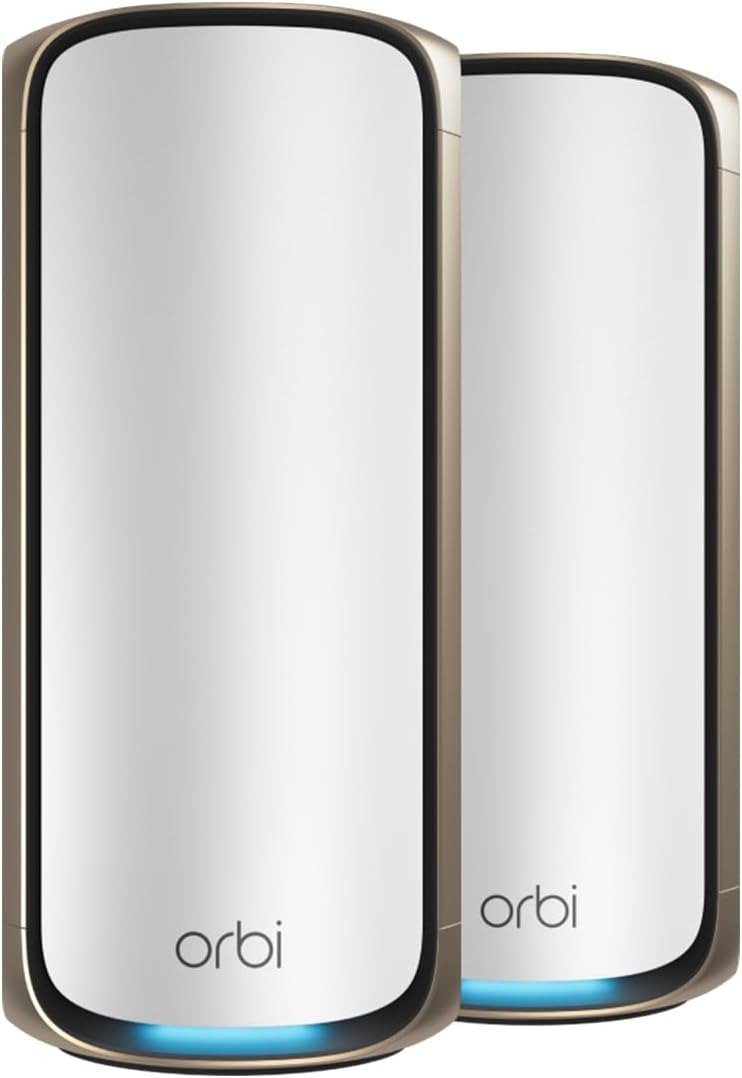
NETGEAR ORBI RBE972
The Wi-Fi in your home isn’t slow. It’s inconsistent. There’s a difference, and it matters more than any spec sheet will admit.
You stream fine for 40 minutes, then the buffer wheel appears. The work call is stable until someone else joins a game. The basement office works until the kids get home from school. None of these failures show up in a speed test. They don’t look like network problems. They look like bad luck.
They’re not bad luck. They’re threshold events. And the NETGEAR Orbi RBE972 was engineered specifically for this kind of failure — which is exactly why understanding it requires more than reading a spec sheet.
The Result Looks Fine. The Problem Isn’t.
Most home networks pass a speed test with flying colors and still fail at dinner time. The test measures what your connection can do with one device, at one moment, under no load. Real life looks nothing like that.
The actual failure mode isn’t missing bandwidth — it’s contention. When 15, 40, or 80 devices compete for the same wireless spectrum simultaneously, the congestion creates latency spikes that feel like slowness even when the raw speed number is technically adequate. A 300 Mbps plan is sufficient for streaming 4K — that requires roughly 25 Mbps per stream. But the same plan, split across a busy household on a standard tri-band router, can fail to deliver consistent 25 Mbps to any one device the moment multiple competing requests stack on the same radio.
Wi-Fi 7 is 2.4 times faster than Wi-Fi 6, but raw speed gain is not the mechanism that fixes this. The real fix is band architecture — specifically, how many independent paths exist for traffic to travel simultaneously without interference.
This is the invisible problem the Orbi RBE972 is built around.
What You’re Actually Feeling but Not Naming
There’s a specific kind of network frustration that doesn’t get reported to support desks, because no one knows how to describe it precisely.
It’s not “the internet is down.” It’s “the internet feels thick.” Requests complete, but they drag. Video calls stay connected but pixelate during motion. Downloads run, but at 60% of what they ran an hour ago. You restart the router, things improve for a day, and then the pattern returns.
This is the multi-device collision problem. It shows up in homes above a specific device density — roughly 30 to 50 connected devices — and gets dramatically worse when several of those devices attempt high-bandwidth activity at the same time. Smart TVs, laptops, phones, tablets, game consoles, smart speakers, thermostats, cameras: they don’t announce their transmissions. They all attempt to access the radio simultaneously, wait for airtime, retry, and eventually succeed. The user experience of all that waiting is what feels like “the internet being slow.”
The Orbi RBE972 supports up to 200 devices simultaneously — double the capacity of many competing mesh kits. But device count alone is not the differentiator. The architecture underneath it is.
The Hidden Mechanism Behind the Miss
Here is the mechanism most buyers miss when reading spec sheets: not all mesh systems handle the backhaul-to-client tradeoff the same way.
In a standard tri-band mesh router, one of the three bands is permanently dedicated to moving traffic between nodes — the backhaul. Two bands remain for client devices. Every device in the house competes for airtime on those two remaining bands. Under load, they saturate.
The Orbi RBE972 uses exclusive, patented Quad-Band technology with an Enhanced Dedicated Backhaul. The fourth band exists as an additional dedicated highway between nodes, which means three bands remain available for client devices rather than two. The total combined wireless throughput reaches up to 27 Gbps across all four bands.
| Feature | Standard Tri-Band Mesh | NETGEAR Orbi RBE972 (Quad-Band) |
|---|---|---|
| Total Bands | 3 | 4 |
| Bands Available to Client Devices | 2 | 3 |
| Dedicated Backhaul | 1 × 5 GHz | 1 × 5 GHz + Enhanced Backhaul |
| Max Combined Speed | Up to ~11 Gbps | Up to 27 Gbps |
| Max Device Support | ~100 | 200 |
| Coverage (2-Pack) | ~4,000–5,000 sq. ft. | 6,600 sq. ft. |
| Wi-Fi Standard | Wi-Fi 6 / 6E | Wi-Fi 7 (802.11be) |
The hardware runs on a Qualcomm Networking Pro 1620 chipset with a quad-core 2.2 GHz processor, 1 GB of RAM, and 512 MB of flash storage. This matters because mesh performance under load is a processing problem as much as a radio problem. Underpowered nodes throttle before the radio saturates.
Wi-Fi 7 adds three specific capabilities that previous generations lacked:
Multi-Link Operation (MLO): A single device can transmit and receive across multiple bands simultaneously, reducing latency and improving throughput.
320 MHz Channels: Wi-Fi 7 doubles the maximum channel width over Wi-Fi 6E, which increases the theoretical data pipe per transmission.
4K-QAM: Quadrature Amplitude Modulation at 4096 points vs. 1024 in Wi-Fi 6, which encodes more data per signal cycle under strong signal conditions.
None of these numbers mean anything in isolation. They mean something in aggregate, at scale, in a home with 50+ devices running simultaneously over 6,600 square feet.
The Threshold Where the Outcome Quietly Breaks
There is a threshold in every home network beyond which the architecture of the router stops being a background variable and becomes the primary constraint. Understanding where that threshold sits is the only honest basis for a purchase decision.
Below the threshold, nearly any modern router works fine. Above it, router architecture determines whether the network functions reliably or degrades unpredictably.
The threshold is defined by the intersection of three variables:
| Variable | Below Threshold (Safe Zone) | Above Threshold (Degradation Zone) |
|---|---|---|
| Device count | Under 30 simultaneous devices | 50–200+ active devices |
| Home size | Under 3,000 sq. ft., single floor | 4,000–10,000+ sq. ft., multi-floor |
| Concurrent high-bandwidth users | 1–3 at a time | 5+ simultaneous 4K/gaming/calls |
In benchmark testing at close range (15 feet), the Orbi RBE973 (same hardware platform as the RBE972) achieved 4.324 Gbps of throughput using iPerf3 to simulate 20 concurrent users — making it one of the fastest close-range performers ever tested.
The distance performance is where the architecture matters more than the spec sheet admits:
| Distance from Router | Measured Throughput (RBE972 platform) |
|---|---|
| 15 feet (close range) | ~2.0 Gbps |
| 50 feet (mid-range) | ~700–900 Mbps |
| 95 feet (max tested range) | Signal maintained, speed reduced |
| Beyond 95 feet (wireless only) | Coverage gap — additional satellite needed |
The Orbi RBE972 lags at longer distances, making this the mesh kit to get for a small or mid-sized home — or any large home where the satellite can be placed within 40–60 feet of the router for a strong wireless backhaul.
Why Most Buyers Misread This Too Early
The most common buying mistake in the premium mesh market is the feature-count comparison: more Gbps, more bands, bigger numbers must mean better value. This framing is structurally wrong.
The relevant question is not “which router has the highest peak speed number?” It is: “under my specific device density, home layout, and concurrent usage pattern, which architecture holds its performance instead of degrading?”
The Orbi 970 Series is the fastest Orbi to date — but this mesh system has far less to offer than the enormous expectation created by its sticker-shock price. That gap between expectation and outcome is almost entirely created by buyers comparing peak numbers rather than architectural behavior under load.
The second mistake is ISP speed conflation. If your internet plan delivers 500 Mbps, you cannot experience the throughput ceiling of a 27 Gbps router. What you will experience is lower latency, reduced inter-device interference, and more stable speeds for every device simultaneously — which is valuable but fundamentally different from “getting 27 Gbps.”
The third mistake is deployment assumption. The RBE972 two-pack is priced at $1,699 and covers up to 6,600 square feet. A buyer with a 2,000 sq. ft. home buying this system for “future-proofing” is paying for coverage capacity they will never use. The architecture delivers most of its value in large, multi-device environments. In a small apartment, it is equivalent to buying a commercial-grade HVAC system for a studio.
Who Is Actually Inside This Problem
The Orbi RBE972 solves a specific class of network problem. The people inside that class tend to look like this:
A household above 4,000 square feet with multiple floors, where dead zones in the far corners create consistent frustration — particularly in garages, back bedrooms, or detached structures within wireless range.
A home with 50 to 150 connected devices: smart TVs, multiple laptops, gaming consoles, voice assistants, smart lighting, thermostats, security cameras, and tablets running simultaneously with no predictable pattern.
A household where 5 or more people engage in high-bandwidth activities concurrently — 4K streaming, video conferencing, competitive gaming, large file downloads — and the current router fails to serve all of them simultaneously without visible performance drops.
A home with a multi-gigabit internet plan (1 Gbps+) where the ISP delivers the speed to the modem but the router fails to distribute it consistently across the home.
The router features a single 10 Gbps WAN input, a 10 Gbps LAN port, and four 2.5 Gbps downstream LAN ports, making it purpose-built for environments with high-speed internet connections.
| Who Gets Full Value from RBE972 | What the Problem Looks Like for Them |
|---|---|
| Large home (4,000–6,600 sq. ft.) | Dead zones in far rooms, multi-floor inconsistency |
| 50–200 device household | Congestion-based slowdowns, unpredictable peak-hour degradation |
| Multi-gig ISP plan (1 Gbps+) | ISP speed not reaching devices consistently |
| Power users + casual users coexisting | Gaming/conferencing degraded by background smart home traffic |
| Home office requiring reliability | Meeting drops, video pixelation under simultaneous household load |
Where Wrong-Fit Begins
The Orbi RBE972 does several things wrong for specific buyers, and naming those failures is more useful than burying them.
The app dependency problem. The Orbi 970 has limited Wi-Fi and network settings accessible through the mobile app, requires a login account, and even subscriptions to be fully useful — and produces frequent upselling pop-ups. A buyer who expects full router configurability through a traditional web browser interface will find the Orbi 970 significantly constrained. Power users who want granular VLAN control, custom DNS over the web interface, or detailed per-device traffic shaping will find the experience frustrating.
The subscription orbit. The included NETGEAR Armor security subscription is free for one year. After that, renewal costs add to the total ownership cost. NETGEAR’s Smart Parental Controls, advertised as a feature, was absent from the app at launch — a detail buyers who purchased specifically for that feature discovered after the fact.
The backhaul architecture trade-off. The permanent 5 GHz backhaul band is unavailable to client devices in a wired backhaul setup. This means buyers who run Ethernet between nodes — the optimal configuration for any mesh system — lose access to that dedicated backhaul band entirely, reducing the effective client band count from three back toward two.
The price-to-coverage mismatch. The RBE972 two-pack costs $200 more than the TP-Link Deco BE85 three-pack. The Deco BE85 three-pack covers more square footage for less money. The Orbi wins on throughput benchmarks and device capacity. The Deco wins on coverage per dollar. Buyers whose primary constraint is square footage rather than device density are inside the wrong decision framework if they choose the Orbi.
| Wrong-Fit Signal | Why It Matters |
|---|---|
| Home under 3,000 sq. ft. | Architecture exceeds the physical need — coverage and capacity both oversized |
| Under 30 simultaneous devices | Congestion problem doesn’t exist at this density — simpler mesh performs identically |
| Budget under $1,200 | TP-Link Deco BE85 or ASUS ZenWiFi BQ16 Pro deliver comparable performance at lower cost |
| Requires deep web UI control | App-required management frustrates power users expecting traditional interfaces |
| Primary ISP speed under 500 Mbps | Throughput ceiling is never approached — infrastructure investment is premature |
| Wants subscription-free long-term ownership | Security features and parental tools carry recurring costs after year one |
The One Situation Where This Product Becomes Logical
After everything above, there is a specific configuration where the NETGEAR Orbi RBE972 becomes the structurally correct choice rather than merely an expensive one.
The condition: a home between 4,000 and 6,600 square feet, with a multi-gigabit internet plan, 50 or more regularly active connected devices, multiple simultaneous high-bandwidth users, and an owner who values setup simplicity over deep network configurability.
In this configuration, the quad-band architecture directly addresses the contention problem. The patented dedicated backhaul ensures Wi-Fi stays fast across all devices simultaneously, which is the specific failure mode that households at this device density experience most often. The 10 Gbps WAN port captures multi-gig ISP speeds fully. The 200-device capacity means the system doesn’t throttle as the smart home ecosystem grows. And the Orbi app, while constrained for power users, delivers a genuinely frictionless setup experience for the owner who wants the network to work without becoming an IT project.
Reviewers at this usage level consistently describe setup as seamless, performance as reliable, and the overall transformation of the home network as immediately noticeable across all connected devices and applications.
The Orbi RBE972 is not the cheapest way to solve a large-home, high-density network problem. It is one of the most reliable ways, specifically when the 6,600 sq. ft. coverage footprint and 200-device ceiling align with actual need rather than aspirational specification shopping.
What It Solves, What It Reduces, and What It Still Leaves to You
What it solves:
Consistent multi-device congestion in large homes above 4,000 sq. ft. Coverage gaps that require adding third-party extenders. Backhaul degradation in wireless mesh setups. Distribution of multi-gigabit ISP speeds across an entire home simultaneously.
What it reduces but doesn’t eliminate:
Long-range performance degradation — present at distances beyond 80 feet from any node in a wireless-only setup. The Orbi lags at longer distances, and a third satellite may be needed in multi-wing homes or properties with detached structures.
What it still leaves to you:
The subscription decision after year one. The app-only management limitation if you need browser-based control. Firmware stability — early launch versions had bugs requiring updates, and some device-compatibility edge cases persist in high-density smart home configurations.
The hidden cost structure:
| Cost Category | Detail |
|---|---|
| Hardware (2-Pack RBE972) | $1,699 |
| NETGEAR Armor (Year 2+) | ~$99–$150/year |
| Smart Parental Controls | Additional subscription |
| ISP requirement for full value | Multi-gig plan (1 Gbps+) recommended |
| Wired backhaul infrastructure | Ethernet cabling between nodes strongly advised for large homes |
Final Compression
The NETGEAR Orbi RBE972 is not the right router for most people. It is the exactly right router for a specific kind of problem that most people don’t accurately diagnose before they buy.
If your home exceeds 4,000 square feet, your device count is approaching or beyond 50 simultaneous connections, and your current network fails at peak hours despite an adequate ISP plan — you are inside the threshold this system was built for. The quad-band architecture, 200-device capacity, and 10 Gbps wired ports are not marketing language at that scale. They are the mechanism.
If you are below that threshold, the Orbi RBE972 is an expensive answer to a question your network isn’t actually asking.
The decision is architectural, not aspirational. Verify your device count. Map your floor plan. Check your ISP plan speed. If all three align with the conditions above, the cost stops being excessive and starts being proportional.
If you are already experiencing peak-hour degradation, consistent dead zones, or ISP speeds that don’t reach your devices reliably — and your home falls within the described parameters — the next step is straightforward: the problem has a name now, and this is where the solution is.
Frequently Asked Questions
| Question | Answer |
|---|---|
| What is the difference between the RBE972 and the RBE972S? | The RBE972S includes a one-year subscription to NETGEAR Armor security (powered by Bitdefender). The RBE972 is the same hardware without the included subscription. The suffix “S” designates the security bundle; the underlying router and satellite hardware are identical. |
| Does the Orbi RBE972 require a NETGEAR account to function? | Basic functionality works without an account. However, most useful features — including remote management, detailed network settings, and security functions — require the Orbi mobile app with a NETGEAR account and, in many cases, a paid subscription. Users who prefer a fully local, app-free management experience will find this limiting. |
| How does the Orbi RBE972 perform at long range compared to close range? | Close-range throughput (15 feet) reaches approximately 2 Gbps, while performance degrades meaningfully at distances beyond 50–80 feet from a node. The two-pack is rated for 6,600 sq. ft., but optimal performance assumes the satellite is placed within 40–60 feet of the router in large wireless deployments. |
| Is the dedicated backhaul useful if I wire my nodes with Ethernet? | In a wired backhaul setup, the permanent 5 GHz dedicated backhaul band is unavailable to client devices, which reduces one of the quad-band architecture’s primary advantages. For wired deployments, competing systems with more flexible backhaul configuration may be more efficient. |
| What internet plan speed do I need to justify this purchase? | The 10 Gbps WAN port is designed for multi-gigabit plans. Users with plans below 500 Mbps will not experience meaningfully different throughput compared to a significantly less expensive router. The primary value at lower ISP speeds is congestion reduction and device capacity — which may still be justified in high-density households, but the throughput hardware is running below its design intent. |
| Does the Orbi RBE972 support Wi-Fi 7 features like MLO (Multi-Link Operation)? | The Orbi 970 Series supports most Wi-Fi 7 features, with the exception of Adaptive Frequency Coordination. MLO is supported, though its interaction with the dedicated backhaul architecture creates constraints that NETGEAR’s newer Orbi 870 and 770 series have addressed by removing the permanent dedicated backhaul in favor of |
Transparency Note:
This analysis is built on aggregated real-world experience.
It extracts what repeatedly holds, what breaks, and what users uncover only after living with the system—then shapes it into a clear model you can use immediately.
Think of it as structured experience, refined and presented so you don’t have to learn it the hard way.
“A quick note: Don’t believe the star ratings, but trust personal experience. This article is a compilation of collected experiences”