JMGO N1S Pro 4K Review: The Triple Laser Projector That Rewrites the Rules — Until Your Room Doesn’t Let It

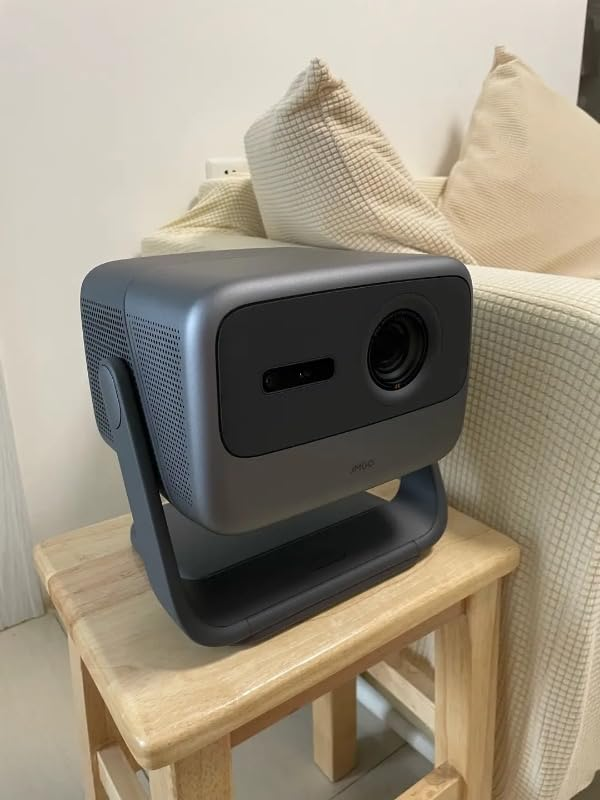
JMGO N1S PRO 4K
You set it up in twenty minutes. The image fills 120 inches of wall. Colors you haven’t seen outside a commercial cinema. Bass from a 20-watt integrated speaker system that surprises everyone in the room. And then, one night, someone notices a faint shimmer in a dark scene — and suddenly you’re questioning a $1,999 decision from a completely different angle than you expected.
That’s not a flaw in the JMGO N1S Pro 4K. That’s the threshold moment most buyers never read about before purchasing. And this article exists to make sure you hit that moment informed, not blindsided.
The Image Looks Stunning. That’s Not the Problem.
The JMGO N1S Pro 4K produces a genuinely excellent picture. The projector uses a triple laser DLP light engine, is rated for 2,400 ANSI lumens of brightness, and delivers colors that look vibrant and natural with contrast that’s rich — particularly in bright scenes — while details and textures come through with real refinement.
That last sentence is doing a lot of work. “Particularly in bright scenes” is the honest qualifier that most spec sheets don’t give you. It matters.
JMGO’s CEO Forrest Li said at IFA 2024 that the trade-off between brightness, contrast, and color has long been the central challenge for laser projectors — and the MALC 2.0 Triple Laser Optics system is their answer to eliminating that trade-off simultaneously. The claim holds up in most real-world conditions. But “most” is not “all,” and the conditions where it partially softens are exactly where many buyers end up using the projector.
The problem isn’t the technology. The problem is that the image looks so immediately compelling at unboxing that buyers stop evaluating surface, distance, and ambient control — the three variables that actually govern your long-term experience.
What You’re Actually Feeling After a Few Weeks
Something is slightly wrong in dark scenes. You can’t name it yet. It doesn’t ruin movies. But it persists. And because the bright scenes look genuinely excellent, you keep second-guessing yourself.
What you’re experiencing has a name, and it’s not a defect.
Laser speckle is a physics phenomenon where the coherent light of a laser creates tiny, shimmering patterns that make images appear slightly grainy or noisy — it’s most noticeable in darker scenes and in areas with concentrated red tones, like skin or brick walls. It has been the persistent engineering challenge of triple-laser RGB projectors for years.
The JMGO N1S Pro 4K addresses this more aggressively than its predecessors. But the degree to which you experience it depends almost entirely on what you’re projecting onto — not on the projector itself.
Testing across more than 50 different screen materials found that acoustically transparent woven material performed best, white screens outperformed gray in all cases, and screen gain between 1.0 and 1.2 significantly reduced visible laser speckle to the point of being non-noticeable from standard viewing distances.
What doesn’t work well: ALR (ambient light rejecting) screens. What works very well: smooth matte white walls or quality matte white screens with gain around 1.0 to 1.2.
This is the first hidden variable. Most buyers don’t discover it until after installation.
The Mechanism Behind the Miss: How MALC 2.0 Actually Works
Most projectors marketed as “laser” are not what the JMGO N1S Pro is. The distinction changes everything about how you interpret the specs.
| Light Engine Type | How It Works | Color Source | Typical Weakness |
|---|---|---|---|
| Single blue laser + phosphor | Blue laser excites a phosphor wheel to create white light, then filtered | Phosphor-derived | Limited color gamut, phosphor degradation over time |
| LED | Three LED sources (R/G/B) | Direct LED emission | Lower brightness ceiling, softer colors |
| JMGO MALC 2.0 (Triple RGB Laser) | Three separate dedicated lasers — red, green, blue — each independently controlled | Direct laser emission | Laser speckle (manageable with correct surface) |
Instead of a single blue laser with a phosphor wheel — the approach most “laser” projectors actually use — the MALC 2.0 system employs entirely separate red, green, and blue lasers. Think of it as three precision flashlights, each perfectly tuned to one primary color, rather than one white flashlight with colored filters.
The practical result: the N1S Pro 4K delivers 2,400 ANSI lumens, a 1600:1 contrast ratio, and 110% BT.2020 color coverage with ∆E less than 1 — meaning the colors you see are among the most accurate and wide-ranging you can get from a portable projector at any price point.
JMGO’s modularized laser stacking technology in the N1S line is 15% more efficient than previous models, and can reproduce shades of colors that most projectors simply cannot display at all, because those colors fall outside their color space coverage.
That 110% BT.2020 figure isn’t marketing inflation. It means the projector can show colors that standard monitors, most TVs, and certainly most projectors cannot produce.

The Threshold Where the Outcome Quietly Breaks
There are two distinct thresholds in the JMGO N1S Pro 4K ownership experience. Cross one correctly and you have a machine you’ll use for a decade. Cross the other without understanding it and you’ll end up with a technically excellent projector that frustrates you structurally.
Threshold 1: The Surface Condition
| Surface Type | Speckle Visibility | Image Quality |
|---|---|---|
| Smooth matte white wall | Low to negligible | Excellent |
| Matte white screen, gain 1.0–1.2 | Minimal | Excellent |
| Rough textured wall or ceiling | Moderate to high | Degraded |
| ALR/CLR ambient-light-rejecting screen | High | Color shift + speckle |
| Gray screen | Moderate | Darkened, speckle present |
Reddit users who experienced significant speckle were almost universally projecting onto imperfect or textured surfaces — those who moved to proper matte white screens described the experience as immediately transformed.
Threshold 2: The Fixed Focal Distance
This projector requires placement at exactly 10 feet 5 inches from the screen to produce a 120-inch diagonal image. It has a fixed focal length with no optical zoom — which is unusual for a projector at this price point, where most competitors include at least some level of optical zoom to allow flexible positioning.
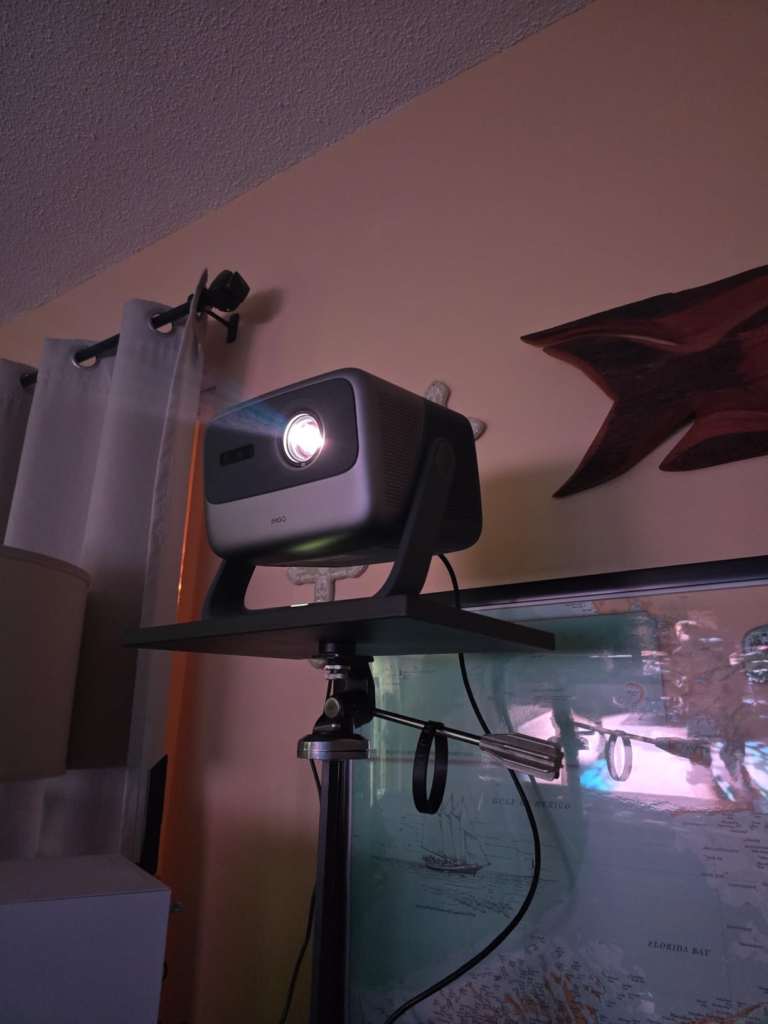
This is the placement rigidity threshold. The gimbal can rotate 360° horizontally and tilt 135° vertically. That flexibility is real and genuinely useful. But the distance from the screen is fixed by the lens — not adjustable through the gimbal. If your room is two feet shorter or longer than the required throw distance for your desired screen size, digital zoom will compensate — but at a reduction in resolution and sharpness.
Since the N1S line uses a fixed-lens design without optical zoom, horizontal lens shift, or vertical lens shift, it must be placed at a precise distance relative to screen size, and users who rely heavily on keystone correction to compensate for non-ideal placement will see slight image quality reductions, as keystone correction uses fewer native pixels.
Use the ProjectorCentral throw calculator before deciding placement. This step isn’t optional — it’s the difference between a crisp 4K image and a digitally-processed approximation of one.
Why Most Buyers Misread This Too Early
The lazy comparison goes like this: “JMGO N1S Pro vs XGIMI Horizon Ultra — same price bracket, which is brighter?”
That comparison bypasses the actual decision variables entirely.
| Spec | What Buyers Think It Means | What It Actually Tells You |
|---|---|---|
| 2,400 ANSI lumens | How bright the image will look | Maximum brightness under ideal conditions — not usable brightness in ambient light |
| 110% BT.2020 | Very accurate colors | Color accuracy on calibrated mode; other modes may vary significantly |
| 4K resolution | Sharp image at all times | Full 4K sharpness only at native resolution, without digital zoom or keystone correction |
| Auto keystone | Flexible placement anywhere | Corrects angles but cannot replace proper throw distance |
| Google TV | Full app ecosystem | Netflix certified; iOS mirroring requires workaround |
JMGO acknowledges that what they call “lossless zoom” in marketing materials is in fact digital zoom — digital zoom compresses the image into pixels at the center of the screen, resulting in resolution loss, so careful pre-installation planning is essential to maximize image integrity.
The other early comparison trap: brightness numbers across manufacturers. The N1S Pro is rated at 2,400 ANSI lumens; real-world performance in testing showed the picture quality was solid with vibrant colors and refined detail — but brightness performance in high-ambient-light environments requires active light control to maintain image quality at larger screen sizes.
Who Is Actually Inside This Problem
The JMGO N1S Pro 4K is built for a specific person. That person isn’t everyone who wants a good projector.
You are inside this product’s optimum range if:
- You have a dedicated room or space where ambient light is controllable — not a fully blacked-out cinema, but at least a room where you can dim lights meaningfully
- You want a permanent or semi-permanent installation, not a “take it everywhere” portable projector
- You have a smooth matte white wall or are willing to invest in a matte white screen with 1.0–1.2 gain
- You want certified Netflix, Disney+, Prime Video, Max through Google TV without dongles or workarounds
- You’re buying for movies, streaming, or casual gaming — not competitive, low-latency eSports gaming
- Your room geometry allows the projector to sit at the correct throw distance for your target screen size
The effective auto keystone and focus features, combined with 135-degree vertical and 360-degree horizontal gimbal adjustments, make the N1S Pro genuinely versatile — but that versatility operates within the constraint of a fixed throw ratio.
Buyers who connected PS5 and Nintendo Switch through the two full-size HDMI ports reported impressive results, with the auto focus and keystone correction delivering a perfectly aligned image within minutes — the design removes most of the traditional frustration from projector setup.
Where Wrong-Fit Begins
These are the conditions under which the JMGO N1S Pro 4K will underperform your expectations — not because it’s a bad projector, but because its design logic doesn’t match your use case.
| Your Situation | Why It’s Wrong-Fit |
|---|---|
| Projecting onto a textured wall or ceiling without treatment | Laser speckle will be noticeable and persistent |
| Using an ALR/CLR screen for ambient light rejection | Increases speckle significantly; not recommended by JMGO or independent reviewers |
| Needing optical zoom for flexible room-to-room placement | Fixed lens means no optical adjustment; digital zoom sacrifices resolution |
| Primarily competitive gaming needing sub-10ms latency | Game mode is 17ms — good for cinematic gaming, not competitive FPS |
| Wanting true portability with battery power | Requires wall power; not battery-capable |
| Planning to use a gray or high-gain screen | Worsens speckle; reduces color accuracy |
| Living in a country with no local JMGO service center | Warranty service may require international shipping — a documented pain point for some users |
Post-warranty repair is an area where some buyers have reported frustration, with JMGO’s support directing users to ship units internationally for service — a significant friction point for a machine priced at $2,000.
The One Situation Where the JMGO N1S Pro 4K Becomes Logical
You have a room. You can control the light. You have or will buy a matte white screen with gain between 1.0 and 1.2, or a smooth white wall. You want the largest, most color-accurate image possible from a portable projector under $2,000 that runs Google TV natively, streams Netflix without workarounds, and sets itself up in minutes.
There is no better-suited machine in its price class for that specific situation.
| Category | JMGO N1S Pro 4K | What You Get |
|---|---|---|
| Light Engine | MALC 2.0 Triple RGB Laser | True red, green, and blue lasers — not phosphor-derived |
| Peak Brightness | 2,400 ANSI lumens | Usable in dimmed rooms; requires light control at 150″+ |
| Color Coverage | 110% BT.2020, ΔE < 1 | Cinema-grade color accuracy in calibrated mode |
| Contrast | 1600:1 native | Good; stronger in bright scenes than deep dark scenes |
| Resolution | True 4K UHD (3,840 × 2,160) | Full resolution at native throw; digital zoom reduces it |
| Screen Size | 85″–300″ | 120″ optimal from approximately 10’5″ |
| Operating System | Google TV | Certified Netflix, Disney+, Max, Prime Video, YouTube |
| Audio | 20W dual speaker, Dolby Digital Plus | Better than most integrated speaker systems; 45Hz bass floor |
| Gimbal | 360° horizontal, 135° vertical | Unique in this class; simplifies placement dramatically |
| Input Lag | 17ms (Game Mode) | Suitable for narrative gaming; not for competitive FPS |
| Light Source Lifespan | 30,000+ hours | At 4 hours daily use: over 20 years before dimming |
| Connectivity | 2× HDMI, USB, Wi-Fi 6, Bluetooth | Two full HDMI ports is a genuine advantage over competitors |
| Price (Amazon) | $1,099–$1,999 depending on seller/timing | Significant value gap vs traditional home theater at this performance level |
The built-in sound on the N1S Pro 4K genuinely surprises — punchy bass, clear dialogue, and good directional sound from an integrated speaker system that most buyers don’t expect to sound this capable.
The speakers are among the best-sounding integrated speakers across the reviewer’s experience with portable projectors, reaching bass frequencies down to a rumbling 45Hz at 20 watts total — usable as a standalone audio system for casual viewing before adding external sound.
What It Solves, What It Reduces, and What It Still Leaves to You
What the JMGO N1S Pro 4K genuinely solves:
- The brightness-color-contrast trade-off that limited earlier laser projectors
- Setup complexity: auto focus, auto keystone, and gimbal adjustment deliver a calibrated image in under five minutes
- Streaming ecosystem fragmentation: certified Google TV with all major apps natively installed
- Light source longevity: 30,000 hours rated life means you will not replace the lamp during normal ownership
What it meaningfully reduces but doesn’t eliminate:
- Laser speckle: significantly reduced vs. first-generation triple-laser projectors; still surface-dependent
- Setup friction: easier than traditional projectors, but throw distance planning is still required before installation
- Input lag: 17ms is good for gaming; not zero
What remains on you:
| Your Responsibility | Why It Matters |
|---|---|
| Surface selection | The difference between excellent and frustrating image quality |
| Throw distance pre-calculation | Fixed focal length means no room for guessing |
| Ambient light management | Not a UST projector; brightness doesn’t substitute for light control |
| External audio (optional) | Built-in speakers are good; not audiophile-grade |
| Service access verification | Confirm warranty coverage in your country before purchasing |
Frequently Asked Questions
Q: Is the JMGO N1S Pro 4K truly 4K, or is it pixel-shifted?
It uses a 0.47″ DLP DMD chip with XPR (Extended Pixel Resolution) technology — the same approach used by most 4K DLP projectors including BenQ and Optoma. It delivers full 4K resolution at native throw distance. Digital zoom or heavy keystone correction reduces effective resolution.
Q: How does the JMGO N1S Pro compare to the N1S Ultra?
The primary difference is brightness: the Pro delivers 2,400 ANSI lumens, the Ultra delivers 2,800 ISO lumens, and the Ultimate reaches 3,300–3,500 ANSI lumens. Color accuracy and contrast ratios are comparable across the series. The Ultra and Ultimate also gained HDMI 2.1 in some configurations. For rooms under 150 inches with light control, the Pro’s brightness is sufficient.
Q: Can I use it on a ceiling?
Yes. The 360°/135° gimbal makes ceiling projection physically possible. However, auto keystone may not correct successfully at extreme angles — manual keystone adjustment works, and saving screen positions is available on Android-based models.
Q: Does Google TV on the N1S Pro support all streaming apps?
Netflix, Disney+, Prime Video, Max, YouTube, and most major streaming apps are certified. iOS screen mirroring does not have a native solution — an Apple TV connected via HDMI is the cleaner option if you’re in an Apple ecosystem.
Q: What screen should I buy with it?
A matte white screen with 1.0 to 1.2 gain at your target diagonal. Woven acoustically transparent material reduces laser speckle the most. Avoid ALR, CLR, gray, or high-gain screens — they worsen speckle without improving ambient light performance on this projector.
Q: Is 17ms input lag good enough for gaming?
For narrative, cinematic, or casual gaming — excellent. For competitive FPS or fighting games where sub-5ms matters — no. God of War, Elden Ring, FIFA, sports games: works very well. Valorant, CS2, competitive ranked play: use a monitor instead.
Q: What’s the effective throw distance for common screen sizes?
| Screen Size (Diagonal) | Required Throw Distance |
|---|---|
| 100″ | ~8’8″ |
| 120″ | ~10’5″ |
| 150″ | ~13’0″ |
| 180″ | ~15’7″ |
These are approximate. Verify with the ProjectorCentral throw calculator before finalizing room setup.
Q: How does laser speckle appear and how do I minimize it?
Laser speckle manifests as a faint, shimmering grain — most visible in dark scenes, in reds, and on textured or ALR surfaces. Minimize it by using a smooth matte white wall or a 1.0–1.2 gain matte white screen. If you already own an ALR screen, the N1S Pro is not the right projector for it.
Final Compression
The JMGO N1S Pro 4K is not a universally correct answer. It’s a structurally correct answer for a specific, definable situation.
If your room allows the throw distance, your surface is smooth matte white, and your ambient light is manageable — this projector delivers genuine cinema-grade color accuracy, reliable auto setup, and a streaming ecosystem that doesn’t
Transparency Note:
This analysis is built on aggregated real-world experience.
It extracts what repeatedly holds, what breaks, and what users uncover only after living with the system—then shapes it into a clear model you can use immediately.
Think of it as structured experience, refined and presented so you don’t have to learn it the hard way.
“A quick note: Don’t believe the star ratings, but trust personal experience. This article is a compilation of collected experiences”