AQARA CAMERA HUB G3 REVIEW: THE ONE SPEC NOBODY’S AMAZON LISTING EXPLAINS
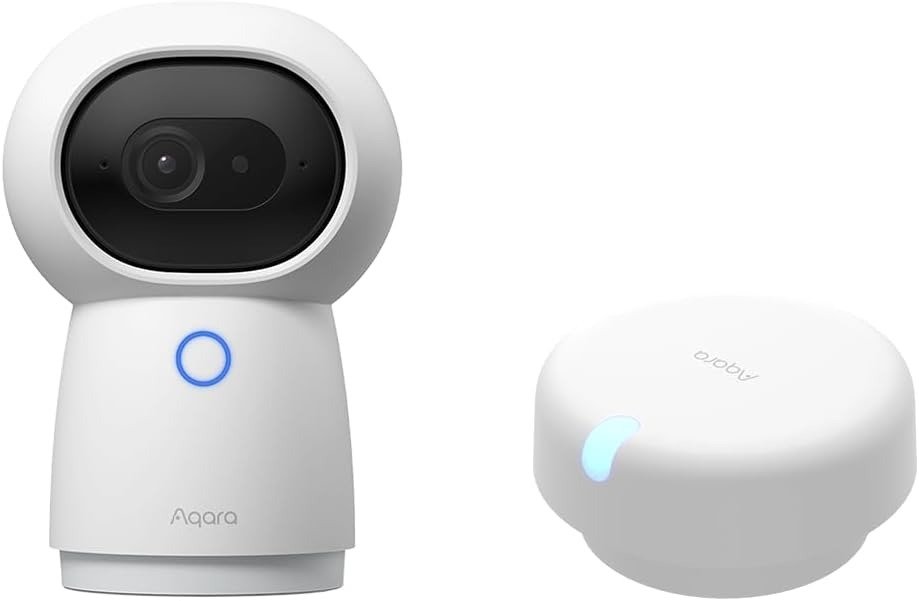
AQARA CAMERA HUB G3
Your dog jumps on the couch at 2:14 p.m. Your phone buzzes before you’ve even set your coffee down — motion detected, pet recognized, no drama. That part of owning the Aqara Camera Hub G3 feels almost boring, in the best way. The trouble shows up later, usually a few weeks in, the first time you route recordings through Apple’s HomeKit Secure Video for the extra layer of encryption. The picture quietly drops from crisp 2K to a softer 1080p. The camera stops turning to follow you across the room. Nothing broke. You just crossed a line the product page never drew for you.
Quick take: The G3 earns its price by replacing three separate boxes — camera, Zigbee hub, and infrared remote — with no subscription required to make any of it work. The catch only shows up once you pick Apple’s ecosystem for recording, which is a rule Apple sets, not Aqara.
Before trusting any spec sheet at face value, it’s worth saying plainly: Aqara’s own documentation isn’t fully consistent with itself. One official spec page lists an IP65 rating; the product’s own name, its retail packaging, and every hands-on reviewer we cross-checked agree this is an indoor-only camera with no weather sealing. We’re going with the version that matches the product’s own branding and real hands-on use, not the outlier line buried on one spec page.
| Spec | Aqara Camera Hub G3 |
|---|---|
| Resolution | 2K, 2304×1296 (drops to 1080p in Apple HomeKit Secure Video mode) |
| Lens / coverage | 110° wide-angle, pan-tilt to 340° horizontal, 45° vertical |
| AI recognition | Local face ID (manually uploaded photos), pet detection, 5-gesture control |
| Smart home hub | Zigbee 3.0, up to 128 connected devices |
| Infrared blaster | Yes — fully local, works with no internet connection |
| Wi-Fi | 2.4 / 5 GHz, WPA3 |
| Power | Wired, USB-C (5V / 2A) |
| Local storage | microSD, Class 4+, up to 128 GB |
| Cloud storage | 7 days free; 30-day plan from around $4.99/month |
| Night vision | 940nm infrared, no visible red glow |
| Privacy | Physical lens-block “sleepy” mode, manual or scheduled |
| Mount | Standard 1/4″ tripod thread |
| Use case | Indoor only |
| Price | $119.99 MSRP, commonly discounted to roughly $90–$130 |
Aqara Camera Hub G3 2K Video: The Result Looks Fine. The Problem Isn’t.
On paper, the footage is the easy part to sell. 2304×1296 resolution, a wide 110-degree lens, and pan-tilt motors that swing the camera almost all the way around a room — 340 degrees side to side, another 45 up and down. Reviewers who’ve spent real time with the hardware describe the daytime image as sharp and the night image as clean, with none of the reddish glow older infrared cameras throw across a dark room, since the G3 uses 940nm LEDs that stay invisible to the eye.
None of that is the actual catch. The catch is that “2K” is a headline spec, not a promise that follows you into every mode. Switch the camera into Apple’s HomeKit Secure Video, and Apple’s own platform rules — not anything Aqara chose — cap the stream at 1080p and freeze the pan-tilt motor for as long as you’re in that mode. The footage still looks fine. It’s just not the footage the box implied you’d get once you’d already picked your ecosystem.
Aqara Camera Hub G3 False Alerts: What You’re Actually Feeling but Not Naming
Here’s the feeling, before you’ve put a word to it: the notifications are fast, almost too fast, and by the fortieth one you’ve stopped reading them closely. That’s not really a flaw — it’s what happens when a camera is good at noticing motion but still learning what your household looks like.
Two habits create this. First, face recognition here isn’t the kind that quietly teaches itself; you upload the photos yourself, and the camera checks new faces against that batch. Skip that step and the G3 flags every regular visitor as a stranger, indefinitely. Second, gesture control — the five hand signals that trigger automations — occasionally fires on a stretch, a wave, or a hand reaching for a light switch. Hands-on reviewers have flagged this exact false-positive pattern, and we found the same complaint echoed across owner reviews in several languages — not constant, but frequent enough to notice. Neither issue is dangerous. Both are the kind of low-grade friction that makes people quietly stop trusting a feature instead of complaining about it.
Aqara Camera Hub G3 AI Recognition: The Hidden Mechanism Behind the Miss
Here’s why both of those things happen, and it comes down to one chip. The G3 runs face, pet, and gesture recognition locally, on its own onboard processor, instead of shipping your video to a server where a heavier model could analyze it. That’s genuinely good news for privacy — recognition happens without your face leaving the device by default. It’s also exactly why the recognition feels a step behind flashier, cloud-processed systems on pricier cameras.
Local, on-device AI in a sub-$150 camera has to be efficient more than it has to be brilliant. It checks faces against a small library you build by hand, rather than learning continuously on its own. It reads a hand gesture as a shape, not as a full read of what you’re doing in the room. That’s the trade Aqara made — faster, more private, slightly less psychic — and once you know that’s the trade, an occasional false gesture stops feeling like a defect and starts feeling like the expected cost of keeping everything local.
Aqara Camera Hub G3 vs HomeKit Secure Video: The Threshold Where the Outcome Quietly Breaks
This is the moment worth naming directly, since it’s the one buyers usually discover after the return window has closed. Call it the Secure Video Ceiling. The instant you record through Apple’s HomeKit Secure Video instead of the Aqara app, two things happen together — resolution drops from 2K to 1080p, and pan-tilt control switches off for as long as you’re in that mode. This isn’t an Aqara shortcoming so much as a rule Apple applies to every HomeKit Secure Video pan-tilt camera on the market; it shows up on competing brands too.
| Aqara App / Local Storage | Apple HomeKit Secure Video | |
|---|---|---|
| Resolution | Full 2K (2304×1296) | Capped at 1080p |
| Pan-tilt control | Fully active | Frozen while recording |
| Storage | microSD, NAS, or Aqara cloud | Your existing iCloud+ plan |
| Monthly cost | $0 with microSD, or from $4.99 | Whatever iCloud+ tier you already pay for |
What it means in practice: if encrypted, Apple-native storage is your priority, you’ll live on the 1080p side of the ceiling and lose remote pan-tilt. If full 2K and pan-tilt matter more, stick with the Aqara app, a microSD card, or the cloud plan — and you can still layer on Alexa or Google Assistant without hitting this same wall, since the ceiling is specific to HomeKit Secure Video, not to the camera itself.
Aqara Camera Hub G3 vs Camera Hub G350: Why Most Buyers Misread This Too Early
The mistake happens before the purchase, not after: comparing the G3 only against Aqara’s newest camera instead of against your own house. Aqara released the Camera Hub G350 in 2026 — 4K dual lenses, 9x hybrid zoom, Wi-Fi 6, and the company’s first Matter-certified camera — and it’s tempting to assume newer automatically means “buy that one instead.”
Here’s the trade nobody puts on the box: the G350 dropped the infrared blaster entirely. If your air conditioner, TV, or ceiling fan still takes an infrared remote, that one omission can undo every resolution upgrade the G350 offers, since you’d need a second device just to get that function back. The G3 also stays meaningfully cheaper, and its 128GB local storage ceiling is plenty for households that aren’t running continuous 4K recording. Matter support is the other real gap — the G350 carries the newer certification, though as of this writing only a handful of platforms actually expose Matter camera features, making it more of a future-facing spec than a today-facing one.
| G2H Pro | G3 (this review) | G350 | |
|---|---|---|---|
| Resolution | 1080p | 2K (2304×1296) | 4K + 2.5K tele, 9x zoom |
| Zigbee hub | Yes | Yes | Yes, plus Thread |
| IR blaster | No | Yes | No |
| Wi-Fi | 2.4GHz | 2.4/5GHz | 2.4/5GHz, Wi-Fi 6 |
| Local storage | microSD | Up to 128GB | Up to 512GB |
| Approx. US price | ~$70 | ~$100–120 | ~$160 |
Buying for where your smart home is headed in three years is reasonable. Buying for the IR remote sitting on your coffee table right now is just as reasonable — arguably more so.
Aqara Camera Hub G3 Best Use Cases: Who Is Actually Inside This Problem
The households that get the most from this camera share a pattern. You already own, or are about to own, a handful of Aqara sensors — door and window contacts, motion sensors, maybe a smart plug — and you’d rather not buy a separate hub just to run them, since the G3’s Zigbee radio covers up to 128 of those on its own. You have at least one appliance that only responds to an infrared remote, and you’d like to stop hunting for that remote. You want a pet or baby monitor that doesn’t ask for a subscription just to check in, since the free cloud tier and microSD option both cover that with no recurring bill. And if you already run Home Assistant, Frigate, or a Synology box, the RTSP stream pull and NAS support mean the G3 slots into that setup instead of fighting it.
Aqara Camera Hub G3 Limitations: Where Wrong-Fit Begins
It’s just as useful to know who should keep scrolling. If you need a camera for a porch or anywhere exposed to weather, this isn’t it — it’s built and marketed strictly for indoor use. If a fully hands-off, self-learning face system matters to you, the manual photo library here will feel like a step backward. If Matter is the whole point of your next purchase, the newer G350 carries that certification and this one doesn’t. And if you’re chasing the sharpest possible zoomed-in detail across a large room, a single 110-degree lens won’t match a dual-lens, hybrid-zoom setup. None of that makes the G3 a bad product — it makes it a specific one, built for a specific shelf in a specific kind of home.
Aqara Camera Hub G3 Review: The One Situation Where This Camera Becomes Logical
Line all of that up, and one buyer comes into focus clearly: someone already inside the Aqara or wider Zigbee ecosystem, holding onto at least one piece of infrared gear, who wants a camera, a hub, and a remote replaced by one box on a shelf — without agreeing to a monthly fee to make it work. For that person, the G3 isn’t a compromise dressed up as a win. It’s the more direct route to an outcome three separate devices would have taken longer, and cost more, to reach.
Aqara Camera Hub G3 Pros and Cons: What It Solves, What It Reduces, What’s Still on You
It solves the “three gadgets, three apps” problem, reduces your monthly subscription surface to zero if you pick local storage, and still leaves you responsible for uploading a decent photo library for face ID and choosing a storage plan that matches how much you actually record.
| What Works | What Doesn’t |
|---|---|
| Genuinely doubles as a Zigbee hub — skip buying one separately | Face ID needs manually uploaded photos, not automatic learning |
| IR blaster actually controls old ACs and TVs, fully offline | Gesture control occasionally fires on the wrong movement |
| No subscription required for core use | HomeKit Secure Video locks you to 1080p and freezes pan-tilt |
| microSD, NAS, and RTSP options for local-first setups | Indoor use only — no weather sealing |
| 940nm night vision with no visible glow | 128GB storage ceiling feels tight next to the G350’s 512GB |
Aqara Camera Hub G3 Verdict: Final Compression
Strip away the spec sheet and the decision comes down to one question: does your home already have the Zigbee devices and the IR remote that make the hub half of this box worth as much as the camera half? If yes, the G3 remains one of the more complete, subscription-optional answers in its price range, Secure Video Ceiling and manual face library included. If your honest answer is “I just want a camera,” a simpler single-purpose model will cost less and ask less of you. If this is the exact gap in your setup, it’s worth adding to the cart before comparing five other cameras that quietly do less for a similar price.
Aqara Camera Hub G3 FAQ: The Questions Buyers Actually Ask
| Question | Answer |
|---|---|
| Does the Aqara Camera Hub G3 need a monthly subscription? | No. You get 7 days of free cloud storage, and a microSD card covers local recording at no ongoing cost. |
| Can I mount it outdoors? | No. It’s built for indoor use only and isn’t sealed against rain or humidity. |
| Does it work with Apple HomeKit? | Yes, through HomeKit Secure Video — but that mode caps resolution at 1080p and disables pan-tilt control. |
| Is the G3 being replaced by the newer G350? | Not exactly. The G350 adds 4K and Matter but drops the IR blaster, so the G3 still wins for anyone with older infrared gear. |
| Does it keep working without internet? | Local automations, IR control, and microSD recording all continue offline; remote viewing needs a connection. |
| How many Zigbee devices can it control? | Up to 128 child devices, since it’s a full Zigbee 3.0 hub, not just a camera. |
| Is my face data sent to the cloud? | No. Face, pet, and gesture recognition run locally on the camera’s own processor, and HomeKit Secure Video footage is end-to-end encrypted by Apple, not Aqara. |
Transparency Note:
This analysis is built on aggregated real-world experience.
It extracts what repeatedly holds, what breaks, and what users uncover only after living with the system—then shapes it into a clear model you can use immediately.
Think of it as structured experience, refined and presented so you don’t have to learn it the hard way.
“A quick note: Don’t believe the star ratings, but trust personal experience. This article is a compilation of collected experiences.”