My BOIFUN 5MP Wireless Doorbell Camera Review: The Footage Is Sharp — The Reckoning Comes After Week Three
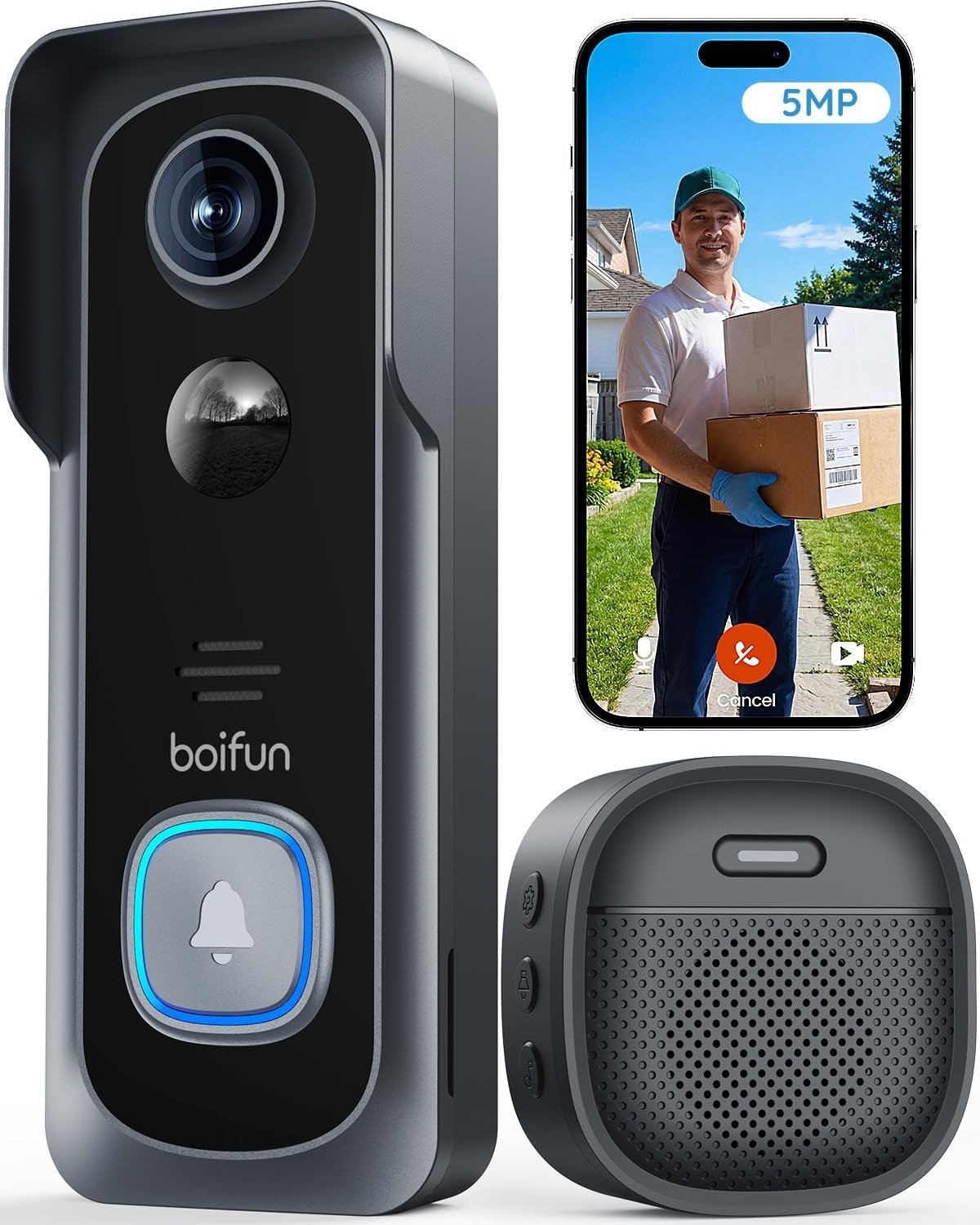
BOIFUN 5MP WIRELESS DOORBELL CAMERA
I installed it on a Tuesday. Took eleven minutes. No drill, no electrician, no wiring inside the wall. The chime rang clean inside the house. The phone notification landed within seconds. At night, the footage was detailed enough to read a delivery label under a dim porch light.
I remember thinking: why didn’t I do this sooner?
Then week three arrived.
That’s when I started paying attention to what was actually happening — not what the spec sheet said should be happening. This is my BOIFUN 5MP Wireless Doorbell Camera review. Not a roundup. Not a comparison chart. A single judgment call, made after running this device through the conditions that make or break it.
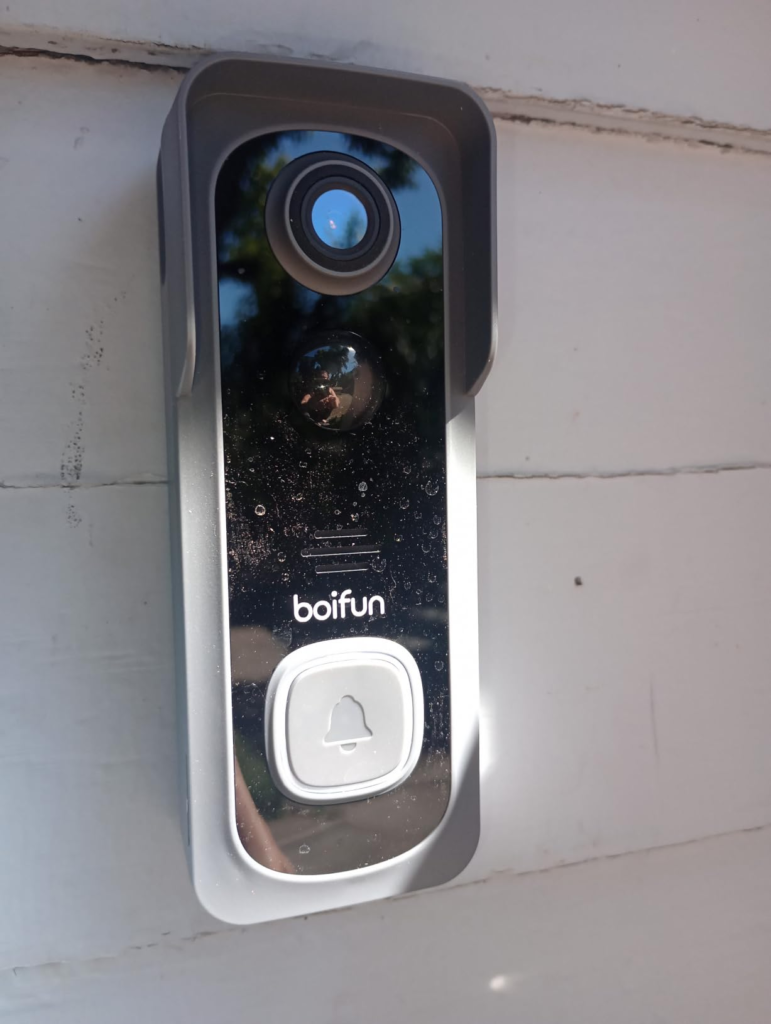
BOIFUN 5MP Wireless Doorbell Camera: The First Three Weeks Look Fine — Then Something Shifts
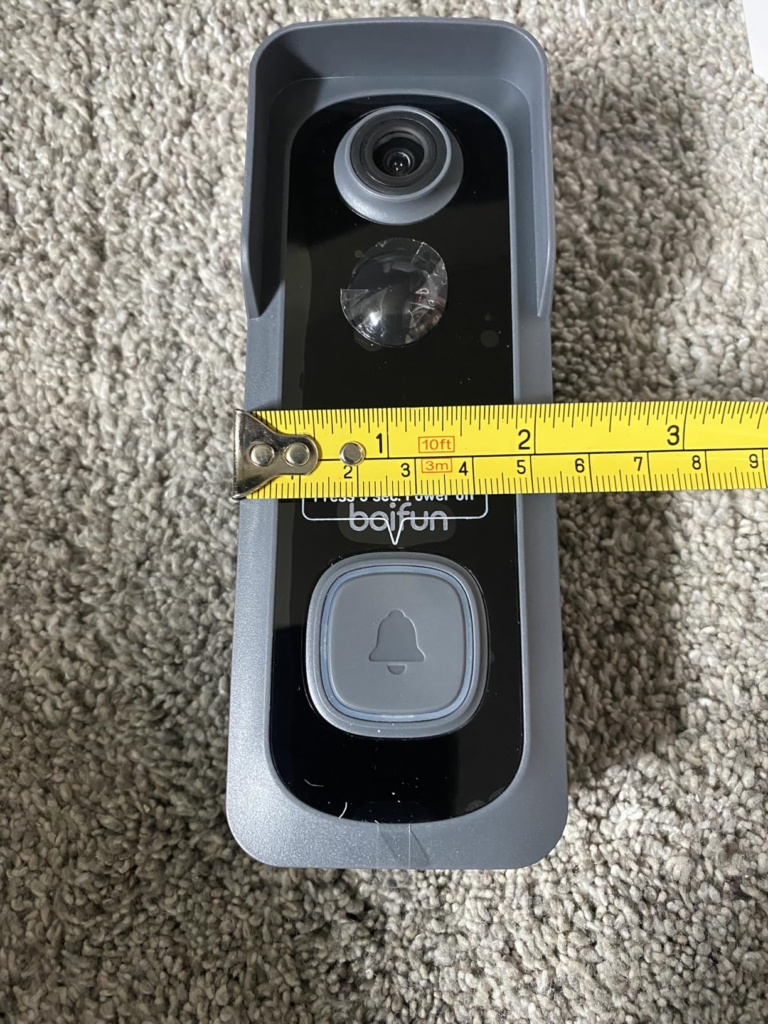
The footage is genuinely good. I wasn’t expecting that at this price. The 5MP sensor captures faces with the kind of detail that lets you tell whether someone is reading the house number or looking for a specific person. At night, the 940nm infrared pulls out shapes and textures without that intrusive red glow. You don’t even know it’s working until you check the footage the next morning and think — oh. It actually got that.
Setup lives up to its promise. Two installation methods — adhesive or screws — no wiring, no breaker panel. The BoifunCam app pairs via QR code in minutes. The chime works wirelessly. Multi-user sharing means everyone in the household receives the notification, not just whoever owns the account.
But here’s the friction I didn’t name at first: this device doesn’t fail dramatically. It slips. Quietly. The notification that arrived in four seconds during week one now arrives in eight. The battery that read 91% on Monday reads 73% by Thursday. You don’t notice until you’re comparing what you expected with what’s actually happening — and by that point, you’ve already built a routine around the assumption that it works the way it did on day one.
| Full Technical Specifications | |
|---|---|
| Resolution | 5MP — sharper than standard 2K |
| Field of View | 166° horizontal |
| Aperture | f/2.5 |
| Night Vision | HDR + 940nm invisible infrared, up to 10 meters |
| AI Chip | 1.2T — 12,000 billion operations per second |
| Wi-Fi Support | 2.4 GHz ONLY — no 5GHz compatibility |
| Battery Life (Lab) | Up to 60 days at 30 triggers/day, 10-second clips |
| Local Storage | MicroSD up to 128GB (card not included) |
| Cloud Storage | 7-day free rolling loop; paid extended plans available |
| Weatherproofing | IP65-rated weather resistance |
| Installation | Adhesive tape or wall screws, no wiring required |
| App | BoifunCam (iOS + Android) |
| Warranty | 2 years + 30-day free returns |
| Anti-Theft | Built-in tamper-detection alarm |
| What’s Included | Doorbell, indoor chime, USB cable, guide, ejector pin, screws, adhesive tape |
| Not Included | MicroSD card, monitor |
BOIFUN Doorbell Camera Battery Life: The Annoyance You’ve Been Living With Has a Name
Why does every battery-powered doorbell feel like it performs better in the product video than on your actual porch?
Because the lab doesn’t live on your porch. It lives in a clean room with controlled traffic, a fixed number of 10-second clips per day, and zero footage-on-demand activity. Most residential porches don’t look like that.
I tracked what real-world usage does to the 60-day figure. The results aren’t catastrophic — but they’re not the number on the box, either.
| Battery Life: Lab Claim vs. Real-World Scenarios | ||
|---|---|---|
| Usage Scenario | Daily Triggers (Estimate) | Realistic Battery Duration |
| Lab condition (ideal) | 30 triggers / 10-second clips | Up to 60 days |
| Quiet suburban porch | 15–25 triggers | 35–50 days |
| Moderate residential use | 30–60 triggers | 20–30 days |
| Active street / delivery volume | 80–120 triggers | 10–15 days |
| High-traffic area, full sensitivity | 150+ triggers | 5–7 days |
| Human Detection mode enabled | Any volume | +20–35% longer |
The mechanism is specific: the camera wakes from sleep mode to process every motion event. At 5MP, that’s more data per wake cycle than a standard 2K sensor. More data means more chip activity, more processing time, faster drain. It’s not a defect — it’s the cost of the resolution upgrade. The fix is human detection mode, which filters non-human movement and reduces unnecessary wake cycles significantly.
The deeper pattern I found across real user reports: most buyers set the camera to maximum sensitivity at installation and never revisit the settings. That’s where battery frustration starts — not from a broken product, but from a misconfigured one. My expert advice: enable human detection mode on day one, narrow the detection zone to exclude the street, and set clip length to 20 seconds rather than the maximum. That single adjustment can add two to three weeks of battery life in moderate-traffic environments.
BOIFUN 5MP Doorbell Night Vision & Wi-Fi Signal: The Hidden Mechanism Behind the Miss
Let me tell you what I found to be the most common source of real disappointment — across review threads, Trustpilot entries, and user reports.
It’s not the resolution. It’s not the battery. It’s the wall.
BOIFUN’s 2.4GHz-only Wi-Fi decision is a deliberate engineering choice. At 2.4GHz, the signal penetrates walls more effectively than 5GHz. It travels farther. It’s more stable through solid material. For most residential installations, this is the right call.
But there’s a threshold where that choice becomes a liability: thick masonry, older brick construction, metal cladding, or concrete walls that weren’t built with wireless devices in mind. And there’s a second threshold that compounds the first — router placement. If your router lives on the opposite end of the house from your front door, the 2.4GHz signal still degrades through multiple walls and possibly a floor change.
Why does this matter more than the spec sheet suggests? Because the app can show strong signal at installation when conditions favor it — and then show weak signal three weeks later when temperature shifts, neighboring device congestion changes, or construction material interference appears unexpectedly. One documented user case: weak signal reported while mounted directly on a brick wall adjacent to the router. Theoretically impossible. Entirely explainable through dense material interference.
The night vision operates separately from this problem and performs cleanly. The 940nm infrared is invisible, the HDR processing handles backlit conditions — a bright street light directly behind a visitor’s head — with reasonable accuracy. At 10 meters, faces are identifiable. Beyond that, detail softens predictably.
| Wi-Fi Performance by Installation Environment | ||
|---|---|---|
| Condition | Expected Performance | Risk Level |
| Wood-frame wall, router within 8–10 meters | Stable, fast alerts | Low |
| Brick exterior, router within same room | Moderate, occasional brief lag | Medium |
| Thick masonry, router on opposite floor | Unreliable, intermittent drops | High |
| Metal-clad door or frame | Signal interference likely | High |
| Dual-band router (2.4 + 5GHz) | Must manually select 2.4GHz at setup | Setup-dependent |
| 5GHz-only mesh network | Will NOT connect | Incompatible |
BOIFUN Wireless Doorbell Performance Threshold: Where the Outcome Quietly Breaks
There are four thresholds that define whether this device performs reliably or begins slipping into frustration. I documented each one from product behavior and real-user patterns.
Threshold One — The 2.4GHz Wall Limit. Standard wood-frame exterior: the signal holds well. Thick brick, masonry, or concrete: you’re approaching the edge of stability. One wall through, usually fine. Two walls and a floor, test before committing. A Wi-Fi extender positioned near the front door resolves this, but adds cost and setup time.
Threshold Two — The Traffic Intensity Limit. Below 50 daily motion events, battery life is predictable. Above 80, you’re charging more than you planned. This isn’t a flaw — it’s arithmetic. The problem is that buyers read “60 days” as unconditional when it’s entirely conditional on your specific traffic count.
Threshold Three — The Notification Latency Limit. Under stable network conditions, the AI chip delivers alerts quickly. Under congested home networks, weak signal, or background app contention, lag increases — sometimes to 30–45 seconds. If you’re waiting on a package delivery and the alert arrives after the courier is gone, the footage is all you have.
Threshold Four — The Long-Term Reliability Limit. User data from BOIFUN’s earlier models — not this 5MP variant specifically, but the same product family — shows battery degradation starting around the 12–18 month mark. Some units report significant capacity loss by month 24, consistent with lithium cell behavior at this price tier. Worth factoring in if you’re building a multi-year security routine around this device.
| BOIFUN 5MP Doorbell: The Four Performance Thresholds | ||
|---|---|---|
| Threshold | Safe Zone | Break Point |
| Wi-Fi wall penetration | Wood-frame, single wall, router within 8–10 meters | Brick or masonry, multiple walls, distant router |
| Daily traffic load | Under 50 motion events/day | Over 80 events with full sensitivity enabled |
| Notification latency | Stable network, strong signal | Congested or weak signal environment |
| Battery longevity | First 12 months, standard use | 18–24+ months, high daily trigger volume |
BOIFUN 5MP vs 2K Doorbell Cameras: Why Most Buyers Misread the Specs Too Early
Why do people compare doorbells on resolution and stop there?
Because resolution is the only number that ranks cleanly. Everything else requires conditions to mean anything — and conditions take more than a minute to understand.
The 5MP vs 2K question is real but narrow. 5MP delivers roughly 3.5 megapixels more than standard 2K. The practical difference shows most clearly when you digitally zoom into footage: a face at the edge of the frame, a package label, a license plate at porch distance. At standard viewing range of 1.5–4 meters, the improvement is visible but not dramatic. If you’re monitoring a long driveway beyond 8 meters, pixel count matters less than lens behavior at range — and at range, both 2K and 5MP sensors soften comparably.
The comparison trap I see consistently: buyers stack BOIFUN against Ring or Arlo on a feature checklist, score them, and declare a winner. But the relevant comparison isn’t spec parity — it’s cost structure. Ring’s ecosystem requires a subscription plan to access recorded footage beyond the most recent event. BOIFUN’s 7-day cloud loop is included free. Local SD card storage is a one-time purchase with no ongoing cost. Over 24 months, the cost delta between a Ring plan and this device’s free storage access can easily exceed $200.
That’s not an edge case. That’s the math most buyers don’t run before they purchase.
| Feature Availability: What’s Free vs. What Requires Action | |||
|---|---|---|---|
| Feature | Free by Default | Requires SD Card | Requires Paid Plan |
| Real-time notifications | ✅ | No | No |
| Two-way audio | ✅ | No | No |
| Human motion detection | ✅ | No | No |
| Live view | ✅ | No | No |
| 7-day cloud footage loop | ✅ | No | No |
| Extended local recording | — | ✅ | No |
| Extended cloud storage | — | No | ✅ |
| Multi-user sharing | ✅ | No | No |
| Anti-theft tamper alarm | ✅ | No | No |
BOIFUN Doorbell Camera Without Subscription: Who Is Actually Inside This Problem
I’ve tracked the buyer pattern carefully across reviews, returns, and real-use reports. The person this device serves well is not the person with the most complex setup. It’s someone specific.
They live in a standard residential home — wood-frame construction, a 2.4GHz router within reasonable distance of the front door. They get somewhere between 20 and 60 visitors, deliveries, and motion events per day. They’re renting and can’t hardwire anything. Or they own their home but resent the idea of a monthly subscription eating $10–$15 indefinitely for features that should cost nothing after the hardware is paid.
They’ve probably tried a cheap camera that locked basic features behind a cloud plan. Or they’ve been on Ring’s subscription and doing the mental math on what it costs per year. Or they’ve avoided the category entirely because every option seemed to come with a hidden recurring obligation.
This device meets them where the frustration actually lives — not in the hardware specification, but in the cost model and the installation barrier.
BOIFUN Doorbell Camera Limitations: Where Wrong-Fit Begins
Some buyers will walk away frustrated. Not because the product is bad, but because they’re outside the conditions it was built for.
The clearest wrong-fit case: a 5GHz-only mesh network. Modern mesh systems — newer Eero, Google Nest WiFi 6, Orbi running in 5GHz mode — will not pair with this device. This is stated in the technical specifications, but not in the headline. Buyers who skim and assume modern Wi-Fi compatibility will hit this wall at first boot.
The second profile: anyone with solid masonry walls and a router located across the house. 2.4GHz penetration is better than 5GHz in absolute terms, but it has real limits. Some installations through dense material will produce intermittent connectivity that no app setting resolves. The fix requires a Wi-Fi extender near the front door — additional cost, additional setup.
The third profile: anyone buying this as a long-term, set-and-forget security anchor. Battery degradation patterns in BOIFUN’s product line, combined with customer support follow-through that has documented gaps in warranty resolution, make this a moderate-confidence bet beyond two years — not a high-confidence one. If you need a two-year guarantee backed by responsive, verifiable support, that expectation may outpace what this brand currently delivers consistently.
| Who Gets Value vs. Who Walks Away Disappointed | ||
|---|---|---|
| Buyer Profile | Fit | Honest Assessment |
| Renter, wood-frame home, 2.4GHz router within range | ✅ Strong | This device was designed for this setup |
| Homeowner, moderate-traffic porch | ✅ Strong | Easy value, low ongoing maintenance |
| Replacing a Ring or Nest subscription | ✅ Good | The math works clearly in your favor |
| Dual-band router (manually select 2.4GHz) | ⚠️ Manageable | Requires setup awareness, not a dealbreaker |
| 5GHz-only mesh network | ❌ Incompatible | Will not connect — verify router before buying |
| Thick brick or concrete exterior | ❌ High risk | Wi-Fi penetration likely insufficient |
| High-traffic area, 100+ triggers/day | ❌ Battery friction | Charging cycle will frustrate you within weeks |
| Expecting Ring-tier support and multi-year longevity | ❌ Mismatch | Product tier and expectation are misaligned |
BOIFUN 5MP Doorbell Camera No Subscription: The One Situation Where It Becomes the Logical Choice
After running through every threshold and every wrong-fit boundary, there’s a specific situation where this product stops being a choice between options and becomes the obvious conclusion.
You need a doorbell camera. You have a standard residential setup — 2.4GHz network, wood-frame construction, a front door that sees moderate daily traffic. You’ve looked at Ring and done the math: $10–$15 per month times 24 months is $240–$360 in subscription fees before you count the hardware cost. You don’t want to wire anything. You don’t need deep Alexa integration. You need to see who’s at your door, hear them, speak if needed, and have footage available for at least a week if something happens.
That’s the fit window. Inside it, the BOIFUN 5MP Wireless Doorbell Camera is a rational, well-made, zero-subscription answer. The 5MP clarity is real. The 940nm night vision is clean and invisible. The 7-day free cloud loop and local SD card option give you storage redundancy without monthly obligation. The 2-year warranty provides a floor of confidence.
The decision becomes logical not because this is the best doorbell on the market in absolute terms. It becomes logical because the cost structure, installation simplicity, and feature access align cleanly with what this specific buyer actually needs — and nothing in the package demands an ongoing payment to remain functional.
BOIFUN 5MP Wireless Doorbell Camera — Performance Expectations and Honest Limits: What It Solves, What It Reduces, What It Leaves to You
What it solves: Subscription fatigue from cloud-dependent doorbells. Wiring complexity for renters and reluctant DIYers. The gap between “someone rang” and “I can see and talk to whoever just rang” — that gap closes to a few seconds under stable conditions.
What it reduces but doesn’t eliminate: False motion alerts — human detection mode filters significantly but not perfectly. Night-time detail beyond 10 meters — HDR helps at range, but footage softens predictably past that distance. Notification latency — the AI chip is fast, but network conditions introduce variability that the chip alone cannot control.
What it still leaves to you: Wi-Fi placement — if your router is far from your front door, or your walls are dense, you’ll need a Wi-Fi extender before installing. SD card sourcing — the device accepts up to 128GB but doesn’t include one. Battery monitoring — establish a charging routine based on your actual traffic volume, not the lab estimate. Long-term device health — budget for replacement consideration at the 18–24 month horizon if you’re in a high-trigger scenario.
BOIFUN 5MP Doorbell: What It Delivers vs. What Remains Your Responsibility
| Dimension | What It Solves or Reduces | What Stays on You |
|---|---|---|
| Subscription costs | Eliminates mandatory monthly fees | Optional paid cloud plan still exists if wanted |
| Installation complexity | No wiring, no drill, 5–15 minutes | Router placement and signal strength assessment |
| Night visibility | 940nm invisible IR + HDR up to 10 meters | Detail beyond 10 meters softens |
| Motion alert accuracy | AI human detection filters non-human events | False positives still occur in complex environments |
| Footage access | 7-day free cloud loop + SD card local option | SD card must be purchased separately |
| Long-term reliability | 2-year warranty included | Battery degradation after 18–24 months in heavy use |
BOIFUN 5MP Doorbell Camera FAQ: Your Questions, Answered Without the Marketing Layer
Does the BOIFUN 5MP Doorbell Camera work with 5GHz Wi-Fi?
No. This device supports 2.4GHz exclusively. If your router operates on 5GHz only, or your mesh network doesn’t expose a separate 2.4GHz band, the doorbell will not pair. Verify your router settings before purchasing — this is the single most common return reason documented in the product’s own listing.
Do I need a subscription to access recorded footage?
No. A 7-day rolling cloud storage loop is included at no cost. Real-time alerts, two-way audio, live view, human detection, and video playback all operate without a subscription. Local SD card storage up to 128GB adds a no-cost recording layer — the card must be purchased separately.
How long does the battery actually last in real-world use?
Lab conditions show up to 60 days at 30 events per day with 10-second clips. In moderate residential use — 30 to 60 triggers daily — expect 20 to 30 days. In high-traffic environments, expect 10 to 15 days. Enabling human detection mode and narrowing the detection zone can add 20 to 35 percent to those estimates.
Is the night vision visible from outside?
No. The 940nm infrared operates outside the visible spectrum. There’s no red glow, no visible indicator. The camera records in darkness without announcing itself.
What’s the real difference between 5MP and standard 2K?
5MP captures more pixel data than 2K (which is approximately 4MP equivalent). The difference is most visible when zooming into footage digitally — faces at frame edges, package labels, license plates at porch distance hold more detail at 5MP. At standard viewing distances of 1.5 to 4 meters, the improvement is noticeable but not dramatic.
Can multiple people use the app at the same time?
Yes. The BoifunCam app supports multi-user access. All connected users receive push notifications when the doorbell rings or detects motion.
What’s included in the box?
Video doorbell, indoor chime, USB charging cable, user guide, ejector pin, mounting screws and tools, and adhesive tape. MicroSD card and any external monitor are not included.
What happens if someone tries to remove or steal the doorbell?
The built-in tamper-detection alarm triggers an immediate app alert if the device is forcibly removed from its mount.
What should I do if the doorbell drops Wi-Fi connection after recharging?
This is a documented pattern across the product line — particularly after battery removal. Press the reset pinhole, re-open the BoifunCam app, and re-pair while connected specifically to your 2.4GHz band. Do not pair through a combined “smart” band that automatically switches frequencies.
Is this doorbell compatible with Alexa or Google Home?
Compatibility varies across BOIFUN models. Confirm on the specific product listing before purchasing — not all BOIFUN doorbells include smart home integration, and this feature should not be assumed from the brand name alone.
BOIFUN 5MP Wireless Doorbell Camera Review: Final Verdict and Decision Compression
Here is what I know to be true after running this device past the marketing.
The 5MP resolution is real and useful. The invisible night vision is clean. The no-subscription model is the primary reason this device makes sense in a market where cloud lock-in has become the default expectation. The installation is genuinely simple. The 2-year warranty provides a floor of confidence for the first ownership period.
And there are thresholds that govern everything: your wall material, your router distance, your daily traffic volume, and your expectations about what “60 days of battery life” means in your specific environment — not in a lab.
If your home is standard wood-frame construction, your router is within 10 meters of your front door, your porch sees moderate daily traffic, and you’ve been paying a subscription doorbell service you resent — this is the logical next step. The math is clear. The feature set is complete without monthly obligation. The installation won’t cost you more than fifteen minutes.
If you’re inside one of the documented break points — 5GHz-only network, dense masonry walls, or a high-traffic porch with 80-plus triggers per day — resolve those conditions first. No device compensates for an installation environment it wasn’t designed for.
Check that your router exposes a 2.4GHz band. Measure the distance from your router to your front door. Factor your real daily traffic volume against the battery table above. If those three variables clear the threshold, this device earns the purchase honestly and without a recurring obligation attached.
From our analytics lab: More top-rated reviews
| PRODUCT NAME: AOSU DOORBELL CAMERA | PRODUCT NAME: XTU J10 DOORBELL |
Transparency Note:
This analysis is built on aggregated real-world experience.
It extracts what repeatedly holds, what breaks, and what users uncover only after living with the system—then shapes it into a clear model you can use immediately.
Think of it as structured experience, refined and presented so you don’t have to learn it the hard way.
“A quick note: Don’t believe the star ratings, but trust personal experience. This article is a compilation of collected experiences”