TIMEMORE BLACK MIRROR PRO REVIEW: I MEASURED WHAT IT MISSES — AND WHERE IT STILL WINS
The Result Looks Fine. The Problem Isn’t.
You pull a shot. The scale reads 36g out. The timer says 28 seconds. Everything looks right on paper.
But the shot tastes slightly off — a little thin, a touch bitter, not quite what you dialed in yesterday. You adjust the grind. You adjust the dose. The numbers match again. The result still drifts.
This is the quiet failure that most coffee scale reviews never name directly: the issue isn’t whether your scale displays a number. It’s whether that number arrives in time to mean anything — and whether the tool you’re using was actually designed for the environment you’re using it in.
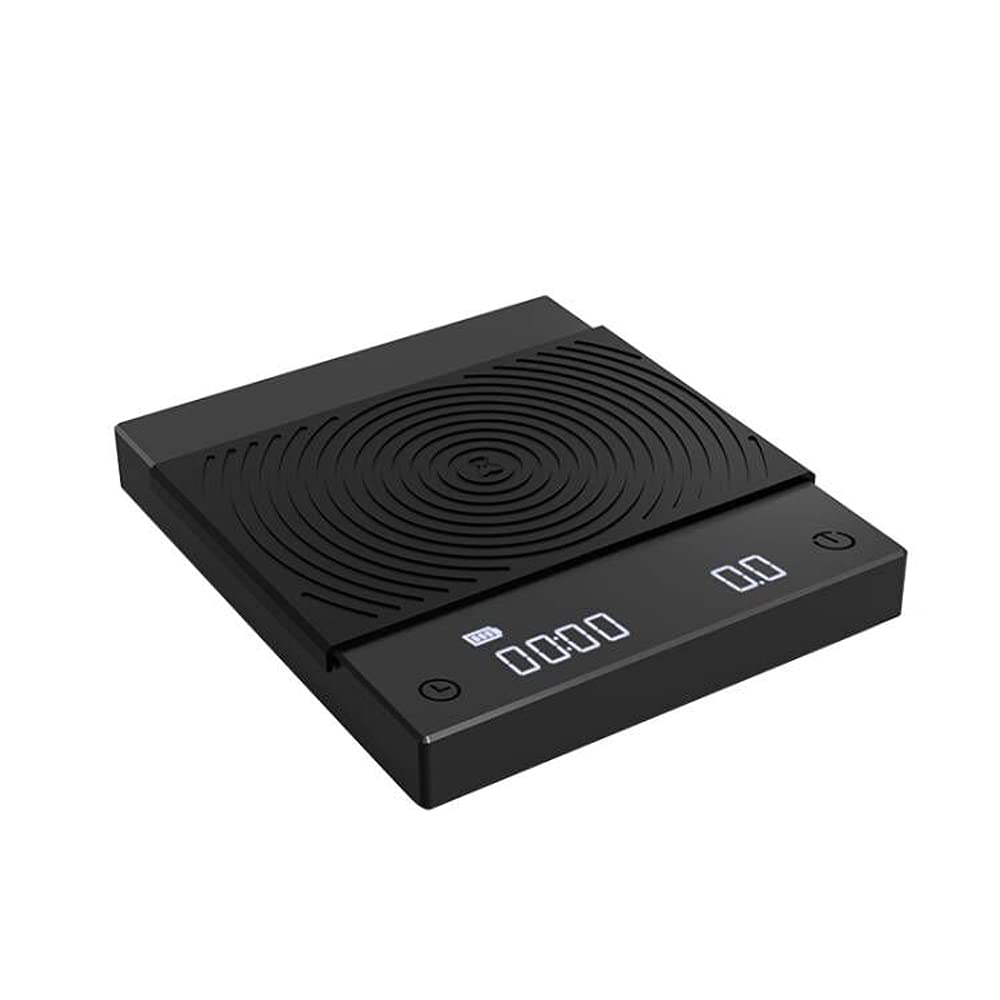
The Timemore Black Mirror Pro is a scale that looks like it belongs in a specialty setup. At around $45–55, it occupies the widest gap in the market — between cheap kitchen scales with no timer and Bluetooth smart scales at $200+. That gap is real. The question is whether the Black Mirror Pro fills it cleanly, or only appears to.
What You’re Actually Feeling but Not Naming
Most people who feel friction with their coffee scale don’t describe it as a “latency problem” or a “sensor limitation.” They describe it as inconsistency they can’t locate.
The pour looks the same. The ratio looks the same. But the extraction doesn’t taste the same. And because the scale confirmed the numbers, they blame the grinder, the beans, the water temperature — everything except the tool that was supposed to anchor the process.
What’s actually happening in many of these cases:
| Symptom | What You Feel | What’s Actually Happening |
|---|---|---|
| Weight display lags on pour | You over-pour by 2–3g | ~0.5 second readout latency during active pour |
| Auto-timer misfires | Brew data resets mid-process | Timer triggered by vibration or dripper lift |
| Flow rate number jumps | Display feels chaotic during pour | Single-sensor architecture, not dual |
| Off-center placement | Reading drifts slightly | One sensor concentrated at center |
| Scale tares on its own | You lose your reference point | Touch controls oversensitive to hover |
None of these are catastrophic on their own. Together, under real brewing conditions — especially espresso — they form a pattern of low-level unreliability that skilled users notice and beginners absorb as unexplained inconsistency.
The Hidden Mechanism Behind the Miss
The Black Mirror Pro is a single-sensor scale. This is not a flaw — it’s a design reality that defines its ceiling.
A single sensor, positioned at the center of the platform, delivers accurate readings when the weight is placed centrally, the surface is still, and the measurement is static. Under those conditions, the Black Mirror Pro performs well. Accuracy of 0.1g, confirmed across independent tests.
The mechanism breaks down when:
1. The pour is active and fast. Weight is being added in real time. The single sensor processes at a rate that introduces approximately 0.3–0.5 seconds of readout lag. At a typical espresso flow rate of 1–2g per second, a half-second delay means the number you’re reading is already 0.5–1g behind the reality inside the cup.
2. The vessel is lifted mid-brew. The auto-timer function on the Pro is set to not stop within the first 40 seconds of a lift — a useful consideration. But outside that window, lifting your dripper to swirl or check can disrupt the timer logic, forcing a manual intervention mid-brew.
3. The placement is off-center. The Pro includes a small center logo as a placement guide. That guide exists because off-center placement produces measurably different readings. The sensitivity to position is a direct consequence of single-sensor architecture.
4. The touch controls respond to proximity, not pressure. The Pro’s touch buttons activate on near-hover. Multiple reviewers across platforms report accidental tares during V60 repositioning, wiping the surface, or adjusting a portafilter. Once tared, the brew reference is lost.
The Pro knows this. The sensor upgrade it received over the original Basic Plus was specifically aimed at improving responsiveness. And it did improve. But improving single-sensor responsiveness is not the same as dual-sensor stability.
The Threshold Where the Outcome Quietly Breaks
There is a specific threshold at which the Black Mirror Pro stops being “accurate enough” and starts being “a variable you’re managing around.”
That threshold is defined by two factors:
Brewing method precision requirement + pour-over repeatability demand.
| Brewing Method | Black Mirror Pro Fit | Why |
|---|---|---|
| Pour-over (V60, Chemex) — casual to intermediate | Strong | Slower pours, static moments, readable lag |
| Pour-over — high-precision, fast-bloom technique | Borderline | 0.5s lag becomes meaningful at controlled flow rates |
| AeroPress, French Press, Cold Brew | Excellent | Static weight, no dynamic pour tracking required |
| Espresso — home machine, moderate use | Acceptable | Fits most drip trays; size caveat applies |
| Espresso — tight drip tray, dialing-in obsessive | Weak | Size may not fit; single sensor limits live shot tracking |
| Professional or competition-level espresso | Not designed for this | Acaia Lunar or Nano-class tool required |
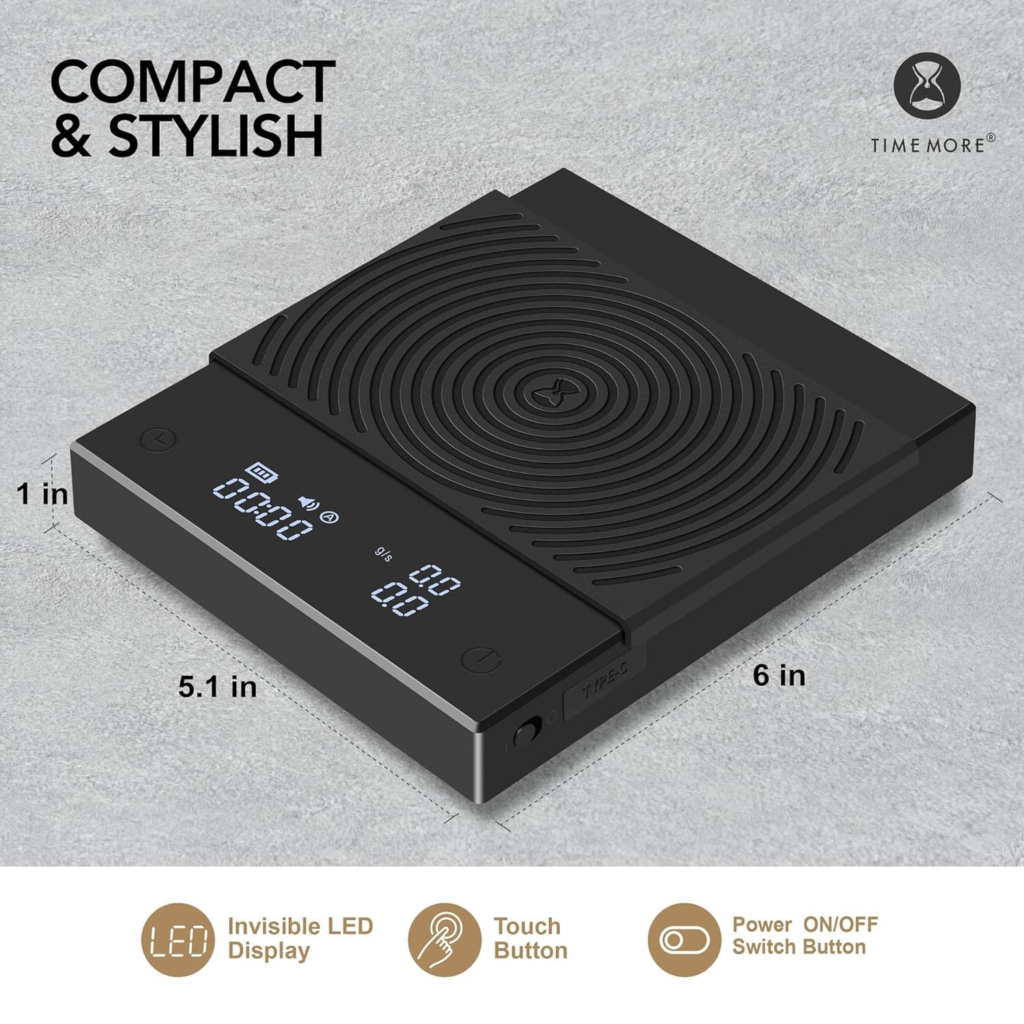
The Pro’s footprint — 6 × 5.1 × 1 inch — fits most drip trays. Not all. If your espresso machine has a shallow or compact drip tray, you need to measure before purchasing. This is not a minor disclaimer. It’s the most common source of post-purchase regret with this scale.
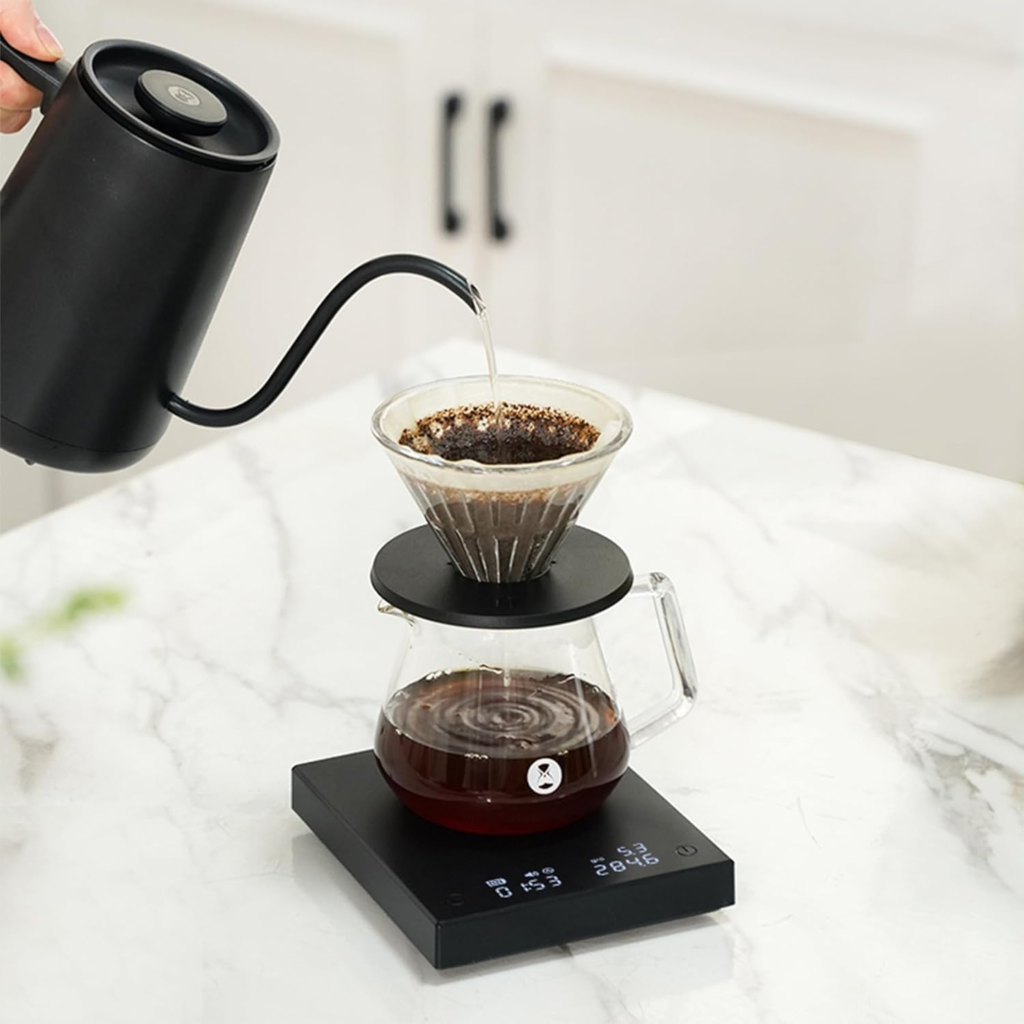
The flow rate display, while present and real, updates quickly enough that it reads as noise to many users during active espresso extraction. Tom’s Guide noted directly that the auto-flow-rate monitor “changes too quickly to perceive” in practical use. That’s not a criticism of the feature — it’s an honest description of what single-sensor flow rate monitoring looks like in real time.
Why Most Buyers Misread This Too Early
The comparison most people reach for when evaluating the Black Mirror Pro is the Acaia Pearl. That comparison is emotionally understandable and structurally misleading.
The Acaia Pearl is a smart scale. Dual sensor. Bluetooth. App-connected. It processes, records, and visualizes brew data across sessions. Its real-time responsiveness is not just faster — it’s architecturally different. Comparing a Black Mirror Pro to an Acaia Pearl on accuracy is like comparing a mechanical chronograph to a GPS watch on positioning precision. They both tell time. One of them is doing something fundamentally different with it.
The comparison that actually matters is within the Black Mirror Pro’s own category:
| Scale | Price | Sensor | Flow Rate | Bluetooth | Best For |
|---|---|---|---|---|---|
| Timemore Black Mirror Basic | ~$30 | Single | No | No | Entry-level pour-over |
| Timemore Black Mirror Pro | ~$45–55 | Single (upgraded) | Yes | No | Intermediate pour-over + espresso |
| Timemore Black Mirror Basic 2 | ~$55–60 | Single | Yes | No | Aesthetic upgrade, waterproof LED |
| Timemore Black Mirror Nano | ~$65–75 | Single | Yes | No | Dedicated espresso, small drip tray |
| Acaia Pearl | ~$225 | Dual | Yes | Yes | Precision pour-over, professional use |
| Acaia Lunar | ~$250 | Dual | Yes | Yes | Precision espresso, professional use |
Within this map, the Black Mirror Pro sits correctly at a specific address: it is the right step up from a basic kitchen timer-scale if you brew pour-over regularly and want flow rate visibility without the Acaia investment.
The misread happens when buyers use it to replace what they actually need: a dedicated espresso scale with a smaller footprint, or a smart scale with session tracking. The Pro cannot do either of those things. Not because it fails — but because it was not designed for them.
Who Is Actually Inside This Problem
You are the right person for the Black Mirror Pro if your situation matches this profile:
- You brew pour-over as your primary method — V60, Chemex, AeroPress, Kalita
- You want to track brew ratios consistently, not just casually
- You’re interested in flow rate as a learning signal, not a data-logging tool
- You brew espresso occasionally, or have an espresso machine with a standard drip tray
- You want a scale that looks intentional on a counter, not like a postal scale
- Your budget ceiling is under $60 and you are not willing to pay for Bluetooth features you don’t use
- You’ve been using a phone timer and a kitchen scale and have felt the gap
You are not the right person if:
- You pull espresso shots daily on a machine with a compact drip tray (measure first)
- You want to track shot-by-shot extraction data across sessions
- You expect flow rate to be a stable, readable number during active espresso extraction
- You make buying decisions based on maximum-precision benchmarks and compare to lab-grade instruments
- You already own an Acaia and are wondering if this is “just as good” — it is not, in the ways that made you want precision in the first place
Where Wrong-Fit Begins
The failure pattern with the Black Mirror Pro is almost always one of these three:
Wrong-fit #1: Tight drip tray. The buyer assumes the scale fits, installs it, and realizes the scale is 0.5 inches too wide for their machine’s drip tray — or the cup clearance is insufficient. The Pro’s middle-range size is a genuine limitation for compact espresso machines. The Black Mirror Nano exists for this reason.
Wrong-fit #2: Espresso obsession. The buyer wants to dial in espresso with the precision of a competition barista. The single sensor, the 0.5-second lag during shot extraction, the touch-sensitive tare button — all of these compound in an espresso context where 0.5g and 1 second are meaningful variables.
Wrong-fit #3: Feature-led decision. The flow rate display sounds like the headline feature. But flow rate on a single-sensor scale is a directional indicator, not a precision instrument. Buyers who purchase primarily for flow rate precision discover in practice that the number moves faster than they can respond to it. The feature is real. Its practical resolution is lower than the marketing implies.
None of these failures are dishonest on Timemore’s part. All of them are visible in the specifications if you know what to look for.
The One Situation Where This Product Becomes Logical
If you brew pour-over regularly — V60, Chemex, or AeroPress — and you want a scale that tracks ratio, timer, and flow direction in one clean, rechargeable device that fits in a drawer and looks like it belongs next to a gooseneck kettle, the Timemore Black Mirror Pro is the most structurally honest answer in its price range.
It doesn’t overpromise. It boots instantly. The battery lasts approximately one month of regular use on a single USB-C charge. The 0.1g accuracy holds under real conditions. The flow rate display, while not precision-grade, gives enough directional information to catch pour-rate drift during a bloom or a second pour. The physical on/off switch — added in response to user feedback — prevents the accidental activation that plagued earlier models.
For the intermediate home brewer who has outgrown a kitchen scale but is not ready to pay $225 for an Acaia Pearl, the Black Mirror Pro closes that gap clearly. Not completely. Clearly.
What It Solves, What It Reduces, and What It Still Leaves to You
| Category | Black Mirror Pro |
|---|---|
| Solves | Ratio tracking, brew timing, consistent 0.1g accuracy, rechargeable convenience, flow direction awareness |
| Reduces | Mid-brew guesswork, over-pouring from no feedback, post-brew inconsistency in pour-over |
| Does not solve | Espresso shot tracking with sub-second precision, off-center placement sensitivity, touch-button accidental tare |
| Leaves to you | Verifying drip tray fit before purchase, managing pour rate with eyes not just numbers, accepting no Bluetooth app integration |
| Regret risk | Buying for espresso without measuring your drip tray. Buying for flow rate precision expecting lab-grade display stability. |
The scale will not make you a better brewer by itself. It will make the variables you’re already controlling more visible. That’s the honest value of a $45 tool — not transformation, but legibility.
Final Compression
The Timemore Black Mirror Pro is not the scale for every coffee setup. It is the correct scale for a specific one: intermediate pour-over, standard espresso clearance, no need for Bluetooth, a preference for clean design over feature bloat.
Its single sensor is not a secret — it’s a tradeoff that keeps the price where it is. Its flow rate display is useful as a trend signal, not a precision instrument. Its touch controls require deliberate handling. Its footprint requires pre-purchase measurement if espresso is part of the plan.
If your setup matches the threshold described above, this is where the decision stops being vague: the Black Mirror Pro delivers honest, consistent, legible results for the brewer who knows what they’re actually measuring — and why.
If your setup demands tighter espresso tracking, smaller form factor, or session-by-session data logging, the decision is also clear: this is not where you stop.
Frequently Asked Questions
| Question | Answer |
|---|---|
| Is the Timemore Black Mirror Pro accurate enough for espresso? | For standard home espresso use — pulling shots, tracking output weight, timing extraction — yes. The 0.1g accuracy and approximately 0.3–0.5 second lag are acceptable for most home setups. For high-precision shot dialing where sub-second, sub-gram real-time tracking matters, the single-sensor architecture reaches its practical ceiling. |
| Does the Timemore Black Mirror Pro fit on all espresso machine drip trays? | No. At 6 × 5.1 inches, it fits most drip trays but not all compact or built-in machines. Always measure your drip tray dimensions and cup clearance before purchase. If your drip tray is tight, the Black Mirror Nano (smaller footprint) is the more appropriate model. |
| What is the difference between the Black Mirror Pro and the Black Mirror Basic 2? | Both share the same sensor upgrade, flow rate display, and USB-C charging. The primary difference is the silicone pad: the Pro has a full-surface larger silicone cover; the Basic 2 has a thinner pad that doesn’t cover the full face. The Basic 2 also adds a waterproof LED screen. Functionally, the two models are nearly identical in core performance. |
| Is the flow rate feature on the Black Mirror Pro useful? | For pour-over brewing, yes — as a directional indicator. It helps you notice if your pour rate accelerates or slows unexpectedly. For precision espresso tracking, its update speed is too fast to act on in real time. Multiple testers across platforms describe it as a signal, not a precise readout. |
| Why doesn’t the Timemore Black Mirror Pro have Bluetooth? | By design. Timemore has kept the Black Mirror series focused on standalone functionality at an accessible price. Bluetooth and app integration are available on Acaia scales (Pearl, Lunar) at roughly 4–5x the price. If session-tracking, historical data, or app-guided brewing are priorities, the Acaia ecosystem is the logical alternative — not a Pro upgrade. |
| How long does the battery last on the Black Mirror Pro? | A full USB-C charge (approximately 2 hours) delivers roughly one month of regular home brewing use. The LED display continuously shows battery level so you are not caught mid-brew without warning. |
| Who should NOT buy the Timemore Black Mirror Pro? | Anyone with a compact espresso machine drip tray (measure first), anyone expecting app integration or session logging, anyone whose primary use case is competition-level shot dialing, and anyone who already owns a smart scale and is evaluating a downgrade. |
Transparency Note:
This analysis is built on aggregated real-world experience.
It extracts what repeatedly holds, what breaks, and what users uncover only after living with the system—then shapes it into a clear model you can use immediately.
Think of it as structured experience, refined and presented so you don’t have to learn it the hard way.
“A quick note: Don’t believe the star ratings, but trust personal experience. This article is a compilation of collected experiences”