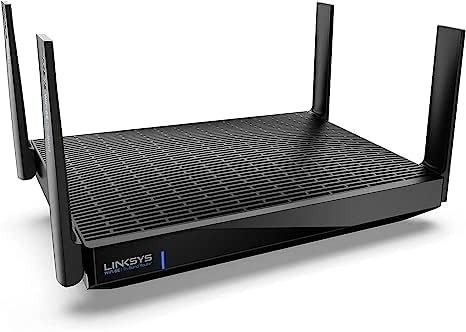
My Linksys Hydra Pro 6E AXE6600 Review: YOU’RE PROBABLY PAYING FOR A BAND YOU CAN’T USE YET
The Signal Looks Strong. The Problem Is Invisible.
You plug it in. The app sets up in minutes. The LED turns solid blue. Your devices connect. Speed tests look decent. You move on.
And then — three weeks in — you notice something you can’t quite name. The gaming laptop in the next room feels slightly sluggish during peak hours. The 4K stream hesitates once, twice. Your phone sometimes connects slower than it should. Nothing crashes. Nothing fails completely. Just a quiet performance gap that keeps showing up where you least expect it.
This is the exact pattern that defines the Linksys Hydra Pro 6E AXE6600 (MR7500) experience for most buyers. Not a broken router. Not a defective unit. A structurally misallocated one.
And if you don’t understand why before buying, you’ll spend months blaming your ISP, your walls, your devices — when the actual answer lives inside the router’s architecture itself.
What You’re Feeling But Not Naming
There’s a specific type of performance frustration that doesn’t show up in speed tests. It shows up in the gap between what the spec sheet promised and what your daily experience delivers — especially on devices you actually own.
Most buyers of the Hydra Pro 6E AXE6600 don’t feel cheated by one dramatic failure. They feel underwhelmed by a persistent, quiet underperformance on the bands they use most: 2.4GHz and 5GHz.
The 5GHz band in the Hydra Pro 6E is equipped with only 2×2 MIMO and an 80MHz channel width, meaning devices that don’t use 6GHz get a mere quarter of the theoretical bandwidth. That’s not a minor footnote. That’s the structural backbone of how your phones, your laptops, your smart TVs, and your gaming consoles actually connect — every day.
Real users testing on 1-gigabit fiber connections reported that Wi-Fi speed tests on an iPhone in front of the router topped out at 450Mbps down — while the Linksys app’s own internal speed test showed 945Mbps. The upstream gap was even more dramatic: 400Mbps reported by external tests versus only 150Mbps shown in the app.
The frustration is real. It’s just not easy to name without understanding the mechanism underneath it.
The Hidden Mechanism Behind the Miss
The Hydra Pro 6E is a tri-band router: 2.4GHz (600Mbps), 5GHz (1,200Mbps), and 6GHz (4,800Mbps). On paper, the combined theoretical throughput reaches 6.6Gbps — hence the AXE6600 designation.
But the hardware allocation is deeply asymmetrical.
Linksys engineered the Hydra Pro 6E around Qualcomm’s Networking Pro 810 chipset, not the more capable and expensive 1210 chipset. This was a deliberate cost-reduction decision — and it shows directly in the router’s overall performance ceiling.
The 6GHz band received the lion’s share of the hardware investment: 4×4 MU-MIMO, 160MHz channel width, and 4,800Mbps peak throughput. The 5GHz and 2.4GHz bands were allocated what was left. Community networking experts noted the router runs a 2×2 radio configuration on 2.4GHz and 5GHz — so the slower performance on legacy bands is not a defect. It is an architectural consequence.
The problem is that 6GHz — the band that received all the investment — has a shorter range than 5GHz, requires newer client devices, and remains largely unused by the majority of household gadgets in 2025.
| Band | Max Speed | MIMO Config | Channel Width | Practical Use Case |
|---|---|---|---|---|
| 2.4GHz | 600 Mbps | 2×2 | 40MHz | IoT, older devices, long-range |
| 5GHz | 1,200 Mbps | 2×2 | 80MHz | Laptops, phones, TVs |
| 6GHz | 4,800 Mbps | 4×4 | 160MHz | 6E-capable devices only |
The router’s best hardware serves the devices least likely to be in your home right now.
The Threshold Where Performance Quietly Breaks
Tom’s Guide benchmark testing measured peak 802.11ac performance at 1.96Gbps at 15 feet and rated effective range at 80 feet — both figures that look competitive on a comparison chart. But the range figure collapses significantly for the 5GHz band when you move beyond a single room.
In side-by-side comparison tests, the Netgear Nighthawk RAXE300 — priced only £50 higher — embarrassed the Linksys at every distance, with download speeds of 142MB/sec in the study, 136MB/sec in the living room, 50MB/sec in the kitchen, and 21MB/sec in the bathroom, compared to the Hydra Pro 6E’s noticeably weaker numbers across the same positions.
The performance threshold breaks specifically at two distance-and-device intersections:
| Scenario | Expected | Actual Pattern |
|---|---|---|
| 5GHz device, 1 room away | Fast, stable | Acceptable but underwhelming |
| 5GHz device, 2+ rooms away | Moderate drop | Significant degradation |
| 6GHz device, close range | Excellent | Delivers on spec |
| 6GHz device, 2+ rooms away | Moderate | Short-range limitation of 6GHz physics |
| 2.4GHz IoT devices | Background stable | Generally acceptable |
| Multi-device congestion peak | Managed | Can drop channels under load |
Multiple users reported connection drops and aggressive band-switching behavior between 2.4GHz and 5GHz under normal load conditions — the kind of issue a router at this price point should not exhibit.
This is the threshold. The router doesn’t fail at low use. It quietly underperforms at the exact moment your household demands the most from it.
Why Most Buyers Misread This Too Early
The Hydra Pro 6E’s marketing is coherent and confident: AXE6600, 6GHz expansion, 55+ devices, 2,700 sq. ft. coverage, tri-band intelligent mesh. Every claim is technically accurate. None of them tell you where the hardware actually lives.
Most buyers make three systematic errors when evaluating this router:
Error 1 — The AXE6600 Number Is Not a 5GHz Speed
The 6,600Mbps figure is the combined theoretical sum across all three bands. Your phone operating on 5GHz is working with 1,200Mbps theoretical maximum — on a 2×2 radio. Not 6,600.
Error 2 — Assuming 6GHz Works Like 5GHz
The 6GHz band is inferior to 5GHz in terms of range. At its best, this band trades reach for speed — which matters deeply in any real home where walls, floors, and distance reduce signal before devices can benefit.
Error 3 — Comparing Price Without Comparing Band Allocation
Independent networking analysts concluded that at $500, the Hydra Pro 6E is the most expensive in terms of return on investment among early Wi-Fi 6E routers — despite having the lowest price. The 5GHz and 2.4GHz limitations relative to price made it difficult to justify against alternatives.
The comparison trap is this: the number on the box looks like a specification. It is actually a marketing sum. Buyers who don’t disaggregate it walk in expecting one router and live with another.
Who Is Actually Inside This Problem
This router has a genuine use-case fit — but it is narrow and specific.
You are a real fit if:
- Your home has multiple devices that support Wi-Fi 6E (phones released after 2022, laptops released in 2023+, AR/VR headsets)
- Your internet plan delivers 500Mbps or more and you want to extract full value from it wirelessly
- You want a mesh-expandable router that uses 6GHz as a backhaul channel — a genuine performance advantage in that topology
- Your devices are primarily used close to the router or in an open-plan layout
- You are future-proofing for a device ecosystem that will be 6E-saturated in the next 2–3 years
The match begins to weaken if:
- Your primary connected devices are mid-cycle laptops, current-gen gaming consoles, or standard smartphones (most of which are still Wi-Fi 6 or lower)
- Your home has multiple walls, floors, or dead zones that depend on strong 5GHz penetration
- You rely on IoT smart home devices across large areas
- You are comparing this router on raw 5GHz throughput against alternatives in the same price tier
Early adopters who connected 6E-capable devices — specifically high-end ASUS laptops with Wi-Fi 6 support — noted a significant improvement in download throughput compared to Wi-Fi 5 routers, acknowledging that 6E’s major benefit is contingent on client-side hardware compatibility.
Where Wrong-Fit Begins
The regret pattern for the Hydra Pro 6E is consistent across real user reports and professional reviews. It follows a recognizable shape:
Stage 1 — Setup Satisfaction
Setup via the Linksys iOS or Android app is smooth and fast, guiding users through account creation, router placement tips, and initial configuration without friction. The first impression is strong.
Stage 2 — Speed Test Optimism
Devices connect, speed tests run near ISP plan speeds, everything appears to work. The router passes the initial evaluation.
Stage 3 — Sustained Use Disappointment
Some users noted the router restarting on its own under sustained load, with perceived range shorter than the previous generation despite the Wi-Fi 6 upgrade. Others reported the band-switching between 2.4GHz and 5GHz as overly aggressive.
Stage 4 — The Interface Frustration
The user interface is clunky and sparse. There is no separate IoT network available, and the management experience — while functional — lacks the features that more sophisticated router users expect.
The web interface is deliberately obscured to push users toward the Linksys mobile app, which requires a Linksys account login — a privacy concern for users who prefer local-only management.
Wrong-fit begins the moment your household’s actual device mix and physical environment collide with what the 6GHz-optimized architecture can realistically deliver.
| Wrong-Fit Signal | What It Means |
|---|---|
| Primarily 5GHz devices throughout house | 6GHz investment wasted |
| Multi-story home with thick walls | 5GHz range insufficient |
| Heavy IoT deployment | No dedicated IoT VLAN |
| Advanced network control needed | Interface too limited |
| Budget-conscious buyer | Better 5GHz performance available cheaper |
The One Situation Where This Router Becomes Logical
After everything above: there is one specific configuration where the Linksys Hydra Pro 6E AXE6600 becomes not just acceptable, but genuinely logical.
That configuration is this: a household at the early edge of a Wi-Fi 6E device ecosystem, with a high-bandwidth internet plan, deploying the MR7500 as the primary node in a multi-node Linksys mesh system — using 6GHz as a dedicated backhaul channel between nodes while 5GHz serves existing client devices.
In this topology, the 6GHz band’s hardware strength is applied where it creates maximum structural benefit: between the router nodes, freeing the 5GHz band entirely for client traffic. When used within Linksys’s Intelligent Mesh Technology, the system maintained stable connections across extended distances with a low measured speed penalty — a credible result for a mesh deployment context.
In single-router real-world testing with a 1-gigabit fiber connection — running 4K streaming, large file downloads, and online gaming simultaneously on the same band — performance held without significant drops, suggesting the router manages multi-stream loads adequately under controlled conditions.
This is the narrow corridor where the MR7500 earns its price. Outside it, the value proposition weakens rapidly.
What It Solves, What It Reduces, and What It Still Leaves to You
| Category | Assessment |
|---|---|
| 6GHz throughput near the router | Delivers on spec for 6E-capable devices |
| 5GHz throughput across rooms | Underwhelming relative to price tier |
| Setup experience | Clean, fast, app-guided |
| Mesh expansion | Supported, works well as a system |
| Connection stability | Some users report drops; firmware-dependent |
| Advanced network controls | Limited; no IoT VLAN, sparse web UI |
| Privacy | Cloud account required for full features |
| Range | 80 ft effective; short for large homes |
| Value for legacy device users | Poor — competing routers offer more 5GHz for less |
| Value for 6E early adopters | Reasonable at current discounted price ($100–$150 range) |
It solves: future-proofing for 6E devices, congestion on the 6GHz band, clean setup experience, basic mesh expandability.
It reduces: 5GHz congestion in 6E-heavy environments, multi-device management friction through the app.
It still leaves to you: advanced network segmentation, strong 5GHz range in large or complex homes, local-only management without cloud dependency, IoT isolation.
Final Compression
The Linksys Hydra Pro 6E AXE6600 is not a bad router. It is a structurally specific one. Its hardware bet on 6GHz was placed when 6GHz device adoption was near zero — and that bet has only partially paid out as of 2025.
If your home is already accumulating Wi-Fi 6E devices — recent flagship phones, new-generation laptops, AR/VR hardware — and you are building a mesh system rather than relying on a single router to cover a large space, the Hydra Pro 6E at its current market price (often $100–$150) becomes a defensible, forward-looking decision.
If your house runs on the devices most households actually own — current-generation phones, mid-cycle laptops, smart TVs, gaming consoles — and you need strong 5GHz performance across multiple rooms, this router will quietly underdeliver in exactly the places you need it most.
The clearest professional verdict: the Hydra Pro 6E can be a good router — it just cannot be $500 good. At $200 less, the calculus changes. Even then, the 5GHz limitations remain a structural concern.
The decision here is not about specifications. It is about whether the band that received this router’s best hardware is the band your devices actually use. If the answer is yes: the logic holds. If the answer is not yet: the cost of waiting is lower than the cost of paying now for performance your ecosystem cannot reach.
Frequently Asked Questions
| Question | Answer |
|---|---|
| Is the Linksys Hydra Pro 6E AXE6600 worth buying in 2025? | At its original retail price of $499, it is difficult to justify for most users. At the discounted price of $100–$150 where it often appears on Amazon and refurbished markets, it becomes a reasonable choice specifically for households with Wi-Fi 6E devices or those building a mesh system. |
| What does AXE6600 actually mean in real-world speed? | AXE6600 is the combined theoretical sum of all three bands: 600Mbps (2.4GHz) + 1,200Mbps (5GHz) + 4,800Mbps (6GHz). In practice, your devices connect to only one band at a time. Most current devices will land on 5GHz, where the practical maximum is significantly lower than the headline number. |
| Why is my 5GHz performance disappointing on the Hydra Pro 6E? | The router uses a 2×2 MIMO configuration on 5GHz with an 80MHz channel width — a deliberate hardware allocation decision that prioritized the 6GHz band. If your devices are primarily 5GHz, you are using the router’s secondary hardware tier. |
| Does the Linksys Hydra Pro 6E work well for gaming? | At close range with a 6E-capable device, yes. For gaming consoles and most laptops operating on 5GHz across one or more walls, the performance ceiling and occasional connection instability reported by users make it a weaker choice than dedicated gaming routers in the same price range. |
| Can I manage the Hydra Pro 6E without creating a Linksys account? | A local web interface exists, but Linksys deliberately limits its visibility to encourage app use. Advanced features require the app, and the app requires a Linksys cloud account — a concern for privacy-focused users. |
| Who should NOT buy the Linksys Hydra Pro 6E? | Buyers with primarily Wi-Fi 5 or Wi-Fi 6 (non-6E) devices, those needing strong signal across multiple floors or rooms, users who require IoT network isolation, and anyone expecting performance proportional to the AXE6600 headline number across all bands. |
| Is the 6GHz band actually useful in a typical home right now? | For most households in 2025, 6E client devices remain a minority. The 6GHz band delivers its best results at close range with compatible devices. Its most practical application is as a dedicated mesh backhaul channel — not as a primary client-serving band for a typical mixed-device home. |
Transparency Note:
This analysis is built on aggregated real-world experience.
It extracts what repeatedly holds, what breaks, and what users uncover only after living with the system—then shapes it into a clear model you can use immediately.
Think of it as structured experience, refined and presented so you don’t have to learn it the hard way.
“A quick note: Don’t believe the star ratings, but trust personal experience. This article is a compilation of collected experiences”