NETGEAR Nighthawk AX2400 WiFi 6 Router: YOUR INTERNET ISN’T SLOW. YOUR NETWORK ARCHITECTURE IS.
The Speed Test Looks Fine. The Problem Runs Deeper.
You ran the speed test. The numbers came back respectable. Maybe even impressive.
And yet — the call stuttered. The game spiked. The 4K stream paused for the third time this week, right when you were watching something you actually cared about.
So you refreshed the test. Still fine. You unplugged the router, waited thirty seconds, plugged it back in. Fine again.
The frustration isn’t in the numbers. It’s in the gap between what your network reports and what your household actually experiences. That gap has a name. It’s not a speed problem. It’s a congestion problem — and it’s the specific category of failure that the NETGEAR Nighthawk AX2400 WiFi 6 Router (RAX30) was engineered to address.
Whether it addresses your congestion problem — that’s a different question entirely, and one that most reviews skip.
What You’re Actually Feeling But Haven’t Named Yet
The symptom you keep trying to fix isn’t “slow internet.” Slow internet looks like a consistently low speed test. What you have is something more erratic: fast when one device is online, degraded when three are, miserable when six are competing.
That’s not your ISP failing you. That’s your WiFi 5 router doing exactly what it was designed to do — serve one device at a time, rotating through the queue so fast you don’t notice the rotation until there are too many devices waiting in line.
The technical name for what WiFi 5 does is OFDM — Orthogonal Frequency-Division Multiplexing. Each channel serves a single device per transmission cycle. When two people in your home are streaming simultaneously, they’re not sharing the channel. They’re alternating it. At low device counts, this is invisible. At five, eight, twelve active devices, the wait accumulates into something you feel as lag, buffering, and dropped voice quality.
The average American household in 2025 has more than 20 connected devices. Your WiFi 5 router was designed for a world that no longer exists in your home.
The Hidden Mechanism: Why “2.4 Gbps” Doesn’t Mean What You Think
Here is the number on the box: 2.4 Gbps.
Here is what that number means: it’s the theoretical combined ceiling across both bands (2.4 GHz and 5 GHz), measured under laboratory conditions with a single device at close range on an unobstructed line of sight.
Here is what that number does not mean: that any single device in your living room will receive 2.4 Gbps of throughput.
Real-world single-device speeds on the 5 GHz band of the RAX30 typically land between 400–700 Mbps at close to medium range — which, for context, is more than sufficient for any streaming, video conferencing, or casual gaming scenario. The honest ceiling matters less than how that ceiling distributes under load.
This is where WiFi 6 earns its keep — not by delivering more speed to one device, but by maintaining adequate speed to many devices simultaneously.
| Condition | WiFi 5 Router | NETGEAR Nighthawk AX2400 (RAX30) |
|---|---|---|
| 1 device, close range | 400–600 Mbps | 400–700 Mbps |
| 5 devices active simultaneously | Noticeable degradation | Stable across devices |
| 10+ devices mixed traffic | Significant queuing lag | Managed congestion |
| 4K stream + video call + gaming | Frequent micro-interruptions | Consistent low-latency routing |
| IoT devices on 2.4 GHz | Shared with everything | Dedicated band separation |
| Network latency (light load) | ~5–10ms | ~3–6ms |
The difference isn’t in peak speed. It’s in floor stability — the minimum reliable performance your most sensitive application receives when everything else is competing for bandwidth.
The Threshold Where Outcomes Quietly Break
There is a specific point at which the Nighthawk AX2400’s value proposition either crystallizes or evaporates. That point is determined by three variables working together:
Your current router’s age. If your router was purchased before 2020, it almost certainly runs WiFi 5 (802.11ac) or older. The congestion architecture is fundamentally different. Any WiFi 6 router — including this one — will produce a measurable improvement in multi-device environments.
Your device count. The RAX30 is rated for up to 20 devices. More precisely: it manages up to 20 devices without the queue-based degradation that cripples older routers. If your household regularly runs 8–15 active devices, this is the meaningful sweet spot. Below 5 devices total, you will see minimal improvement over a competent WiFi 5 router.
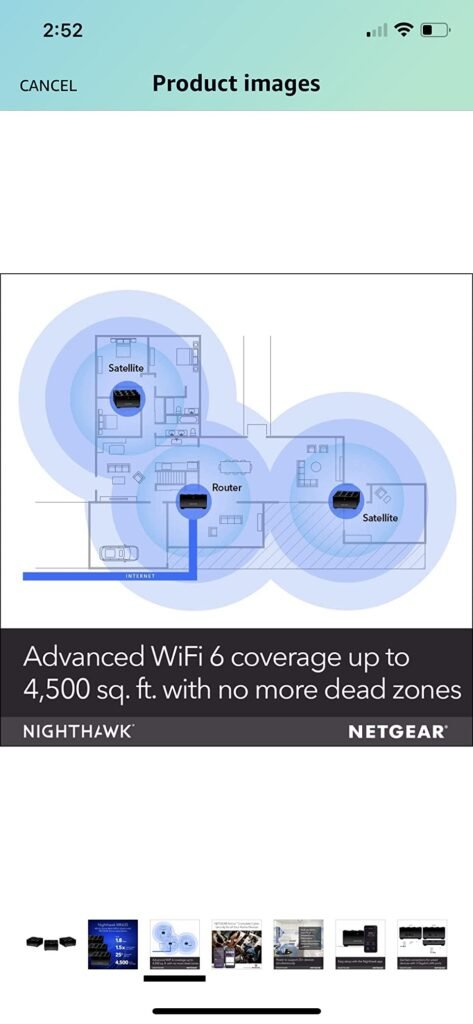
Your home’s footprint. The RAX30 covers up to 2,000 square feet with its three high-power antennas and Beamforming+ technology. In a standard apartment or small-to-medium home, this is sufficient. In a 3,000+ square foot home with multiple floors and concrete or brick construction, the signal will weaken before it reaches the far corners. This router will not fix a coverage problem — it will fix a congestion problem within its coverage radius.
The threshold, stated plainly: If you have more than 8 active devices, a router older than 4 years, and a home under 2,000 square feet — the Nighthawk AX2400 addresses your actual problem. If even one of those conditions doesn’t apply, your money may be better placed differently.
Why Most Buyers Judge This Router Too Early — or Entirely Wrong
The most common negative reviews of the RAX30 share a structural pattern. They appear within the first 48 hours. They cite a speed test that doesn’t show dramatic improvement. They conclude the router “isn’t worth it.”
This is a measurement error, not a product failure.
Speed test results in a low-device environment — which is what you have immediately after setting up a new router, before every device in your home has reconnected — will look nearly identical to your previous router’s results. The Nighthawk AX2400’s advantage isn’t visible in isolation. It’s visible under load.
The second category of negative reviews describes connection drops and stability issues. These are real, and worth taking seriously. NETGEAR’s firmware history on the RAX30 and its predecessor the RAX35 includes documented periods of instability — particularly in early 2021 and again in mid-2023. Community forums on NETGEAR’s own support board show users experiencing 7–10 daily micro-disconnections, primarily appearing as brief gaming and streaming interruptions. NETGEAR has addressed most of these through firmware updates, but the pattern is worth noting: firmware maintenance is part of owning this router. Automatic firmware updates are enabled by default, but users who disable them or purchase refurbished units without updating risk inheriting older instability.
A third category of criticism targets the NETGEAR Armor security subscription. After the 30-day free trial, Armor costs approximately $100/year. If you don’t want it, you don’t need it — the router functions fully without Armor activated. But if you’re irritated by subscription upsells embedded in setup flows, know going in that this is part of the NETGEAR experience.
Who Is Actually Inside This Problem
The NETGEAR Nighthawk AX2400 solves a specific problem for a specific household. Let’s name it precisely.
This router is built for:
A household of 2–4 people with a combined active device count between 8 and 18. You have a mix of smartphones, laptops, a smart TV or two, perhaps a gaming console and a handful of smart home devices. Your current router is at least 3–4 years old. You experience intermittent performance degradation — not consistent slowness — and it’s worst when multiple people are online simultaneously.
Your internet plan delivers somewhere between 200–1,000 Mbps. You are not exceeding 1 Gbps (the RAX30’s WAN port is Gigabit; plans faster than 1 Gbps require a 2.5G port, which this router does not have).
You live in a space under 2,000 square feet, or you’re willing to accept coverage gaps in larger spaces rather than invest in a mesh system.
You want a clean upgrade — one router, no subscription required to use basic functions, app-based setup, and compatibility with your existing cable or fiber modem.
Where Wrong-Fit Begins
This router is not a match — and the mismatch will cost you — if:
You have a plan faster than 1 Gbps. The RAX30’s single WAN port is Gigabit Ethernet. It physically cannot route more than approximately 940 Mbps to your network. If your ISP delivers 1.2, 2, or 5 Gbps to your modem, this router becomes a bottleneck. The speed you’re paying for stops at the router.
You have a home larger than 2,000 square feet, or heavy construction. Concrete walls, multiple floors, and significant square footage require either a higher-powered single router or a mesh system. The Nighthawk AX2400’s three antennas and Beamforming+ work well within their rated range. Beyond it, signal degrades in ways no firmware update will solve.
Your entire device fleet predates WiFi 6. OFDMA — the core technology that makes WiFi 6 congestion management work — requires both the router and the client device to support it. An older iPhone, a 2018 laptop, a legacy smart TV: these devices don’t speak WiFi 6. They connect on WiFi 5 protocols, and while the router handles them without issue, they don’t unlock the efficiency gains OFDMA provides. You’ll still see improvement from the better processor and antenna design, but the signature multi-device performance advantage narrows.
You want a mesh-ready system from the start. The RAX30 does not natively support NETGEAR Orbi mesh without additional hardware. If your coverage problem is a coverage problem — not a congestion problem — this router doesn’t solve it.
| Wrong-Fit Scenario | What Actually Happens | What You Need Instead |
|---|---|---|
| Internet plan > 1 Gbps | Router becomes the speed bottleneck | Router with 2.5G WAN port |
| Home > 2,500 sq ft | Dead zones persist, frustration increases | Mesh system (Orbi, Eero) |
| All devices are pre-2019 WiFi 5 | WiFi 6 benefits largely untapped | Any modern WiFi 5 router saves money |
| Heavy office/business use | Firmware instability risk increases | Managed business-grade hardware |
| Apartment with 1–2 people, <5 devices | Barely perceptible improvement | ISP modem/router is likely sufficient |
The One Situation Where the NETGEAR Nighthawk AX2400 Becomes Logical
You have a WiFi 5 router that’s 3–5 years old. Your household runs 10–16 active devices at peak hours. The living room is 40 feet from the router and the 4K TV buffers more than it should. Video calls from the home office are unstable when your partner is streaming. Your internet plan is between 300 Mbps and 1 Gbps.
In that situation, you don’t have a speed problem. You have a congestion distribution problem. And the NETGEAR Nighthawk AX2400 WiFi 6 Router addresses it with a combination of components that aren’t visible on the spec sheet:
A 1.5 GHz triple-core processor that can handle concurrent traffic without queuing delay. OFDMA that divides the channel into sub-channels, routing data to multiple devices in parallel rather than sequentially. MU-MIMO (5-stream) that allows simultaneous multi-user transmission. Beamforming+ that directs signal toward devices rather than broadcasting omnidirectionally. WPA3 security that future-proofs your network authentication without requiring manual configuration.
The setup takes under ten minutes through the Nighthawk app. The four Gigabit LAN ports wire in your stationary devices — game console, desktop, NAS, smart TV — removing them from the wireless queue entirely and freeing bandwidth for your mobile devices.
The improvement is not dramatic in a speed test. It is dramatic in lived experience. The micro-pauses stop. The video calls stop stuttering when someone else connects. The gaming session stops spiking. The feeling that your internet is fine when you’re alone but broken when everyone is home — that feeling resolves.
What It Solves, What It Reduces, and What It Still Leaves to You
| Category | What Changes | What Remains Your Problem |
|---|---|---|
| Multi-device congestion | Resolved in most households under 2,000 sq ft with <20 devices | Households with >20 concurrent active streams need a higher-tier router |
| Streaming stability | 4K streams stabilize; micro-buffering drops significantly | ISP plan below 100 Mbps remains a hard ceiling |
| Gaming latency | Reduced under load; OFDMA prevents queue-based lag spikes | Wired connection to gaming console still recommended for competitive play |
| Video call quality | Stable even with 3–4 simultaneous calls | ISP upload speed is the limiting factor, not the router |
| Security | WPA3 + optional Armor protection | Armor subscription required after 30-day trial for full threat monitoring |
| Coverage area | Solid up to 2,000 sq ft | Larger homes need mesh nodes — this router cannot fix a range gap |
| Firmware stability | Current firmware is stable; auto-updates keep it current | Refurbished units require manual firmware update before full use |
| Setup complexity | App-based setup, 10 minutes typical | PPPoE configurations (some fiber ISPs) require manual router login |
Final Compression
The NETGEAR Nighthawk AX2400 WiFi 6 Router is not the router for every problem. It is precisely the router for one problem that tens of millions of households have right now: a WiFi 5 network that made sense in 2019 and no longer matches the device load and simultaneous-use patterns of a modern connected home.
It will not transform a slow ISP plan. It will not cover a three-story colonial with thick walls. It will not benefit a home with two people and four devices. Those are not its failure modes — those are simply not its use cases.
If your household is in the 8–18 device range, your current router is older than three years, your plan runs between 300 Mbps and 1 Gbps, and your home is under 2,000 square feet — the upgrade calculus is clear. The technology gap between WiFi 5 and WiFi 6 in a congested household is not theoretical. It is measured in calls that stop dropping, streams that stop buffering, and evenings that stop being an exercise in patience.
The decision isn’t about whether the NETGEAR Nighthawk AX2400 is impressive. It’s about whether it solves the problem you actually have.
Frequently Asked Questions
| Question | Answer |
|---|---|
| Does the NETGEAR Nighthawk AX2400 work with any internet provider? | Yes. The RAX30 is compatible with any ISP up to 1 Gbps, including cable, fiber, DSL, and satellite, connecting to your existing modem. If your plan exceeds 1 Gbps, you will need a router with a 2.5G WAN port. |
| Do I need a NETGEAR Armor subscription to use this router? | No. Armor is optional. The router functions fully without it after the 30-day trial expires. Armor adds network-level threat monitoring powered by Bitdefender; dismissing it does not affect routing performance or security protocols like WPA3. |
| Will this router improve my speeds if I have WiFi 5 devices? | Partially. Older WiFi 5 devices connect and work normally, but they don’t benefit from OFDMA’s congestion management. You will still see improvement from the router’s stronger processor, Beamforming+, and cleaner band management — but the full WiFi 6 advantage unlocks only when connecting WiFi 6-capable devices. |
| How is the NETGEAR Nighthawk AX2400 different from the RAX35? | The RAX30 (sold as the AX2400) includes a USB 3.0 port and five streams; the RAX35 is a stripped-down variant originally built for Walmart without USB. Both run similar hardware but differ in minor port and stream configurations. For home use, the RAX30 is the more complete unit. |
| Why does my speed test not look much faster after installing the RAX30? | Speed test results measure peak bandwidth to a single device — which is not the Nighthawk AX2400’s primary strength. Its value is in simultaneous multi-device performance. The improvement becomes measurable when 8 or more devices are actively using the network at the same time. |
| Is the NETGEAR Nighthawk AX2400 good for gaming? | Yes, for most gaming setups. Online gaming benefits more from low, consistent latency than from peak speed, and OFDMA substantially reduces queue-based latency spikes. For competitive gaming at the highest level, a wired Ethernet connection through one of the four LAN ports remains the best-performing option regardless of router. |
| What is the coverage range of the RAX30? | NETGEAR rates the RAX30 at up to 2,000 square feet with three high-power antennas and Beamforming+. In practice, open floor plans and standard drywall construction reach this rating reliably. Brick, concrete, or multi-story configurations with thick floors reduce effective coverage. |
| Should I buy a refurbished NETGEAR Nighthawk AX2400? | If purchasing refurbished, immediately perform a manual firmware update before normal use. Early firmware versions had documented instability issues. Current firmware is stable, but refurbished units may ship with outdated firmware that predates key fixes. |
Transparency Note:
This analysis is built on aggregated real-world experience.
It extracts what repeatedly holds, what breaks, and what users uncover only after living with the system—then shapes it into a clear model you can use immediately.
Think of it as structured experience, refined and presented so you don’t have to learn it the hard way.
“A quick note: Don’t believe the star ratings, but trust personal experience. This article is a compilation of collected experiences”