GOOGLE NEST DOORBELL BATTERY (GWX3T): YOU THINK YOU’RE BUYING FREEDOM FROM WIRES. YOU’RE ACTUALLY BUYING INTO A SYSTEM — AND THAT CHANGES EVERYTHING
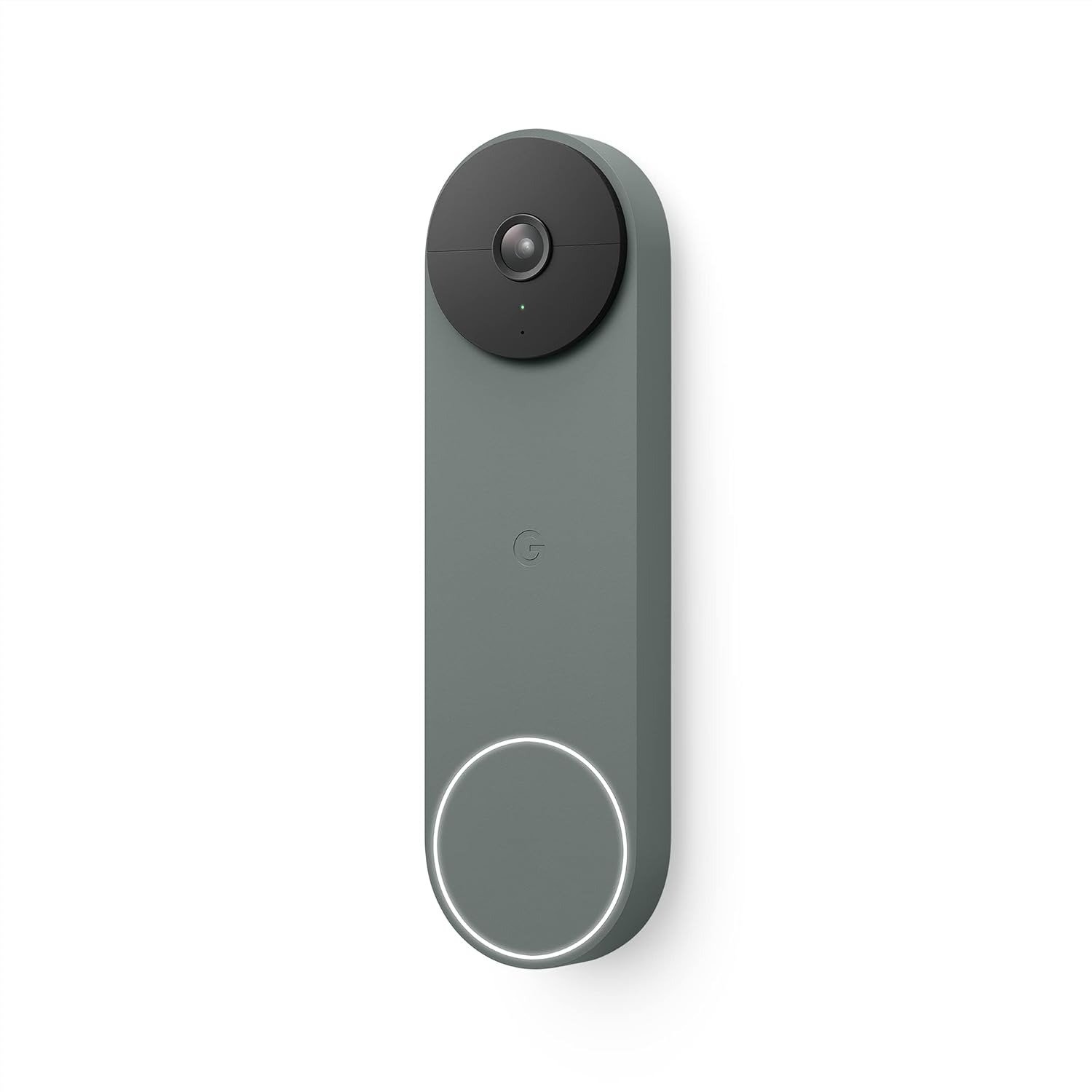
GOOGLE NEST DOORBELL BATTERY (GWX3T)
The Result Looks Fine. The Problem Isn’t.
You install it. The app opens cleanly. The video loads. Someone walks past your front door and your phone buzzes — person detected. You think: this works exactly like they said.
And it does. For a while, and under the right conditions.
The problem isn’t that the Google Nest Doorbell Battery (GWX3T) fails to function. The problem is that it functions perfectly inside a specific set of conditions — and those conditions are narrower than the marketing suggests, narrower than the product box implies, and narrower than most buyers assume when they pull it off the shelf.
The device is well-built. The detection logic is genuinely impressive. The app is among the smoothest in the category. None of that is in question.
What’s in question is whether the situation you’re actually in matches the situation this doorbell was designed for.
Most buyers don’t discover the gap until after installation. This article closes that gap before it costs you.
What You’re Actually Feeling but Not Naming
You wanted something simple. No electrician. No running wires through walls. Just a doorbell that shows you who’s at the door, catches package deliveries, and stops the low-grade anxiety that comes from not knowing what happens at your front door when you’re not home.
That’s not a complicated ask. And the GWX3T answers it — on the surface.
But underneath that surface, a quieter frustration tends to build:
- You wire it into your existing doorbell transformer, expecting continuous power. The battery still drains because the wires don’t directly power the device — they only trickle-charge it, and under certain conditions, not even that.
- You expect 24/7 recording because it’s a security camera. There is no 24/7 recording, not on battery, not even when wired, not even with a paid subscription.
- You expect the notification to arrive fast enough to actually catch a porch thief in motion. Sometimes it does. Sometimes, under cloud processing load, it doesn’t.
- You expect the video to be sharp enough to read a face clearly. At 960p, in low light or shade, it often isn’t.
None of these are catastrophic. Each one, alone, is manageable. But together, they form a specific shape of unmet expectation — and if that shape matches your actual use case, you will feel it every week.
The annoyance doesn’t announce itself clearly. It shows up as vague dissatisfaction with a product that technically works.
The Hidden Mechanism Behind the Miss
Here is what the spec sheet doesn’t surface directly:
The Google Nest Doorbell (Battery) is, at its core, a cloud-dependent, event-only, subscription-structured device that happens to have a battery inside.
The battery is not the power source in the way most people assume. When wired, the existing transformer trickle-charges the internal battery — the doorbell always runs off the battery itself, not off the wire. This means in cold weather (below 32°F / 0°C), the battery cannot accept a charge, and will drain regardless of whether it’s connected to wires. Google confirmed this in their official support documentation.
The 960p resolution is not a budget compromise. It’s a deliberate hardware choice that has not been updated since the first model — while competitors have moved to 1080p, 2K, and 2.5K. The result: adequate in bright daylight, noticeably pixelated with moving objects, and limited in shadow or low-light conditions.
The “free 3-hour event history” is real and usable — but it stores only triggered events, not continuous footage. If a motion event wasn’t detected, it wasn’t recorded. If the Wi-Fi went down during an incident, you get up to 1 hour of local buffer storage — not a local archive.
The facial recognition, extended video history (30 to 60 days), and familiar face alerts are all locked behind Nest Aware, a monthly subscription starting at $8/month, scaling to $15/month for Nest Aware Plus.
The device is not broken. The device is exactly what it was designed to be. The question is whether that design matches your actual situation.
The Threshold Where the Outcome Quietly Breaks
There is a specific activity level at which this doorbell changes from low-maintenance to high-friction.
| Daily Motion Events | Expected Battery Life | Recharge Frequency |
|---|---|---|
| 1–5 events | 3–4 months | Seasonal |
| 6–15 events | 3–6 weeks | Monthly |
| 16–30 events | 1–2 weeks | Weekly |
| 30+ events or cold climate | Days to 1 week | Effectively constant |
This is the threshold most buyers cross without knowing it existed.
A quiet suburban front door in moderate climate: the battery performs well, the device earns its place, the free tier covers basic needs. A busy front door — street-facing, multiple pedestrians daily, delivery-heavy, or cold-weather location — and the device becomes a maintenance obligation rather than a convenience.
The same threshold applies to video expectations:
| Use Case | 960p Performance |
|---|---|
| Package arrived? Yes/No | Sufficient |
| Recognize a known family member | Sufficient |
| Identify a stranger’s face clearly | Marginal |
| Read a license plate | Insufficient |
| Low-light / night / shade condition | Insufficient without HDR offset |
If your actual question at the door is “was a package left?” — 960p answers it. If your actual question is “can I identify this person for a police report?” — 960p does not answer it reliably.
Why Most Buyers Misread This Too Early
The early comparison trap looks like this: someone sees the Google Nest Doorbell Battery next to a Ring Video Doorbell Plus, notes the similar price point, and starts comparing features side by side on paper.
This is where the judgment breaks.
Feature parity on paper does not mean experience parity in use. What the spec sheet cannot show is the operational dependency tree — the chain of conditions that must be true simultaneously for the device to perform at the level you’re imagining.
For the GWX3T, the dependency tree looks like this:
The device performs at its ceiling when:
- You are already embedded in the Google ecosystem (Google Home, Nest Hubs, Chromecast, Google Assistant)
- Your front door sees low-to-moderate motion traffic (under 15 events daily)
- Your climate stays above freezing for most of the year
- You either pay for Nest Aware or accept 3-hour event history as sufficient
- You do not need 24/7 continuous recording under any circumstances
- Your Wi-Fi is stable and reaches the front door reliably
Remove any two of those conditions, and the device still works — but it works noticeably below what you assumed when you bought it.
The comparison to Ring becomes meaningful only after you’ve mapped this dependency tree honestly. If your home runs on Alexa and Echo devices, the Nest Doorbell’s deepest integrations won’t fire for you. You’d be paying for an ecosystem advantage that belongs to someone else’s setup.
Who Is Actually Inside This Problem
This doorbell was built for a specific user. That user looks like this:
| Profile Element | Fit |
|---|---|
| Already uses Google Home / Nest Hub | Strong fit |
| Renter or no existing doorbell wiring | Strong fit |
| Moderate-traffic front door | Strong fit |
| Wants basic package + person detection | Strong fit |
| Willing to pay Nest Aware for full feature unlock | Fit with cost acceptance |
| Needs fast, effortless plug-in — no tools | Strong fit |
| Lives in temperate climate | Strong fit |
The device is for someone whose main friction is “I don’t know what’s happening at my front door when I’m away” — not “I need court-admissible footage of every event at my property.”
If your use case is closer to the first description, the GWX3T solves it cleanly and integrates into an existing Google household with almost no friction.
Where Wrong-Fit Begins
There is a clear line between who belongs inside this purchase and who will regret it within 60 days.
The wrong-fit profile:
- You expect wired installation to eliminate battery management. It reduces it — it does not eliminate it, especially in cold climates.
- You expect 24/7 recording as a baseline for home security. This device cannot do that, ever, by design.
- You expect subscription-free full functionality. The free tier is functional but deliberately limited — facial recognition, extended history, and advanced alert customization all require Nest Aware.
- You live in a consistently cold climate. The battery will not charge below freezing. You will be removing the doorbell from its mount and bringing it inside to charge during winter months.
- You need sharp footage for identification or incident documentation. 960p, particularly in shade or at night, will not meet that standard.
- Your smart home ecosystem is Alexa/Amazon-primary. The device supports Alexa, but multiple users report the experience is noticeably less polished than the Google-native integration.
- You want local storage as a security fallback. There is no local storage in any persistent sense — only 1 hour of offline buffer.
The regret with this device almost always traces back to one of these conditions being present at purchase and unacknowledged.
The One Situation Where the Google Nest Doorbell Battery (GWX3T) Becomes the Logical Choice
After the full map above, the situation where this device is the logical conclusion — not a compromise, not a hedge — looks like this:
You live in a temperate climate. Your front door is not on a high-traffic street. You already use Google Home or have Nest devices in your house. You want to know when someone rings the bell, when a package lands, when a person enters the camera frame — and you want that information delivered to your phone and announced through your Nest Hub or Chromecast display without any configuration friction.
You do not need continuous recording. You are comfortable with the free 3-hour event history as a starting point, and you understand that Nest Aware is the upgrade path if your needs grow.
You want wireless installation — no electrician, no drilling for wires — and you want it done in under 20 minutes.
In that situation, the GWX3T is not a trade-off. It is the direct answer. The Google ecosystem integration is genuinely seamless in a way that competing battery doorbells from outside that ecosystem cannot replicate. The motion detection — distinguishing between people, packages, animals, and vehicles — is among the most reliable in the category at its price tier. The setup is fast, the app is clean, and the device earns its place quietly.
That is a real and common situation. For the person inside it, this is the right device.
What It Solves, What It Reduces, and What It Still Leaves to You
Buying the Google Nest Doorbell Battery (GWX3T) should produce realistic expectations before day one.
| Category | What the GWX3T Does |
|---|---|
| Solves completely | Wireless installation with no wiring required |
| Solves completely | Basic person, package, animal, vehicle detection |
| Solves completely | Two-way audio for answering the door remotely |
| Solves completely | Google Home / Nest Hub / Chromecast integration |
| Reduces significantly | Front-door anxiety in moderate-traffic environments |
| Reduces significantly | Package-missed anxiety |
| Reduces partially | Night-time identification (HDR helps; 960p limits) |
| Leaves to you | Battery maintenance (charging every 1–4 months or more) |
| Leaves to you | Subscription cost for full history and facial recognition |
| Leaves to you | 24/7 recording — this device cannot provide it |
| Leaves to you | Cold-weather battery management |
There is no device in this category that solves everything. The GWX3T makes a clear and honest trade: it gives you frictionless Google integration and reliable smart detection in exchange for video resolution below the current competition standard and an architectural dependence on cloud connectivity and subscription unlocking.
If you know the trade before you make it, the device delivers well. If you discover the trade after installation, the device will feel like it fell short.
Final Compression
The Google Nest Doorbell Battery (GWX3T) is not for everyone who wants a wireless doorbell camera. It is for a specific person whose situation already fits the conditions this device was designed for.
The decision compresses to three questions:
1. Is your home already in the Google ecosystem?
If yes, this device integrates seamlessly and delivers more value per dollar than almost anything else at its price.
If no, you will pay for an ecosystem advantage that won’t fire for you.
2. Does your front door see moderate, not constant, motion traffic — and do you live in a climate that stays above freezing?
If yes, the battery performs within acceptable maintenance intervals and the detection is reliable.
If no, the device becomes a battery management task rather than a security asset.
3. Can you work within event-based recording — without needing 24/7 footage?
If yes, the free tier is genuinely usable and the upgrade path through Nest Aware is clear.
If no, this is not the right device. Full stop.
If all three answers are yes, the GWX3T earns its place at your front door. The next step is not complicated: confirm your ecosystem, confirm your climate, confirm your recording expectation — and then the decision stops being vague.
Frequently Asked Questions
| Question | Answer |
|---|---|
| Does the Google Nest Doorbell Battery (GWX3T) work without a subscription? | Yes. The free tier includes 3 hours of event video history, person/package/animal/vehicle detection, two-way audio, and live view. Facial recognition and extended history (30–60 days) require a Nest Aware subscription. |
| Can I wire the GWX3T to my existing doorbell transformer for continuous power? | You can connect it to existing wiring, but it does not run off the wires directly. The wires trickle-charge the internal battery. The device always operates from the battery — meaning it cannot be “fully wired” in the traditional sense. |
| Does the Google Nest Doorbell Battery record 24/7? | No. This is confirmed by Google. Neither battery nor wired installation enables continuous 24/7 recording — not even with a paid Nest Aware Plus subscription. Only event-triggered recordings are stored. |
| What happens to the battery in cold weather? | Below 32°F (0°C), the battery cannot be charged, even if connected to doorbell wires. It will continue to drain until it shuts down. Google officially documented this limitation. Users in cold climates must bring the device inside to charge during winter months. |
| What is the video resolution of the GWX3T? | 960p. This is lower than most current competitors, which offer 1080p to 2.5K. It is adequate for basic detection and identification of known individuals in good light. It is insufficient for detailed identification in low light, shade, or at distance. |
| How long does the battery last on a single charge? | Highly variable. Low-activity doors in temperate climates: 3–4 months. Moderate-activity doors: 3–6 weeks. High-activity or cold-climate environments: days to weeks. |
| Does it work with Alexa? | It has Alexa compatibility, but users consistently report the experience is less polished and integrated than it is within the Google ecosystem. If your home is Alexa-primary, that gap matters in daily use. |
| Can I use a Nest Hub or Chromecast as a chime? | Yes. Google Home speakers and Nest Hub displays can function as indoor chimes and can display the live video feed when someone rings — no separate chime device required if you already own these. |
| Is there local storage? | No persistent local storage. There is a 1-hour offline buffer that captures events if Wi-Fi or power goes down temporarily. It is not a substitute for local storage. |
| Who should not buy this doorbell? | Anyone who needs 24/7 continuous recording, lives in a cold climate without tolerance for regular battery management, wants high-resolution footage for security documentation, or operates primarily in an Alexa/Amazon ecosystem. |
Transparency Note:
This analysis is built on aggregated real-world experience.
It extracts what repeatedly holds, what breaks, and what users uncover only after living with the system—then shapes it into a clear model you can use immediately.
Think of it as structured experience, refined and presented so you don’t have to learn it the hard way.
“A quick note: Don’t believe the star ratings, but trust personal experience. This article is a compilation of collected experiences”