GOOGLE NEST LEARNING THERMOSTAT (4TH GEN): YOUR HOME HAS BEEN RUNNING BLIND — HERE’S THE EXACT POINT WHERE THAT STARTS COSTING YOU
Most people don’t buy a smart thermostat because they’re cold. They buy one because something quiet keeps happening: the house feels right some days and wrong on others, the bill arrives and the number doesn’t match the effort, the schedule you set months ago stopped making sense after your life changed — and nobody told the thermostat.
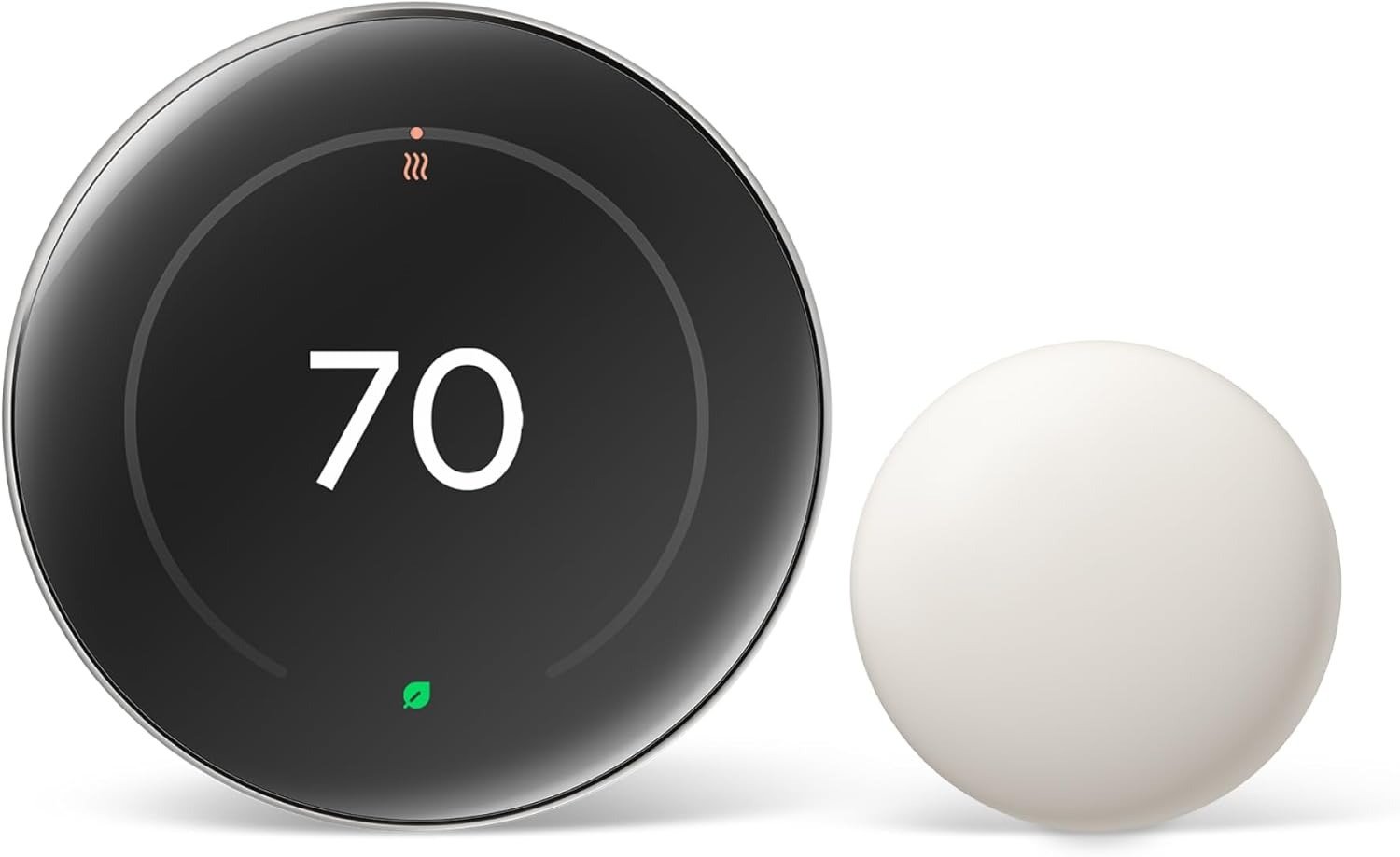
The Google Nest Learning Thermostat (4th Gen) is the most sophisticated answer the industry has produced to that specific, unnamed friction. Not the most affordable. Not the simplest. The most sophisticated. That distinction matters enormously — because sophistication, misapplied, is just expensive confusion. This article exists to locate exactly where this thermostat becomes logical, and where it becomes a $280 lesson in buying the wrong thing.
The Result Looks Fine. The Problem Isn’t.
You walk in, it’s 72 degrees. Looks fine. The bill says otherwise.
The average American household spends between $900 and $1,500 annually on heating and cooling — roughly half their total utility spend. Yet the dominant thermostat behavior in most homes is either a static schedule set once and never revisited, or manual override so frequent the schedule is fiction. The system runs to satisfy a setting, not to satisfy a home.
The gap between those two things — what the setting says and what the home actually needs — is where energy disappears. On a sunny January afternoon, your heating system may be running to maintain 70°F while the south-facing windows are already pushing the living room past 74°F naturally. The thermostat doesn’t know that. It’s reading the wall sensor, not the house.
| Thermostat Type | Awareness Level | What It Ignores |
|---|---|---|
| Manual/Dumb | None | Everything except your last touch |
| Basic Programmable | Time-only | Weather, occupancy, room variation, habits |
| Basic Smart (app-controlled) | Remote only | Learning, solar gain, local climate modeling |
| Nest Learning (4th Gen) | Multi-variable | Almost nothing, within its sensor range |
That gap — between what a basic smart thermostat sees and what the 4th Gen Nest sees — is not a marketing gap. It’s an architectural one. The 4th Gen uses Gemini AI, a Soli radar presence chip, multi-room temperature sensors, solar gain modeling, and occupancy-based Adaptive Eco to operate a fundamentally different model of what “comfortable” means at any given moment.
The problem doesn’t look like a problem. That’s exactly why it costs you.
What You’re Actually Feeling but Not Naming
It’s not that the temperature is wrong. It’s that it’s wrong in ways you can’t predict.
The bedroom is always a few degrees warmer than the living room, but the thermostat only controls one. You’ve compensated by keeping the system running longer than necessary, accepting overheating in one room to fix underheating in another. You’ve adjusted the schedule three times this year because the routine it was programmed for stopped being your routine. You’ve noticed the bill spikes in transition seasons — October, April — when the system can’t decide whether to heat or cool and cycles inefficiently between both.
These aren’t thermostat malfunctions. They are the natural output of systems that lack the inputs to do better. What the Nest 4th Gen calls Natural Heating and Cooling is a direct answer to the October/April problem: it monitors how outdoor temperature passively heats or cools your home — through walls, windows, and structural mass — and pauses the HVAC when nature is already doing the work. This isn’t a feature you configure. It runs invisibly, learning your home’s thermal signature over weeks.
| Unnamed Friction | What’s Actually Happening | How Gen 4 Responds |
|---|---|---|
| “It’s the right temp but still feels off” | Room-level variance the wall sensor can’t see | Included 2nd Gen Temp Sensor prioritizes the room, not just the hallway |
| “The schedule never fits anymore” | Life changed; the programming didn’t | Smart Schedule learns adjustments and suggests them — you approve in the app |
| “Bills spike in spring and fall” | System fighting natural thermal fluctuation | Natural Heating & Cooling pauses the system when outdoor temps do the work |
| “It runs all night even when I’m not home” | No occupancy intelligence | Soli radar + phone location activates Eco mode within 15 minutes of departure |
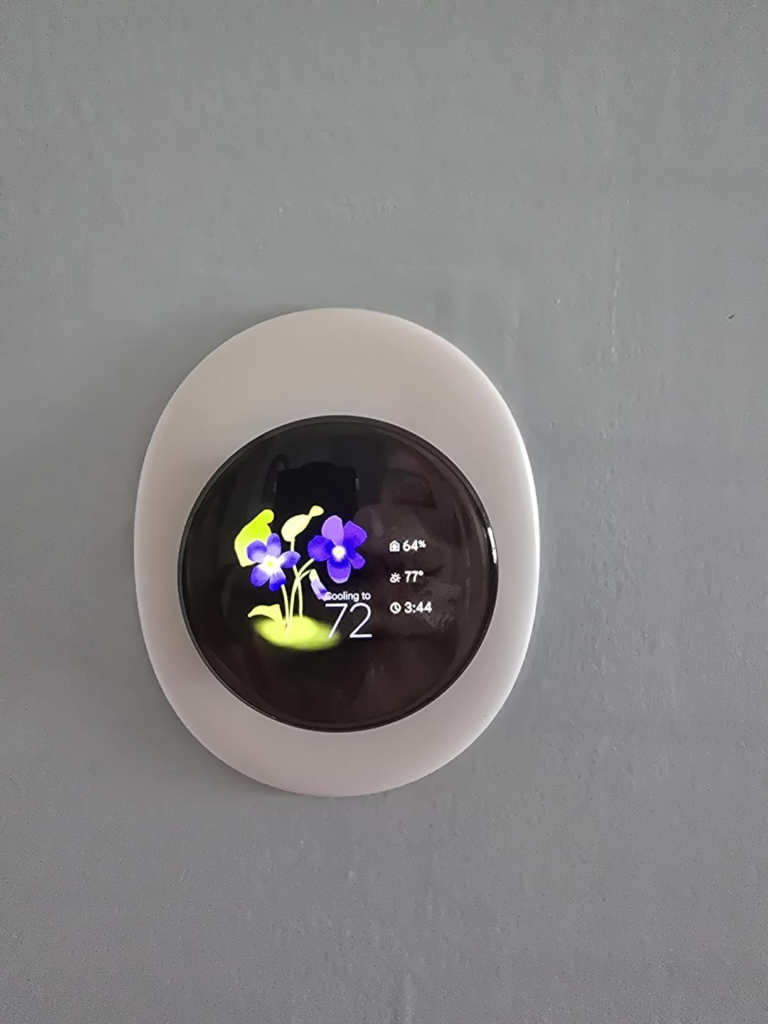
| “The display is useless from across the room” | Small, static display on older models | 60% larger borderless display with Dynamic Farsight — info scales with your distance |
The friction you’re feeling has names. The names were just missing until now.
The Hidden Mechanism Behind the Miss
Most people buy this thermostat for the schedule. That’s not the right reason.
The schedule is a fallback. What makes the 4th Gen structurally different is the sensor architecture: the combination of Soli radar presence detection, the included Nest Temperature Sensor (2nd Gen), and the AI layer that processes outdoor temperature data, solar orientation, HVAC runtime history, and behavioral patterns simultaneously.
Here’s the mechanism most buyers don’t understand until week three: the 4th Gen Nest doesn’t just set a temperature. It models the relationship between your HVAC system’s behavior and your comfort outcomes, then adjusts not for the set point — but for the result. The ENERGY STAR certification isn’t a sticker. It’s based on real-world data from verified installations showing average savings of 10–12% on heating and 15% on cooling compared to pre-Nest baselines. For a household spending $1,200 annually on HVAC, that’s a recurring $130–$180 per year after the first year of learning.
| Mechanism | What It Does | Typical Result |
|---|---|---|
| Smart Schedule AI | Learns your routine, suggests tweaks, adapts to life changes | Schedule that programs itself without friction |
| Natural Heating & Cooling | Reads outdoor temp to identify when solar/ambient gain replaces HVAC need | System pauses during passive heating windows |
| Adaptive Eco | Combines outdoor temp + your home’s thermal profile to set the best away-temp | Returns to comfort within 60 minutes of arrival |
| System Health Monitor | Monitors HVAC runtime anomalies and alerts you to potential issues | Catches filter problems, refrigerant loss patterns early |
| Smart Ventilation | Brings outdoor air in when quality and temperature are optimal | Energy-free air quality refresh during shoulder seasons |
| Soli Radar Presence | Detects presence without camera or microphone | Away mode activates ~15 minutes after departure |
The miss most people experience isn’t from lack of features. It’s from not knowing which mechanism is doing what — and therefore not knowing when the thermostat is working perfectly, versus when the home setup is preventing it from working at all.
The Threshold Where the Outcome Quietly Breaks
There is a precise point at which this thermostat’s intelligence becomes inaccessible. It’s not in the specifications.
The 4th Gen Nest requires 2.4GHz WiFi on a dedicated SSID. If your router uses the same network name for both 2.4GHz and 5GHz bands — which is the default configuration for most modern mesh and dual-band routers — setup will time out with a generic “Something went wrong” error. Google does not document this clearly. The workaround (Bluetooth pairing via a 15-second hold) is not in the standard setup flow.
The second threshold is the C-wire boundary. Google states the device works in most homes without a C-wire, and for standard two-stage systems, this is accurate. However, homes upgrading from a 3rd Gen Nest face a quiet voltage mismatch: the 4th Gen requires slightly higher voltage on the R-wire than its predecessor, even with identical wiring. Setup reports no power. The thermostat is fully wired and non-functional. The Nest Power Connector — which resolves this — is not mentioned during purchase, not included, and not flagged by the compatibility checker in all cases.
| Setup Threshold | Who Hits It | What Happens |
|---|---|---|
| Same SSID for 2.4/5GHz bands | Most mesh router users | Silent timeout during WiFi setup; requires undocumented Bluetooth workaround |
| C-wire absence in Gen 3 → Gen 4 upgrade | ~15–20% of existing Nest users | Setup fails due to voltage mismatch; requires Nest Power Connector ($16) |
| Heat-only system without C-wire | Older single-pipe or radiant systems | System stays in “learning” state; furnace never activates without Nest Power Connector |
| Nest app migration to Google Home | All existing Nest account holders | Separate Nest accounts require Gmail migration + device reset; adds 30–90 min to setup |
These thresholds are not deal-breakers. They are known obstacles that an informed buyer can solve in advance. The damage isn’t the obstacle — it’s not knowing the obstacle exists before unboxing.
If you are upgrading from a 3rd Gen Nest without a C-wire, run the Nest Compatibility Checker before purchasing and order the Nest Power Connector simultaneously. If your router broadcasts a unified SSID, create a dedicated 2.4GHz SSID before starting setup. Both steps take ten minutes. Neither is documented anywhere visible.
Why Most Buyers Misread This Too Early
The comparison most people make at $240 is: Nest Gen 4 versus Ecobee Smart Thermostat Premium. Both are correct comparisons if made correctly. Most aren’t.
The lazy read: Ecobee has a room sensor included AND a built-in air quality monitor AND supports Alexa natively, so it’s more for the same money. This is technically accurate and strategically wrong for the majority of buyers.
The functional difference is this: Ecobee requires you to manage schedules and sensor priorities consciously. It gives you more manual control. The Nest requires you to manage almost nothing after week one. It gives you more automatic outcome. The decision turns entirely on which failure mode is worse for you: too much setup, or too little control.
| Comparison Point | Google Nest Learning (4th Gen) | Ecobee Smart Premium |
|---|---|---|
| Schedule learning | Fully automatic AI | Manual + schedule assist |
| Included room sensors | 1 (Temp Sensor 2nd Gen) | 1 (SmartSensor) |
| Air quality monitoring | No | Yes (built-in) |
| Alexa built-in | No (works with Alexa) | Yes |
| Matter certified | Yes | Yes |
| Display size | 2.7″ circular, borderless | 3.5″ square, traditional |
| Away detection | Soli radar + geofencing | Geofencing only |
| Ideal user | Wants automation, minimal friction | Wants control, maximum configuration |
| Price (approx. 2026) | $240–$280 | $220–$250 |
| Energy savings (ENERGY STAR avg.) | 10–12% heating / 15% cooling | 10–12% heating / 15% cooling |
The savings ceiling is identical. The path to reach it is not. If you have tried and abandoned schedule-based thermostats before because life doesn’t fit neat daily blocks — the Nest is designed for you. If you manage multiple zones, need air quality data, or are embedded in an Alexa ecosystem — Ecobee earns the comparison.
The early comparison trap is buying based on spec count. The right comparison is buying based on behavioral fit.
Who Is Actually Inside This Problem
The buyer this thermostat was designed for isn’t a tech enthusiast. That person is a secondary market.
The primary buyer is someone who has a functional HVAC system, a thermostat that does what it’s told but nothing more, a reasonably consistent weekly routine with room for variation, and a genuine but low-effort interest in reducing the $1,000–$1,500 annual line item on their utility statement. They are not trying to build a smart home. They are trying to stop overpaying for the home they already have.
More specifically:
- Homeowners in single-family dwellings with 2-stage gas, electric, oil, or heat pump systems — the 4th Gen is compatible with most 24V systems
- Households where manual thermostat overrides are frequent, because real schedules don’t match programmed ones
- Google Home ecosystem users — the integration is native and frictionless
- Anyone upgrading from a basic programmable thermostat (not a 3rd Gen Nest) — the learning curve from zero is lower than the migration curve from a previous generation
- People in climates with real shoulder seasons — spring and fall — where natural heating and cooling delivers measurable system pause time
- Homes with identifiable hot/cold rooms where the hallway thermostat consistently misrepresents actual room experience
This is a wide group. That’s not a marketing claim. It’s a structural description of the population for whom the mechanism works as designed.
Where Wrong-Fit Begins
The thermostat will not solve problems it wasn’t designed to see.
If your home has genuinely uneven HVAC — undersized equipment, blocked ducts, radiant systems with hydronic imbalance — adding intelligence to the thermostat doesn’t fix the distribution problem. The Nest will learn the pattern of failure and optimize around it. That’s useful. But it’s not a fix.
If you are a privacy-first household and the idea of Google modeling your daily presence patterns, phone location, and home thermal signature feels intrusive — this is the wrong product. The smart features require data sharing. Local operation without WiFi is possible, but you lose every feature that justifies the price.
If you are expecting the 31% savings figure in the first year — recalibrate. The 31% Google references is a best-case upper bound using the 72°F-constant baseline methodology, designed for comparative purposes. The ENERGY STAR and independent verified average is 8–12% annually, depending on your baseline management quality. For homes already on a reasonable programmable schedule, year-one gains will be smaller. The compounding advantage builds over time as the learning layer deepens.
| Wrong-Fit Indicator | Why It Matters | Likely Outcome |
|---|---|---|
| HVAC ductwork issues or undersized system | Nest learns the symptom, not the cause | Optimization without resolution; persistent discomfort |
| Privacy-first household | Core features require cloud data sharing | Feature set collapses to basic programmable; value gap widens |
| Expecting 31% first-year savings | This is a ceiling under ideal conditions | 8–12% is the verified average; mismatch creates frustration |
| Apple HomeKit-primary ecosystem | Works with HomeKit via Matter, but Google Home app has full feature set | Some features inaccessible outside Google Home |
| Renters without HVAC access rights | Installation involves low-voltage wiring | Setup may violate lease; professional install adds cost |
| Homes with high-voltage electric baseboard heating | Nest requires 24V low-voltage systems | Incompatible; entirely wrong product category |
The wrong-fit boundary isn’t about the thermostat being bad. It’s about the thermostat being right for a specific set of conditions — and genuinely wrong outside them.
The One Situation Where This Product Becomes Logical
After everything above, the decision compresses to a single condition.
You own your home. You have a standard 24V HVAC system — forced air, heat pump, gas, electric, or oil. Your current thermostat is either manual or a basic programmable that you’ve stopped maintaining. You spend meaningfully on heating and cooling. You don’t want to think about schedules. And you are comfortable inside the Google ecosystem or open to joining it.
If that’s your situation, the Google Nest Learning Thermostat (4th Gen) is not a lifestyle upgrade. It’s infrastructure maintenance. The $240–$280 price recovers in 18–24 months at average savings rates. After that, it returns $130–$180 annually in perpetuity — plus the reduction in HVAC emergency calls that the System Health Monitor partially addresses through early anomaly detection.
The included Nest Temperature Sensor (2nd Gen) eliminates the most common complaint about single-thermostat systems: that the sensor reads one room while you’re living in another. Place it in the bedroom, the nursery, the room you use most — the thermostat will prioritize that room’s temperature at the times you specify, without changing the wiring or adding a zone.
The 60% larger borderless display with Dynamic Farsight is not a vanity feature. For a device mounted in a main corridor that you consult multiple times daily, visibility from 15 feet without walking to it changes the small daily friction of home management in a way that compounds invisibly but genuinely.
| What You Get | What It Solves |
|---|---|
| AI Smart Schedule | Never re-program after routine changes |
| Natural Heating & Cooling | Stops paying to heat a house the sun is already heating |
| Adaptive Eco + Soli radar | Away mode activates within 15 min of departure, not an hour |
| System Health Monitor | Catches HVAC anomalies before they become service calls |
| Included Temp Sensor (2nd Gen) | Fixes the one-thermostat-many-rooms problem |
| Matter certification | Works with Google Home, Apple Home, Amazon Alexa, Home Assistant |
| Dynamic Farsight display | Useful information at room-crossing distance |
This is not a thermostat that makes your home smarter. It’s a thermostat that makes your home stop wasting what it already has.
What It Solves, What It Reduces, and What It Still Leaves to You
Clarity on this prevents regret.
What the Nest Learning Thermostat (4th Gen) definitively solves: the manual reprogramming loop, the schedule-reality mismatch, the single-sensor room-variation problem when used with the included sensor, the solar gain waste cycle in shoulder seasons, and the first 10–15% of HVAC bill that comes purely from lack of occupancy awareness.
What it reduces but doesn’t eliminate: room-to-room temperature variance beyond the sensor’s placement radius, setup friction for specific wiring configurations (C-wire/router conflicts), and the friction of migrating from a previous Nest account to Google Home.
What it leaves entirely to you: HVAC system maintenance, ductwork quality, insulation performance, home envelope sealing, and any structural thermal issues in the home itself. The thermostat is the intelligence layer. It cannot compensate for an HVAC system that is physically unable to deliver what it’s being asked to deliver.
Where regret begins: buying this expecting a set-it-and-forget-it experience within day one. The learning period is real. Week one, it will ask for permission before making adjustments. By week three, it operates with near-full autonomy and accuracy. Buyers who return it in the first five days are evaluating the learning curve, not the learned state.
Who should not buy this: anyone in a rental without wiring authorization, any home with high-voltage electric baseboard heat, anyone who prioritized the Nest app and is unwilling to migrate to Google Home, and anyone whose HVAC problems are physical — not behavioral.
Final Compression
The Google Nest Learning Thermostat (4th Gen) is not the right thermostat for every home. It is the right thermostat for a specific class of home — one where the gap between what the HVAC is doing and what it should be doing is behavioral, not mechanical.
If your current thermostat’s biggest problem is that it doesn’t know when you’re home, doesn’t know what the sun is doing to your living room, and doesn’t know that your schedule in May looks nothing like your schedule in January — this is the product that closes that gap. Methodically, invisibly, at a rate that will recover its cost and exceed it.
The setup thresholds above are real. Resolve them before unboxing. The learning window is real. Trust it past day five.
If your home matches the conditions described in this article, the decision is already made. The question is only when.
From our analytics lab: More top-rated reviews
Transparency Note:
This analysis is built on aggregated real-world experience.
It extracts what repeatedly holds, what breaks, and what users uncover only after living with the system—then shapes it into a clear model you can use immediately.
Think of it as structured experience, refined and presented so you don’t have to learn it the hard way.
“A quick note: Don’t believe the star ratings, but trust personal experience. This article is a compilation of collected experiences”