Your Driveway Looks Covered Until the Wrong Kind of Night Makes It Clear It Isn’t
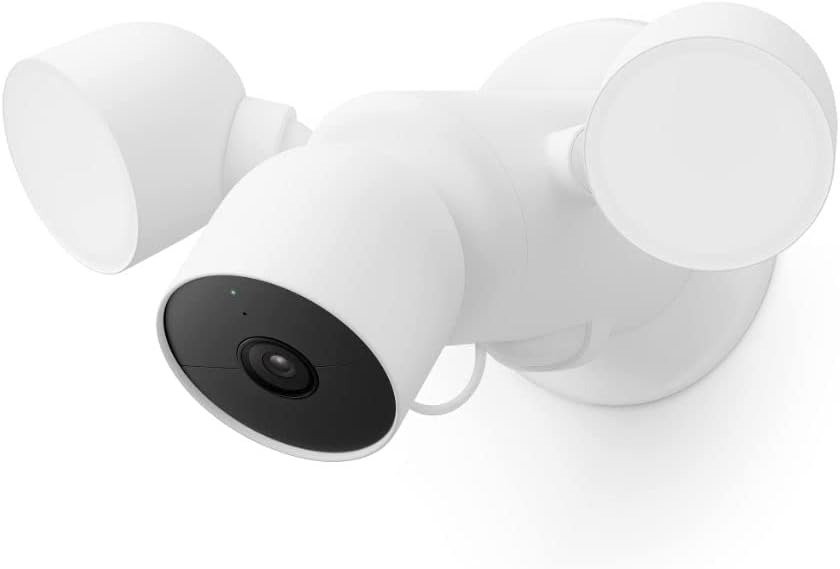
Google Nest Cam Floodlight
The Result Looks Fine. The Problem Isn’t.
A driveway can look protected long before it is actually readable.
That is the first mistake people make with floodlight cameras. They judge the setup from the sidewalk. Bright lights. A live feed. Motion alerts. A clean app. It all feels complete. Then the real test arrives in the wrong sequence: a car glides through the edge of frame, someone crosses the darker side of the driveway, or an alert lands too late to matter. The footage is not useless, but it is not decisive either.
What stood out to me as I worked through Google’s own specifications and the pattern in major reviews was that this product is not really selling “more light.” It is selling a narrower kind of certainty: better filtering, smarter triggers, and a calmer night routine. That is a different promise, and if you read it as a pure image-quality purchase, you start on the wrong foot.
The Nest Cam with Floodlight uses a 1080p HDR camera with a 130-degree diagonal field of view, two adjustable floodlights up to 2,400 lumens, night vision, and activity-based alerts for people, animals, and vehicles. Reviewers broadly praised the lighting control and the surprisingly strong video quality for a 1080p camera, while also noting that it does not behave like a detail-first 2K or 4K forensic camera.
What You’re Actually Feeling but Not Naming
Most people do not say, “My detection logic is wrong.”
They say something looser.
“I keep checking alerts for nothing.”
“The light comes on, but I still do not feel sure.”
“I saw the event, but not clearly enough to settle it.”
“The setup looks good, yet I still glance outside.”
That feeling has a shape. It is not simple insecurity. It is intervention burden. You bought automation, but the system still recruits you back into the loop. You are still classifying shadows, rechecking clips, or mentally discounting notifications because too many of them were trivial.
This is where the Nest approach becomes interesting. Google’s floodlight is controlled by the camera’s intelligence rather than by a dumb motion sensor alone, and the system lets you tune activity zones, sensitivity, and which categories can trigger alerts and light behavior. That matters because a floodlight camera becomes exhausting when brightness is triggered by everything, including the events you do not care about. What I kept seeing across the official material and user-facing setup logic is that Google is trying to reduce noise before it becomes fatigue.
The Hidden Mechanism Behind the Miss
The miss usually begins with the wrong decision metric.
Buyers overrate headline resolution and underrate behavioral control.
That sounds backward until you live with an outdoor camera. A floodlight camera is not judged once. It is judged repeatedly, under friction. At 11:40 p.m. When you are half-awake. When rain is moving across the driveway. When a neighbor’s headlights sweep past. When a delivery, a raccoon, and your own car can all occupy the same zone in a week. The system that keeps feeling “good enough” on paper starts to separate into two parts: image capture and decision relevance.
Google’s strength here is not that it wins the spec sheet. It does not. The camera remains 1080p HDR with a 1/2.8-inch 2MP sensor and 6x digital zoom, which is functional, but not where premium outdoor imaging has moved in 2025 and 2026. Its strength is that person, animal, and vehicle detection are built in, activity zones are easy to shape, and the floodlight can respond to specific kinds of activity instead of treating every movement as equal.
Its weakness is just as important: once your problem becomes identification at distance, reading finer detail, or extracting more evidence from the frame, 1080p stops feeling premium and starts feeling like the ceiling. Recent reviews still describe the video as very good for 1080p, but they also point out that it is not in the same class as higher-resolution competitors or Google’s newer 2K-era camera hardware.
The Threshold Where the Outcome Quietly Breaks
This is the threshold that matters:
The Nest Cam with Floodlight works best when your problem is selective awareness, not evidence-grade detail.
Once I reduced the product to that line, the whole category became easier to read.
If the break point in your life is this — I need the light to come on for the right thing, I need cleaner alerts, I need a reliable live check, and I need basic event history without building an NVR system — the product starts making structural sense.
Google includes up to three hours of event video history without a subscription, and the camera can store up to about one hour of events locally if Wi-Fi or power drops before uploading later. That fallback matters more than it first appears, because many smart cameras become functionally blind at the exact moment the network or power path gets messy.
But the threshold breaks somewhere else too.
If your break point is this — I need longer retention by default, sharper investigative detail, richer low-light color evidence, local ownership, or a newer camera stack that has already moved to 2K — then the value proposition softens fast. Google’s paid tiers now sit at $10 / month or $100 / year for Standard and $20 / month or $200 / year for Advanced, with the latter unlocking 60 days of event history and 10 days of 24/7 history. That subscription math is not catastrophic for a whole-home Google setup, but it is absolutely part of the real price of confidence.
Why Most Buyers Misread This Too Early
They compare categories that do not fail in the same way.
A typical early comparison sounds like this:
more lumens = safer
more pixels = better
more app features = smarter purchase
None of those are useless. None of them is enough.
The uncomfortable truth is that floodlight cameras fail less often at the level of “can it see” than at the level of “can I live with the way it decides.” The Verge called out the Nest Cam with Floodlight for good smart alerts, excellent light control, and decent video, but also noted that it cannot match more detail-forward systems for zoomed evidence and does not offer the kind of auto-tracking some rivals do.
Tom’s Guide was more generous about the video itself, arguing that Google squeezes unusually strong quality from a modest 1080p sensor. Put those together and the pattern becomes clear: this is not a brute-force camera. It is a behavior-first one.
That is why lazy comparison fails here. You are not only buying a sensor. You are buying a night routine.
Who Is Actually Inside This Problem
This product is for a narrow type of buyer, and the fit becomes sharper when stated plainly.
| Need | Fit |
|---|---|
| Driveway or side-yard coverage with existing junction-box wiring | Strong |
| Smart alerts for person / animal / vehicle without a subscription paywall | Strong |
| Fine control over when the light turns on | Strong |
| Easy use inside the Google Home app | Strong |
| Basic free event lookback, not full archival comfort | Borderline-Strong |
| Maximum video detail for plates, faces, and distant evidence | Weak |
| Local-first storage or NVR-style ownership | Weak |
| Lowest long-term cost | Weak |
| People already deep in Google Home routines and displays | Strong |
| Buyers who want a floodlight cam but dislike noisy motion behavior | Strong |
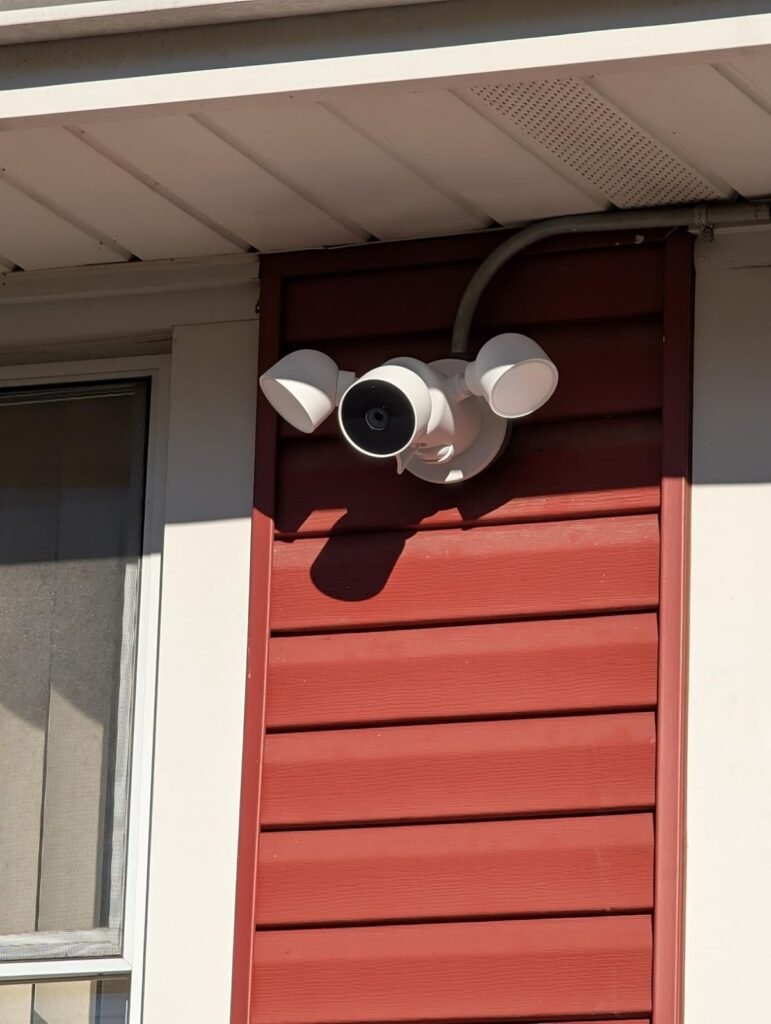
That table is the real split. The Nest Cam with Floodlight belongs to the homeowner who already has wiring where the camera needs to live, wants the floodlight to react with more judgment than a standard motion lamp, and values app simplicity over system sovereignty.
It is also a cleaner fit for people who already use Google Home and want live feeds, notifications, and automation in one place. It can stream to compatible Google Assistant displays and also to certain Alexa smart displays, TVs, and tablets, but it still lives operationally inside the Google Home app and is not compatible with the old Nest app or Nest web experience.
Where Wrong-Fit Begins
This is not for everyone.
If your priority is detail over discrimination, this will start feeling thin.
If your priority is ownership over convenience, this will feel rented.
If your priority is subscription-free retention, the free three-hour window will feel shallow very quickly.
If your priority is the newest Google camera hardware, this model will feel visibly older now that Google has introduced newer 2K Nest cameras elsewhere in the lineup.
Wrong-fit also begins when installation reality gets ignored. This unit is designed to replace an existing wired floodlight and mount to an electrical box with household power. That sounds simple until it is not. The camera body is flexible, but the product is still structurally tied to where your exterior light and box already live.
Reviews and owner discussions repeatedly point back to this: the camera can be positioned, but the site itself limits the outcome more than many buyers expect.
There is another wrong-fit zone that buyers hate admitting: some people do not need a smarter floodlight. They need a different security philosophy. If you want continuous ownership of footage, local-first storage, or a cheaper path to scaling several outdoor cameras, the friction does not start later. It starts on day one.
The One Situation Where This Product Becomes Logical
The Google Nest Cam with Floodlight becomes logical in one very specific situation:
You already have the wiring, your real problem is driveway awareness rather than forensic detail, and you want the light to respond with judgment instead of panic.
That is the lane.
In that lane, the product is unusually coherent. The floodlight can react to relevant activity. The app can filter and label events. The camera gives you 1080p HDR, night vision, two-way talk, and a free baseline of event history. The hardware is weather resistant, with the camera rated IP54 and the floodlight assembly commonly described as weatherproof for outdoor use.
The reviews that liked it most were not admiring it as a raw-spec monster. They liked it because it reduced the stupid kind of friction: pointless triggers, messy lighting behavior, and the sense that you still have to babysit the perimeter.
That is why I would not frame it as “the best floodlight camera.” That phrase is too blunt. I would frame it more precisely:
It is a good answer for the buyer whose threshold is alert quality first, coverage second, and image detail third.
The product that fits that threshold here is the Google Nest Cam with Floodlight.
What It Solves, What It Reduces, and What It Still Leaves to You
What it solves is straightforward.
- It solves the dumb-floodlight problem.
- It solves part of the false-motion problem.
- It solves the “I need to check the driveway quickly from the same app as the rest of my Google home” problem.
- It solves basic awareness during outages better than many people realize because of the local fallback buffer.
What it reduces is just as valuable.
- It reduces alert fatigue by letting you shape zones and event types.
- It reduces unnecessary lighting behavior by using camera intelligence to decide what matters.
- It reduces the gap between “something moved” and “something relevant happened.”
What it leaves to you should not be hidden.
- You still need to accept 1080p as enough.
- You still need to decide whether three hours of free history is genuinely enough for your life.
- You still need to pay if you want deeper retention and 24/7 history.
- You still need to live inside Google Home.
- You still need to install it where real wiring already exists, or pay someone who can.
That trade-off is the whole deal: you gain cleaner behavioral logic, but you trade off raw image ambition and storage generosity.
Final Compression
The cleanest way to say this is the hardest way to market it:
The Google Nest Cam with Floodlight is not compelling because it is brighter than the category. It is compelling because it is calmer.
It becomes a strong purchase when your night problem is repetitive, low-grade uncertainty — not total blindness, not forensic obsession, just that draining middle ground where your exterior light and your camera both work, yet neither settles the situation cleanly. In that band, Google’s mix of built-in smart alerts, customizable light behavior, free short-history access, outage fallback, and dependable app flow makes structural sense.
But the boundary matters. If you want sharper evidence, more generous included history, local-first ownership, or the newest 2K-era Nest hardware, this is where the fit stops. That is the threshold. And once you see that threshold clearly, the decision stops being vague.
Transparency Note:
This analysis is not based on quick personal impressions.
It is derived from documented system behavior, verified user patterns, and the physical constraints of storage capacity.
The goal is to translate complex technical behavior into a realistic performance model that helps you make a clear decision