Arlo’s Problem Is Not Security. It’s Fit.
ARLO
A lot of home security regret starts the same way.
Not with a break-in. With a shrug.
The door is covered. The window has a sensor. The app sends alerts. The keypad lights up. On paper, everything looks handled. But a few weeks later, the truth starts to leak through the seams: the setup is cleaner than the routine, the hardware is stronger than the software, and the system only feels elegant if your life happens to match the way Arlo wants to be used. That split is why this product gets real praise and real irritation at the same time. Its core hardware is widely described as innovative, especially the all-in-one sensor design, yet reviewers and users keep circling back to the same pressure points: subscription layering, app friction, limited smart-home depth, and a fit that narrows fast once you step outside Arlo’s lane.
The Result Looks Fine. The Problem Isn’t.
What makes the Arlo Home Security System seductive is that it photographs well in your mind before it proves itself in your house.
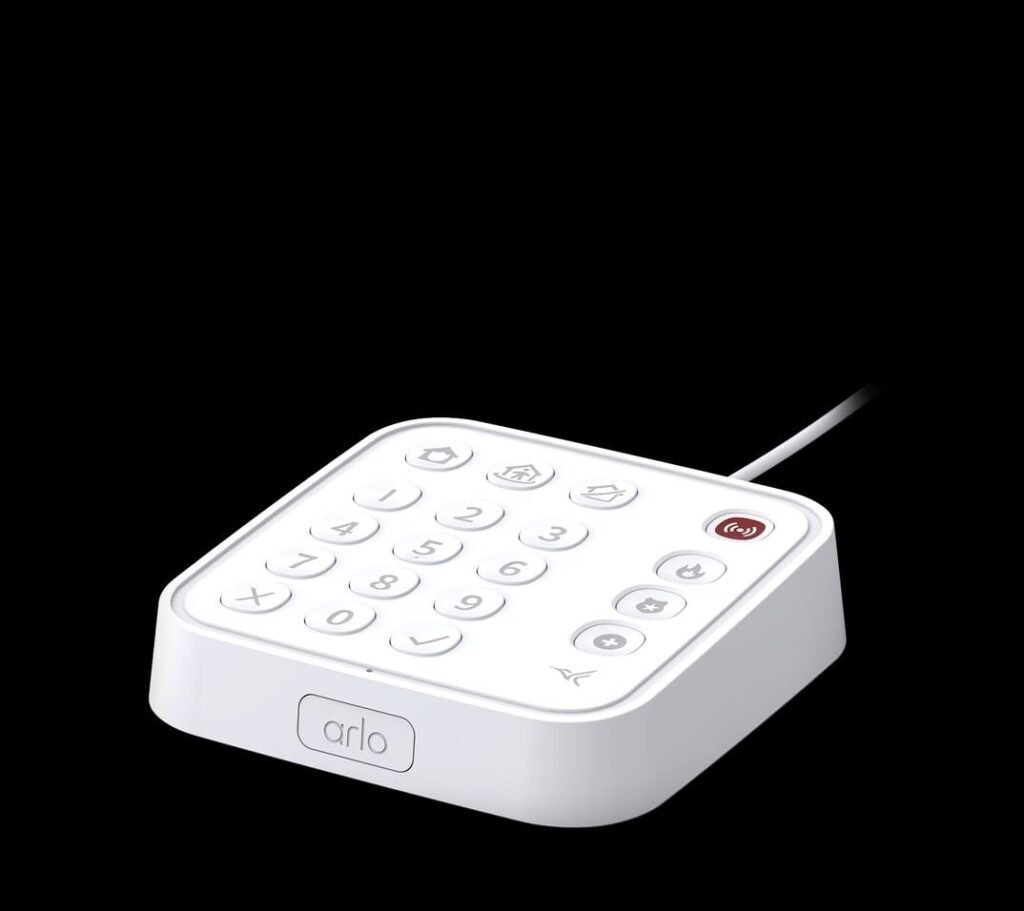
A tidy keypad. Two compact sensors. One app. No contract. No installer drilling through your afternoon. The starter kit includes a wired Keypad Sensor Hub and two all-in-one sensors, and both Amazon’s listing and multiple hands-on reviews emphasize the same first impression: setup is fast, the hardware feels modern, and the sensor concept is unusually flexible. The starter kit has sold around the $199.99 mark, the step-up bundle around $299.99, and Tom’s Guide reported going from unboxing to installed in roughly 15 minutes.
That surface is real. So is the miss.
Because this is not one of those systems where “easy to install” automatically means “easy to live with.” The product is strongest when you judge it as a tightly controlled Arlo security shell. It gets shakier when you expect it to behave like a broad, deeply integrated smart-home command layer. That is the first crack. Not performance. Expectation.
What You’re Actually Feeling but Not Naming
Most people do not say, “I bought a narrow-fit security system.”
They say smaller things.
The app feels a little messy.
The automations are not where I expected.
The alerts are good, but the whole thing feels more expensive than it first looked.
I thought this would connect to more of my house than it actually does.
That cluster matters because it points to one psychological friction: ownership drag.
Ownership drag is what happens when a device solves the headline problem but keeps charging you in attention, navigation, or ecosystem compromise. SafeWise praised the sensors and overall value, but also called out confusing app menus and settings that are harder to find than they should be. Tom’s Guide liked the setup, the keypad, and the sensor versatility, but still landed on the same catch: monthly fees are higher than direct DIY rivals. PCWorld’s verdict was similar in spirit—capable hardware, but not a clean endorsement of every premium software promise attached to it.
That is the feeling many buyers struggle to name. The system is not broken. It is just not frictionless enough to disappear.
The Hidden Mechanism Behind the Miss
The smartest part of this package is also the thing that can mislead you.
Arlo’s all-in-one sensor is not a normal door sensor pretending to be clever. It really is doing more. Amazon’s product listing says each sensor can be configured for motion, open/close, water leak, freeze, smoke/CO alarm listening, tilt, and ambient light changes. SafeWise and Tom’s Guide both singled out this sensor as the product’s standout feature, precisely because one device can cover multiple detection jobs instead of forcing you into a pile of single-purpose accessories.
That sounds like pure upside. It is not.
Because the sensor compresses hardware complexity, not decision complexity.
You still have to decide where each sensor belongs, which mode matters, what detection you truly need, how alerts should behave, and whether you are building a self-monitored warning layer or paying for a fuller response system. Tom’s Guide explicitly noted that choosing where and how to use each sensor can become the hardest part of setup because there are so many possible roles for each one.
So the hidden mechanism is this: Arlo reduces device clutter, but it does not reduce judgment burden.
That is why some people love it. It gives them fewer objects and more control.
That is why others sour on it. It gives them fewer objects and more decisions.
The Threshold Where the Outcome Quietly Breaks
There is a quiet line in this product. Cross it, and the system stops feeling clever and starts feeling conditional.
I would call it the subscription-and-ecosystem threshold.
Below that line, Arlo feels sharp. You can self-monitor without a contract, get core alerts, and build around the sensor flexibility. SafeWise notes that self-monitoring is available without a subscription, though some features are excluded.
Above that line, the economics and expectations change. Professional monitoring has been reported at about $24.99 to $25 per month by SafeWise and Tom’s Guide, while PCWorld laid out Arlo’s tiered subscriptions and noted that the Plus tier adds AI detections and the Premium tier adds professional monitoring. Some premium functions—such as smoke/CO alert listening, emergency response pathways, and cellular backup behavior—sit behind paid plans or optional add-ons. The cellular and battery backup accessory itself has been priced around $80, and both Arlo and major reviewers say the backup can extend protection during outages for up to 12 hours.
That threshold matters because this is where casual buyers misread the system.
They think they are buying a clean DIY kit.
Often, they are buying an entry point into a more conditional stack.
Why Most Buyers Misread This Too Early
Because they compare the wrong thing first.
They compare the box.
They should compare the behavior.
On the box, Arlo looks like a flexible alarm system. In practice, it behaves more like a premium camera brand expanding sideways into whole-home security. That distinction changes everything. SafeWise praised Arlo’s camera lineup and noted that the security system works especially well if you already live inside the Arlo app. Tom’s Guide and PCWorld both highlighted the keypad and sensor design, but also showed the cost logic and software constraints that come with Arlo’s ecosystem.
The lazy comparison trap goes like this:
| What buyers compare | What actually decides satisfaction |
|---|---|
| Number of sensors | How much configuration patience you have |
| Starter-kit price | Whether you will pay for monitoring and add-ons |
| “Works with Alexa/Google” | How deep that integration really goes |
| Modern hardware | Whether the app feels calm under repeated use |
Arlo passes the first column more easily than the second.
That is the whole mistake.
Who Is Actually Inside This Problem
This system makes the most sense for a very specific buyer.
Not everybody. A slice.
You are inside the real fit zone if three things are true:
| Strong-fit signal | Why it matters |
|---|---|
| You want fewer physical sensors doing more jobs | Arlo’s all-in-one sensor is the system’s clearest advantage. |
| You already like Arlo cameras or plan to add them | Reviewers repeatedly point to Arlo’s camera ecosystem as part of the value story. |
| You prefer polished hardware over deep third-party automation | The keypad, siren, panic controls, and clean physical design are genuine strengths. |
This buyer is usually not chasing the cheapest perimeter alarm.
They are trying to reduce hardware clutter, keep the install simple, and hold cameras plus sensors inside one branded environment.
That is the person Arlo serves well.
Where Wrong-Fit Begins
Wrong-fit starts earlier than most people think.
Not when something fails. When something is missing.
If you expect deep sensor visibility in Google Home or Alexa, this is already the wrong shape. SafeWise reported that while Alexa and Google Home can handle some arming functions, the sensors themselves do not show up in those apps, which blocks deeper third-party automation. Tom’s Guide also noted the system lacks Zigbee and Z-Wave and relies on Wi-Fi rather than acting like a broader smart-home bridge.
If you are app-sensitive—meaning sloppy menu structure or buried system settings irritate you faster than they irritate most people—be careful. SafeWise directly called out vague navigation for system-wide settings, and user sentiment across Reddit and app reviews shows a familiar split: solid hardware, less enthusiasm for software and support consistency.
If you are subscription-averse, the wrong-fit boundary gets even clearer. Arlo does let you self-monitor, but some of the features that make the system feel fully “security-grade” sit on the paid side of the fence.
This is the regret zone:
| Wrong-fit signal | Why regret shows up later |
|---|---|
| You want the system to be cheap over time | Arlo’s monitoring costs have been rated higher than some DIY rivals. |
| You want rich cross-platform automation | Sensor exposure and smart-home depth are limited. |
| You hate software friction more than hardware tradeoffs | Reviewers and users repeatedly mention app/menu frustration. |
The One Situation Where This Product Becomes Logical
This is where Arlo stops being “an interesting option” and becomes a clean decision.
It becomes logical when you want one tightly managed security layer built around versatile indoor sensors and the possibility of adding Arlo cameras later, without paying for professional installation.
In that specific situation, the product’s logic sharpens fast.
The keypad hub is not just a keypad. Reviews describe a built-in siren, motion sensor, smoke/CO alarm listening, emergency buttons, backlit keys, and straightforward Wi-Fi setup without Ethernet. The sensor package is genuinely more flexible than the usual contact-sensor routine, and Arlo’s own platform plus outside reviewers emphasize quick pairing, DIY setup, and a compact footprint. PCWorld also reports Arlo’s sensors can be placed up to 500 feet away from the hub over the company’s proprietary wireless link, while noting the hub itself connects over 2.4 GHz Wi-Fi.
That combination is why the system works.
Not because it does everything.
Because it does one shape of security unusually well.
[link] If your home security problem is really “I want fewer devices, cleaner placement, faster setup, and one app that can grow into Arlo cameras,” this product stops looking expensive and starts looking structurally coherent.
What It Solves, What It Reduces, and What It Still Leaves to You
Here is the cleanest way I can put it after lining up the specs, the reviews, and the user sentiment.
| What it solves well | What it reduces | What it still leaves to you |
|---|---|---|
| Sensor clutter through multi-role hardware | Installation friction | Subscription decisions |
| Fast DIY deployment | The need for multiple single-purpose detectors | App-learning patience |
| Clear physical control through the keypad | Dependence on remotes | Third-party smart-home depth |
| A stronger path if you already like Arlo cameras | Some false-alarm friction when paired with camera verification on paid plans | Whether the long-term cost still feels justified |
The product also leaves you with one subtle but important job: expectation discipline.
You cannot buy this like a generic alarm kit and expect perfect emotional symmetry later. You need to buy it for its actual center of gravity: versatile sensors, strong physical hardware, Arlo ecosystem expansion, optional monitoring. Once you shift the expectation to that shape, most of the product makes sense. When you do not, the cracks get loud.
Final Compression
ARLO
The easiest way to buy the wrong security system is to ask, “How much comes in the box?”
The better question is harsher.
What kind of friction am I willing to live with every day?
Arlo’s answer is unusually clear. It gives you excellent sensor versatility, strong physical hardware, a good keypad experience, easy setup, and a natural path into Arlo cameras. It does not give you the broadest smart-home reach, the lowest ongoing cost, or the calmest software reputation in its category. That is not a contradiction. That is the fit.
So my decision line is simple.
If you want a broad automation playground, keep walking.
If you want the cheapest alarm math, keep walking.
If you want a compact, premium-feeling, sensor-first Arlo security layer with a real keypad and a narrower but sharper use case, this is where the guesswork ends.
Transparency Note:
This analysis is not based on quick personal impressions.
It is derived from documented system behavior, verified user patterns, and the physical constraints of storage capacity.
The goal is to translate complex technical behavior into a realistic performance model that helps you make a clear decision.
“A quick note: Don’t believe the star ratings, but trust personal experience. This article is a compilation of collected experiences”