Tenda Nova MX12: THE WI-FI FIX THAT FEELS FAST—UNTIL THE HOUSE STARTS ASKING FOR MORE
The Result Looks Fine. The Problem Isn’t.
A bad home network rarely announces itself like a dramatic collapse. It does something more annoying. It pretends to work. The movie starts. The call connects. The smart camera stays online. Then you walk upstairs, close one door, open three more tabs, and the whole thing turns sticky—nothing fully dead, nothing fully clean. That is the trap this category lives on. The signal bars look healthy enough to stop you from questioning them, while the experience underneath keeps dragging its feet. Mesh systems exist because dead zones are visible, but the more expensive problem is often invisible: usable coverage that cannot carry real household load gracefully. RTINGS’ current mesh recommendations lean heavily toward systems with stronger range consistency and better high-load behavior, which is exactly why simple coverage claims never tell the whole story.
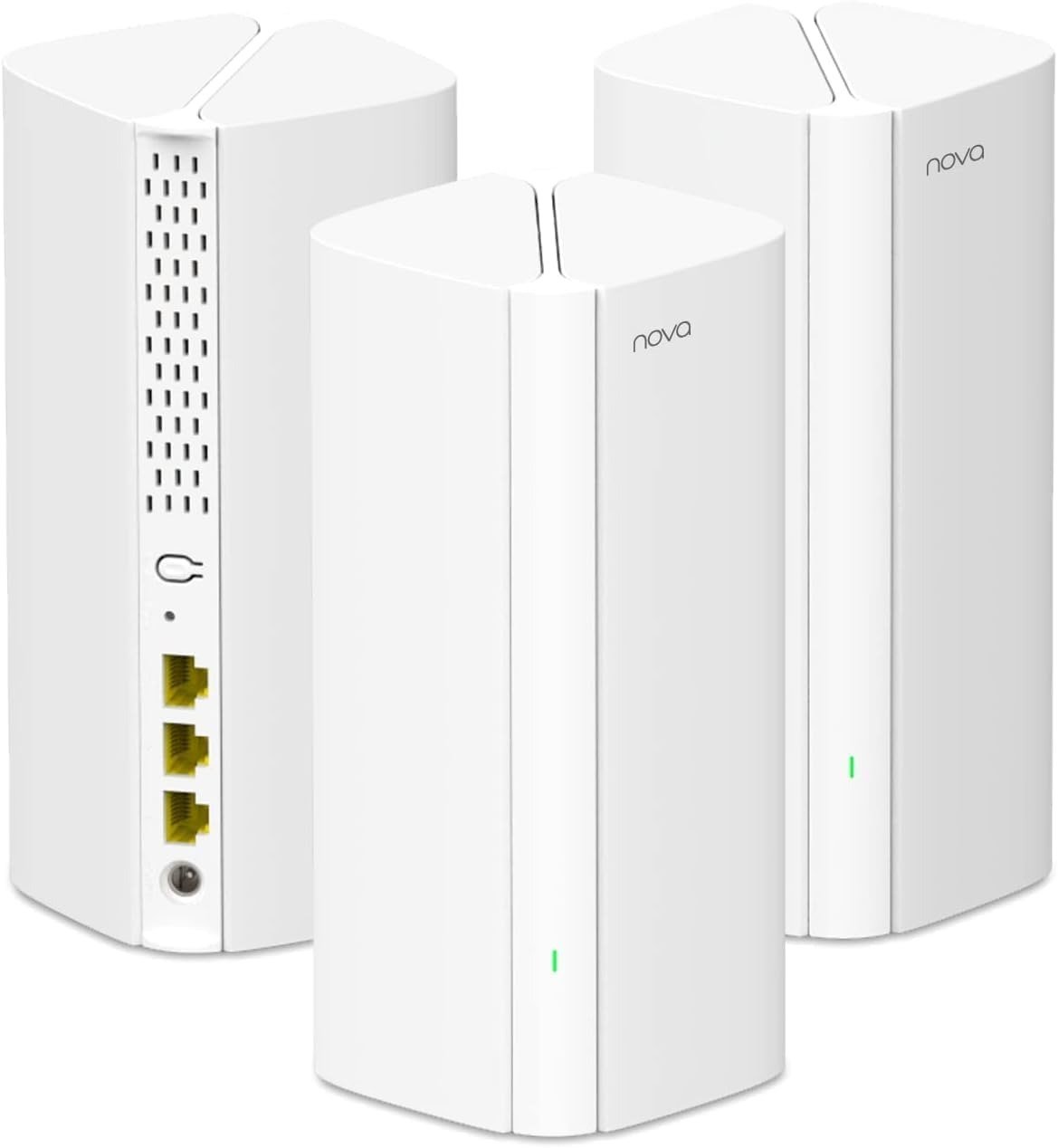
That is the first thing I would correct in the way most people read the Tenda Nova MX12. The headline spec is seductive—AX3000, Wi-Fi 6, up to 7,000 square feet, 1.7 GHz quad-core CPU, support for 160+ devices, and three Gigabit ports on each unit. On paper, it sounds like the kind of product that should silence the problem everywhere at once. And for the right kind of house, it can get surprisingly close. But a mesh system is not judged by how far its name travels across the box. It is judged by what survives when distance, walls, and simultaneous traffic begin squeezing the same air.
| What the MX12 advertises | What that usually means in real life |
|---|---|
| Up to 7,000 sq. ft. coverage | The network can reach widely; it does not guarantee equal throughput everywhere |
| AX3000 dual-band Wi-Fi 6 | Fast enough for strong mid-range use, but still dual-band rather than tri-band |
| 160 MHz support | Best felt by compatible devices at closer or cleaner links |
| 3 Gigabit ports per unit | Useful if you want wired devices near each node |
| 160+ devices | Capacity claim, not proof that all of them will perform well at once |
What You’re Actually Feeling but Not Naming
Most buyers do not say, “My node-to-node wireless backhaul is colliding with client traffic.” They say something simpler. The upstairs room feels slower. The video doorbell is fine until everyone comes home. The bedroom TV buffers even though the Wi-Fi icon looks full. The work call gets grainy right when the dishwasher, two phones, a tablet, and a console all wake up. That feeling has a shape. It is not pure lack of coverage. It is not pure ISP speed. It is friction created when the network looks broadly present but stops carrying cleanly under distance plus demand.
This is where the MX12 starts to make emotional sense. Owner feedback repeatedly lands on the same three notes: setup is easy, range is surprisingly strong for the money, and the app is the part that gets side-eye. On Amazon US, the three-pack listing sits at 4.0/5 from 629 ratings, while other MX12 variants hover around 4.1 to 4.2 with smaller pools. On Amazon UK, one typical owner comment praises the coverage and stability but calls the app the weak link. Community posts echo that split: strong raw reach, less enthusiasm for software polish and advanced control.
What people are really reacting to is relief from one pain and exposure to another. The first pain is obvious: weak Wi-Fi in the far room. The second pain only appears after the fix: now the house is covered, but the expectations rise. Once every room can see the network, you begin asking it to behave like a stronger class of system. That is the point where cheap satisfaction can quietly turn into lingering irritation. Not failure. Friction. And friction is what this article is really about.
The Hidden Mechanism Behind the Miss
The hidden variable is simple enough to say and easy to miss: the Tenda Nova MX12 is a dual-band mesh system. That matters because in a dual-band mesh, the same radio resources are often doing double duty—serving your devices and carrying traffic between the mesh units when you are using wireless backhaul. In plain English, the road is not just busy; some of the road is being used by the network itself to keep the house stitched together. The more distance and obstruction you add between nodes, the more this matters.
That is why mesh buying gets derailed so often by headline speed numbers. AX3000 sounds muscular, and in a local sense it is. Tenda’s own spec sheet lists up to 574 Mbps on 2.4 GHz and up to 2402 Mbps on 5 GHz, with beamforming, MU-MIMO, OFDMA, 160 MHz support, and 802.11k/v roaming. Those are real Wi-Fi 6 features, not decorative acronyms. The quad-core Broadcom processor and 256 MB RAM also help explain why users often describe the MX12 as responsive and stable for ordinary family use. But none of that cancels the structural reality of dual-band mesh under wireless backhaul. Features can improve traffic handling. They cannot repeal radio geometry.
The easiest way to picture it is a hallway with only two lanes. If the family is walking in both directions and the building staff is also moving boxes through the same corridor, the hallway can still function. It can even feel smooth when the crowd is light. But once distance grows, walls interfere, and multiple tasks hit at once, you stop noticing the architecture and start noticing the delay. That is the mechanism most buyers never name when they say, “The coverage is there, but the speed doesn’t feel like it used to.”
The Threshold Where the Outcome Quietly Breaks
Here is the threshold in human language: the MX12 stops feeling like a clean solution when you need the far node to deliver not just signal, but sustained speed under shared load without wired backhaul. That is the line. Not coverage alone. Not total house size alone. Not even raw ISP plan alone. The break point is the moment your expectation shifts from “please reach this room” to “please carry this room like the main router is here.”
You can see hints of that threshold in user behavior. One owner with a 1.5 Gbps internet plan asked why speeds would not rise past roughly 900 Mbps on the MX12 despite the product’s marketing numbers. That complaint is not bizarre. Each node has Gigabit Ethernet, not multi-gig ports, and Wi-Fi marketing rates are not the same thing as end-user throughput. Once you combine protocol overhead, environmental loss, and the limits of a dual-band mesh path, the dream number on the box stops being the number in the room.
A cleaner way to read the threshold is this:
| You are likely below the threshold | You are likely crossing the threshold |
|---|---|
| Internet plan is sub-gigabit or modest gigabit | You expect near-top performance from a far node |
| Main goal is killing dead zones | Main goal is preserving high throughput deep in the house |
| Household load is normal streaming, calls, browsing, cameras | Heavy simultaneous transfers, gaming, 4K streams, work calls, cloud backups |
| You can place nodes sensibly or use Ethernet backhaul | Nodes must talk wirelessly across difficult walls/floors |
| You care about value more than granular control | You care about advanced management and polished software |
Why Most Buyers Misread This Too Early
Because mesh shopping is full of visual lies. A bigger coverage number feels like a bigger solution. More devices supported sounds like future-proofing. A clean white tower on a product page whispers simplicity. And simplicity is seductive when your actual house has become a low-grade daily argument between walls, floors, and signal decay.
The shallow comparison trap usually follows three wrong metrics. First, people compare advertised area instead of node-to-node conditions. Second, they compare headline throughput instead of the performance they need from the worst room. Third, they compare price against pain without comparing price against threshold. That is how a product that is genuinely good for one household becomes disappointing in another without either side being irrational.
You may think at first glance that the MX12’s lower price versus better-known mesh names makes it the obvious smart buy. But the more useful question is narrower: smart buy for what kind of break point? Amazon’s own page currently places this three-pack around $192.66, while a TP-Link Deco XE75 three-pack on the same marketplace sits very close at $197.99. Once those numbers narrow, the “budget triumph” story gets less automatic, especially because the XE75 is a tri-band Wi-Fi 6E system and RTINGS’ current mid-range mesh recommendation points to the same class of product for users who need stronger overall performance. That does not make the MX12 bad. It makes it conditional.
Who Is Actually Inside This Problem
The real fit for the Tenda Nova MX12 is more specific than the marketing language suggests. I would place you inside this product’s problem set if your house is large enough for a single router to leave annoying blind spots, but not so demanding that every distant room needs premium throughput at all times. You want a house that feels covered, calm, and usable. You do not need a shrine to networking obsession in the hallway. You need the signal to stop falling apart in ordinary life.
This especially fits homes with a familiar pattern: smart TVs, phones, tablets, laptops, a few cameras, a game console, perhaps a doorbell, maybe a home office—but not a house where multiple remote workers, heavy downloaders, and low-latency-sensitive users all expect the furthest node to behave like a premium wired access point. The MX12’s strengths line up with that middle band nicely: Wi-Fi 6 features, simple app setup, seamless roaming, decent wired flexibility with three Gigabit ports per node, and a lower barrier to whole-home coverage than many high-end systems.
Psychologically, this is for the buyer whose biggest stress is not chasing benchmark glory. It is living with repeated interruption. The parent tired of one bedroom becoming the buffering room. The renter or homeowner who wants fewer restarts, fewer dead corners, fewer muttered complaints. The person who values “finally, it reaches” more than “it tops the chart.” That is where the MX12 starts looking rational instead of merely attractive.
Where Wrong-Fit Begins
Wrong-fit starts where the house asks this system to be something it is not. If you have multi-gig internet and actually care about seeing much of that speed survive across the home, this is the wrong lane. Each node gives you three Gigabit Ethernet ports, not 2.5GbE. If you are buying specifically to preserve top-end throughput at range, newer tri-band or higher-tier systems are built for that job more convincingly.
Wrong-fit also begins when software quality matters almost as much as radio quality. The Tenda WiFi app is functional and often praised for easy initial setup, but it is not commonly described as refined, deep, or especially elegant. Owner comments and third-party summaries repeatedly point to the app as the weaker side of the experience. If you are the kind of user who likes advanced visibility, richer controls, or a cleaner management ecosystem, you are already leaning outside this product’s comfort zone.
There is one more boundary that deserves honesty: firmware discipline. Tenda’s official support pages list firmware updates for the MX12, including a June 2024 release that specifically says it fixes security vulnerabilities, and Amazon’s own listing tells buyers to update firmware manually in time. That is not a scandal by itself; it is a maintenance fact. But if your buying personality assumes “plug it in once and never think about it again,” you should at least know the product asks for a little more adult supervision than its minimalist shell suggests.
The One Situation Where This Product Becomes Logical
The Tenda Nova MX12 becomes genuinely logical in one clear situation: you are fighting coverage failure more than absolute speed failure, and you want a Wi-Fi 6 mesh that gives you broad reach, easy deployment, and solid everyday stability without paying for a class of performance your household will not fully use. That is the center of the target.
In that lane, the product’s shape makes sense. The 1.7 GHz quad-core processor and Wi-Fi 6 stack give it enough muscle for busy normal use. The three Gigabit ports per node quietly matter more than people think, because they let you rescue high-value stationary devices—TVs, consoles, desktops, switches—without turning your living room into a router shrine. Seamless roaming support is real. Setup is widely described as straightforward. And when your old pain is simply that the back room used to feel cut off, the MX12 is the kind of system that can make the house exhale.
If that is your condition, the forward action belongs here: Tenda Nova MX12 on Amazon. Not because it wins every category. Because in this one condition, it stops being vague and starts being appropriately matched.
What It Solves, What It Reduces, and What It Still Leaves to You
What it solves is straightforward. It solves the daily insult of rooms that fall off the map. It solves the ugly patchwork of extenders and inconsistent handoffs. It reduces the need to think about where the router is every time you move through the house. It also reduces the low-level domestic friction that bad Wi-Fi creates—paused streams, stalled updates, cameras that act shy, calls that go watery at the wrong moment. Those are not dramatic problems. They are worse. They are repetitive.
| It solves | It reduces | It leaves to you |
|---|---|---|
| Dead zones and weak-room frustration | Buffering and instability in ordinary use | Sensible node placement |
| Roaming between rooms | Reliance on cheap extenders | Firmware upkeep |
| Broad whole-home usability | Household complaints about patchy Wi-Fi | Honest expectations about far-node speed |
| Basic family network management | Setup friction | Knowing whether your house needs tri-band instead |
Final Compression
The Tenda Nova MX12 is not the mesh system you buy to end all comparison forever. It is the one you buy when your real enemy is uneven coverage, not performance absolutism. That distinction matters. If the house has been asking only for reach, calm, and competent everyday throughput, the MX12 is a sensible answer with real value. If the house has already crossed into demanding high sustained performance from distant nodes under heavier shared load, this is where the illusion begins to crack.
So the decision compresses to one line. If your break point is dead-zone relief with solid day-to-day Wi-Fi 6 performance, the MX12 is logical. If your break point is preserving premium speed deep into the house without compromise, the search should stop here and move up a class.
Transparency Note:
This analysis is not based on quick personal impressions.
It is derived from documented system behavior, verified user patterns, and the physical constraints of storage capacity.
The goal is to translate complex technical behavior into a realistic performance model that helps you make a clear decision.
“A quick note: Don’t believe the star ratings, but trust personal experience. This article is a compilation of collected experiences”