The Stability Threshold That Makes a DIY Alarm System Feel Reliable
ANALYSIS FRAMEWORK
When I started analyzing DIY security systems , I expected the biggest problems to appear during installation.
They rarely do.
Most systems work perfectly on day one. Sensors connect, alerts arrive instantly, cameras stream smoothly, and the entire setup feels reassuring.
But something subtle often happens after the first week.
The system doesn’t fail — it drifts.
Notifications become slightly less predictable. Motion alerts occasionally trigger when nothing obvious happened. Cameras sometimes reconnect when the Wi-Fi load increases.
At first those moments feel random.
Then you realize they follow a pattern.
Understanding that pattern is the key to crossing what I call the stability threshold.
What the Stability Threshold Actually Means
A home security system becomes trustworthy when alerts stop feeling like noise and start feeling like signals.
In practical terms, the threshold appears when four conditions remain stable together:
- Sensors report events consistently
- Power interruptions don’t reset the system
- Entry points are fully covered
- Alerts remain meaningful enough that you never start ignoring them
If any one of those begins to drift, the system still works — but it stops feeling reliable.
And once trust drops, the system stops doing its real job.
Why Drift Appears After Installation
From analyzing hundreds of user experiences across DIY security products, a repeating pattern appears.
The drift rarely comes from hardware failure.
It comes from behavior interacting with the environment.
Placement Drift
Motion sensors installed on day one often face bright windows, hallways with reflective light, or areas where pets move unpredictably.
During the first week, the alerts feel normal.
Over time small environmental triggers accumulate and alerts slowly become less meaningful.
Notification Drift
Human attention changes.
The first few days every alert feels urgent. Later the brain starts filtering them.
If alerts become even slightly noisy, users unconsciously begin ignoring them.
At that moment the system drops below the stability threshold.
Connectivity Drift
Outdoor cameras add another layer of complexity.
Exterior walls, distance from routers, and household network load all change the reliability margin.
Cameras may appear perfect initially, but real-world conditions reveal where signal coverage is thinner than expected.
The Mechanical Structure Behind a Stable DIY System
A security system stays stable when its core architecture separates sensor communication from general Wi-Fi traffic.
That is why systems using dedicated low-power networks for sensors tend to remain predictable longer.
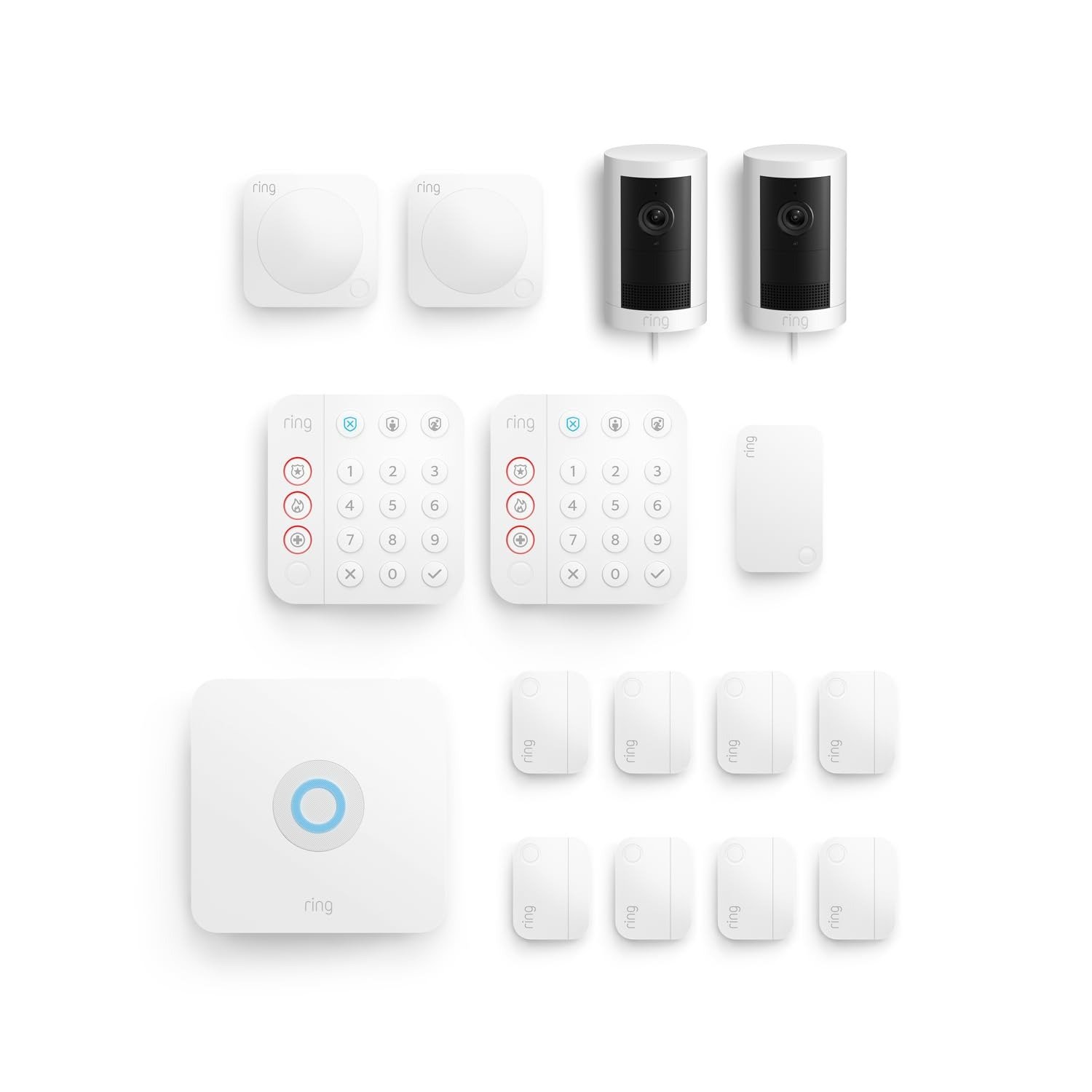
The Ring Alarm architecture relies on a central Base Station that coordinates sensors through a Z-Wave mesh network.
This design avoids many of the congestion issues common in Wi-Fi-only sensor systems.
The base station also includes a built-in battery backup that can maintain operation during short power interruptions.
Those two elements — communication stability and power continuity — form the mechanical backbone of the system.
Failure Signatures That Appear Before Trust Breaks
Every system shows warning signs before users lose confidence in it.
Recognizing those patterns early prevents unnecessary troubleshooting.
| Trigger Condition | Observable Symptom | Drift Pattern | Repeat Condition | Likely Cause |
|---|---|---|---|---|
| Motion sensor facing window | Random motion alerts | Occurs during daylight changes | Same time each day | Light contrast triggering sensor |
| Sensors far from base station | Delayed door notifications | Gradual delay increase | After furniture changes | Signal attenuation |
| Camera near Wi-Fi edge | Camera reconnect notifications | Intermittent drops | During peak network use | Weak Wi-Fi margin |
| Incomplete entry coverage | Constant manual checking | Psychological drift | Every evening | Coverage gap |
The system may still function technically.
But reliability perception begins declining.
Compatibility Split — When DIY Security Systems Work Best
Different home layouts naturally sit at different distances from the stability threshold.
Profile A — Compact Layouts
Apartments and small homes typically cross the threshold quickly.
Short sensor distances and simple entry paths make the system naturally stable.
Profile B — Standard Family Homes
Most houses fall into this category.
Multiple doors, interior motion zones, and daily household activity introduce complexity.
With proper sensor placement and early tuning, the threshold remains stable.
Profile C — Extended Layouts
Homes with detached garages, deep outdoor areas, or thick structural walls create longer signal paths.
The system can still remain stable, but only if placement respects those physical constraints.
The Quiet Metric of a Good Security System
A security system is not measured by how often it triggers.
It is measured by how many nights pass without unnecessary alerts.
When a system reaches that state, the stability threshold has been crossed.
For readers who want to see how a real deployment fits this threshold model, the system breakdown continues here:
Ring Alarm 14-Piece Security System + Outdoor Cam Plus Plug-In (2-Pack) Setup Analysis
Transparency Note:
This analysis is not based on quick personal impressions.
It is derived from documented system behavior, verified user patterns, and the physical constraints of storage capacity.
The goal is to translate complex technical behavior into a realistic performance model that helps you make a clear decision



One Comment