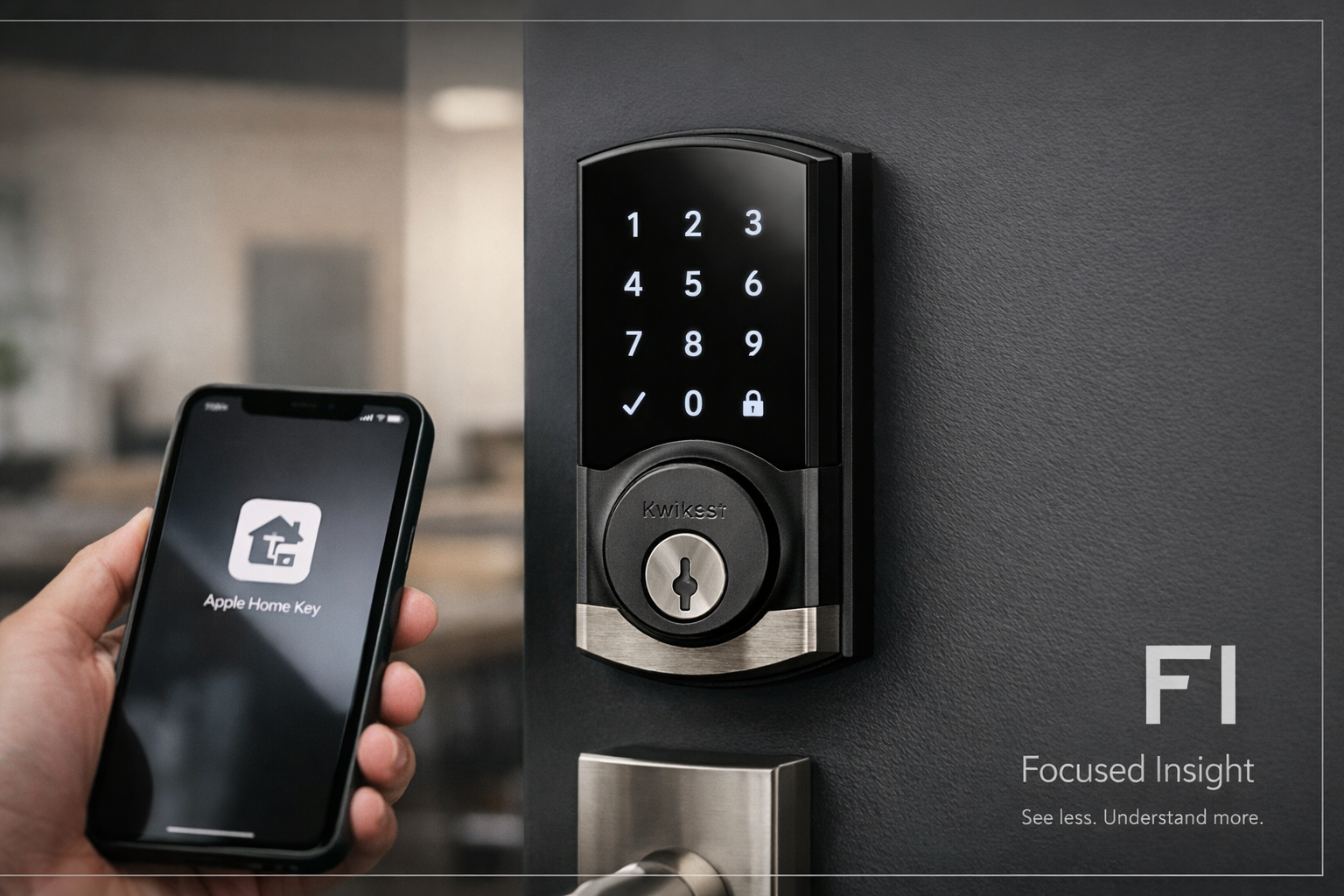
Kwikset Halo Select Plus (Matter + Apple Home Key): The Evaluation Framework
ANALYSIS FRAMEWORK
Opening Context: Why Smart Deadbolts Create Decision Anxiety
When people buy a smart deadbolt, they’re not buying “a lock.” They’re buying certainty—the feeling that the door is secured without adding daily hassle.
In real life, the lock is judged in high-friction moments: carrying groceries, arriving late, letting in guests, or leaving town and wanting to know the door status.
That’s why the decision tends to revolve around two hidden metrics:
- Control certainty: “Can I verify what’s happening at my door?”
- Entry friction tolerance: “How many small failures will I forgive before I regret this?”
Halo Select Plus is designed to lower both, mainly via tap access (Home Key), remote control, door-status sensing, and intrusion alerts—but those same features can backfire if your home setup doesn’t match the assumptions behind them.
Core Structural Explanation: The Four Systems You’re Actually Buying
Most buyers evaluate features. Power buyers evaluate systems. Here are the four that matter.
1) Access System: How entry happens under pressure
You’re evaluating whether entry is fast, predictable, and multi-path:
- Touchscreen codes for everyday use and guests (especially when phones are dead or unavailable).
- Apple Home Key tap-to-unlock when you want “touch and go” instead of “open app, wait, unlock.”
- A smart lock earns trust when it offers redundant entry methods so the household never feels trapped by one failure mode.
Psychologically, redundancy reduces “lockout fear,” which is the number one reason people abandon smart locks.
2) Connectivity & Ecosystem System: What controls the lock when you’re away
With Matter + Wi-Fi, you’re implicitly buying ecosystem flexibility. Matter signals “less vendor lock-in,” which reduces buyer hesitation in homes that mix Apple + Google + Alexa devices.
But you still need stable home connectivity, because most negative experiences in this category are blamed on the lock when they’re actually caused by weak networks.
3) Door-State & Automation System: When automations are safe
This model’s door status sensor matters more than most people realize. Automations like auto-lock are only “comfort features” when the lock can reliably infer whether the door is closed and aligned.
When door-state awareness is weak, users experience:
- bolt resistance
- noisy relocking behavior
- battery drain
- “it locked weird” anxiety
Door-state sensing is what turns auto-lock from “annoying” into “trustworthy.”
4) Intrusion & Anomaly System: What happens when something feels off
Intrusion detection is not just security theater when it delivers clear, actionable signals. The key psychological effect is narrative clarity: people feel calmer when they can answer “did someone try to mess with it?” without guessing.
But there’s a trap: if alerts become noisy, users habituate and ignore them. The best systems produce fewer alerts—but more meaningful ones.
Hidden Technical Factors: What Reviews Usually Reveal (Even When Specs Look Perfect)
This is where smart locks win or lose in the real world—because reviewers rarely say “semantic mismatch.” They say “I loved it” or “I returned it.”
Touchscreen behavior and visible pattern risk
Touchscreens can expose frequent digits via residue patterns. Buyers don’t always articulate this, but it affects perceived security. A lock feels more “serious” when it minimizes pattern predictability.
Auto-unlock and geofencing: convenience vs. discomfort
Hands-free unlocking is either:
- a daily delight (when it’s consistent), or
- a trust-breaker (when it triggers unexpectedly)
The psychological divide is simple: people who fear false unlocks value “manual intent,” while people who hate friction value “automatic relief.”
Guest access scale: the real household use case
High code capacity isn’t about quantity—it’s about boundaries:
- giving a contractor a code that expires
- giving family a permanent code
- giving a cleaner a scheduled window
This reduces the social mess of spare keys and the awkwardness of “who still has access?”
Installation reality: the door decides your experience
A smart deadbolt can be excellent and still feel terrible on a poorly aligned door. If your bolt throws smoothly today with a normal deadbolt, you’re already ahead.
If your door sticks, the “smart” part won’t save you—it’ll amplify the pain.
Market Reality: What People Usually Praise vs. Complain About
Across this category, sentiment tends to cluster predictably.
Praise patterns (why buyers feel relief)
- “I can verify the door is locked from anywhere.”
- “My family can enter without coordinating keys.”
- “Tap access feels instant and natural.”
- “It finally reduced my ‘did I lock it?’ loop.”
Complaint patterns (why buyers feel betrayed)
- setup friction that feels like “it shouldn’t be this hard”
- inconsistent automations that erode trust
- battery/maintenance annoyance (especially when the door is misaligned)
- ecosystem expectations that exceed what the home network reliably supports
The point of this Network Article is to make those failure modes visible before a purchase decision happens—so the decision process becomes rational, not emotional.
Decision Transition: What You Must Verify Before You Decide
Before you move into a transactional decision, you should be able to answer these four questions cleanly:
- Access fit: Will you actually use tap access (Home Key), codes, or both?
- Ecosystem fit: Are you buying for Matter interoperability—or simply remote lock/unlock?
- Door fit: Is your door aligned well enough to benefit from door-status sensing and automation?
- Alert fit: Will intrusion alerts reduce anxiety—or create notification fatigue you’ll ignore?
If you want the complete transactional breakdown that applies this framework directly to Halo Select Plus (without guessing), read the Decision Article here: 🔗 [LINK: complete technical analysis] (insert Decision Article URL)
One Comment