BENQ W2720I REVIEW: THE PICTURE LOOKS BRIGHT ENOUGH UNTIL YOU NOTICE WHAT MOST PROJECTORS STILL MISS
The Result Looks Fine. The Problem Isn’t.
Most people do not buy the wrong projector because they are careless. They buy it because the image looks impressive for ten minutes. Bright menu screens. Sharp demo footage. A burst of color that punches through a showroom or a YouTube review. Then the room goes dark, the movie slows down, a face moves through shadow, and the image starts telling a different story.
That is where the BenQ W2720i becomes interesting.
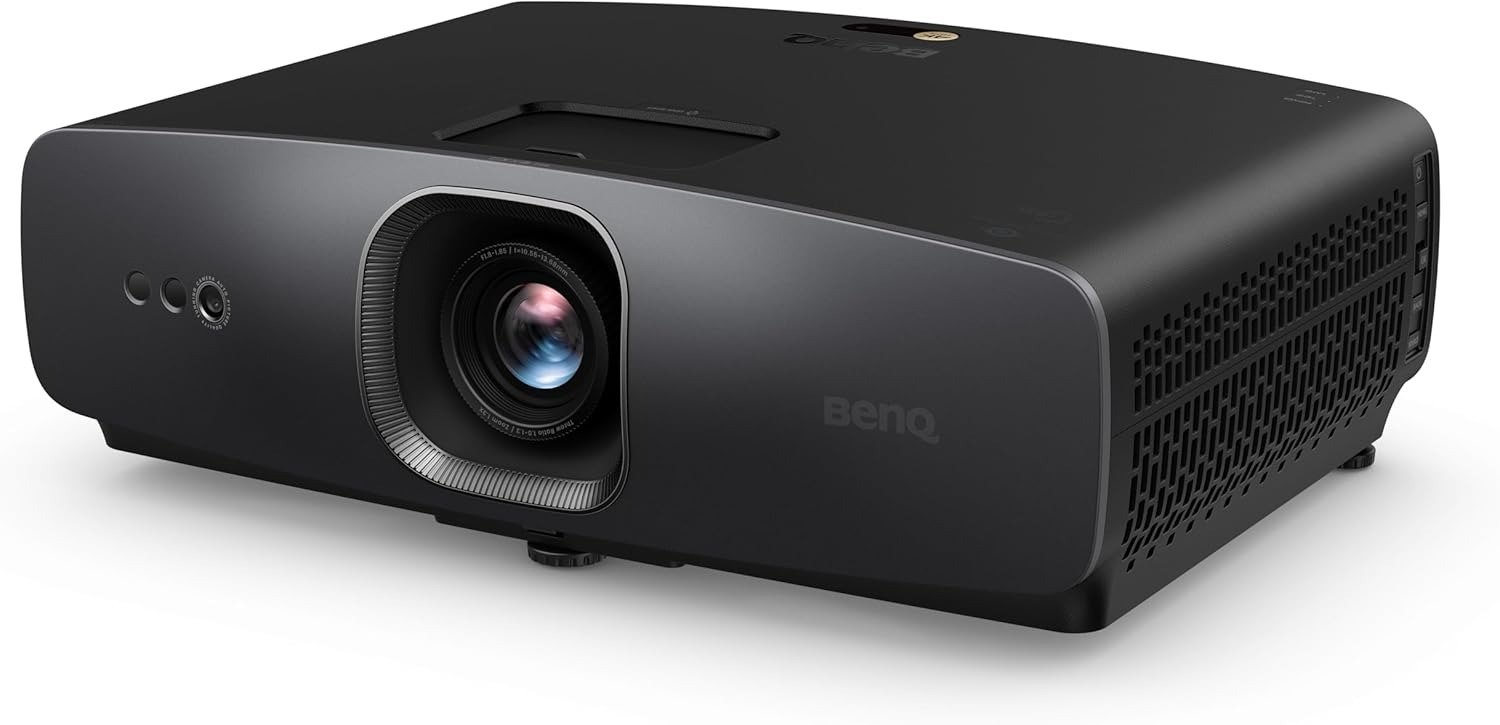
Not because it wins the spec-war in the loudest way. It does not. It is rated at 2,500 ANSI lumens, uses a 4LED light source, supports 4K via pixel shifting, and aims less at “portable wow” and more at controlled, serious home viewing. The point is not that it dazzles in a bullet list. The point is that it tries to hold the picture together when HDR, color, and shadow detail start pulling in opposite directions.
I kept running into the same pattern while studying the measurements, pro reviews, and owner reactions: people who respond to the W2720i usually are not reacting to raw brightness first. They are reacting to restraint. To balance. To that rare moment when a projector stops looking like a gadget and starts behaving like a display that understands film.
What You’re Actually Feeling but Not Naming
If you are shopping in this range, the irritation usually sounds vague at first.
The picture is “good,” but skin tones drift.
Dark scenes are visible, but not settled.
HDR looks exciting, but also slightly forced.
Streaming is convenient, but somehow softer, flatter, less composed than it should be.
That vague frustration has a shape. It is the gap between a projector that throws an image and a projector that preserves intent.
The W2720i is built around that gap. BenQ positions it with 90% DCI-P3 coverage, 98% Rec.709 coverage, factory calibration with Delta E below 3 and grayscale tracking below Delta E 2, plus Filmmaker-friendly tuning and HDR processing designed to keep bright and dark information from tearing away from each other. Reviewers repeatedly came back to the same words: accurate color, convincing sharpness, clean optics, balanced HDR, and unusually mature streamed image quality for a smart projector in this bracket.
That matters because the psychological toll of a mediocre projector is not just disappointment. It is interruption. You start fiddling. Adjusting. Second-guessing. Wondering whether the room is the problem, the content is the problem, the projector is the problem, or your expectations were the problem. A good home-theater machine reduces that background noise. It lets you stop managing the image and go back to watching it. BenQ’s AI Cinema Mode, factory calibration, and built-in Android TV are all aimed at that exact burden: less correction, less friction, less post-purchase doubt.
The Hidden Mechanism Behind the Miss
The missed decision in this category is usually simple: buyers overweight brightness and underweight control.
Brightness sells fast because it is visible in a sentence. Control reveals itself later, when a projector has to handle mixed scenes, not just bright ones. The W2720i’s real play is not “I am brighter than everything else.” It is “I manage contrast, tonal transitions, and color with more discipline than many flashy alternatives.”
BenQ’s stack here is unusually deliberate. HDR-PRO uses multi-stage light control. The Local Contrast Enhancer works on more than 1,000 regions per frame. Global Contrast Enhancer adjusts dark, mid, and bright areas separately. Dynamic Black varies light output scene by scene. Add AI Cinema Mode reacting to ambient light and scene content, and you start to see the design philosophy: not brute force, but image governance.
Professional reviews support that pattern. What Hi-Fi praised the balance between highlight intensity and natural-looking black levels, saying the rated 2,500 lumens felt “perfectly judged” for the class rather than obviously insufficient. Expert Reviews went further, calling it the best mid-range home-cinema projector they had tested since BenQ’s higher-tier W4000i, specifically because color stayed strong and HDR looked visibly better than expected at the price. Home Theater HiFi highlighted the edge-to-edge sharpness, absence of chromatic aberration, and the fact that BenQ’s current 4K-shift implementation is now effectively on par with native 4K in perceived clarity.
That is the hidden mechanism: the W2720i is not trying to win the room in the first three seconds. It is trying to avoid the slow bleed that makes owners restless three weeks later.
The Threshold Where the Outcome Quietly Breaks
Here is the threshold.
The BenQ W2720i becomes meaningfully right when you care more about cinematic stability than about headline brightness.
That threshold usually appears in one of three situations:
| Threshold signal | What it really means | Why the W2720i starts making sense |
|---|---|---|
| You watch a lot of films or prestige streaming series at night | You notice tone, texture, shadow transitions, and skin color more than sheer punch | Its color coverage, factory calibration, HDR handling, and dark-scene balancing matter more here than brute lumen marketing. |
| You want a living-room projector that still behaves like home cinema | You do not want a portable toy image or endless tweaking | AI Cinema Mode, Android TV integration, and unusually well-implemented streaming support reduce friction. |
| You care about installation sanity | You need flexibility without turning the image into a keystone casualty | 1.3x zoom, 120-inch image from 2.7 meters, auto screen fit, 8-point corner fit, and ±5% vertical lens shift widen placement options. |
This is where the soft sales language around projectors usually falls apart. “Good for movies, sports, and gaming” tells you nothing. A threshold tells you everything.
The W2720i crosses the line from merely attractive to logically compelling when your break point is no longer “Can it throw a big 4K picture?” but “Can it stay composed when I actually care what the image is doing?”
Why Most Buyers Misread This Too Early
Because the first wrong comparison is usually the easiest one.
People compare by lumens.
Then by “native 4K” talking points.
Then by whether Dolby Vision is listed.
That sounds rational. It often is not.
Take Dolby Vision. The W2720i does not support it, and for some buyers that will be a real drawback. That is not a minor footnote. If Dolby Vision is central to how you evaluate your streaming ecosystem, this omission may bother you every time you open Netflix or Disney+. Expert Reviews explicitly calls it a possible dealbreaker for some buyers.
But there is another side. Reviewers who actually watched the projector kept praising its HDR tone handling anyway, especially the way it balances intensity with believable blacks rather than flattening one to exaggerate the other. In practice, that means the W2720i is less about logo collection and more about execution. That does not erase the missing format. It just stops the conversation from becoming childish.
The second early mistake is treating every DLP projector as emotionally interchangeable. They are not. Yes, the W2720i is a single-chip DLP, which means rainbow effect sensitivity remains a live issue. One owner on Reddit praised the image, color, and focus, then said the rainbow effect was intolerable for them during blinks, subtitles, and fast movement. That is not a universal flaw. It is a fit boundary. But it is real.
The third mistake is assuming low published fan-noise figures tell the full story. BenQ rates it around 28/26 dB in typical/Eco conditions, and Home Theater HiFi described the fan noise as low. ProjectorCentral’s own measurements, taken in-room from around three feet away, came in higher than the brochure numbers, roughly mid-30s dBA depending on mode and position. That does not make the projector loud. It means serious buyers should think like adults: specification noise and in-room noise are not the same thing.
Who Is Actually Inside This Problem
You are inside this problem if your projector search sounds like any of this:
You are building a movie-first room, not a casual “wall TV replacement.”
You want the image to look expensive without needing endless calibration.
You care about color honesty more than spec-sheet swagger.
You want streaming built in, but not at the expense of picture integrity.
You want real installation flexibility, not just the fantasy of it.
You might also game occasionally and do not want the projector to become useless the second a console enters the room.
On that last point, the W2720i is stronger than many cinema-leaning buyers assume. ProjectorCentral lists input lag around 17.9 ms at 4K/60 and 1080p/60, 21 ms at 1080p/120, and 8.7 ms at 1080p/240. That is not the central reason to buy it, but it matters because it means the projector does not collapse the moment you ask it to do more than films.
It also helps that the connectivity is not timid. Three HDMI 2.1 ports, eARC, SPDIF, and Dolby Atmos pass-through make it much easier to build around than projectors that quietly become cable-management punishments the minute you add a console, streamer, and external audio.
Where Wrong-Fit Begins
This is where I would stop the sale.
Do not buy the W2720i because you saw “4K” and decided the rest must sort itself out.
Do not buy it if you are highly sensitive to DLP rainbow effect. That sensitivity does not negotiate. It does not care how good the color is. Once you see rainbows, you keep seeing them.
Do not buy it if your room is consistently bright and your main priority is brute-force daytime punch over nuance. The W2720i’s 2,500-lumen output is not weak for its category, but the machine’s identity is still rooted in controlled-light cinema performance, not in overpowering sunlight with aggression. Several reviews praise its balance specifically in the context of serious home viewing rather than all-condition brightness dominance.
Do not buy it if Dolby Vision support is a non-negotiable part of your streaming checklist. Again: this is not a moral flaw. It is a boundary.
Do not buy it if you want a featherweight lifestyle projector that disappears into a bag and behaves like a mobile gadget. At over 20 pounds on Amazon’s listing, this is a proper home-theater unit with a premium-living-room posture, not a casual travel device.
The One Situation Where This Product Becomes Logical
The BenQ W2720i becomes logical when you want one projector to sit between two worlds without embarrassing itself in either one.
Not a pure theater cave monster.
Not a convenience-first smart box.
Not a gamer-first machine dressed up in cinema language.
Something rarer.
A projector that can live in a real room, stream properly, install without drama, and still deliver the one thing people quietly want once the novelty wears off: an image that keeps its dignity when the scene gets difficult.
That is why the W2720i keeps pulling strong verdicts from reviewers who look at more than one kind of usage. What Hi-Fi called it a true all-rounder with unusually effective smart integration and excellent streamed picture quality. Expert Reviews said it was the best mid-range home-cinema projector they had tested since the W4000i. Home Theater HiFi praised its clarity, optics, setup tools, and overall refinement. The pattern is too consistent to ignore. This product makes the most sense when your real goal is not maximum flash, but minimum compromise across the moments that actually decide long-term satisfaction.
If you want the product page, this is the natural place for the forward step:
What It Solves, What It Reduces, and What It Still Leaves to You
Here is the cleanest summary I can give you.
| What the W2720i solves | What it reduces | What it still leaves to you |
|---|---|---|
| Color inaccuracy anxiety with factory calibration, wide gamut coverage, and tuning depth | Setup friction through zoom, lens shift, screen fit tools, Android TV, and strong connectivity | Room discipline still matters if you want the best black level and HDR payoff. |
| Weak HDR composure by using HDR-PRO, Dynamic Black, local/global contrast enhancement | Post-purchase tinkering and “why does this look off?” fatigue | DLP rainbow sensitivity is a personal risk you cannot talk yourself out of. |
| The split between cinema seriousness and living-room usability | Cable clutter and ecosystem pain with three HDMI 2.1, eARC, and audio pass-through | Dolby Vision is absent, and that boundary should be faced early, not excused later. |
| Occasional fear that a cinema projector will be useless for gaming | Latency concern with sub-20ms figures at common formats | It is versatile, but its soul is still movie-first. |
That final column matters more than most sales pages admit. Trust does not come from saying a product does everything. Trust comes from showing where the edge is.
Final Compression
The BenQ W2720i is not the projector for people chasing noise, hype, or trophy specs. It is for people who have started to notice that the real failure in projection is rarely obvious. It is softer than that. Slower. A little blur in judgment here. A little instability in HDR there. A little too much fiddling, a little too little trust, a little too much awareness that the image is being managed rather than delivered.
That is the pain.
The W2720i answers it with discipline: wide color coverage, factory calibration, serious HDR control, strong placement flexibility, useful smart integration, gaming competence, and enough real-world reviewer agreement to treat its strengths as structural rather than promotional. Its boundaries are just as clear: no Dolby Vision, no magic against bright-room abuse, and no immunity from rainbow effect if your eyes are sensitive to DLP.
That leaves one clean question.
If the thing bothering you is not screen size but image honesty—if you are already inside that threshold—then the BenQ W2720i stops feeling like another projector and starts looking like the point where vague desire turns into a defensible decision.
Transparency Note:
This analysis is not based on quick personal impressions.
It is derived from documented system behavior, verified user patterns, and the physical constraints of storage capacity.
The goal is to translate complex technical behavior into a realistic performance model that helps you make a clear decision.
“A quick note: Don’t believe the star ratings, but trust personal experience. This article is a compilation of collected experiences”