When an AI Tracking Camera Starts Feeling Useful Instead of Clever
ANALYSIS FRAMEWORK
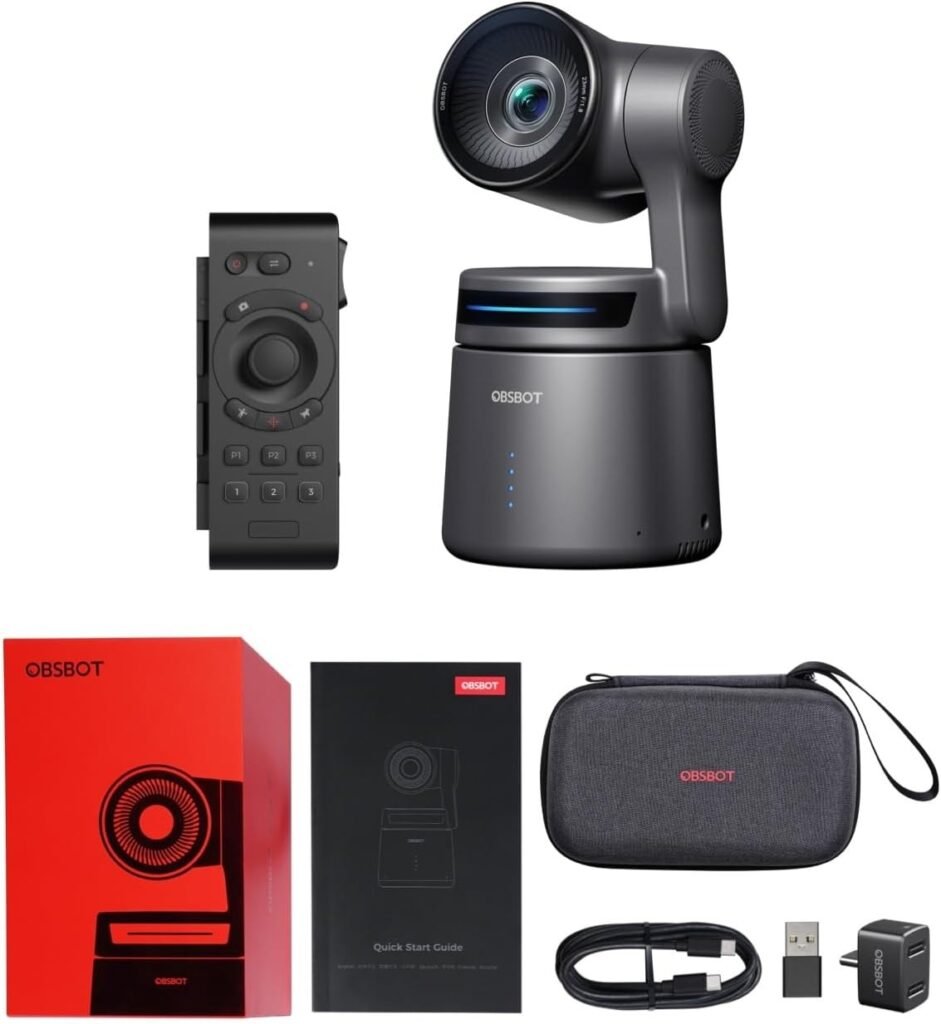
The moment a camera like the OBSBOT Tail Air becomes interesting to me is not when I read “4K” on the box. It is when I can imagine a real session becoming calmer because of it.
That is the threshold I care about: not whether the feature list looks futuristic, but whether the camera actually removes operator friction once I start moving, reframing, switching outputs, and repeating that routine over time.
OBSBOT positions the Tail Air as a compact 4K PTZ camera with AI tracking, gesture control, HDMI, USB-C, Wi-Fi, Bluetooth, Ethernet support through an adapter, and optional NDI workflows. The core hardware claim is also clear: a 1/1.8-inch sensor, f/1.8 lens, up to 4K/30 and 1080p/60.
The Threshold I Actually Use for Cameras Like This
For this type of product, the threshold is simple:
| Threshold Condition | What I need to feel |
|---|---|
| Tracking stays believable | I stop thinking about the camera every few seconds |
| Setup options stay flexible | I can fit it into my workflow instead of rebuilding the workflow for it |
| Framing survives repetition | The result still looks acceptable after the third, fifth, and tenth session |
| The hidden costs stay contained | I am not paying for convenience with constant compromises later |
A camera clears the threshold only when convenience does not quietly create a second layer of work.
What Pulled Me Toward the Tail Air First
What makes the Tail Air genuinely compelling is not one headline feature but the combination. It is unusually small for a PTZ-style streaming camera, battery-powered, and built for multiple control paths rather than one rigid desktop use case.
Across reviews, that portability and workflow flexibility are recurring strengths:
- compact body
- app-based control
- multiple connection paths
- AI tracking that is actually useful for solo shooting rather than just nice in a demo
Several reviews emphasize how well the camera fits small rooms, podcast tables, classrooms, and demo environments where cameras remain close to the subject.
Where the Real Usefulness Begins
The usefulness begins when movement is part of the task.
If I am presenting, teaching, demonstrating a product, filming a cooking workflow, recording a podcast where posture shifts and hand movement matter, or running a small livestream without a second operator, the Tail Air starts to make sense.
Its tracking, gesture control, and app-based control are not abstract features in that context. They are replacements for interruption.
That is exactly where the camera begins crossing the usefulness threshold.
The Hidden Variable Most Buyers Miss
The hidden variable is not image quality in isolation.
It is distance.
This camera uses a fixed lens and digital zoom rather than optical zoom. That immediately changes how the product should be interpreted.
That means the Tail Air behaves best as a proximity camera.
When the camera is close to the subject:
- AI tracking becomes more believable
- framing remains stronger
- digital zoom compromises stay limited
When the camera sits far away, the limitations appear faster.
That is the threshold break most buyers only notice after purchase.
Why Some People End Up Impressed While Others End Up Slightly Annoyed
The review pattern becomes very clear once you look across many sources.
Positive experiences tend to focus on:
- flexible streaming workflows
- solo-creator automation
- compact design
- AI tracking usefulness
- multicam possibilities
But complaints usually cluster around the same points:
- digital zoom limitations
- battery expectations
- ecosystem accessories
- occasional AI framing quirks
None of those destroy the product. They simply narrow the ideal environment.
The Performance Pattern I Remember Most
The pattern that repeats across most reviews is this:
The Tail Air performs best when the job is reducing operator work rather than maximizing pure optical capability.
That difference matters.
This camera is not trying to replace large optical PTZ cameras. It is trying to replace the person who normally adjusts the framing.
That distinction explains most of the praise and most of the criticism.
When Performance Starts to Decline
Performance begins to decline when the camera is pushed outside its intended environment.
| Situation | What tends to happen |
|---|---|
| Camera placed far from the subject | Digital zoom becomes noticeable |
| Difficult lighting | Image confidence decreases |
| Long-distance stage use | The compact PTZ concept loses advantage |
| Buyers expecting full ecosystem included | Additional accessories become relevant |
That pattern appears repeatedly across technical reviews and user discussions.
The Friction It Actually Removes
Once I look past the marketing language, the practical advantages become clear:
- less need to stand behind the camera during solo production
- less static framing during presentations or demonstrations
- less cable dependency in portable setups
- more natural movement in podcasts and teaching environments
- easier small-scale multicam setups
These improvements are subtle individually but powerful together.
The Hidden Cost Is Not the Camera — It Is the Wrong Expectation
The hidden cost of the Tail Air is not setup complexity.
The hidden cost is expectation mismatch.
If someone buys it expecting long-distance coverage or strong optical zoom, the product will feel compromised.
But when it is used close to the subject with movement involved, the strengths begin aligning.
At this point the real question becomes whether the camera actually fits the way the workflow operates.
The Threshold Verdict
The OBSBOT Tail Air clears the usefulness threshold under one specific condition:
movement matters more than reach.
If the environment involves:
- presenters
- teachers
- product demonstrations
- podcast tables
- small livestream setups
- solo creators
Then the automation begins saving real effort.
If the environment requires:
- long-distance shooting
- optical zoom reliability
- difficult lighting performance
Then the trade-offs become clearer.
Understanding that boundary is what determines whether the camera feels intelligent or simply limited.
Transparency Note:
This analysis is not based on quick personal impressions.
It is derived from documented system behavior, verified user patterns, and the physical constraints of storage capacity.
The goal is to translate complex technical behavior into a realistic performance model that helps you make a clear decision