BOND BRIDGE PRO REVIEW: SMART UNTIL THE EXACT MOMENT IT ISN’T
Bond Bridge Pro Setup: The Result Looks Perfect, The Problem Isn’t
The first time it works, it genuinely feels like a magic trick. You say “Alexa, turn on the ceiling fan,” and a fan that’s been dumb since the day it was installed just… spins. No new switch on the wall, nothing to explain to a guest except “we got a little gadget.”
That first week is the best week. Every command lands. The kids think it’s funny to ask Google to slow the fan down. You forget the old remote even exists.
But the real test of a device like this was never day one. It’s the day nobody’s paying attention — the day someone in the house does something completely ordinary, and the “smart” part quietly stops matching reality.
Ceiling Fan Remote Clutter: What You’re Actually Feeling but Not Naming
If you’re reading a review this deep on “Bond Bridge Pro,” you already know the actual irritation, even if you haven’t named it yet.
It’s the drawer or counter corner with three or four remotes that all look almost identical. It’s the fact that only one person in the house knows you have to hold the fan remote’s button for exactly two seconds, not one. It’s asking Alexa to turn off a fan and getting a cheerful “Okay” — while the fan keeps spinning.
That gap, between what the assistant confirms and what the room is actually doing, is the real friction. Most people blame the assistant. The real explanation is more specific than that, and it has nothing to do with Alexa.
Bond Bridge Pro No Feedback Loop: The Hidden Mechanism Behind the Miss
Why does Alexa say “Okay” while the fan keeps spinning? Here’s the part almost nobody explains clearly before you buy one of these: Bond Bridge Pro doesn’t actually “talk” to your fan, fireplace, or shade motor the way a smart bulb talks to your Wi-Fi network.
It works by recording the exact radio signal your existing remote sends, then replaying that signal on command — from the app, from Alexa, from Google Home, or from a Control4 or RTI system if that’s your setup. That part is genuinely clever.
But it’s a one-way trick. The bridge has no sensor telling it “the blades are actually spinning” or “the shade is actually at 40%.” It only remembers the last command it sent. So the moment anyone touches the original physical remote instead of the app, the bridge’s memory of “what’s on” quietly drifts away from what’s actually on — and nothing in the system catches that by itself.
Bond Bridge Pro — Key Numbers
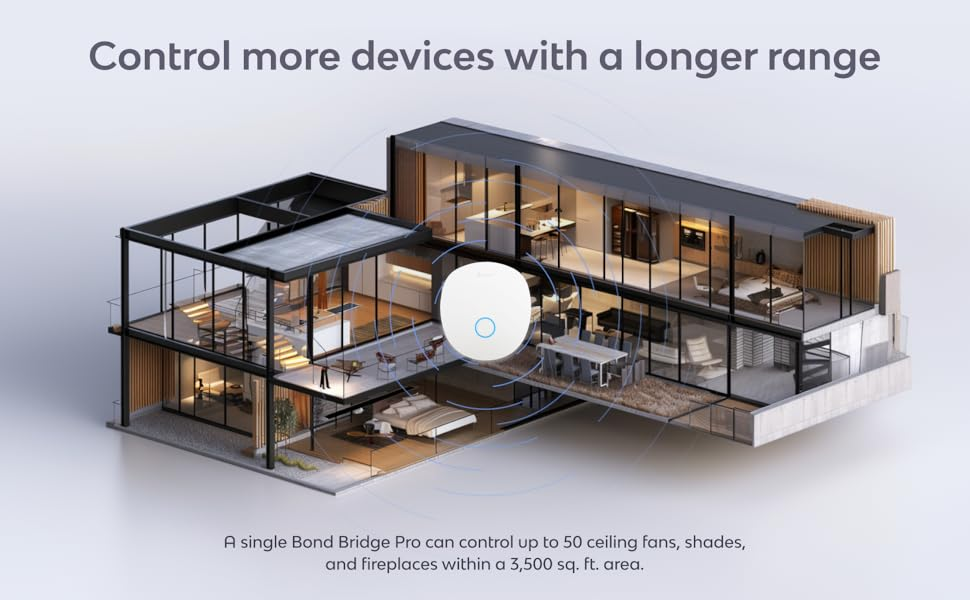
| Coverage | Up to 3,500 sq. ft. |
| Max devices per bridge | Up to 50 (fans, shades, fireplaces combined) |
| Connection | Wi-Fi, or Ethernet with optional PoE |
| Warranty | 3 years |
| Support | In-app support, 7 days a week |
| Works with | Alexa, Google Home, SmartThings, Josh.ai, Savant, plus Control4 / RTI / Elan / Crestron |
| Multi-unit range | Up to 8 bridges per property, with anti-collision RF handling |
Bond Bridge Pro Wi-Fi Range: The Threshold Where the Fan Quietly Goes Silent
There are exactly two moments where the “smart” layer breaks, and once you can name them, most of the confusion about this product disappears.
The first is human: the mechanism above, and it happens on every Bond bridge, Pro or standard.
The second is technical — why does it fail silently instead of throwing an error? Because the standard bridge only talks to your network over Wi-Fi. If the spot where it sits — a garage, a media room behind a thick wall, the far end of a two-story house — has weak Wi-Fi, the bridge doesn’t fail loudly. It just goes quiet. Alexa says it can’t reach the fan. The app shows a spinner that never resolves.
That second break point is the one the Pro version exists to remove.
Bond Bridge Pro vs. Bond Bridge: Why Most Buyers Compare This Wrong
Why do most people pick the wrong one of these two boxes? Because they compare on price alone, as if it’s the same product with a different sticker. That leads to buyer’s remorse in both directions — paying for capability you’ll never use, or saving money and running straight into the dead zone from the last section.
| Bond Bridge | Bond Bridge Pro | |
|---|---|---|
| Coverage | Up to 2,500 sq. ft. | Up to 3,500 sq. ft. |
| Max devices | Up to 30 | Up to 50 |
| Connection | Wi-Fi only | Wi-Fi, or Ethernet + PoE |
| Warranty | 1 year | 3 years |
| Best suited for | One property, solid Wi-Fi throughout | Larger, multi-floor, or Wi-Fi-weak properties, and pro installs |
If your Wi-Fi is strong everywhere you need it and you’re under thirty devices, the standard bridge does the identical core job for less.
Bond Bridge Pro Compatibility: Who Is Actually Inside This Problem
The people who actually need to keep reading tend to share a few things.
More than one or two RF-controlled fans, shades, or a fireplace — often three or more, spread across a floor plan. A spot with genuinely weak Wi-Fi: a detached garage, a converted attic, a sunroom added after the router was placed. Already working with Control4, RTI, Crestron, Savant, or Elan — or tired enough of the remote drawer to want one dependable answer instead of a patchwork of apps.

Bond Bridge Pro Won’t Fix This: Where Wrong-Fit Begins
Just as important is being honest about who this isn’t for, because the disappointed reviews almost always trace back to one of these.
One fan, five feet from your router, on Wi-Fi that’s never dropped — you don’t need the Pro. A fan or shade with no remote at all, just a pull chain or a plain wall switch — there’s nothing here for Bond to learn from; it copies an existing signal, it can’t invent one. A garage door — rolling-code security exists specifically to stop any device from recording and replaying a signal, and that’s working as intended, not a gap. An all-Apple household expecting every device to show up in HomeKit with full control — shade support has moved to a native integration, but fireplaces in particular tend to appear as a basic on/off or dimmer, not the fuller control inside the Bond app itself.
Compatible With (Examples)
| Ceiling fan brands | Hunter, Minka, Quorum, Monte Carlo, Hinkley, Westinghouse, Craftmade, Hampton Bay, Harbor Breeze |
| Shade motor brands | Dooya, Rollease Acmeda, NICE, Gaposa, A.OK, Bofu, Allen + Roth |
| Voice / smart home | Amazon Alexa, Google Home, Samsung SmartThings |
| Professional systems | Control4, RTI, Crestron, Savant, Elan, Josh.ai |
| Not supported | Garage doors, devices with no existing remote |
Bond Bridge Pro Ethernet + PoE: The One Situation Where It Becomes Logical
If you recognized your own house two sections back, and none of the last section’s exclusions applied to you, here’s where paying more stops being about status and starts being about function.
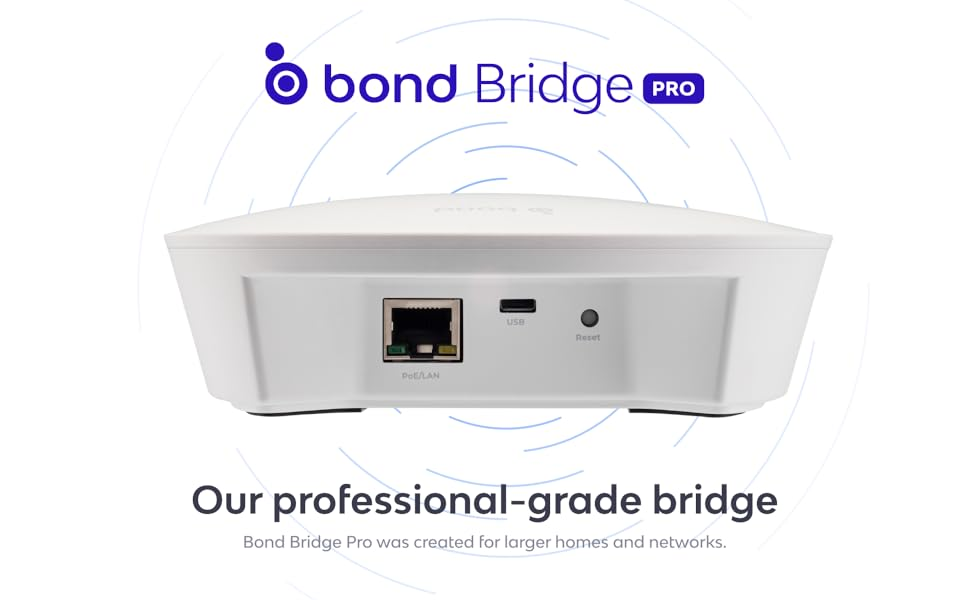
PoE (Power over Ethernet) lets one cable carry both the network connection and the power itself, so a garage, detached structure, or far corner behind thick walls gets a permanent wired connection instead of hoping Wi-Fi holds up. Add room for 50 devices across 3,500 sq. ft., and up to eight bridges on one property without interference, and the Pro is built for exactly the gap described earlier — not because Pro sounds better than standard.
Bond Bridge Pro Review: What It Solves, What It Reduces, What’s Still on You
| Solves | Reduces | Still on you |
|---|---|---|
| Wi-Fi dependency at the install spot, via Ethernet/PoE | Dropped or missed commands from weak signal | The “ghost state” issue if anyone uses the original remote — true on every Bond bridge |
| Device-count and range ceiling for bigger properties | The number of separate remotes in daily use | Confirming your exact remote/frequency is supported before ordering |
| Integration with professional AV systems | App-jumping between manufacturer apps | Accepting simplified HomeKit views for some device types |
| Longer warranty and live support window | Replaying what your remote already does — not adding features it never had |
None of this makes the Pro flawless. It makes it predictable, which for a device meant to disappear into daily life is the more useful quality.
Bond Bridge Pro FAQ: What Buyers Ask Before They Commit
| Question | Answer |
|---|---|
| Does Bond Bridge Pro need Wi-Fi to work? | No — that’s the point of the Pro. It works over Wi-Fi like the standard bridge, but also accepts a direct Ethernet connection with optional PoE. |
| Will it work with my specific fan or shades? | Very likely, if the device already has its own remote. Coverage spans most major fan and shade motor brands. If your remote feels unusual, a quick check with Bond’s support before ordering is worth the two minutes. |
| Does it support Apple HomeKit? | Partially. Shade control has a native HomeKit integration. Fireplaces in particular tend to show up as a basic on/off or dimmer rather than full multi-function control. |
| Can it control a garage door? | No. Rolling-code security exists to prevent exactly this kind of signal recording and replay. |
| What happens if someone still uses the old remote? | The tracked state can quietly fall out of sync with reality, since the bridge has no way to confirm what the device is actually doing. Worth knowing before it happens the first time. |
| What if my fan has no remote at all? | Then there’s nothing for Bond to learn from. A receiver-based solution would need to go in first. |
| Is the Pro worth the extra cost over the standard bridge? | Only if you’re hitting something the standard version genuinely can’t do — more than 30 devices, over 2,500 sq. ft., a Wi-Fi dead zone at the install point, or a system like Control4 or RTI. Otherwise, the standard bridge does the same core job for less. |
Bond Bridge Pro Review: The One Next Step
Strip away the comparison shopping and it comes down to one question: does your Wi-Fi actually reach the spot where your fans, shades, or fireplace need to be controlled from, and are you past the 30-device, 2,500 sq. ft. ceiling of the standard bridge?
If the answer is yes to either one, the Pro is closing a real, specific gap, not a theoretical one. Specs and pricing shift over time, so the listing itself is the most current source before you decide.
Transparency Note:
This analysis is built on aggregated real-world experience.
It extracts what repeatedly holds, what breaks, and what users uncover only after living with the system—then shapes it into a clear model you can use immediately.
Think of it as structured experience, refined and presented so you don’t have to learn it the hard way.
“A quick note: Don’t believe the star ratings, but trust personal experience. This article is a compilation of collected experiences.”