YOUR BACKYARD GETS SIGNAL. YOUR DEVICES DON’T GET WI-FI. THERE’S A DIFFERENCE.

TP-LINK DECO BE65-OUTDOOR
You walked outside with your laptop. The signal bars looked fine. The video call froze anyway.
You checked the router app. It showed the device connected. It was — technically. What the app doesn’t show is that your indoor mesh node was pushing signal through a stucco wall, across twenty feet of open air, through another wall of humidity, into a space your router was never designed to serve. The bars were real. The connection was borrowed. And borrowed connections have a threshold — a line where the appearance of coverage collapses into the reality of it.
That threshold is the outdoor problem. Not absence of signal. Deterioration of signal quality in conditions your indoor hardware was never rated to survive.
THE RESULT LOOKS FINE. THE PROBLEM ISN’T.
The reason outdoor Wi-Fi failures are so disorienting is that they don’t announce themselves cleanly. You don’t get “No Wi-Fi.” You get 400 millisecond latency spikes on a call that was supposed to be smooth. You get a download that starts at 480 Mbps and quietly settles at 40. You get your phone showing five bars of connection while buffering a 1080p video.
When an indoor mesh network is used as the only coverage source, testing shows results like 504 Mbps on a covered porch dropping to just 115 Mbps at a fire pit twenty feet further out — and that’s on the 5 GHz band under controlled conditions, with no direct obstruction. Tom’s Hardware Add humidity. Add a sprinkler arc. Add the signal traveling through a wall it was never meant to penetrate, and those numbers decay further than the specification sheet ever warned you about.
The spec sheet describes the device’s performance in an ideal environment. Your backyard is not an ideal environment. It is a variable one. And variable environments expose threshold behavior that stable indoor conditions permanently hide.
WHAT YOU’RE ACTUALLY FEELING BUT NOT NAMING
There is a specific irritation that outdoor Wi-Fi produces that most people don’t diagnose correctly. It’s not “bad Wi-Fi.” It’s unpredictability.
You’ve moved outside with work or leisure. The connection holds for twenty minutes. Then a video stutters, a file transfer stalls, a call degrades without warning. You move slightly. It improves. You stop moving. It decays again. You begin making unconscious routing decisions — standing in that one corner, keeping your chair near the door, never going to the far end of the patio.
That is not a range problem. That is a signal-quality oscillation problem. Your indoor node is operating at the edge of its envelope, and at that edge, environmental fluctuations — temperature, moisture in the air, interference from neighboring networks on the same band — create performance variance that no amount of proximity to the router reliably fixes.
The annoyance is real. The cause is structural. And no setting adjustment inside the Deco app will compensate for hardware that was not designed to be outdoors.
THE HIDDEN MECHANISM BEHIND THE MISS
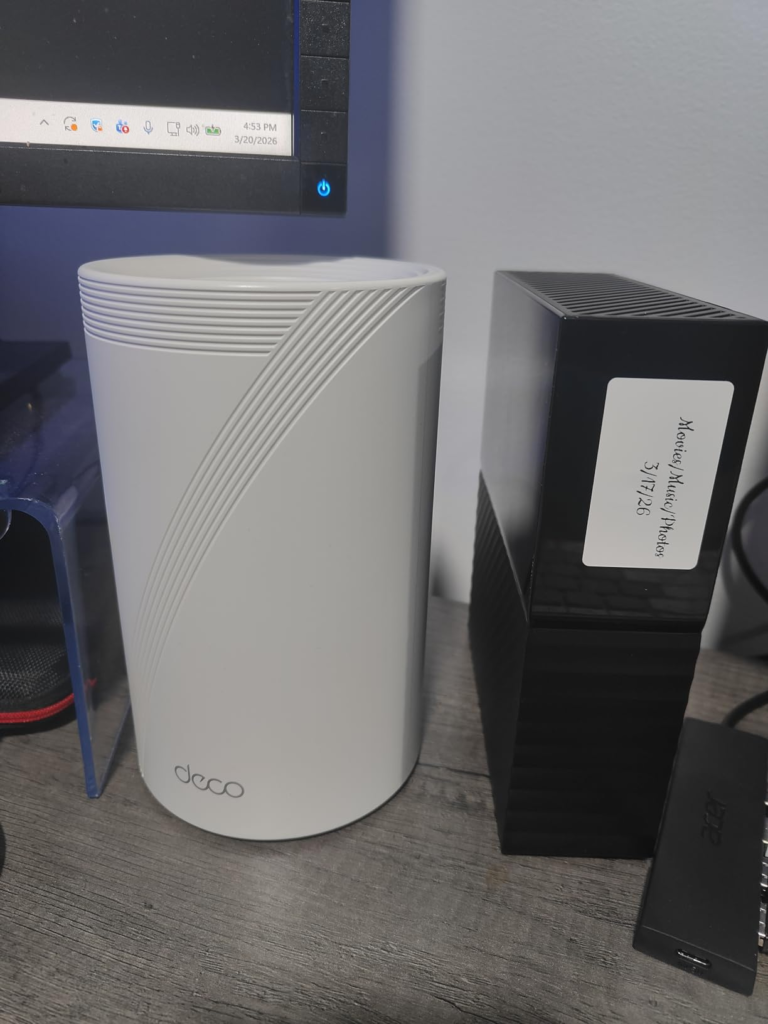
Indoor mesh nodes operate on the assumption of a controlled thermal and RF environment. Their antennas are calibrated for interior reflection patterns — signal bouncing off walls, ceilings, floors. They have no waterproofing. Their circuit boards are not sealed against condensation. And critically, they are not authorized to operate on the 6 GHz band outdoors.
That last point matters more than most people realize. Outdoor use of the 6 GHz band requires Automated Frequency Coordination (AFC) compliance — a regulatory requirement that protects incumbent spectrum users. TP-Link Standard indoor Wi-Fi 7 devices broadcasting 6 GHz signal outdoors operate outside their regulatory authorization, and more importantly, they cannot access the clean, interference-low frequencies that make the 6 GHz band valuable in the first place.
This is not theoretical: in testing, even placing a BE65-Outdoor unit within six feet of a main indoor node still resulted in it defaulting to 5 GHz wireless backhaul — because AFC mode, required for outdoor 6 GHz usage, was not enabled by default, and had to be manually activated. Tom’s Hardware
The hidden mechanism is not signal weakness. It is hardware operating outside its design boundary, regulatory boundary, and thermal boundary simultaneously. Under those three pressures, the degradation isn’t occasional. It’s structural.
THE THRESHOLD WHERE THE OUTCOME QUIETLY BREAKS
Every mesh system has an outdoor threshold. It’s not a wall. It’s a gradient — a zone where indoor hardware begins to make compromises silently, without alerting you.
The threshold typically arrives in three phases:
Phase one is physical boundary crossing. The moment the signal leaves the conditioned interior and enters open air, signal behavior changes. Fresnel zones open up. Reflections disappear. Range that felt reliable indoors becomes directional, inconsistent, and sensitive to obstacles that walls previously absorbed.
Phase two is environmental exposure. Indoor hardware is not sealed. At sustained outdoor temperatures, particularly above 95°F or below freezing, passive components behave differently. Performance consistency drops. Nodes that ran stable for weeks begin cycling unexpectedly.
Phase three is spectrum collapse. Without AFC compliance and an IP-rated enclosure, the device cannot reliably use the 6 GHz band in the open. It falls back to 5 GHz or 2.4 GHz. The backhaul degrades. The downstream clients — your phone, your laptop, your outdoor cameras — feel the bottleneck, even if they’re sitting three feet from the node.
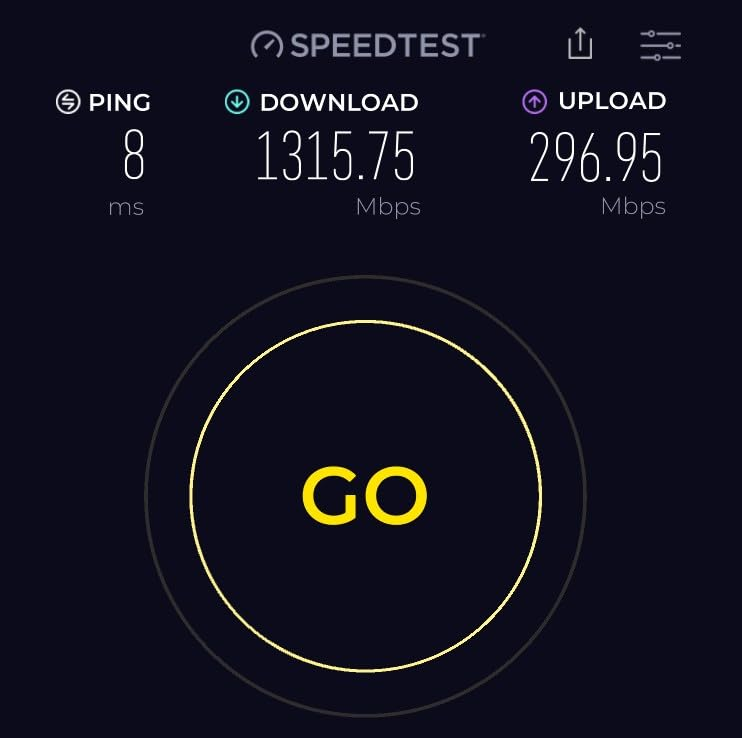
Controlled testing confirms this threshold behavior: at 15 feet from an outdoor-rated node with wired backhaul, peak throughput reaches 1.577 Gbps — nearly double the throughput of the same unit operating wirelessly without environmental-grade hardware. Tom’s Guide
The threshold is not hypothetical. The numbers show exactly where it sits.
WHY MOST BUYERS MISREAD THIS TOO EARLY
The most common purchasing error in outdoor networking is applying indoor logic to an outdoor problem.
A buyer looks at their existing Deco BE65 indoor system, sees it’s Wi-Fi 7, notes the strong range figures on the spec sheet, and assumes that mounting it near a window or placing a spare node in the garage will extend coverage outdoors adequately.
This is the early comparison trap. It compares the specification of an indoor device to the requirement of an outdoor environment, and finds a match that does not actually exist in field conditions. Indoor mesh nodes show a dramatic difference in outdoor performance — baseline coverage without a dedicated outdoor node yields only 115 Mbps at twenty feet outside versus the 343 Mbps achievable with a purpose-built outdoor unit on wireless backhaul, and up to 479 Mbps on the porch with that same outdoor node in place. Tom’s Hardware
The other common misread is treating dual-band outdoor units as equivalent to tri-band ones. Unlike dual-band outdoor alternatives, a tri-band outdoor mesh unit fully accesses all three Wi-Fi 7 data bands, including the 6 GHz band — a difference that becomes decisive at longer outdoor distances where the lower bands are already saturated. Tom’s Guide
The spec sheet doesn’t lie. It just describes a different scenario than the one you’re actually in.
WHO IS ACTUALLY INSIDE THIS PROBLEM
This problem belongs to a specific person, not everyone.
You are in this problem if your work or recreation has genuinely moved outdoors — not occasionally, but as a regular pattern. Video calls on the patio. School sessions in the yard. Security cameras that need reliable uplink, not borrowed signal. A garage workshop where a 4K stream needs to stay stable while a power tool runs nearby.
You are in this problem if your home has a meaningful outdoor footprint — a yard, a pool area, a deck, a detached outbuilding — where dead zones or signal decay are already costing you daily. Not annoyance-level, but pattern-level friction. Decisions you make about where you sit, where you work, what you attempt outside.
| User Profile | Outdoor Mesh Need Level |
|---|---|
| Occasional patio browsing | Low — a better indoor node may be sufficient |
| Regular video calls outdoors | High — signal consistency is non-negotiable |
| Outdoor IP cameras + smart devices | High — upload reliability matters more than speed |
| Detached garage or outbuilding | Critical — indoor signal cannot cross the gap cleanly |
| Pool area / 75+ ft from house | Critical — even a good indoor mesh hits its outdoor threshold |
You are not in this problem if you occasionally check your phone on the back step. The problem begins where the pattern is consistent and the consequence of degradation is real.
WHERE WRONG-FIT BEGINS
Wrong-fit in outdoor networking is easy to enter, expensive to exit.
The first wrong-fit is buying any outdoor extender when the real problem is indoor node placement. If your indoor mesh is poorly positioned — too centralized, too obstructed from the outdoor edge — adding an outdoor satellite before fixing that placement produces a node that is dragging signal from a bad source and amplifying the problem, not solving it.
The second wrong-fit is choosing a dual-band outdoor unit for a tri-band use case. A dual-band outdoor unit lacks the 6 GHz band entirely, which means that in congested 5 GHz environments — dense neighborhoods, areas with many competing networks — its wireless backhaul becomes bottlenecked at the band with the most interference. Tom’s Guide
The third wrong-fit is buying an outdoor unit without a plan for backhaul. A wired PoE backhaul delivers roughly double the throughput at distance compared to wireless backhaul — 765 Mbps at fifty feet versus the wireless equivalent — and that gap widens at greater distances. Tom’s Guide A buyer who expects flagship outdoor performance without considering the PoE cable run will consistently underperform their hardware.
| Scenario | Fit Assessment |
|---|---|
| Only occasional outdoor use | Wrong-fit — cost doesn’t justify the problem |
| Indoor node is already poorly placed | Wrong-fit — fix placement first |
| Dense urban environment, 5 GHz congestion | Needs tri-band + 6 GHz to escape congestion |
| Wired backhaul impossible | Performance ceiling is real — manage expectations |
| Outdoor cameras + consistent device usage | Correct fit, PoE backhaul strongly recommended |
| Pool, garden, outbuilding coverage need | Correct fit — this is the exact use case |
THE ONE SITUATION WHERE THIS PRODUCT BECOMES LOGICAL
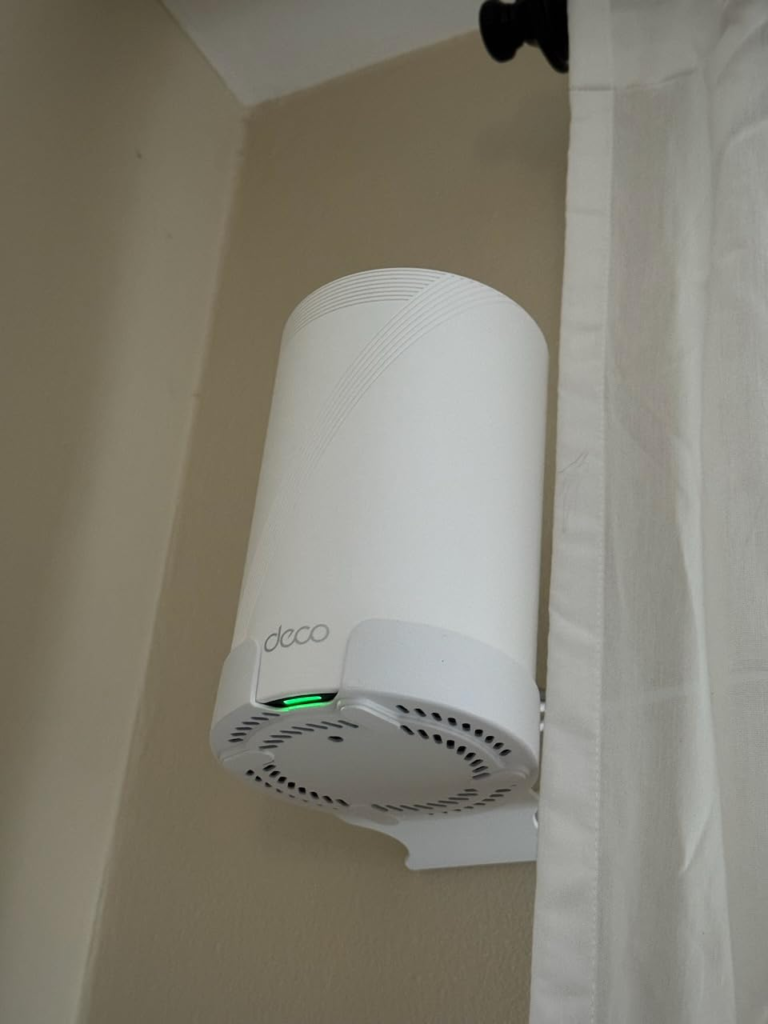
When the outdoor threshold has been located — when the pattern of degradation is consistent, the use case is real, and the backhaul decision has been made — a single device category becomes logical: a tri-band, IP65-rated, Wi-Fi 7 outdoor mesh node with AFC-enabled 6 GHz access and dual-port PoE flexibility.
The TP-Link Deco BE65-Outdoor is that device.
It is the first home Wi-Fi 7 outdoor mesh unit offering 6 GHz band access outdoors through AFC compliance, built on tri-band BE11000 architecture with 320 MHz channels and MLO — delivering a combined theoretical ceiling of 11 Gbps, with dual 2.5 GbE PoE+ ports that allow both power and data to arrive over a single cable. TP-Link
The unit is rated IP65 for dust and water intrusion, operates in temperature extremes from -22°F to 140°F, runs on a 1.5 GHz quad-core processor with 1 GB of RAM, and covers up to 3,000 square feet of outdoor space. Tom’s Guide
It integrates directly into an existing Deco mesh network. No separate app, no secondary management interface, no translation layer between the indoor and outdoor nodes. All Deco units are compatible with each other, which means the outdoor node joins the existing mesh as a native satellite — inheriting AI-Roaming, MLO backhaul, and band steering without manual configuration. Blacktubi
The logic is not that it is the best device on a spec sheet. It is that it is the device that was built to be where you need it to be.
COMPLETE SPECIFICATIONS TABLE
| Specification | TP-Link Deco BE65-Outdoor |
|---|---|
| Wi-Fi Standard | Wi-Fi 7 (802.11be) — BE11000 |
| Bands | Tri-band: 2.4 GHz + 5 GHz + 6 GHz |
| Combined Speed | Up to 11 Gbps (theoretical) |
| 6 GHz Channel Width | 320 MHz (AFC-enabled for outdoor use) |
| Key Wi-Fi 7 Features | MLO, 4K-QAM, OFDMA, MU-MIMO, BSS Coloring |
| Processor | 1.5 GHz Quad-Core |
| RAM / Storage | 1 GB / 128 MB |
| Wi-Fi Chips | Qualcomm IPQ5322 + QCN6274 |
| Antennas | 6 internal (non-removable) |
| Ethernet Ports | 2× 2.5 GbE (PoE+ supported) |
| Power Options | AC power OR PoE (IEEE 802.3at) |
| Weatherproofing | IP65 (dust + water resistant) |
| Operating Temperature | -22°F to 140°F (-30°C to 60°C) |
| Outdoor Coverage | Up to 3,000 sq. ft. per unit |
| Peak Tested Throughput (wired backhaul) | 1.577 Gbps at 15 ft |
| AI-Roaming | Yes |
| HomeShield Security | Yes (subscription for advanced features) |
| Mounting Options | Wall, pole, tabletop |
| Annual Electricity Cost (est.) | ~$12.75 at 17.5¢/kWh |
| Warranty | 2 years |
PERFORMANCE BENCHMARK COMPARISON
| Test Condition | Baseline (Indoor Mesh Only) | BE65-Outdoor (Wireless Backhaul) | BE65-Outdoor (Wired PoE Backhaul) |
|---|---|---|---|
| Porch — 5 GHz | 504 Mbps | 479 Mbps | 479+ Mbps |
| Fire pit (20 ft out) — 5 GHz | 115 Mbps | 343 Mbps (+198%) | Significant further gain |
| Porch — 2.4 GHz | 25 Mbps | 64 Mbps | 74 Mbps |
| Fire pit — 2.4 GHz | 6 Mbps | 44 Mbps | 60 Mbps |
| 6 GHz at 15 ft (Tom’s Guide) | — | 833–864 Mbps | 1,577 Mbps |
| 50 ft range (Tom’s Guide) | — | — | 765 Mbps |
| 75 ft range (Tom’s Guide) | — | — | 700 Mbps |
Sources: Tom’s Hardware field testing; Tom’s Guide IxChariot benchmarks.
WHAT IT SOLVES, WHAT IT REDUCES, AND WHAT IT STILL LEAVES TO YOU
What it solves:
The outdoor threshold problem — the structural gap between indoor hardware capability and outdoor environmental demand. It eliminates the three failure pressures: physical boundary crossing, environmental exposure, and spectrum collapse. It puts a purpose-built, regulation-compliant, environmentally-sealed Wi-Fi 7 node exactly where the outdoor use case actually lives.
What it reduces:
Signal variance. The oscillation between usable and degraded that makes outdoor Wi-Fi psychologically exhausting. With a dedicated outdoor node — especially on wired backhaul — that variance compresses significantly. The connection stops behaving like borrowed signal and starts behaving like a primary one.
What it still leaves to you:
The cable decision. The performance gap between wireless and wired backhaul is roughly double — and that gap widens at distance. Tom’s Guide If PoE cabling to the outdoor location is not possible, you are accepting a real performance ceiling. The device still outperforms any indoor mesh node outdoors, but it will not reach its measured potential without the wired path.
The HomeShield subscription decision. Basic security features are included. Advanced parental controls, device malware scanning, and VPN access require a paid tier.
The 6 GHz AFC activation. AFC mode for outdoor 6 GHz must be manually enabled — it does not default to active, which means buyers who skip this step leave the most valuable spectrum band unused. Tom’s Hardware It is a single setting. It is easy to miss.
FINAL COMPRESSION
The outdoor Wi-Fi problem is a threshold problem. Not a signal problem.
Your current hardware has a line — a moment where the environment it was designed for ends and the environment you’re actually in begins. Past that line, everything degrades: throughput, consistency, spectrum access, thermal stability. And the degradation is quiet, which is why most people live with it longer than they should.
The Deco BE65-Outdoor was built for the space past that line. Tri-band. IP65. AFC-compliant 6 GHz. Dual 2.5 GbE PoE+. Integrated into the Deco mesh without a separate management layer.
| Decision Factor | Threshold Check |
|---|---|
| Consistent outdoor use pattern | ✓ Present → product is logical |
| Indoor node showing outdoor degradation | ✓ Confirmed → source of problem identified |
| 6 GHz spectrum available (AFC-enabled) | ✓ Required → verify AFC is activated post-setup |
| PoE cable run feasible | ✓ Strongly recommended → doubles performance ceiling |
| Existing Deco mesh network | ✓ Ideal scenario → native integration, no extra apps |
| Budget for $299.99 single unit | ✓ Justified only if the outdoor use case is real and consistent |
If the pattern is there, the backhaul is planned, and the outdoor use case is real — this is where the decision stops being vague.
Transparency Note:
This analysis is built on aggregated real-world experience.
It extracts what repeatedly holds, what breaks, and what users uncover only after living with the system—then shapes it into a clear model you can use immediately.
Think of it as structured experience, refined and presented so you don’t have to learn it the hard way.
“A quick note: Don’t believe the star ratings, but trust personal experience. This article is a compilation of collected experiences”