Aqara G410: THE DOORBELL LOOKS SMART. THE REAL TEST STARTS WHEN THE PORCH GETS COMPLICATED
The Result Looks Fine. The Problem Isn’t.
A lot of video doorbells look good in the easy moments. Someone presses the button. A clip appears. You talk back. On paper, that sounds done.
What usually breaks the illusion is not the button press. It is the daily noise around it. Cars passing. Shadows moving. A porch that is busy enough to create interruptions but not busy enough to justify constant nonsense. That is the point where a doorbell stops being a camera and starts becoming a filter.
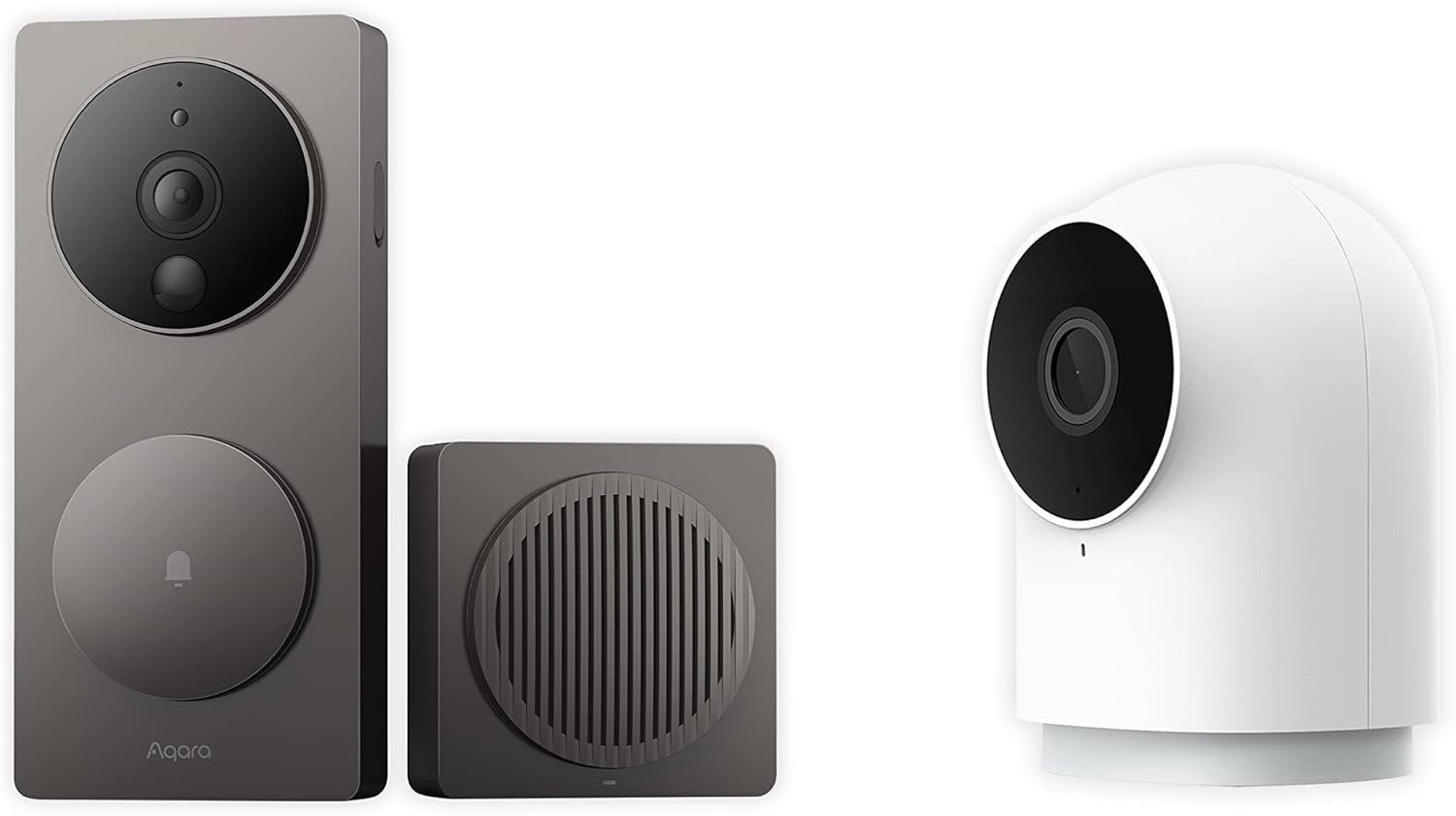
That is exactly where the Aqara G410 makes sense to me. Not because it is universally “better,” and not because it wins on design. It does not. It is physically large, uses six AA batteries if you run it wirelessly, and multiple reviewers call out its bulk and modest weather resistance. Aqara itself positions it around 2K video, a 175° field of view, mmWave-based presence sensing, dual-band Wi-Fi, local face recognition, and built-in hub functions. Those are not cosmetic upgrades. They are threshold upgrades.
The first thing I would correct is the lazy assumption that this is simply “a nicer battery doorbell.” It is not. It is closer to a front-door control node that happens to include a camera.
What You’re Actually Feeling but Not Naming
Most people do not describe the front-door problem accurately.
They say they want “a clear camera.” That is rarely the whole problem.
What they usually want is this:
| What feels wrong in daily use | What the buyer often calls it | What it actually is |
|---|---|---|
| Too many useless alerts | “Bad motion detection” | Poor signal filtering |
| Paying every month just to keep history | “Expensive app” | Ongoing storage dependency |
| Missing packages near the bottom of frame | “Weak camera angle” | Wrong aspect ratio for doorstep use |
| Smart-home routines feel fragmented | “Setup annoyance” | No local control anchor |
| Notifications arrive, but trust drops over time | “Buggy experience” | Threshold drift in daily confidence |
That last one matters most. A doorbell does not usually fail in one dramatic moment. It fails by becoming background irritation. You stop checking it as often. You second-guess the alerts. You let the history expire because another subscription feels pointless. The device is still technically working, but the system has already started to lose authority.
That is why the G410’s appeal is not the spec list by itself. It is the attempt to reduce that slow operational fatigue through local storage up to 512GB on microSD, local face recognition, hub functions, and a presence sensor meant to reduce false triggers.
The Hidden Mechanism Behind the Miss
The hidden variable here is not video quality alone. It is how the device decides that a moment deserves your attention.
Aqara uses an mmWave radar presence sensor in the G410, and both Aqara’s own product material and third-party reviews frame it as the reason the device can reduce false alerts compared with older PIR-style behavior. Aqara explicitly says the built-in sensor is there for presence and lingering detection, while TechRadar says this materially cuts nuisance alerts from passing people and cars.
That matters because the front-door problem is not only “Can I see someone?” It is “Can the system tell the difference between a real doorstep event and meaningless movement near the edge of the scene?”
The second hidden mechanism is framing. The G410 uses a 4:3 aspect ratio with a 175° field of view, and Aqara says that is meant to capture faces and packages more effectively. Reviewers independently point to that taller framing as more practical for doorbell use than the wider, flatter image many cameras give you.
The third mechanism is less obvious but more strategic: the indoor chime is not just a speaker. It is the actual infrastructure piece. It houses the microSD slot, handles the network relationship, and acts as a Matter controller, Thread border router, and Aqara Zigbee hub. That shifts the device from “one more camera” to “entry point for automations.”
The Threshold Where the Outcome Quietly Breaks
The G410 becomes logical only after a specific threshold.
Not the price threshold.
The complexity threshold.
If your front door is simple, dry, quiet, and you only want a slim button with a camera, the G410 is overbuilt in the wrong direction. If your front door sits in a semi-sheltered area, your household already cares about HomeKit, Matter, Aqara automations, or local storage, and false alerts have become a trust problem, then the G410 starts to look rational.
Here is the threshold in plain terms:
| Threshold signal | Below threshold | Above threshold |
|---|---|---|
| Alert quality matters more than raw camera presence | Basic doorbell is enough | Filtering becomes decisive |
| You want to avoid subscription dependence | Cloud-first doorbells feel acceptable | Local storage becomes a relief |
| You already use Apple Home / Aqara / Matter devices | Hub function is wasted | Hub function becomes leverage |
| Your porch is exposed to heavy rain | Weather resistance must be stronger | Sheltered install is acceptable |
| You want clean battery simplicity | Six AA design feels clumsy | Hardwiring or managed battery trade-off feels acceptable |
The hardware facts reinforce this threshold logic. The G410 supports wired or battery installation, dual-band 2.4/5GHz Wi-Fi, local microSD storage up to 512GB, and hub duties across Matter, Thread, and Aqara Zigbee. At the same time, outside reviewers repeatedly flag its IPX3-level weather resistance and bulky body as real trade-offs, not side notes.
Why Most Buyers Misread This Too Early
Most buyers make the wrong call because they compare doorbells the wrong way.
They compare them as cameras.
That is too early in the decision.
A camera-first comparison pushes attention toward generic fields: resolution, lens angle, battery mode, app screenshots, and a shallow “works with” checklist. The G410 can survive that comparison, but that is not where its real advantage lives.
Its real advantage is structural:
| Early comparison mistake | Why it misleads | Better decision metric |
|---|---|---|
| “It has 2K, so quality is the story” | 2K is reduced to 1200p/1600×1200 in HomeKit-linked use cases | Ask where you will actually watch footage |
| “Battery mode makes it flexible” | Battery mode exists, but six AA cells and traffic patterns change the experience | Ask whether you should hardwire from day one |
| “It works with many ecosystems, so setup will be easy everywhere” | Compatibility is broad, but experience quality is not equal across ecosystems | Ask which ecosystem gets the best behavior |
| “A hub inside a doorbell is just a bonus” | For the right home, it is the reason to choose it | Ask whether the front door should be a control point |
That first row is the uncomfortable one. Aqara states that HomeKit Secure Video use limits maximum resolution to 1200p, and Amazon’s product listing says the limit is 1600×1200 when connected to HomeKit, with the same limit applying to Aqara Home when both are used simultaneously. Reviewers echo the same point: the camera is strongest when used inside Aqara’s own environment, and less impressive once you ask it to serve several ecosystems at once.
This is the point many people miss: the G410 is not weak because it does a lot. It becomes weaker when you expect every layer of that stack to feel equally polished.
Who Is Actually Inside This Problem
This is for a very specific buyer.
You are inside the problem if…
| Fit |
|---|
| You are tired of subscriptions for basic retention |
| You care about local face recognition and private automations |
| You already run Apple Home, Aqara, Matter, or mixed smart-home gear |
| Your door area gets package drops low in frame |
| You want one device to act as both doorbell and smart-home bridge |
| You need extremely simple install with minimal tuning |
| You want the smallest possible doorbell body |
| Your door is fully exposed to rain and harsh weather |
This fit pattern lines up with the product’s design and the owner conversation around it. Aqara positions the G410 around local automation, on-device face recognition, broad ecosystem support, and built-in hub capability. Enthusiast reviews tend to like it most in Apple-centric or automation-heavy homes, while community feedback is more mixed when people expect effortless behavior across HomeKit and Home Assistant without setup friction.
The people who seem happiest with it are not buying “a better Ring.” They are buying a front-door device that reduces recurring fees and pulls more of the home into one logic layer. That is a different purchase.
Where Wrong-Fit Begins
Wrong-fit starts the moment you underrate the trade-offs.
The G410 is not for someone who wants to forget the device exists.
It is also not for someone whose porch gets directly punished by weather. TechRadar and HomeKitNews both flag its IPX3 rating as a real limitation, and Amazon’s own listing labels it “Not Water Resistant” while also showing an international protection rating above IPX3. The practical reading is simple: sheltered placement is the safe assumption.
Wrong-fit also begins when battery expectations are unrealistic. Aqara’s Amazon Q&A says battery life can last up to five months under light wake-up conditions, but owner discussion shows that real-world results can collapse fast in high-traffic or difficult setups, especially when distance, notification load, or ecosystem behavior are working against you. Multiple community posts point to battery complaints or the conclusion that hardwiring is the better long-term answer.
And wrong-fit begins when you assume “Home Assistant support” means plug-and-play simplicity. Aqara advertises RTSP and Home Assistant compatibility, but Aqara’s own page says RTSP is available only on wired connection, and user reports repeatedly describe the Home Assistant side as workable rather than graceful.
The One Situation Where This Product Becomes Logical
The Aqara G410 becomes a logical buy in one clear situation:
You are not merely trying to see the front door. You are trying to reduce bad alerts, keep footage locally, and turn the front door into a reliable automation point inside a sheltered smart-home setup.
That is the sentence.
Not “best for everyone.” Not “premium choice.” Not “must-have.”
Just logical.
Because in that condition, the trade-offs line up with the strengths:
| What you gain | What you trade away |
|---|---|
| Better event filtering via mmWave presence logic | A bulkier body |
| Local storage and local face recognition | More setup thinking |
| Built-in Matter/Thread/Zigbee hub functions | Less elegance if you want a simple standalone camera |
| 4:3 framing that suits packages and full doorway view | Resolution compromises in some ecosystem combinations |
| Wired or battery flexibility | Battery mode that may feel less forgiving in busy environments |
That is the entire argument.
Not hype. Alignment.
If this is the condition you are actually dealing with, this becomes the logical next step: [link]
What It Solves, What It Reduces, and What It Still Leaves to You
What it solves is not everything.
It solves a very particular cluster of front-door friction.
| Category | What the G410 clearly helps with | What it does not magically remove |
|---|---|---|
| Doorstep visibility | Wide 4:3, 175° framing, useful for faces and packages | Ecosystem-linked resolution limits |
| Storage control | Local microSD up to 512GB, indoor slot placement | You still need to choose and manage storage mode |
| Alert quality | mmWave-based presence logic can cut nuisance triggers | Notification behavior can still vary by ecosystem |
| Smart-home leverage | Built-in Matter controller, Thread border router, Zigbee hub | Mixed-platform setups may need more effort than expected |
| Visitor interaction | Two-way audio, 95dB indoor chime, custom audio options | It is still a doorbell, not a complete perimeter system |
That last sentence matters. A common mistake in smart-home buying is loading one device with too much responsibility. The G410 can be the front-door anchor. It should not be treated as a complete substitute for broader outdoor coverage, stronger weatherproofing, or a simpler ecosystem if your priority is pure convenience.
And this is where I think Aqara got one thing very right: the chime/hub keeping the microSD inside the house is a small detail with large practical value. It reduces tampering risk and makes “local storage” feel real instead of theoretical.
Final Compression
The cleanest way to think about the Aqara G410 is this:
A normal doorbell answers the question, “Who is there?”
The G410 is trying to answer a harder question: “Which doorstep events deserve trust, storage, and automation?”
That is why the product feels unusually strong in the right house and strangely overcomplicated in the wrong one. Its value does not start at the camera. It starts at the threshold where false alerts, subscription fatigue, mixed-ecosystem friction, and weak front-door logic have already started wearing you down. Aqara’s own spec sheet, Amazon listing, reviewer testing, and owner feedback all point in the same direction: broad capability, real smart-home leverage, strong local-control appeal, but genuine compromises in design, weather resistance, battery expectations, and cross-platform polish.
So my final rule is simple.
If you want a doorbell that disappears into the wall, this is not it.
If you want a front-door device that can also act like infrastructure, this is where the decision stops being vague.
Transparency Note:
This analysis is not based on quick personal impressions.
It is derived from documented system behavior, verified user patterns, and the physical constraints of storage capacity.
The goal is to translate complex technical behavior into a realistic performance model that helps you make a clear decision
If your situation is slightly different, start here: